1. تعارف
The abxylute C8 Wireless Gaming Controller is a multi-platform gamepad designed for enhanced gaming experiences across various devices. It features Hall Effect joysticks and triggers, RGB backlighting, a 1000Hz polling rate, dual vibration, and macro programmable buttons. This manual provides detailed instructions for setting up, operating, and maintaining your controller.

Figure 1: abxylute C8 Wireless Gaming Controller with its charging dock.
2. پيڪيج مواد
پڪ ڪريو ته سڀئي شيون توهان جي پيڪيج ۾ موجود آهن:
- C8 Controller x1
- USB ڪيبل x1
- يوزر مينوئل x1
- چارجنگ ڊاک x1
- Bluetooth Receiver x1
- Joystick Cap x2 (longer ones inside the box, short ones pre-equipped)

Figure 2: Included items: C8 controller, charging dock, USB cable, Bluetooth receiver, and extra joystick caps.
3. پراڊڪٽ ختمview
The abxylute C8 controller features a semi-transparent magnetic shell, allowing for customization and showcasing its internal components. Key features include Hall Effect joysticks and triggers, micro-switch ABXY buttons, macro programmable buttons, and asymmetric motors for vibration feedback.

شڪل 3: ڌماڪو ٿيو view highlighting key components like Hall Effect joysticks, micro-switches, and macro buttons.
4. سيٽ اپ ۽ ڪنيڪشن
The abxylute C8 controller supports multiple connection modes for wide compatibility. The USB dongle mode is recommended for ultra-low latency.
4.1. ڪنيڪشن جا طريقا

Figure 4: The C8 controller offers Wired, Bluetooth Wireless, and Bluetooth Dongle connection modes.
4.2. Connecting to PC/Laptop (Windows/Mac)
The controller can connect to PC/Laptop via Bluetooth Dongle, Bluetooth Wireless, or USB Wired.
- Bluetooth Dongle (Recommended for Xinput mode):
- Plug the Bluetooth dongle into an available USB port on your PC/Laptop.
- The controller should automatically pair. LED 2 + LED 4 will light up for Xinput mode (Xbox 360 Controller for Windows).
- For Dinput mode, turn off the controller, then press and hold VIEW + MENU for 3 seconds. LED 2 + LED 3 will flash.
- For PC Switch mode, turn off the controller, then press and hold the Right joystick (R3) while connecting the USB cable. LED 1 will flash.
- Bluetooth وائرليس:
- On the controller, press and hold the HOME button and X button simultaneously for 3 seconds until the LEDs flash rapidly.
- On your PC/Laptop, go to Bluetooth settings and search for new devices.
- Select "Xbox Wireless Controller" or "Gamepad" from the list to pair. LED 1 + LED 4 will light up for Xinput mode.
- USB وائرڊ:
- Connect the controller to your PC/Laptop using the provided USB-C cable.
- The controller will automatically connect. LED 1 + LED 4 will light up for Xinput mode.
- To switch modes (Dinput or PC Switch), follow the instructions for Bluetooth Dongle mode while the USB cable is connected.
Video 1: Demonstrates how to connect the abxylute C8 controller to a PC/laptop/Mac and exchange connection modes using a USB cable.
4.3. نائنٽينڊو سوئچ سان ڳنڍڻ
- Bluetooth Wireless / USB Wired:
- On the controller, press and hold the HOME button for 3 seconds until the LEDs flash rapidly.
- On your Nintendo Switch, go to "Controllers" -> "Change Grip/Order".
- The controller should appear and pair. LED 1 to LED 4 will flash sequentially, then light up for paired status.
- For USB Wired connection, connect the controller to the Switch dock via a USB-C to USB-A adapter (not included).
Video 2: Instructions on how to pair the C8 Game controller with a Nintendo Switch console.
4.4. Connecting to Android/iOS Devices & Tesla
- Bluetooth وائرليس:
- For Android, press and hold HOME + A for 3 seconds. LED 2 + LED 3 will light up for Gamepad mode.
- For iOS, press and hold HOME + Y for 3 seconds. LED 1 + LED 4 will light up for Xbox Wireless Controller mode.
- پنهنجي ڊوائيس تي، بلوٽوٿ سيٽنگون ڏانهن وڃو ۽ نوان ڊوائيسز ڳوليو.
- Select "Gamepad" (for Android) or "Xbox Wireless Controller" (for iOS/Tesla) from the list to pair.
5. آپريٽنگ هدايتون
5.1. آر جي بي لائيٽنگ ايڊجسٽمينٽ
The controller features personalized RGB lighting with 8 colors and 3 light modes (Fixed, Breathing, Dynamic), and adjustable brightness.
- Turn ON/OFF RGB: پريس VIEW + MENU + A.
- Select RGB Mode: پريس VIEW + D-Pad Up/Down.
- Change RGB Color: پريس VIEW + D-Pad Left/Right.
- روشني کي ترتيب ڏيو: پريس VIEW + Left Joystick Up/Down.

Figure 5: Steps to customize the RGB lighting on your C8 controller.
Video 3: A step-by-step guide on how to adjust the RGB lighting of the abxylute C8 controller.
5.2. Macro Programming
The MR and ML buttons on the back of the controller are macro programmable, allowing you to create shortcuts for complex actions.
- Macro Default Key: ML & MR.
- پروگراميبل ڪيچ: Left Joystick (↑ ↓ ← →), Right Joystick (↑ ↓ ← →), A, B, X, Y, LB, LT, RB, RT, L3, R3, D-Pad, VIEW، مينيو.
- Steps to Program:
- Press TURBO + ML/MR. LED 2 & LED 3 will light up.
- Input the desired programmable keys.
- Save and Launch by pressing ML/MR.
- To clear memories, press TURBO + ML/MR until LED 2 & LED 3 indicate.

Figure 6: Macro programming allows for custom button sequences.
5.3. ٽربو فنڪشن
The controller features 3 adjustable Turbo settings (5, 15, or 25 shots per second) for rapid-fire actions.

Figure 7: Adjustable Turbo function for rapid inputs.
5.4. وائبريشن ايڊجسٽمينٽ
The asymmetric dual motors provide 4-level adjustable vibration feedback (0%, 30%, 70%, 100%) for enhanced game immersion.

Figure 8: Customize vibration intensity for different gaming scenarios.
5.5. جوائس اسٽڪ ۽ ٽرگر ڪسٽمائيزيشن
The C8 controller features Hall Effect joysticks and linear Hall triggers for precise control, eliminating drift and dead zones. It also includes replaceable joysticks (long and short) and swappable ABXY button layouts.
- هال اثر جوائس اسٽڪ: Offer 0-100 dead zone customization and circular & square edge switch.
- Hall Linear Triggers: Provide 0.1mm precision for accurate actuation and 255-step linear travel.
- تبديل ٿيندڙ جوائس اسٽڪ: Choose between long joysticks for fine control or short joysticks for fast speed.
- ABXY Layout Exchangeable: Switch between NS layout and XBOX layout based on user preference.

Figure 9: Hall Effect technology ensures precision and durability for joysticks and triggers.
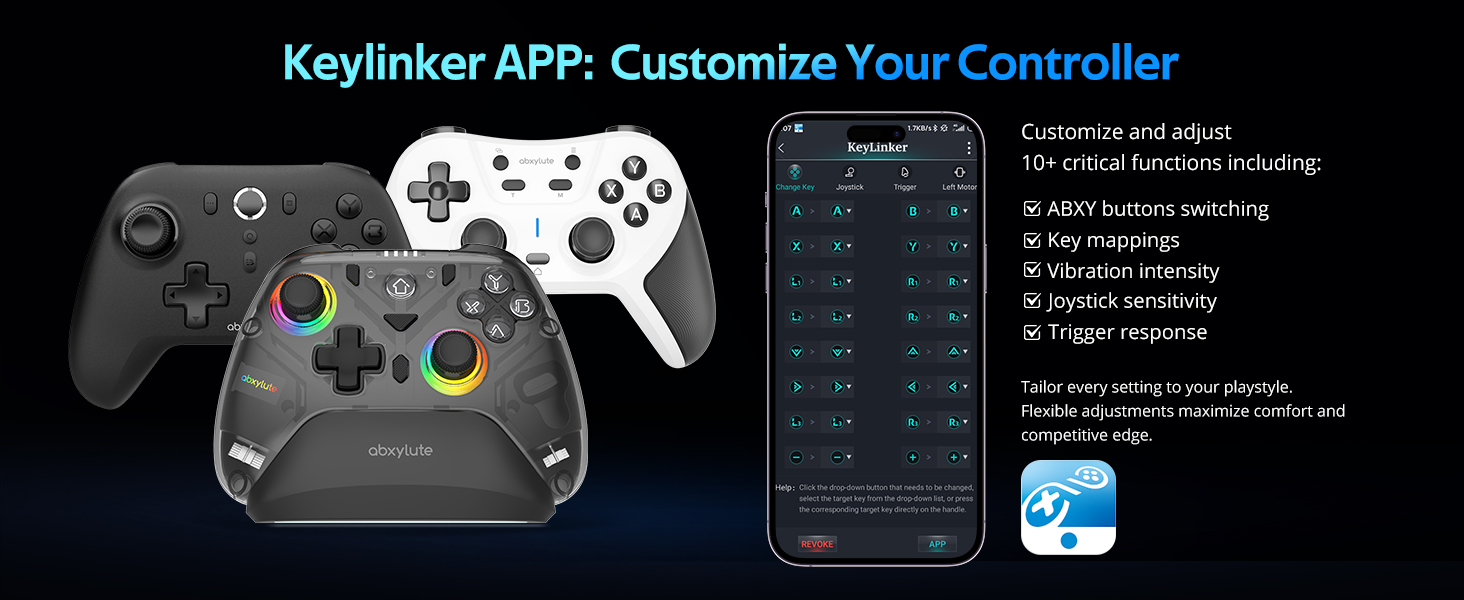
Figure 10: Replaceable joysticks allow for personalized control.

Figure 11: Linear Hall triggers provide accurate and smooth acceleration control.
5.6. Six-Axis Gyroscope
The controller includes a high-precision six-axis gyroscope, primarily for motion control in Nintendo Switch games (e.g., steering in racing games, controlling aircraft, adjusting camera perspective).

Figure 12: Six-axis gyroscope for motion control in compatible games.
5.7. KeyLinker App Customization
The KeyLinker mobile app allows for advanced customization of your controller, including key mappings, vibration intensity, joystick sensitivity, and trigger response. This enables tailoring settings to your playstyle for maximum comfort and competitive advantage.
Video 4: Demonstrates how to customize the abxylute C8 controller using the KeyLinker app.
6. چارج ڪرڻ
The abxylute C8 controller comes with a smart charging dock that provides convenient power replenishment.
- Smart Wake Up & Quick Reconnection: When the gamepad is placed on the dock, it enters sleep mode and begins charging. When picked up, it automatically wakes up and reconnects wirelessly.
- چارج ڪرڻ وقت: The rechargeable controller takes approximately 3 hours to be fully charged. All indicators will light up when charging is complete.
- بيٽري جي گنجائش: The controller is equipped with a 600mAh battery.

Figure 13: The smart charging dock provides convenient charging and auto-reconnection.
7. سار سنڀال
- Keep the controller and charging dock clean and dry. Use a soft, dry cloth for cleaning.
- ڊوائيس کي انتهائي گرمي پد يا سڌي سج جي روشني کي ظاهر ڪرڻ کان بچاء.
- Store the controller in a safe place to prevent physical damage.
- Do not attempt to disassemble or repair the controller yourself, as this may void the warranty.
8. مسئلا حل ڪرڻ
8.1. Device Cannot Connect
If your device (PC/Laptop/Mac) cannot connect to the controller:
- For the first-time use, ensure you activate or connect Bluetooth between the C8 controller and the dongle by long-pressing the Home button for 3 seconds. Refer to the specific connection methods in Section 4.
- If already connected but experiencing issues, try the following:
- Perform a factory reset by pressing the bottom-most hole on the device's back.
- Disconnect the Bluetooth connection on your device, then confirm your operation steps are correct, and follow the instructions to operate step by step again. Ensure the Bluetooth connection on the hardware is successful and in the correct connectivity mode.
8.2. Games Unresponsive or Slow
If some games cannot be played, or the controller is unresponsive/slow, while there are no problems with other games:
- This is likely a game compatibility issue rather than a problem with the gamepad.
- It could be due to the game's own configuration.
- مثال طورample, if the game has a large memory requirement, the computer device may not be powerful enough to run it smoothly. It is recommended that you play games that operate normally on other computers.

Figure 14: Common troubleshooting scenarios and solutions.
9. وضاحتون
| خاصيت | تفصيل |
|---|---|
| ماڊل نمبر | C8 |
| برانڊ | abxylute |
| رابطي | USB Wired, Bluetooth Wireless (5.3), Bluetooth Dongle |
| مطابقت | PC (Windows 7/8/10/11), Android (8.0+), Nintendo Switch/Lite/OLED, Switch 2, Steam, Steam Deck, Android Tablet (8.0+), iOS (13+), iPhone, iPad, Mac, macOS, Tesla Car, Android TV. (Not compatible with all Xbox and PlayStation series) |
| Joysticks & Triggers | Hall Effect (no-drift, zero dead zones, 0.1mm precision) |
| بٽڻ | Macro Programmable (MR/ML), Micro-switch (LB/RB), ABXY layout exchangeable |
| پولنگ جي شرح | 1000Hz (Wired & Dongle mode) |
| گيروسکوپ | 6-Axis Gyroscope (motion control in Switch Games) |
| وائبريشن | Asymmetric Dual Motors, 4-level adjustable |
| بيٽري | 600mAh, 3 hours full charge |
| آر بي جي روشني | 8 Colors, 3 Light Modes, Adjustable Brightness |
| وزن | 1.1 پائونڊ |
| پيڪيج جي ماپ | 8.11 x 7.32 x 2.6 انچ |
10. وارنٽي ۽ سپورٽ
- وارنٽي: All abxylute products come with a 1-year service warranty.
- حمايت: For any issues or operational questions, please contact abxylute through their official channels.
- ڪميونٽي: An official forum is available on Discord for global player communication and support.


