1. تعارف
This manual provides detailed instructions for the setup, operation, and maintenance of your GIEC G5300 4K Ultra HD Blu Ray Player. Designed for an enhanced home entertainment experience, this player supports true 4K ultra-high-definition picture quality, HDR10, Dolby Vision, BT.2020 color spaces, and Dolby audio decoding for immersive visuals and sound.
2. حفاظت جي ڄاڻ
- Ensure proper ventilation around the player to prevent overheating.
- باهه يا برقي جھٽڪي جو خطرو گهٽائڻ لاءِ مينهن يا نمي کي ختم نه ڪيو.
- Avoid placing heavy objects on top of the player.
- سي نه کوليوasing؛ سڀني خدمتن کي قابل اهلڪارن جي حوالي ڪريو.
- Keep the player away from direct sunlight, heat sources, and strong magnetic fields.
- يونٽ سان فراهم ڪيل صرف پاور اڊاپٽر استعمال ڪريو.
3. پيڪيج مواد
مھرباني ڪري پڪ ڪريو ته ھيٺ ڏنل سڀ شيون توھان جي پيڪيج ۾ شامل آھن:
- GIEC G5300 Blu-ray Player (x1)
- HDMI ڪيبل (x1)
- ريموٽ ڪنٽرول (x1)
- يوزر مينوئل (x1)
4. پراڊڪٽ ختمview
4.1 فرنٽ پينل

شڪل 4.1: سامهون view of the GIEC G5300 Blu Ray Player, showing the disc tray, display, USB port, and control buttons (power, play/pause, eject).
- ڊسڪ ٽري: هتي بلو ري يا ڊي وي ڊي ڊسڪ داخل ڪريو.
- ڊسپلي پينل: پلے بیک اسٽيٽس ۽ وقت ڏيکاري ٿو.
- USB 3.0 پورٽ: ميڊيا پلے بیک لاءِ USB اسٽوريج ڊوائيسز ڳنڍيو.
- ڪنٽرول بٽڻ: Power On/Off, Play/Pause, Eject.
4.2 ريئر پينل ۽ ڪنيڪشن

شڪل 4.2: پوئتي view of the GIEC G5300 Blu Ray Player, highlighting various input/output ports including LAN, HDMI 2.0, HDMI 1.4, USB 3.0, Coaxial, and Optical outputs.
- LAN پورٽ: For network connection (e.g., firmware updates).
- HDMI 2.0 Output (Video/Audio): Primary HDMI output for 4K video and audio.
- HDMI 1.4 Output (Audio Only): Dedicated HDMI output for audio to an AV receiver.
- USB 3.0 Input: ميڊيا پلے بیک لاءِ USB اسٽوريج ڊوائيسز ڳنڍيو.
- Coaxial Output: ڊجيٽل آڊيو آئوٽ.
- بصري پيداوار: ڊجيٽل آڊيو آئوٽ.
5. سيٽ اپ
5.1 ريموٽ ڪنٽرول بيٽري جي انسٽاليشن
Insert two AAA batteries (not included) into the remote control, ensuring correct polarity.
Video 5.1: This video demonstrates how to install batteries into the remote control and connect the Blu-ray player to a TV using an HDMI cable.
5.2 Connecting to a Display Device (TV/Projector)
- فراهم ڪيل HDMI ڪيبل جي هڪ پڇاڙي کي سان ڳنڍيو HDMI 2.0 Output (Video/Audio) بلو ري پليئر جي پوئين پاسي پورٽ.
- Connect the other end of the HDMI cable to an available HDMI input port on your TV or projector.
- For separate audio output, connect another HDMI cable from the HDMI 1.4 Output (Audio Only) port to your AV receiver, or use the Coaxial/Optical outputs.
5.3 پاور ڪنيڪشن
- Connect the power cable to the power input on the rear of the Blu-ray player.
- پاور ڪيبل جي ٻئي ڇيڙي کي وال آئوٽليٽ ۾ لڳايو.
- Turn on your TV/projector and select the correct HDMI input source corresponding to the port you connected the Blu-ray player to.
- Press the Power button on the Blu-ray player or remote control to turn on the unit.
6. آپريٽنگ هدايتون
6.1 ڊسڪ پلے بیک
- Ensure the player is powered on and connected to your display device.
- کي دٻايو EJECT ڊسڪ ٽري کولڻ لاءِ فرنٽ پينل يا ريموٽ ڪنٽرول تي بٽڻ.
- Carefully place a Blu-ray or DVD disc onto the tray with the label side facing up.
- کي دٻايو EJECT button again to close the tray. The player will automatically begin loading and playing the disc.
- پلے بیک ڪمن لاءِ ريموٽ ڪنٽرول استعمال ڪريو جيئن ته پلي، پاز، اسٽاپ، فاسٽ فارورڊ، ۽ ريوائنڊ.
6.2 USB ميڊيا پلے بیک
The GIEC G5300 supports playback of various media files هڪ USB اسٽوريج ڊوائيس مان.
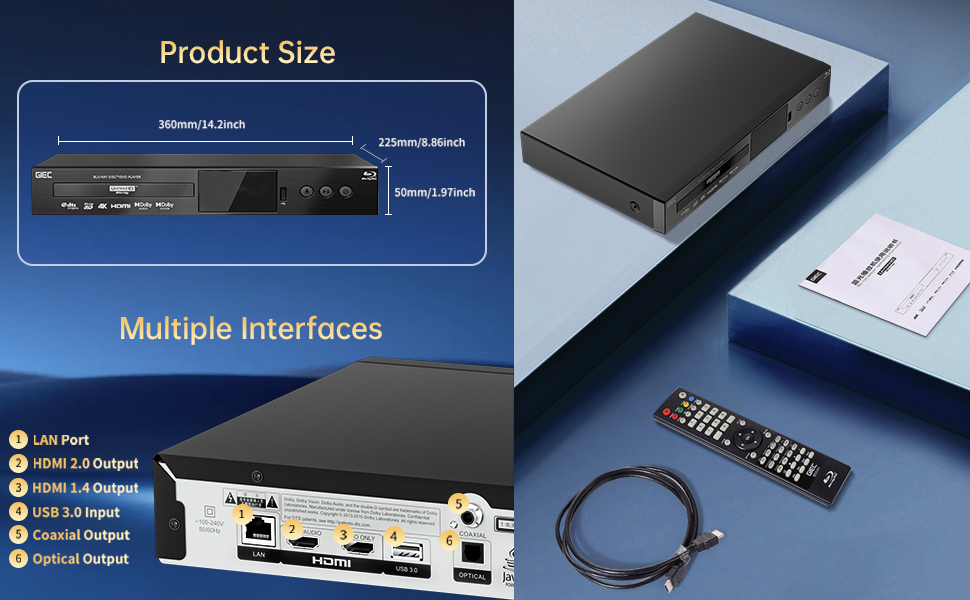
Figure 6.1: Illustration of the multiple disc, video, and audio formats supported by the player.
- پنھنجي USB اسٽوريج ڊيوائس کي اندر داخل ڪريو USB 3.0 پورٽ اڳيان يا پوئين پينل تي.
- Navigate to the "Video," "Music," or "Photo" section on the player's main menu using the remote control.
- توهان جي گهربل چونڊيو file from the USB device to begin playback.
سپورٽ فارميٽ:
- ڊسڪ جا قسم: BD, BD-R, BD-RE, DVD-R/RW, DVD+R/RW, DVD-Video, VCD, CD, CD-R/RW.
- وڊيو فارميٽ: MPEG-1, MPEG-2, MPEG-4, VC1, H.264, MOV, MKV, AVI, TS.
- آڊيو فارميٽ: AAC, APE, CUE, FLAC, OGG, MP3, WAV.
7. خاصيتون
- 4K Ultra HD Playback: Experience movies and shows in stunning 4K resolution with clearer images and richer colors.
- HDR10 سپورٽ: Enjoy a wider range of brightness and contrast, revealing more detail in both dark and bright scenes.
- ڊولبي ويزن: Enhances image quality by dynamically adjusting brightness and expanding dynamic range for more detailed and vivid pictures.
- BT.2020 Color Spaces: Provides a broader color gamut than standard 1080p Blu-ray, resulting in purer, more natural, and realistic colors.
- Dolby Sound & DTS Decoding: Supports Dolby audio decoding and DTS effects for an immersive 5.1 stereo surround sound experience.
- 3D Blu-ray Playback: Compatible with 3D Blu-ray discs for an immersive three-dimensional viewing experience (requires a 3D-compatible TV and glasses).
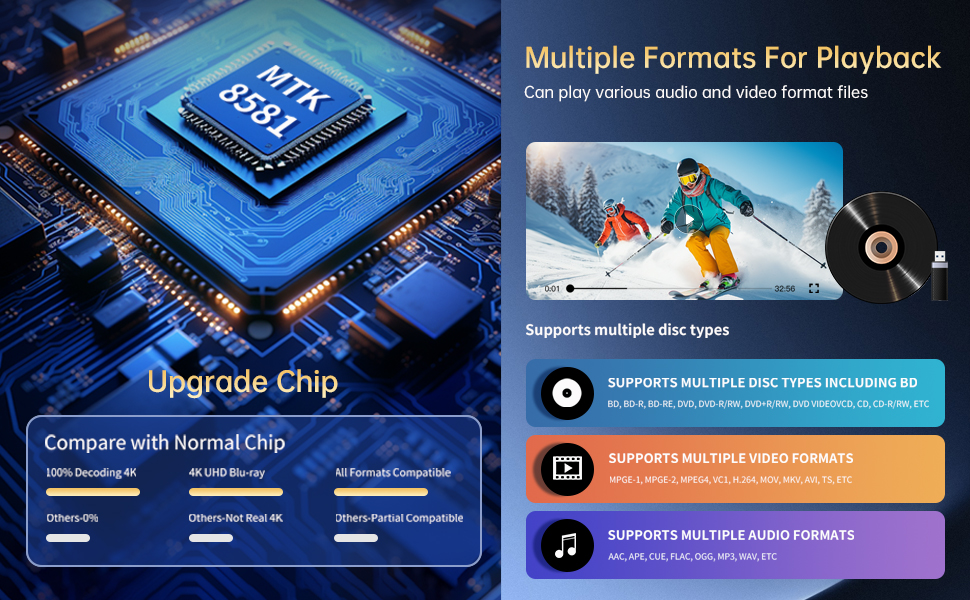
Figure 7.1: Visual comparison illustrating the difference between 8-bit (16.67 million colors) and 10-bit (1.07 billion colors) color depth, highlighting the enhanced detail and delicacy of 10-bit color.

Figure 7.2: The GIEC G5300 Blu Ray Player connected to a TV, showcasing its support for 4K UHD, 3D, HDR, HDR10+, Dolby, and Dolby Vision technologies.
8. سار سنڀال
- صفائي: Use a soft, dry cloth to clean the exterior of the player. Do not use liquid or aerosol cleaners.
- ڊسڪ جي سنڀال: ڊسڪ کي انهن جي ڪنارن کان هٿ ڪريو. ڊسڪ کي نرم، لِنٽ فري ڪپڙي سان صاف ڪريو، وچ کان ٻاهر صاف ڪريو.
- وينٽيليشن: پڪ ڪريو ته رانديگر جي وينٽيليشن جا سوراخ بند نه آهن ته جيئن اوور هيٽنگ کي روڪي سگهجي.
9. مسئلا حل ڪرڻ
If you encounter issues with your Blu-ray player, please refer to the following common solutions:
- طاقت ناهي: Check if the power cable is securely connected to both the player and the power outlet. Ensure the outlet is functional.
- ڪابه تصوير/آواز ناهي: Verify that the HDMI cable is correctly connected to both the player and the TV/receiver. Ensure the correct HDMI input is selected on your TV/receiver.
- ڊسڪ نه هلي رهي آهي: Check if the disc is clean and free of scratches. Ensure the disc is inserted correctly with the label side up. The player supports Region A Blu-ray discs and all region DVD discs.
- ريموٽ ڪنٽرول ڪم نه ڪري رهيو آهي: Check the batteries in the remote control and replace them if necessary. Ensure there are no obstructions between the remote and the player.
10. وضاحتون
| خاصيت | تفصيل |
|---|---|
| برانڊ جو نالو | جي آئي اي سي |
| ماڊل نالو | جي 5300 |
| شيءِ جو وزن | 4.18 پائونڊ (1.9 ڪلوگرام) |
| پيداوار جي ماپ | 14.2 x 8.9 x 2 انچ |
| رنگ | ڪارو |
| ميڊيا جو قسم | بلو-ري ڊسڪ، ڊي وي ڊي |
| قرارداد | 3840x2160 (4 ڪلو الٽرا ايڇ ڊي) |
| خاص خاصيتون | Anti-Shock, Compact, Dust Proof, Multi-Format Playback, Surround Sound, HDR10, Dolby Vision, BT.2020 Color Spaces |
| ڪنيڪٽر جو قسم | HDMI (Dual Outputs), USB 3.0, Coaxial, Optical, LAN |
| رابطي ٽيڪنالاجي | HDMI |
11. وارنٽي ۽ سپورٽ
For warranty information or technical support, please refer to the documentation included with your purchase or contact GIEC customer service. Keep your proof of purchase for warranty claims.


