تعارف
This manual provides detailed instructions for the installation, operation, and maintenance of your Arylic UP2Stream 2.1 Subwoofer Amplifier Board. This high-performance amplifier board integrates WiFi and Bluetooth 5.0 connectivity, delivering 50W x 2 for stereo channels and 100W for a subwoofer, making it ideal for DIY speaker projects and multi-room audio setups. Please read this manual thoroughly before use to ensure proper functionality and safety.
حفاظت جي ڄاڻ
هميشه هيٺ ڏنل حفاظتي احتياطن تي عمل ڪريو:
- بجلي جي فراهمي کي يقيني بڻائيtage matches the requirements specified for the ampلائفائر بورڊ.
- ڊوائيس کي پاڻي، نمي، يا انتهائي گرمي پد جي سامهون نه آڻيو.
- رکڻ کان پاسو ڪريو amplifier board in direct sunlight or near heat sources.
- ڊوائيس کي کولڻ يا تبديل ڪرڻ جي ڪوشش نه ڪريو. سڀني سروسنگ کي قابل اهلڪارن جي حوالي ڪريو.
- ٻارن جي پهچ کان پري رکو.
- ڪو به ڪنيڪشن يا ڊسڪنيڪٽ ڪرڻ کان اڳ بجلي بند ڪريو.
پيڪيج مواد
پڪ ڪريو ته سڀئي شيون پيڪيج ۾ موجود آهن:
- Arylic UP2Stream 2.1 Subwoofer Ampحياتياتي بورڊ
- ريموٽ ڪنٽرول
- استعمال ڪندڙ جو دستياب (ھي دستاويز)
- (Additional cables or accessories may be included depending on the specific package)
پيداوار ختمview ۽ خاصيتون
The Arylic UP2Stream 2.1 Amplifier Board offers advanced audio streaming capabilities and powerful amplification for your custom audio projects.
- وائرليس اسٽيريو Ampزنده: Adds wireless or network streaming functionality to existing speakers, home stereo systems, or receivers.
- High-Performance Subwoofer Output: Features 50W x 2 for stereo channels and a dedicated 100W output for a subwoofer. Supports virtual bass (activatable via remote control) and high-resolution sound. Capable of driving a 10-inch subwoofer for home theater applications.
- Stable Streaming and High Sound Quality: Supports lossless music file playback including MP3, APE, FLAC, and WAV with high-resolution audio. Bluetooth range extends up to 30 meters, while WiFi streaming covers the entire signal range.
- Multiple Music Sources and Protocols: Compatible with various streaming services such as Spotify, TuneIn, iHeartRadio, TIDAL, and supports protocols like AirPlay1, Qplay, DLNA, and UPnP. Also accepts local music from USB flash drives, NAS, and Line inputs.
- Multi-Purpose Streaming: Allows for setting up multiple Arylic devices on the same network, enabling control via the 4stream app to play different audio in various rooms or synchronize the same audio across all devices.

تصوير جي وضاحت: هڪ مٿي کان هيٺ view of the Arylic UP2Stream 2.1 Subwoofer Amplifier Board, showcasing its various components including heatsinks, capacitors, input/output terminals, and control knobs. The board is black with silver and green accents.
سيٽ اپ ڪريو
1. جسماني رابطا
Before powering on the device, ensure all necessary audio inputs and speaker outputs are correctly connected.
- اسپيڪر ڪنيڪشن: Connect your passive stereo speakers to the left and right speaker terminals. Connect your passive subwoofer to the dedicated subwoofer output terminals. Ensure correct polarity (+ to + and - to -).
- آڊيو ان پٽ: Connect your audio source (e.g., TV, CD player, computer) to the RCA Line Input. Alternatively, use Bluetooth or WiFi for wireless audio input.
- بجلي جي فراهمي: Connect a compatible DC power adapter (not included, typically 12-24V) to the power input jack.

تصوير جي وضاحت: A diagram illustrating the various input and output connections of the Arylic UP2Stream 2.1 Amplifier Board. It shows connections for RCA input, Bluetooth input, DAC, Preamp, and outputs to speakers and headphones. Devices like a TV, laptop, DVD player, and smartphone are shown as potential input sources.
2. Network and Bluetooth Setup
جي amplifier board supports both WiFi and Bluetooth for wireless audio streaming.
- وائي فائي سيٽ اپ: Download the "4stream" app from your device's app store (iOS or Android). Follow the in-app instructions to connect the amplifier board to your home WiFi network. This enables multi-room audio and access to online streaming services.
- بلوٽيون ٺاھڻ: پاور تي amplifier board. On your smartphone or other Bluetooth-enabled device, search for available Bluetooth devices and select "Arylic UP2Stream" (or similar name) to pair.
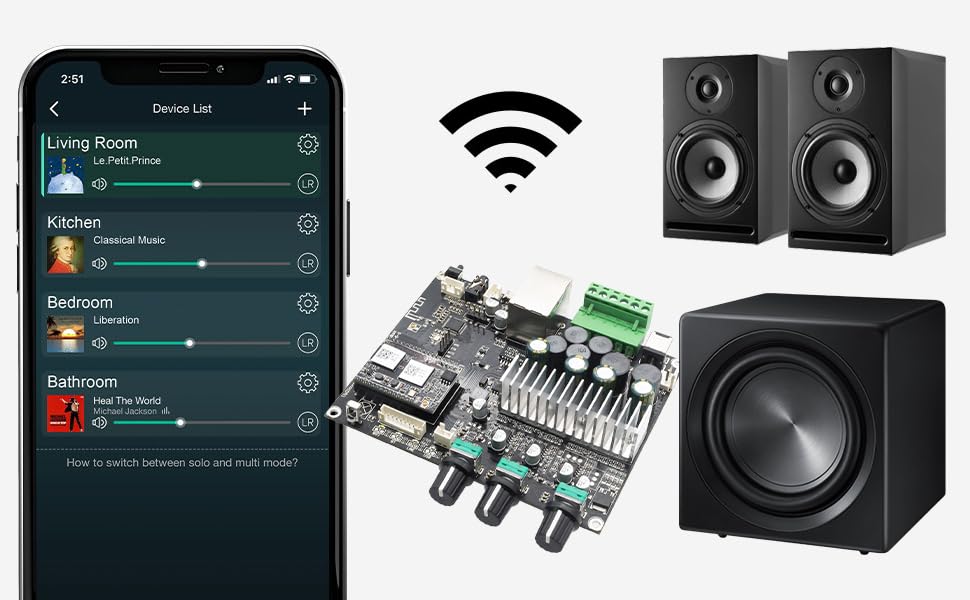
تصوير جي وضاحت: An illustration showing the Arylic UP2Stream 2.1 Amplifier Board at the center, surrounded by a smartphone displaying the "4stream" app interface, a WiFi signal icon, two bookshelf speakers, and a subwoofer. This depicts a complete wireless audio setup.
آپريٽنگ هدايتون
1. آڊيو پلے بیک
- Via 4stream App: Once connected to WiFi, use the 4stream app to select music sources (streaming services, local files, NAS) and control playback, volume, and multi-room settings.
- Bluetooth ذريعي: After pairing, play audio from your Bluetooth-connected device.
- Via Line Input: Select the Line Input source (if available via app or physical control) and play audio from your connected analog source.
2. ملٽي روم اسٽريمنگ
The 4stream app allows you to group multiple Arylic devices for synchronized playback or play different audio in separate zones.

تصوير جي وضاحت: A smartphone screen displaying the "4stream" app interface, showing a "Device List" with different rooms (Living Room, Kitchen, Bedroom, Bathroom) and currently playing music in each. This illustrates the multi-room audio control capability.
3. EQ Control and Audio Effects
Customize your audio experience by adjusting Treble and Bass settings using the ACPWorkbench Audio Effect Tool. This tool provides advanced equalization options.
- Accessing ACPWorkbench: Refer to the Arylic website or product support for instructions on downloading and using the ACPWorkbench software.
- Virtual Bass: Activate the virtual bass feature via the remote control for enhanced low-frequency response.

تصوير جي وضاحت: The Arylic UP2Stream 2.1 Amplifier Board positioned in front of a large audio mixing console, with a computer monitor displaying the "ACPWorkbench Audio Effect Tool" interface. This highlights the customization options for audio settings.
4. ريموٽ ڪنٽرول استعمال
The included remote control provides convenient access to basic functions such as power, volume, input selection, and virtual bass activation.

تصوير جي وضاحت: A hand holding the Arylic remote control, pointing towards a stereo system with two speakers and a receiver, demonstrating its use for controlling the audio setup.
سار سنڀال
- صفائي: صاف ڪرڻ لاء نرم، سڪل ڪپڙو استعمال ڪريو amplifier board. Do not use liquid cleaners or solvents.
- وينٽيليشن: Ensure adequate airflow around the board to prevent overheating. Do not obstruct the heatsinks.
- اسٽوريج: جيڪڏهن ڊوائيس کي گهڻي عرصي تائين ذخيرو ڪري رهيا آهيو، ته ان کي بجلي کان ڌار ڪريو ۽ ان کي ٿڌي، سڪل جاءِ تي ذخيرو ڪريو.
مشڪلاتون
| مسئلو | ممڪن سبب | حل |
|---|---|---|
| طاقت نه آهي | پاور اڊاپٽر ڳنڍيل نه آهي يا خراب آهي؛ پاور آئوٽليٽ ڪم نه ڪري رهيو آهي. | Check power connections. Try a different power outlet or adapter. |
| ڪوبه آواز ٻاھر نه | Incorrect speaker connections; wrong input source selected; volume too low; faulty audio cable. | Verify speaker polarity and connections. Select the correct input source. Increase volume. Test with a different audio cable. |
| وائي فائي سان connectنجي نٿو سگھي | Incorrect WiFi password; device too far from router; network issues. | Double-check WiFi password. Move device closer to router. Restart router. Follow 4stream app setup steps carefully. |
| بلوٽوٿ جوڙڻ ناڪام ٿيو | Device not in pairing mode; too many paired devices; interference. | کي يقيني بڻايو amplifier board is in Bluetooth pairing mode. Clear previous Bluetooth connections on your source device. Try pairing again. |
| آواز جي تحريف | Volume too high; impedance mismatch with speakers; faulty speakers/cables. | Reduce volume. Ensure speakers are compatible with amplifier output. Test with different speakers or cables. |
وضاحتون
- ماڊل نمبر: UP2Stream-50Wx2-100W
- برانڊ: بريليڪ
- ٻاھر نڪرڻ جي طاقت: 50W x 2 (Stereo), 100W (Subwoofer)
- رابطي: وائي فائي، بلوٽوٿ 5.0
- سپورٽ ٿيل آڊيو فارميٽ: MP3, APE, FLAC, WAV (Lossless)
- پروٽوڪول: AirPlay1, Qplay, DLNA, UPnP
- داخلائون: Line Input (RCA), USB Flash Drive, NAS
- ڪنٽرول ايپ: 4stream (iOS & Android)
- طول و عرض: 13.6 x 9.2 x 2.6 انچ
- وزن: 8.01 اونس
- چڙهڻ جو قسم: اندروني
- چينلن جو تعداد: 3 (2.1)
وارنٽي ۽ سپورٽ
Arylic products are designed for reliability and performance. For warranty information, technical support, or service inquiries, please contact Arylic customer support directly through their official webسائيٽ يا توهان جي خريداري سان مهيا ڪيل رابطي جي معلومات.
ٺاهيندڙ: راڪوئٽ ٽيڪنالاجي (شينزين) ڪمپني، لميٽيڊ


