1. پراڊڪٽ ختمview
The ODK L-Shaped Gaming Desk is designed to provide a versatile and functional workspace for both gaming and office use. It features an L-shaped configuration, integrated LED lighting, and convenient power outlets to enhance your experience.
This desk includes a CPU stand, two storage compartments, two iron hooks, two power outlets, and two types of light strips. Its reversible design allows for flexible placement in various room layouts, making it an ideal computer desk for optimizing space.

Figure 1: ODK L-Shaped Gaming Desk setup with dual monitors and LED lighting, showcasing ان جي فنڪشنل ڊيزائن.
2. حفاظت جي ڄاڻ
- پڪ ڪريو ته سڀئي جزا اسيمبلي دوران محفوظ طور تي مضبوط ڪيا ويا آهن ته جيئن عدم استحڪام کي روڪي سگهجي.
- ڊيسڪ يا شيلفن کي انهن جي تجويز ڪيل وزن جي گنجائش کان وڌيڪ نه لوڊ ڪريو.
- Keep liquids away from electrical components, including power outlets and LED lights.
- صرف مهيا ڪيل پاور ڪنڊ استعمال ڪريو ۽ پڪ ڪريو ته اهو گرائونڊ ٿيل آئوٽليٽ سان ڳنڍيل آهي.
- Avoid placing the desk in direct sunlight or near heat sources to prevent material damage.
3. پيڪيج مواد
اسيمبلي کان اڳ، تصديق ڪريو ته هيٺ ڏنل سڀئي جزا موجود آهن ۽ انهن کي ڪو نقصان نه پهتو آهي.
- Desk panels (L-shaped sections)
- Frame components (legs, support bars)
- Upper shelf components (panels, supports)
- 1 x CPU stand
- 2 x Storage compartments
- 2 x Iron hooks
- 2 AC آئوٽليٽس ۽ 2 USB پورٽس سان گڏ انٽيگريٽيڊ پاور اسٽرپ
- LED light strips (2 types: reading light and color-changing LED)
- اسيمبلي هارڊويئر (اسڪرو، بولٽ، ايلن رنچ)
- ھدايت وارو دستور
4. سيٽ اپ ۽ اسيمبلي
Detailed instructions and assembly tools are included in the package. Follow the step-by-step guide provided to ensure correct and safe assembly.
4.1 ريورسيبل ڊيزائن
The L-shaped desk can be assembled with the longer section on either the left or right side, depending on your room layout and preference. Refer to the assembly manual for specific instructions on configuring the desk in your desired orientation.
4.2 Upper Shelf Installation
The two-tier top shelf offers two installation methods:
- اسٽوريج خانو: Use the shelf to store books, pens, photos, and other items.
- مانيٽر اسٽينڊ: Position the shelf to elevate your monitor, providing a comfortable viewing angle to help prevent neck and back strain.

Figure 2: Diagram illustrating the adjustable and removable nature of the desk's upper shelves, allowing for customized setup.
5. آپريٽنگ هدايتون
5.1 ايل اي ڊي لائيٽنگ سسٽم
The desk is equipped with three light strips in two versions: one warm yellow reading light and two color-changing LED lights.
- Reading/Working Mode: Activate the warm yellow reading light for eye protection during work or study sessions.
- گیمنگ موڊ: Switch to the color-changing LED lights to create an immersive e-sport atmosphere.
Refer to the included remote control or integrated switch for specific instructions on changing light modes and colors.
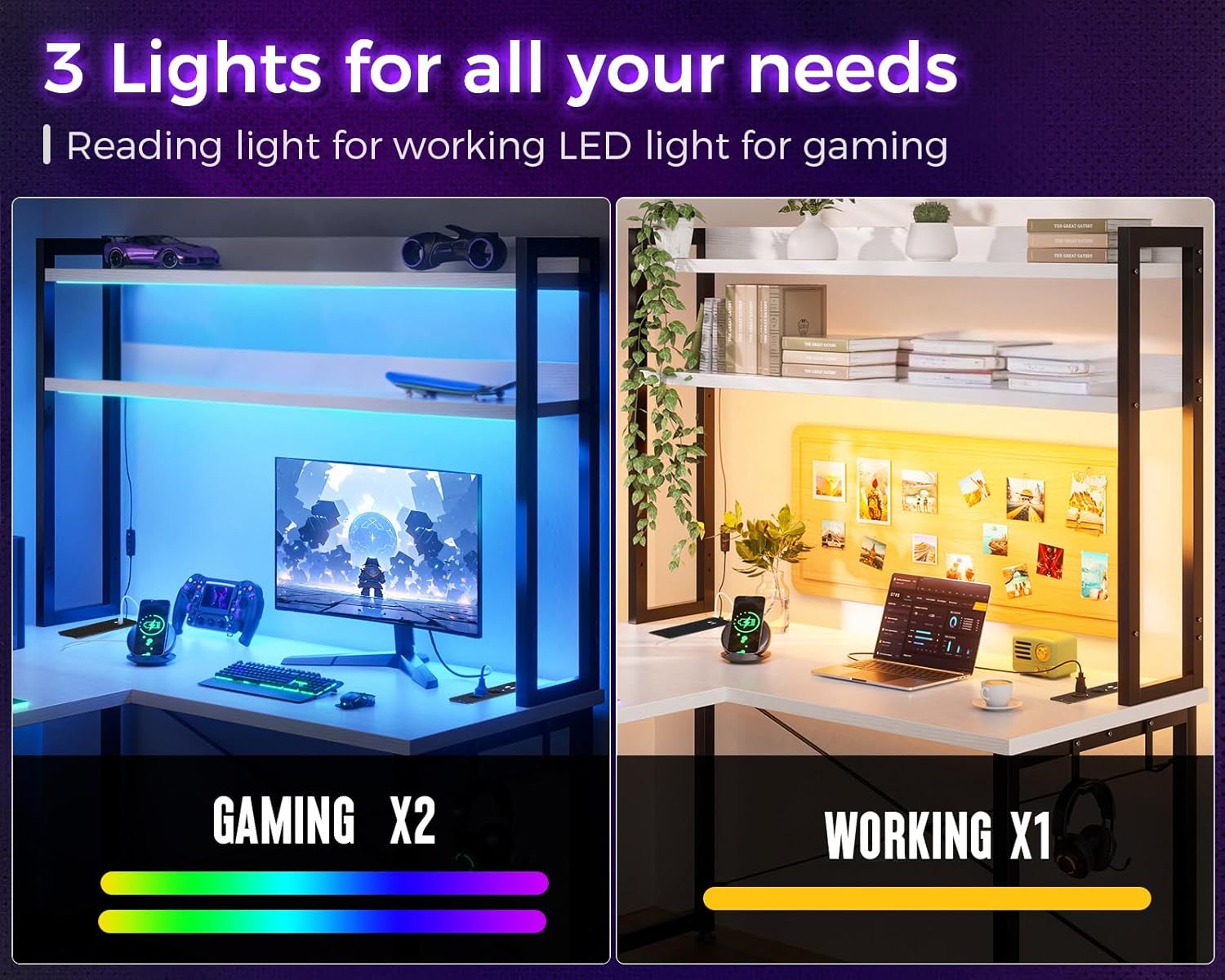
Figure 3: Illustration demonstrating the two primary LED lighting modes: vibrant colors for gaming and a warm yellow light for reading or working.
5.2 Integrated Power Outlets and USB Ports
The corner desk features two charging stations, each providing two AC power outlets and two USB charging ports. These allow for convenient charging of electronic devices such as smartphones, gaming equipment, and Bluetooth devices directly from your workspace.
- Connect the desk's main power cord to a standard wall outlet.
- Plug your devices into the available AC outlets (110V-240V/6A) or USB ports (5V/2A).
- پڪ ڪريو ته ڊوائيسز مهيا ڪيل پاور وضاحتن سان مطابقت رکن ٿا.

شڪل 4: بند اپ view of the integrated power strip, highlighting the AC outlets and USB charging ports for convenient device connectivity.
6. سار سنڀال
- صفائي: ڊيسڪ جي مٿاڇري کي نرم، ڊي سان صاف ڪريوamp ڪپڙو. گھڻائي صاف ڪندڙ يا سخت ڪيميائي کان بچاء جيڪي ختم ڪري سگھن ٿيون.
- فاسٽنرز: وقت بوقت سڀني اسڪرو ۽ بولٽن کي چيڪ ڪريو ته جيئن پڪ ڪري سگهجي ته اهي تنگ رهن. استحڪام برقرار رکڻ لاءِ ضرورت مطابق ٻيهر مضبوط ڪريو.
- برقي اجزاء: Keep the power outlets and LED strips free from dust and debris. Do not attempt to repair electrical components yourself.
7. مسئلا حل ڪرڻ
7.1 ايل اي ڊي لائيٽون ڪم نه ڪري رهيون آهن
- Check if the power cord for the desk is securely plugged into a working wall outlet.
- Ensure the LED light strips are properly connected to their power source.
- Verify that the remote control (if applicable) has working batteries and is pointed correctly at the receiver.
7.2 Power Outlets/USB Ports Not Functioning
- Confirm the desk's main power cord is fully inserted into a live electrical outlet.
- Test the outlet with another device to ensure the wall outlet itself is functional.
- Ensure the device you are trying to charge is working correctly and its cable is not damaged.
7.3 Desk Instability
- Check all assembly screws and bolts and tighten any that are loose.
- پڪ ڪريو ته ڊيسڪ هڪ فليٽ، ليول مٿاڇري تي رکيل آهي. جيڪڏهن موجود هجي ته ڪنهن به ليولنگ فوٽ کي ترتيب ڏيو.
- Verify that the desk has been assembled according to the instructions.
8. وضاحتون
| خاصيت | تفصيل |
|---|---|
| برانڊ | او ڊي ڪي |
| ماڊل | بي 02011301004 |
| رنگ | اڇو |
| مجموعي طول و عرض (L x W x H) | 168 x 120 x 155 سينٽي ميٽر (تقريبن 66.1 x 47.2 x 61 انچ) |
| شيءِ جو وزن | 27.8 ڪلوگرام (تقريبن 61.3 پائونڊ) |
| خاص خاصيتون | L-shaped, LED lights, Reversible, Multifunctional |
| سفارش ٿيل استعمال | گيمنگ |
| بجلي جا دڪان | 2 x AC (110V-240V/6A) |
| USB چارجنگ بندرگاهن | 2 x USB (5V/2A) |
| اسيمبلي گهربل | ها |

Figure 5: Detailed product dimensions, including overall length, width, height, and shelf measurements.
9. وارنٽي ۽ سپورٽ
ODK offers a 30-day free return or exchange service for this product. If you encounter any issues or have questions regarding assembly, operation, or maintenance, please do not hesitate to contact our customer support team.
Our professional 24-hour online customer service team is available to resolve your concerns as quickly as possible.
مدد لاءِ، مھرباني ڪري دورو ڪريو ODK Store on Amazon يا توهان جي خريداري دستاويزن ۾ مهيا ڪيل رابطي جي معلومات جو حوالو ڏيو.


