1. تعارف
Welcome to the user manual for your new DOOGEE S119 (2025) Rugged Phone. This guide provides essential information to help you set up, operate, maintain, and troubleshoot your device. The DOOGEE S119 is designed for durability and performance, featuring a robust build, a large battery, and advanced camera capabilities, making it ideal for demanding environments and active lifestyles.
2. پيڪيج مواد
مھرباني ڪري پنھنجي پيڪيج جي مواد کي چيڪ ڪريو ته جيئن پڪ ڪري سگھجي ته سڀئي شيون موجود آھن:
- 1 x DOOGEE S119 Rugged Smartphone
- 1 x Charger (33W)
- 1 x ٽائپ-سي USB ڪيبل
- 1 x ڌماڪي مخالف فلم (اسڪرين پروٽيڪٽر)
- 1 x استعمال ڪندڙ دستياب
3. پراڊڪٽ ختمview
The DOOGEE S119 is engineered for resilience and functionality. Key features include:
- 1.32" Multifunctional Rear Display: Provides quick access to notifications, call alerts, media controls, and more.
- 10200mAh بيٽري: Offers extended usage time with 33W fast charging and OTG reverse charging capabilities.
- 24GB ريم + 512GB روم: Ample memory and storage, expandable up to 2TB via TF card.
- 6.72" FHD+ IPS Waterdrop Screen: Vibrant display with 1080x2400 resolution.
- 100 ايم پي اي آءِ مين ڪيمرا: High-resolution main camera for detailed photos.
- 20 ايم پي نائيٽ ويزن ڪيمرا: Captures clear images in low-light conditions.
- Mediatek MT8788 Octa-core Processor: Ensures smooth performance and efficient power consumption.
- اينڊرائيڊ 14 سسٽم: Latest Android OS for a seamless user experience.
- مضبوط سرٽيفڪيشن: IP68/IP69K/MIL-STD-810H certified for water, dust, and drop resistance.
- رابطي: NFC, Dual SIM, GPS (Glonass, Galileo, Beidou), Bluetooth, Wi-Fi, USB.
- سيڪيورٽي: Fingerprint ID and Face Unlock.

شڪل 3.1: اڳيان ۽ پوئين view of the DOOGEE S119 (2025) Rugged Phone, highlighting its robust design and rear display.

شڪل 3.2: تفصيلي view of the 1.32" multifunctional rear display, showing various functions like call answering, camera, calendar, message view, music, and alarm clock.

Figure 3.3: Illustration of the 10200mAh mega battery with 33W fast charging and OTG reverse charging capabilities.

Figure 3.4: Visual representation of the 24GB RAM (8GB Basic + 16GB Extended) and 512GB ROM, expandable to 2TB.

Figure 3.5: Close-up of the 6.72" FHD+ IPS Waterdrop Screen, highlighting its aspect ratio, color depth, and brightness.
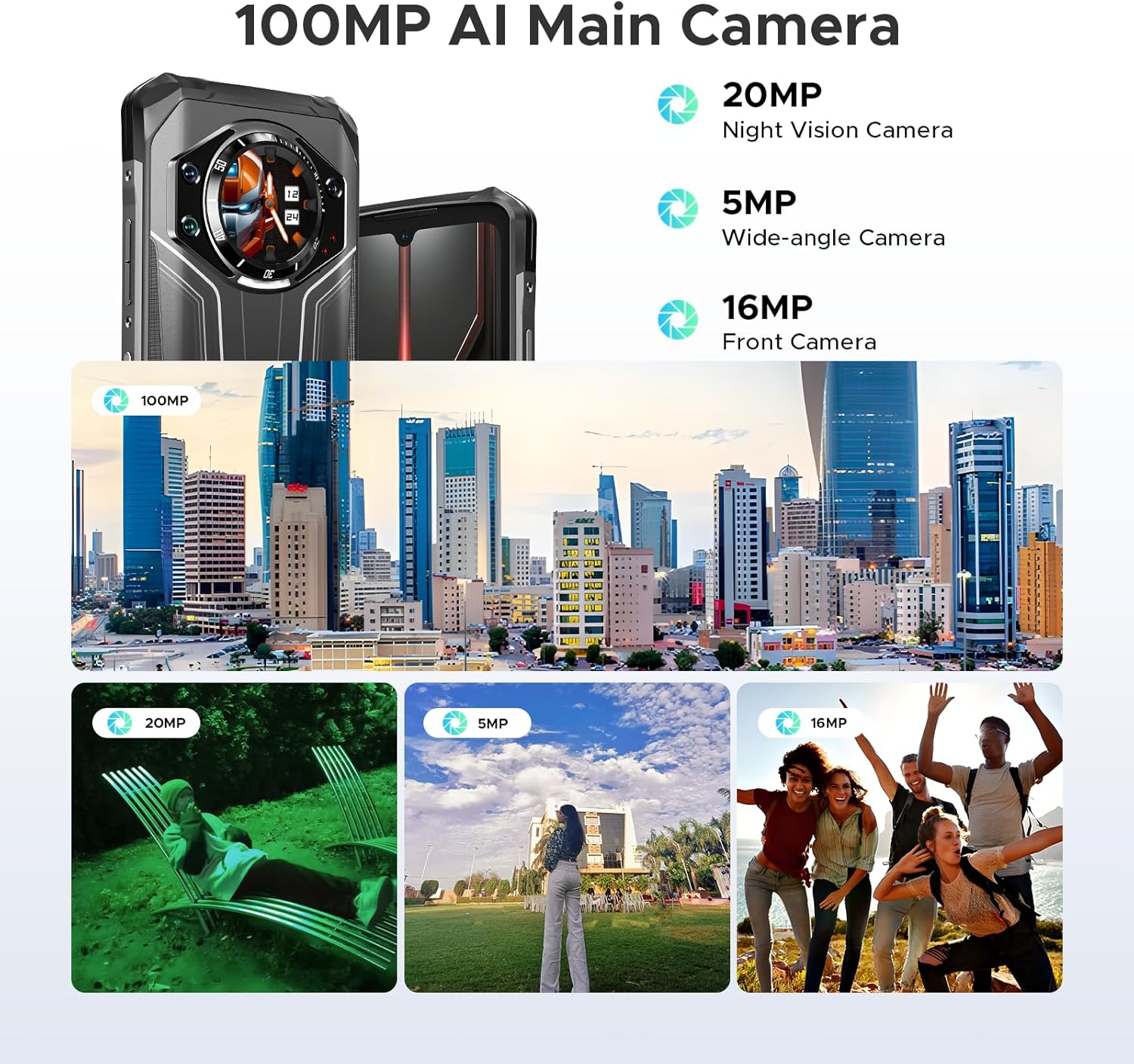
شڪل 3.6: ختمview of the camera system, including the 100MP AI Main Camera, 20MP Night Vision Camera, 5MP Wide-angle Camera, and 16MP Front Camera, with exampتصويرون.

Figure 3.7: Diagram illustrating the MediaTek MT8788 Octa-core Processor, its LPDDR4 Flash Memory, 12nm Production Process, and 2.0GHz Operating Frequency.

Figure 3.8: Depiction of the latest Android 14 System with various app icons, emphasizing a security-enhanced Linux base.
4. سيٽ اپ
4.1 سم ڪارڊ ۽ ٽي ايف ڪارڊ داخل ڪرڻ
The DOOGEE S119 supports a triple card slot (2 SIM cards + 1 TF card).
- فون جي پاسي تي سم ڪارڊ ٽري ڳوليو.
- ٽري کولڻ لاءِ مهيا ڪيل سم ايجيڪٽر ٽول استعمال ڪريو.
- Carefully place your Nano-SIM cards and/or TF card into the designated slots. Ensure correct orientation.
- نرميءَ سان ٽري کي فون ۾ واپس دٻايو جيستائين اهو جاءِ تي ڪلڪ نه ڪري.
4.2 شروعاتي پاور آن ۽ بنيادي ترتيب
- Press and hold the Power button (located on the side) until the DOOGEE logo appears.
- پنهنجي ٻولي چونڊڻ، وائي فائي سان ڳنڍڻ، ۽ پنهنجو گوگل اڪائونٽ سيٽ اپ ڪرڻ لاءِ اسڪرين تي ڏنل هدايتن تي عمل ڪريو.
- Configure security features such as Fingerprint ID and Face Unlock for convenient and secure access.
5. آپريٽنگ هدايتون
5.1 Using the 1.32" Rear Display
The rear display offers quick access to various functions without needing to fully activate the main screen:
- نوٽيفڪيشن: View incoming calls, messages, and app alerts.
- ڪال جو جواب: Answer or reject calls directly from the rear screen.
- موسيقي ڪنٽرول: Play, pause, skip tracks, and adjust volume for media playback.
- ڪئميرا: استعمال ڪريو a viewfinder for rear camera selfies or quick shots.
- Clock/Calendar: Display time, date, and set alarms.
- بيٽري چيڪ: جلدي view بيٽري جو سيڪڙوtage.
- کمپاس: Access a digital compass for navigation.
Video 5.1: Demonstration of the DOOGEE S119 (2025) Rugged Phone's 1.32" multifunctional rear display features, including call answering, music control, and quick access to information.
5.2 ڪئميرا آپريشن
The S119 features a versatile camera system:
- 100 ايم پي اي آءِ مين ڪيمرا: For high-resolution photos. Open the Camera app and select "Photo" mode.
- 20 ايم پي نائيٽ ويزن ڪيمرا: Ideal for low-light environments. Switch to "Night Vision" mode in the camera app.
- 5 ايم پي وائڊ اينگل ڪيمرا: For capturing broader scenes. Select the wide-angle option in the camera interface.
- 16 ايم پي فرنٽ ڪيمرا: For selfies and video calls. Switch to the front camera in the app.
- طريقا: Explore various modes like HDR, Panorama, and Pro Mode for enhanced photography.
5.3 بيٽري جو انتظام
10200mAh جي بيٽري گهڻي وقت تائين استعمال فراهم ڪري ٿي. بيٽري جي زندگي کي بهتر بڻائڻ لاءِ:
- Use the included 33W fast charger for quick power-ups.
- جڏهن بيٽري گهٽ هجي ته بيٽري سيور موڊ کي فعال ڪريو.
- غير استعمال ٿيل پس منظر واري ايپليڪيشنن کي بند ڪريو.
- Utilize OTG reverse charging to power other devices (cable not included).
5.4 General Phone Use
- نيويگيشن: Use GPS, Glonass, Galileo, and Beidou for accurate location services.
- اين ايف سي: رابطي کان سواءِ ادائيگين ۽ ڊيٽا جي منتقلي لاءِ سيٽنگن ۾ NFC کي فعال ڪريو.
- Dual Unlock: Use side fingerprint sensor or face unlock for quick and secure access.
- Android 14: Customize settings, manage apps, and utilize Google services.
6. سار سنڀال
To ensure the longevity and optimal performance of your DOOGEE S119:
- صفائي: فون کي نرم، ڊي سان صاف ڪريو.amp ڪپڙو. سخت ڪيميڪلز يا رگڙيندڙ مواد کان پاسو ڪريو.
- پاڻي جي مزاحمت: While IP68/IP69K certified, ensure all ports and covers are securely closed before exposing to water. Do not intentionally submerge the device beyond specified limits.
- گرمي پد: Avoid exposing the phone to extreme temperatures (very hot or very cold) for prolonged periods.
- اسڪرين تحفظ: Apply the provided anti-explosion film to protect the main screen from scratches.
- سافٽ ويئر اپڊيٽ: بهترين ڪارڪردگي ۽ سيڪيورٽي کي يقيني بڻائڻ لاءِ باقاعدي طور تي سسٽم اپڊيٽس جي جانچ ڪريو ۽ انسٽال ڪريو.
7. مسئلا حل ڪرڻ
| مسئلو | ممڪن حل |
|---|---|
| فون آن نٿو ٿئي. | پڪ ڪريو ته بيٽري چارج ٿيل آهي. پاور آن ڪرڻ جي ڪوشش ڪرڻ کان پهريان گهٽ ۾ گهٽ 10 منٽن لاءِ چارجر سان ڳنڍيو. |
| خراب نيٽ ورڪ سگنل يا ڪا سروس ناهي. | Check SIM card insertion. Verify network compatibility with your carrier (FDD, TDD, WCDMA, GSM bands). Move to an area with better coverage. |
| ايپس سست آهن يا ڪريش ٿي رهيون آهن. | Close background apps. Clear app cache. Restart the phone. Ensure sufficient storage space. |
| بيٽري جلدي ختم ٿئي ٿي. | Reduce screen brightness. Disable unused features like Wi-Fi, Bluetooth, GPS. Limit background app activity. |
| Rear display not responding. | Restart the phone. Check for system updates. |
| وائي فائي سان ڳنڍجي نٿو سگھي. | Restart your router and phone. Re-enter Wi-Fi password. Ensure you are within range. |
8. وضاحتون
| خاصيت | تفصيل |
|---|---|
| ماڊل | ڊوجي ايس 119 |
| آپريٽنگ سسٽم | Android 14 |
| پروسيسر | Mediatek MT8788 Octa-core (2 GHz CPU Speed) |
| رام | 24 جي بي (8 جي بي فزيڪل + 16 جي بي ورچوئل) |
| اندروني اسٽوريج | 512 GB ROM (Expandable up to 2TB via TF card) |
| مکيه ڊسپلي | 6.72 inches FHD+ IPS Waterdrop Screen (1080 x 2400 resolution) |
| پوئتي ڊسپلي | 1.32 inches Multifunctional Round Display (386 PPI) |
| مکيه ڪئميرا | 100MP AI Main Camera |
| نائيٽ ويزن ڪيمرا | 20MP |
| وائڊ اينگل ڪئميرا | 5MP |
| سامهون ڪئميرا | 16MP |
| بيٽري جي گنجائش | 10200 mAh (81 Hours Phone Talk Time) |
| چارج ڪرڻ | 33W فاسٽ چارجنگ، OTG ريورس چارجنگ |
| پائيداري | IP68, IP69K, MIL-STD-810H certified (Waterproof, Dustproof, Drop-proof) |
| رابطي | Bluetooth, Wi-Fi, USB Type-C, NFC, GPS (Glonass, Galileo, Beidou) |
| سم ڪارڊ سلاٽ | Triple Card Slot (2 SIM Cards + 1 TF Card) |
| سيڪيورٽي خاصيتون | Side Fingerprint ID, Face Unlock |
| طول و عرض | 7.02 x 3.27 x 7.04 انچ |
| شيءِ جو وزن | 1.32 پائونڊ |
9. وارنٽي ۽ سپورٽ
DOOGEE provides comprehensive support for its products:
- وارنٽي: پيداوار هڪ 2 سالن جي محدود وارنٽي سان اچي ٿو.
- واپسي: Enjoy a 30-Day Money Back Guarantee and Free Return policy.
- ڪسٽمر سروس: For any inquiries or technical assistance, please contact DOOGEE customer support. Refer to the official DOOGEE website or the contact information provided in your package for details.

شڪل 9.1: ختمview of DOOGEE's customer service, including 30-day money-back guarantee, 2-year limited warranty, and 24/7 online support.


