
تعارف
This user manual provides comprehensive instructions for the installation, operation, and maintenance of your Veise VE06 and VE06L Smart Lock. Please read this manual carefully before installation and use to ensure proper function and safety.

Figure 1: Veise VE06 and VE06L Smart Lock components and app interface.
پيداوار جون خاصيتون
- ڪيترائي ان لاڪ طريقا: Unlock your smart lock using the mobile application, a numerical passcode, RFID fobs, a traditional mechanical key, or the internal thumb turn.
- Flexible Locking Options: The smart deadbolt offers several ways to lock, including automatic locking with adjustable delay (5-900 seconds), a one-touch lock function by pressing '#' on the keypad for 2 seconds, physical key locking, and thumb turn locking.
- Smartphone Control & eKeys: Manage your lock remotely via the dedicated smartphone application. Generate eKeys, manage user access, and review access logs directly from your device or a web انٽرفيس.
- Remote Access (with optional Gateway): When paired with a G2 WiFi gateway (sold separately), the lock integrates with smart home systems, enabling real-time access log viewing, voice control via Alexa and Google Assistant, battery level monitoring, and status checks from any location.
- بهتر سيڪيورٽي خاصيتون: Includes privacy mode, silent mode, low battery alerts, passage mode, wrong entry PIN code limits, and anti-peeping technology for increased home security. The lock is IP54 weatherproof and certified to ANSI Grade 3 standards for durability and reliability.

Figure 2: Multiple convenient ways to unlock your Veise Smart Lock.
انسٽاليشن کان اڳ
Door Compatibility Check
Before proceeding with installation, ensure your door meets the following specifications:
- دروازي جي ٿلهي: 1-3/8" to 2" (35mm-50mm)
- Hole Diameter (Main): 1-1/2" to 2-1/8" (38mm or 54mm)
- Hole Diameter (Latch): 2-1/8" (54 ملي ميٽر)
- پٺيون 2-3/8" يا 2-3/4" (60 ملي ميٽر يا 70 ملي ميٽر)
- سوراخن جي وچ ۾ گھٽ ۾ گھٽ فاصلو: 4" (101.6 ملي ميٽر)
- Ensure the latch hole is chiseled for proper fit.
- The lock is designed for single cylinder doors; it is not compatible with mortise or integrated lock systems.
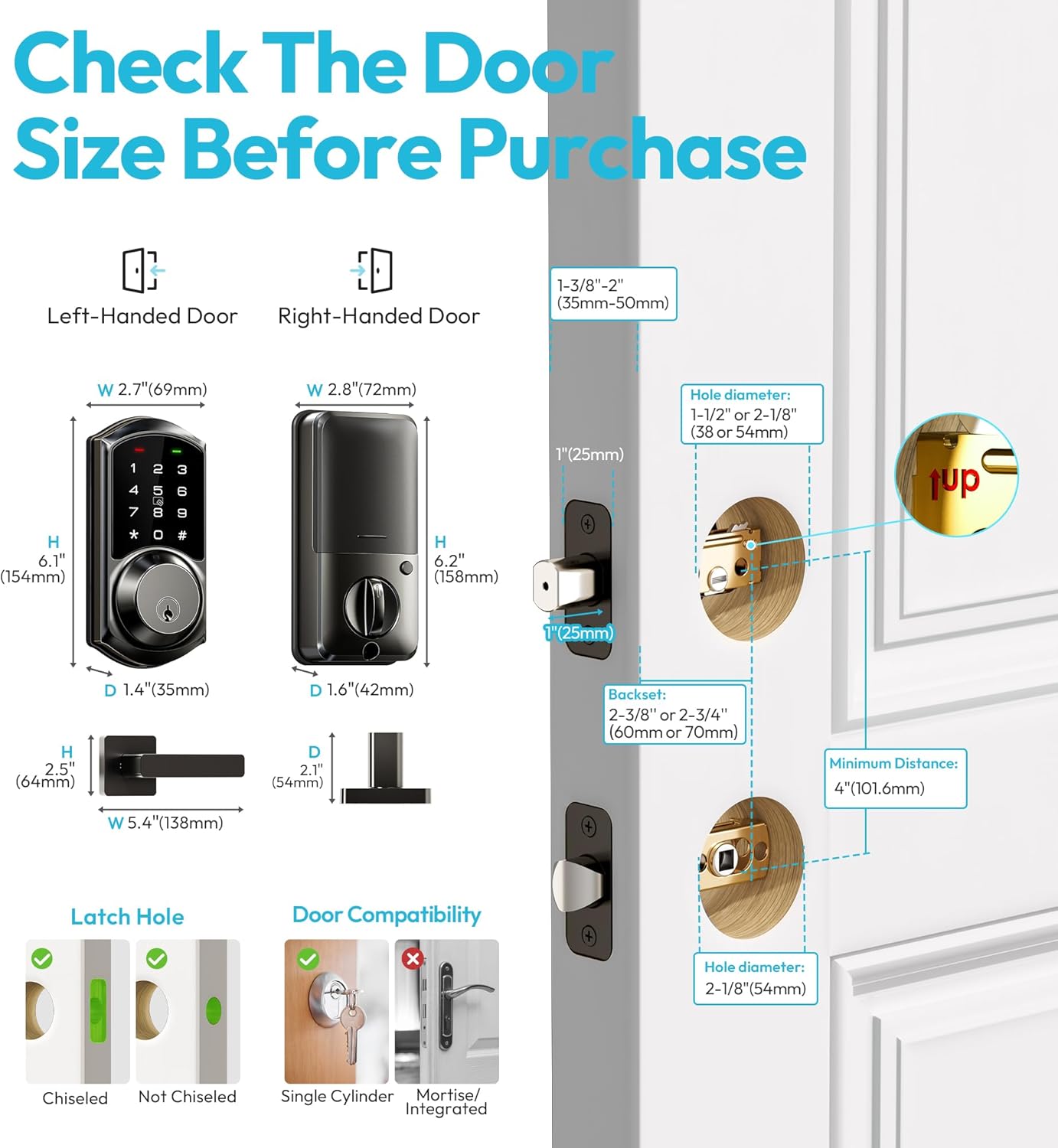
Figure 3: Door measurement and compatibility guide.
انسٽاليشن ھدايت
Follow these steps for a successful installation of your Veise Smart Lock. A Phillips head screwdriver is typically the only tool required.
قدم 1: ليچ ۽ اسٽرائڪ پليٽ انسٽال ڪريو
- Insert the latch into the door edge, ensuring the "UP" arrow is facing upwards.
- اسڪرو سان لچ کي محفوظ ڪريو.
- Install the strike plate on the door frame, aligning it with the latch.
قدم 2: Assemblyاهرين اسيمبلي انسٽال ڪريو
- Feed the cable from the exterior assembly through the latch hole.
- Align the exterior assembly with the door holes and press it firmly against the door.
Step 3: Install the Interior Mounting Plate
- Pass the cable through the mounting plate.
- Secure the mounting plate to the exterior assembly using the provided screws.
Step 4: Connect the Cable and Install the Interior Assembly
- Connect the cable from the exterior assembly to the interior assembly. Ensure the connection is secure.
- Carefully tuck the excess cable into the door.
- Align the interior assembly with the mounting plate and secure it with screws.
Step 5: Install Batteries and Test
- Insert 4 AA batteries (not included) into the battery compartment of the interior assembly.
- Test the lock's functionality by using the mechanical key and the thumb turn. Ensure smooth operation.

Figure 4: The Veise Smart Lock is designed for easy installation and operation.
آپريٽنگ هدايتون
Initial Setup and App Pairing
- ڊائون لوڊ ڪريو DDLock ايپ توهان جي اسمارٽ فون جي ايپ اسٽور (iOS يا Android) تان.
- هڪ اڪائونٽ ٺاهيو ۽ لاگ ان ٿيو.
- پنهنجي اسمارٽ فون تي بلوٽوت کي فعال ڪريو.
- In the app, tap "Add Lock" and select "Door Lock".
- Touch the keypad of your smart lock to activate it. The app should detect the lock.
- Follow the on-screen prompts to pair the lock with your account. You will be prompted to name your lock.

Figure 5: Components and app interface for the Veise Smart Lock.
کولڻ جا طريقا
- ايپ ذريعي: Open the DDLock app, select your lock, and tap the unlock icon.
- Via Passcode: Enter your valid passcode on the keypad followed by the '#' key.
- Via Fob Card: Present the RFID fob card to the designated area on the lock's keypad.
- Via Mechanical Key: جسماني چاٻي کي ڪي هول ۾ داخل ڪريو ۽ ان لاڪ ڪرڻ لاءِ موڙ ڪريو.
- Via Thumb Turn: From the inside, rotate the thumb turn to unlock.

Figure 6: Visual guide to unlocking your smart lock.
تالا لڳائڻ جا طريقا
- خودڪار لاڪ: Configure auto-lock delay (5-900 seconds) in the app. The lock will automatically engage after the set time.
- ون ٽچ لاڪ: Press and hold the '#' key on the keypad for 2 seconds.
- ايپ ذريعي: Open the DDLock app, select your lock, and tap the lock icon.
- Via Mechanical Key: Turn the physical key to lock.
- Via Thumb Turn: From the inside, rotate the thumb turn to lock.

Figure 7: Auto-lock and one-touch lock features for enhanced safety.
User Management (via App)
- استعمال ڪندڙ شامل ڪريو: Generate temporary, timed, or permanent passcodes/eKeys for guests or family members.
- استعمال ڪندڙن کي ختم ڪريو: Revoke access for specific users at any time.
- View رڪارڊ: Access a log of all lock and unlock events, including timestamps ۽ استعمال ڪندڙ جي معلومات.
سار سنڀال
- بيٽري مٽائڻ: The lock will provide a low battery alert. Replace all four AA batteries promptly when indicated. Use high-quality alkaline batteries for optimal performance.
- صفائي: Wipe the keypad and exterior surfaces with a soft, damp ڪپڙو. رگڙيندڙ صاف ڪندڙن يا محلولن کان پاسو ڪريو جيڪي ختم يا اليڪٽرانڪ حصن کي نقصان پهچائي سگهن ٿا.
- لوڻ: Periodically check the mechanical components (latch, deadbolt) for smooth operation. If necessary, apply a small amount of graphite lubricant to the internal mechanisms, avoiding liquid lubricants.
- فرم ويئر اپڊيٽس: Check the DDLock app regularly for available firmware updates for your lock. Updates can improve performance, add features, and enhance security.
مشڪلاتون
| مسئلو | ممڪن سبب | حل |
|---|---|---|
| لاڪ ڪي پيڊ جي داخلا جو جواب نٿو ڏئي. | Low batteries; Incorrect passcode; Keypad malfunction. | Replace batteries; Verify passcode; Contact support if issue persists. |
| ايپ لاڪ سان ڳنڍجي نٿي سگهي. | Bluetooth off; Lock out of range; App not updated; Lock battery low. | Ensure Bluetooth is on; Move closer to lock; Update app; Replace batteries. |
| آٽو لاڪ ڪم نه ڪري رهيو آهي. | Auto-lock feature disabled in app; Incorrect delay setting. | Enable auto-lock in app settings; Adjust delay time. |
| Mechanical key does not work. | Key is bent or damaged; Internal mechanism issue. | Try a spare key; Contact support for assistance. |
| تالا غير معمولي آواز ڪڍندو آهي. | Friction in mechanism; Loose components. | Lubricate mechanical parts; Check for loose screws; Contact support. |
وضاحتون
- ماڊل: VE06, VE06L
- برانڊ: ويس
- تالا جو قسم: Deadbolt with Lever Handle
- مواد: ڌاتو
- رنگ: مٽي اڇو
- طاقت: 4 x AA بيٽريون (شامل نه آھن)
- رابطي: Bluetooth (Optional G2 WiFi Gateway for remote access)
- آپريٽنگ گرمي پد: -20 ° C کان 70 ° C (-4 ° F کان 158 ° F)
- موسم جي مزاحمت: IP54 (Weatherproof)
- سرٽيفڪيشن: ANSI گريڊ 3
- کولڻ جا طريقا: App, Passcode, Fob, Mechanical Key, Thumb Turn
وارنٽي ۽ سپورٽ
Veise products are designed for durability and reliability. For specific warranty information, please refer to the warranty card included with your product or visit the official Veise webسائيٽ.
For technical support, troubleshooting assistance, or any inquiries regarding your Veise Smart Lock, please contact Veise Customer Service:
- Webسائيٽ: www.veise.com/support (مثالample link, replace with actual)
- اي ميل: support@veise.com (مثالample email, replace with actual)
- فون: 1-800-XXX-XXXX (اڳوڻوample number, replace with actual)
Please have your model number (VE06 or VE06L) and purchase date ready when contacting support.