1. تعارف
This manual provides essential instructions for the safe and efficient operation, maintenance, and troubleshooting of your Vexilar T6T7T8 Robot Vacuum. Please read this manual thoroughly before using the product and retain it for future reference.
2. اھم حفاظتي ھدايتون
- هن ڊوائيس کي استعمال ڪرڻ کان پهريان سڀ هدايتون پڙهو.
- روبوٽ ويڪيوم کي گندي ماحول ۾ يا پاڻيءَ جي ويجهو نه هلايو.
- پڪ ڪريو ته پاور اڊاپٽر توهان جي مقامي وول سان مطابقت رکي ٿوtage.
- وارن، ڍڪيل ڪپڙا، آڱريون ۽ جسم جي سڀني حصن کي کليل ۽ هلندڙ حصن کان پري رکو.
- وڏيون يا تيز شيون، مائع شيون، يا ساڙڻ/ تماڪ ڇڪڻ وارو مواد نه کڻو.
- جڏهن روبوٽ ويڪيوم ڪم ڪري رهيو هجي ته ٻارن ۽ پالتو جانورن جي نگراني ڪريو.
- صرف ڪاريگر جي مخصوص منسلڪ ۽ لوازمات استعمال ڪريو.
- Unplug the charging dock when not in use for extended periods.
3. پيڪيج مواد
پڪ ڪريو ته سڀئي شيون موجود آهن ۽ سٺي حالت ۾ آهن:
- 1 x Vexilar T6T7T8 Robot Vacuum
- 1 x چارجنگ ڊاک
- 1 ايڪس سي پاور اڊاپٽر
- 1 x ريموٽ ڪنٽرول
- 2 x HEPA فلٽر
- 1 x صفائي جو اوزار
- 4 ايڪس سائڊ برش
- 1 x استعمال ڪندڙ دستياب (هي دستاويز)

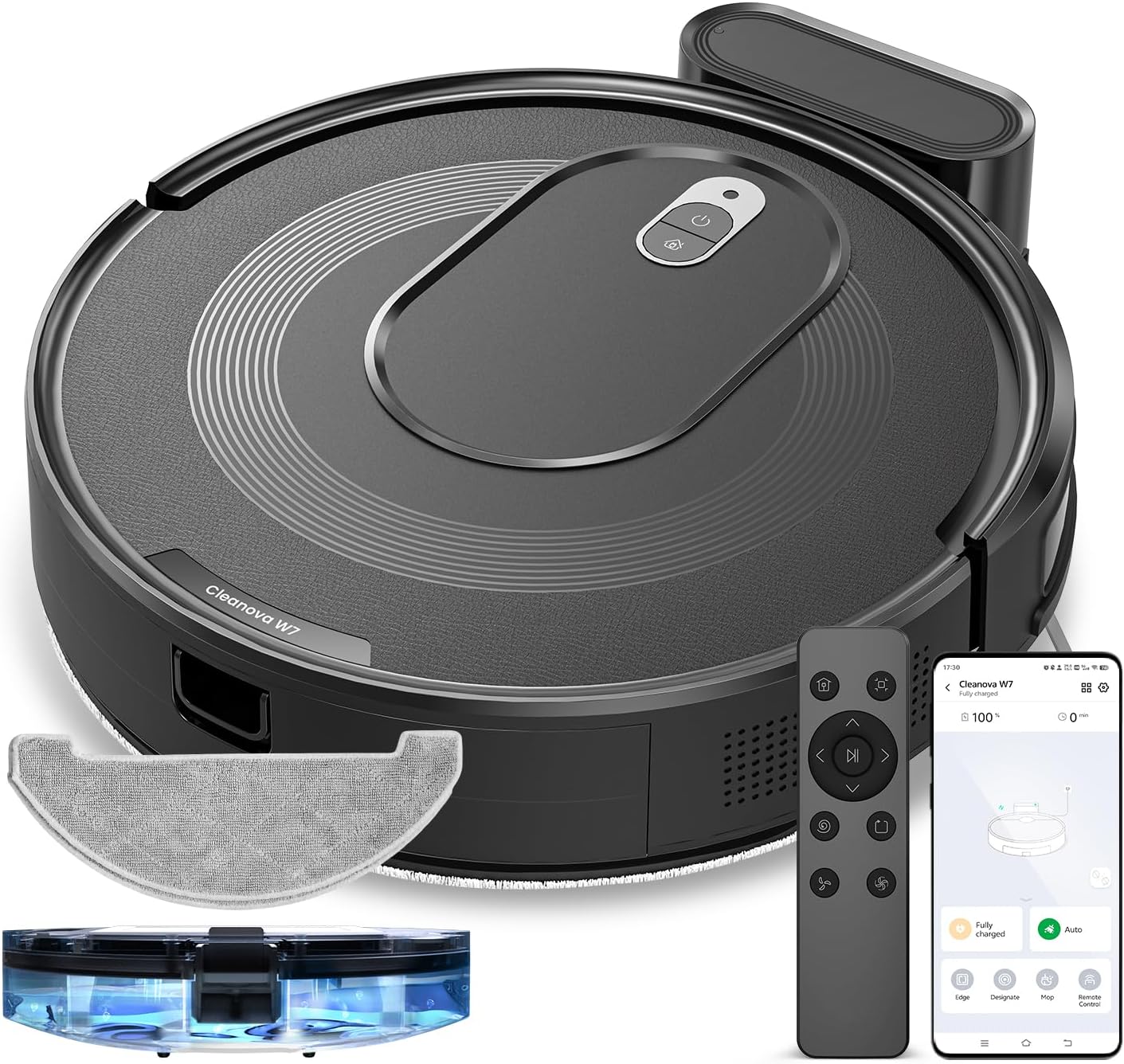
شڪل 3.1: Vexilar T6T7T8 Robot Vacuum with its charging dock, remote control, and other accessories.
4. پراڊڪٽ ختمview
4.1 Robot Vacuum Components (Top View)
شڪل 4.1: مٿو view of the Vexilar T6T7T8 Robot Vacuum, showing the power button and dustbin cover.
4.2 Robot Vacuum Components (Bottom View)
شڪل 4.2: هيٺيون view of the Vexilar T6T7T8 Robot Vacuum, illustrating the side brushes, main brush, and wheels.
4.3 Slim Design and Navigation
The robot's ultra-thin design (2.89 inches height) allows it to easily navigate under furniture and in tight spaces, ensuring comprehensive cleaning.

شڪل 4.3: The Vexilar T6T7T8 Robot Vacuum demonstrating its ability to clean under low-clearance furniture.
5. سيٽ اپ گائيڊ
5.1 چارجنگ ڊاک پليسمينٽ
- چارجنگ ڊاک کي ڀت سان هڪ کليل، بي ترتيب علائقي ۾ رکو.
- پڪ ڪريو ته ڊاک جي ٻنهي پاسن تي گهٽ ۾ گهٽ 0.5 ميٽر (1.6 فوٽ) صاف جاءِ هجي ۽ اڳيان 1.5 ميٽر (4.9 فوٽ) هجي.
- پاور اڊاپٽر کي چارجنگ ڊاک سان ڳنڍيو ۽ ان کي وال آئوٽليٽ ۾ لڳايو.
5.2 شروعاتي چارجنگ
Before first use, fully charge the robot vacuum. Place the robot onto the charging dock, ensuring the charging contacts align. The indicator light will show charging status. A full charge typically takes 4-5 hours.
5.3 App Connection and Smart Control
For enhanced control and scheduling features, download the Vexilar app from your smartphone's app store. The app supports 2.4GHz WiFi networks only (5G WiFi is not supported).
- Download and install the Vexilar app.
- هڪ اڪائونٽ رجسٽر ڪريو ۽ لاگ ان ڪريو.
- پنهنجي روبوٽ ويڪيوم کي پنهنجي گهر جي وائي فائي نيٽ ورڪ سان ڳنڍڻ لاءِ ايپ ۾ ڏنل هدايتن تي عمل ڪريو.
- Once connected, you can control the robot via the app, or integrate with voice assistants like Siri, Google Home, or Alexa.
- Alternatively, use the included remote control or Bluetooth for basic operations without Wi-Fi.

شڪل 5.1: Example of the Vexilar app interface for controlling the robot vacuum.
6. آپريشن
6.1 صفائي شروع ڪرڻ ۽ روڪڻ
- Press the power button on the robot or the "Clean" button on the remote/app to start cleaning.
- Press the button again to pause cleaning.
- To send the robot back to the charging dock, press the home button on the remote/app.
6.2 صفائي جا طريقا
The Vexilar T6T7T8 offers four cleaning modes:
- خودڪار صفائي: The robot intelligently navigates using gyroscope technology to cover the entire floor area in an efficient zig-zag pattern.
- جڳھ صاف ڪرڻ: هڪ مخصوص گندي علائقي تي ڌيان ڏئي ٿو، هڪ سرپل نموني ۾ صفائي.
- ڪنڊ صاف ڪرڻ: ڀتين ۽ فرنيچر جي ڪنارن سان صفائي ڪري ٿو.
- موپ موڊ: Engages the mopping function for hard floors.
6.3 2-in-1 Sweeping and Mopping
The robot can simultaneously vacuum and mop. To use the mopping function:
- Fill the water tank (200ml capacity) with clean water.
- پاڻي جي ٽانڪي سان ايم پي ڪپڙي سان ڳنڍيو.
- روبوٽ ۾ پاڻي جي ٽانڪي اسيمبلي داخل ڪريو.
- Select Mop Mode via the app or remote control. The electronically controlled water pump allows for adjustable four-level water output.
- نوٽ: For carpeted areas, remove the mop holder before cleaning to prevent wetting the carpet. The robot automatically recognizes carpets and switches to max suction mode when the mop holder is removed.

شڪل 6.1: The Vexilar T6T7T8 Robot Vacuum simultaneously vacuuming and mopping a hard floor.
7. سار سنڀال
باقاعده سار سنڀال بهترين ڪارڪردگي کي يقيني بڻائي ٿي ۽ توهان جي روبوٽ ويڪيوم جي عمر وڌائي ٿي.
7.1 ڪچري جي دٻي ۽ فلٽر جي صفائي
- ڊسٽبن ڇڏڻ واري بٽڻ کي دٻايو ۽ ڪچري کي هٽايو.
- Empty the dustbin contents into a trash receptacle.
- Remove the HEPA filter and sponge filter. Tap them gently to remove dust. Do not wash HEPA filters with water.
- جيڪڏهن ضروري هجي ته ڪچري جي دٻي کي پاڻي سان ڌوئو، پڪ ڪريو ته اهو ٻيهر انسٽال ڪرڻ کان اڳ مڪمل طور تي سڪي ويو آهي.
- فلٽر ۽ ڪچري جي دٻي کي ٻيهر لڳايو.
7.2 سائڊ برش ۽ مين برش جي صفائي
- Periodically check side brushes for tangled hair or debris. Remove and clean them using the provided cleaning tool.
- Remove the main brush cover and lift out the main brush. Use the cleaning tool to remove hair and debris.
7.3 سينسر جي صفائي
روبوٽ ۽ چارجنگ ڊاک تي ڪلف سينسرز، وال سينسرز، ۽ چارجنگ ڪانٽيڪٽس کي صاف، سڪل ڪپڙي سان صاف ڪريو ته جيئن صحيح ڪم ڪري سگهجي.
7.4 Water Tank and Mop Cloth Maintenance
- هر صفائي سيشن کان پوءِ، ٽانڪي مان باقي پاڻي خالي ڪريو.
- Remove and wash the mop cloth. Allow it to air dry completely before reuse.
8. مسئلا حل ڪرڻ
| مسئلو | ممڪن سبب | حل |
|---|---|---|
| روبوٽ شروع نٿو ٿئي. | گهٽ بيٽري؛ پاور سوئچ بند | روبوٽ کي چارج ڪريو؛ پاور سوئچ آن ڪريو |
| روبوٽ اڪثر ڦاسي پوندو آهي | Obstacles; Dirty sensors | رڪاوٽون صاف ڪريو؛ سينسر صاف ڪريو |
| ناقص صفائي جي ڪارڪردگي | Full dustbin; Clogged filters/brushes | Empty dustbin; Clean/replace filters and brushes |
| روبوٽ چارجنگ ڊاک نه ڳولي سگهيو | Dock obstructed; Dock unplugged | Ensure clear path to dock; Plug in dock |
| ايپ ڪنيڪشن مسئلا | Incorrect Wi-Fi band; Network issues | Ensure 2.4GHz Wi-Fi; Restart router/robot |
9. وضاحتون
| خاصيت | تفصيل |
|---|---|
| ماڊل نالو | T6T7T8 |
| برانڊ | ويڪسيلر |
| پيداوار جي ماپ | 16"ليٽر x 13"ڊبليو x 4.5"ايڇ |
| شيءِ جو وزن | 7 پائونڊ (3.17 ڪلوگرام) |
| سکشن پاور | Up to 3000Pa (Max Mode) |
| بيٽري جي زندگي | 120 منٽن تائين (خاموش موڊ) |
| ڪچري جي گنجائش | 0.5 ليٽر (500 ايم ايل) |
| پاڻي جي ٽانڪي گنجائش | 200 ملي |
| فلٽر جو قسم | Sponge, HEPA (H10 Grade with 95% filtration above 3 microns) |
| ڪنٽرول طريقا | App, Siri, Google Home, Alexa, Remote Control, Bluetooth |
| نيويگيشن جو قسم | Gyroscope Smart Navigation |
| چارج ڪرڻ وقت | لڳ ڀڳ 4-5 ڪلاڪ |
| شور جي سطح | 60 ڊي بي کان گهٽ |
| طاقت جو ذريعو | بيٽري سان هلندڙ (10.8 وولٽ) |
10. وارنٽي ۽ سپورٽ
The Vexilar T6T7T8 Robot Vacuum comes with a 12-مهيني وارنٽي خريداري جي تاريخ کان، پيداوار جي خرابين کي ڍڪيندي. مھرباني ڪري وارنٽي دعوائن لاءِ خريداري جو ثبوت رکو.
For technical support, troubleshooting assistance, or warranty inquiries, please visit our support page or contact customer service:
- آن لائن سپورٽ: http://www.utenic.com/qr/support/vactidy/
- اي ميل سپورٽ: سپورٽ@gracevacuum.com


