تعارف
Thank you for choosing the Porodo Lifestyle 4K Digital Camera. This camera is designed to capture your world in stunning detail, offering 4K video recording and high-resolution 50MP images. With features like 16x digital zoom, a flip flash, and a 180° rotating screen, it is ideal for vlogging, photography, and various content creation needs. This manual provides essential information on setting up, operating, and maintaining your camera to ensure optimal performance and longevity.
حفاظت جي ڄاڻ
- Do not expose the camera to extreme temperatures, direct sunlight, or high humidity.
- ڪئميرا کي ڇڏڻ يا مضبوط اثرن جي تابع ڪرڻ کان پاسو ڪريو.
- Keep the camera away from water and liquids unless specifically designed for underwater use (this model is not).
- ڪئميرا کي ڌار ڪرڻ يا تبديل ڪرڻ جي ڪوشش نه ڪريو. اهو وارنٽي کي رد ڪري ڇڏيندو.
- Use only the specified battery type and charging method.
- ٻارن جي پهچ کان پري رکو.
پيڪيج مواد
مھرباني ڪري ھيٺ ڏنل شين لاءِ دٻي کي چيڪ ڪريو:
- Porodo Lifestyle 4K Digital Camera
- ريچارجبل بيٽري (650mAh)
- قسم-سي چارجنگ ڪيبل
- استعمال ڪندڙ جو دستياب (ھي دستاويز)
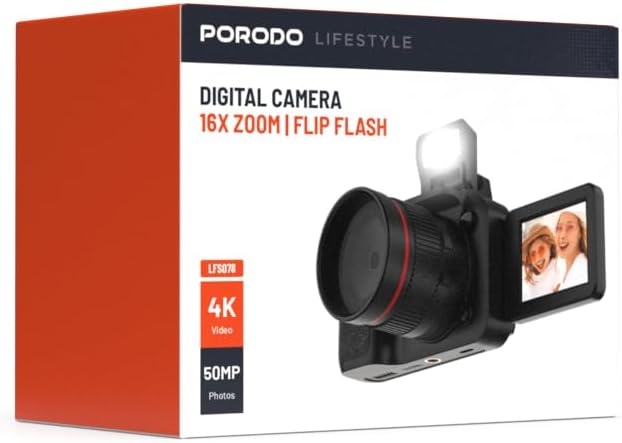
تصوير: سامهون view of the Porodo Lifestyle 4K Digital Camera retail box, showing the camera and key features.

تصوير: پوئتي view of the Porodo Lifestyle 4K Digital Camera retail box, displaying product specifications and features.
پيداوار ختمview
Familiarize yourself with the various parts of your Porodo Lifestyle 4K Digital Camera.

Image: The Porodo Lifestyle 4K Digital Camera shown with its 180° rotating screen flipped open and the integrated flash extended upwards.
- لينس: Main optical component for capturing images and videos.
- Flip Flash: گهٽ روشني واري حالتن ۾ اضافي روشني فراهم ڪري ٿي.
- 180° Rotating Screen (2.2'' Display): لچڪدار جي اجازت ڏئي ٿو viewing angles, ideal for vlogging and selfies.
- پاور بٽڻ: ڪئميرا آن/آف ڪري ٿو.
- شٽر بٽڻ: تصويرون ڪڍندو آهي يا وڊيو رڪارڊنگ شروع ڪندو/بند ڪندو آهي.
- زوم ڪنٽرول: Adjusts the 16x digital zoom.
- نيويگيشن بٽڻ: For menu navigation and settings adjustment.
- قسم-سي پورٽ: چارج ڪرڻ ۽ ڊيٽا جي منتقلي لاء.
- ميموري ڪارڊ سلاٽ: For inserting an SD card (not included).
سيٽ اپ ڪريو
1. بيٽري لڳائڻ ۽ چارج ڪرڻ
- ڪئميرا جي تري ۾ بيٽري جي ڪمپارٽمينٽ ڪَوَر کي ڳوليو.
- ڍڪ کولڻ لاءِ لچ کي سلائڊ ڪريو.
- Insert the provided 650mAh battery, ensuring the contacts align correctly.
- Close the battery compartment cover until it clicks securely.
- Connect the camera to a power source using the Type-C charging cable. The charging indicator will illuminate.
- A full charge takes approximately 2.5 hours. The indicator will change or turn off when charging is complete.
2. ميموري ڪارڊ جي انسٽاليشن
A memory card (SD card, not included) is required to store photos and videos.
- Locate the memory card slot, usually on the side or bottom of the camera.
- Insert the SD card with the metal contacts facing the correct direction (refer to the diagram near the slot if available) until it clicks into place.
- ڪڍڻ لاءِ، ڪارڊ کي نرميءَ سان اندر دٻايو جيستائين اهو ٻاهر نه اچي.
3. شروعاتي پاور آن
- Press and hold the Power button for a few seconds until the screen illuminates.
- Upon first use, you may be prompted to set the date and time. Use the navigation buttons to adjust and confirm.
آپريٽنگ هدايتون
Basic Photo Mode (50MP)
- Turn on the camera. It will typically default to photo mode.
- Frame your shot using the 2.2'' display.
- Press the Shutter button halfway down to focus (if applicable).
- Press the Shutter button fully to capture a 50MP image.

Image: A person holding the Porodo Lifestyle 4K Digital Camera, demonstrating a typical usage scenario for capturing photos.

تصوير: ٻيو view of a person holding the Porodo Lifestyle 4K Digital Camera, illustrating the camera's ergonomic design during use.
Basic Video Mode (4K)
- Switch the camera to video mode (usually via a dedicated button or menu option).
- Press the Shutter button once to start 4K video recording. A recording indicator (e.g., red dot, timer) will appear on the screen.
- رڪارڊ ڪرڻ بند ڪرڻ لاءِ terيهر شٽر بٽڻ دايو.

Image: The Porodo Lifestyle 4K Digital Camera highlighting its 4K video resolution capability.
Using the 16X Digital Zoom
- While in photo or video mode, use the zoom controls (often marked with 'W' for Wide and 'T' for Telephoto) to adjust the 16x digital zoom.
- Press 'T' to zoom in and 'W' to zoom out.
Using the Flip Flash
- To activate the flash, manually flip it up from its resting position.
- The camera will automatically use the flash when needed in low-light conditions, depending on your flash settings (e.g., Auto, Fill-in, Red-eye reduction).
- To turn off the flash, gently push it back down until it locks into place.
Using the 180° Rotating Screen
- The 2.2'' display can be rotated 180 degrees.
- Flip the screen out from the side of the camera and rotate it to face forward for selfies or vlogging, or to various angles for creative shots.
- Ensure the screen is securely positioned before shooting.

Image: The Porodo Lifestyle 4K Digital Camera illustrating its 2.2-inch display and 180-degree flip screen functionality.
Playback and Deleting Files
- Enter Playback mode (usually via a dedicated button or menu option).
- Use the navigation buttons to scroll through your photos and videos.
- حذف ڪرڻ a file, select it and press the Delete button (often marked with a trash can icon). Confirm deletion when prompted.
ڪمپيوٽر سان ڳنڍڻ
- ڪئميرا بند ڪريو.
- Connect the camera to your computer using the provided Type-C cable.
- Turn on the camera. It should appear as a removable disk drive on your computer.
- You can now transfer photos and videos to your computer.
سار سنڀال
ڪئميرا جي صفائي
- ڪئميرا جي باڊي کي صاف ڪرڻ لاءِ نرم، لِنٽ فري ڪپڙو استعمال ڪريو.
- For the lens and screen, use a specialized lens cleaning cloth and solution. Do not use abrasive materials.
- Avoid spraying cleaning solutions directly onto the camera. Apply to the cloth first.
بيٽري جي سنڀال
- Recharge the battery fully before first use.
- Avoid completely draining the battery frequently to prolong its lifespan.
- If storing the camera for an extended period, charge the battery to about 50% and remove it from the camera.
ذخيرو
- ڪئميرا کي ٿڌي، سڪل جاءِ تي، سڌي سج جي روشني ۽ انتهائي گرمي پد کان پري رکو.
- Use a camera bag or case to protect it from dust and scratches.
مشڪلاتون
| مسئلو | ممڪن سبب | حل |
|---|---|---|
| ڪئميرا آن نٿو ٿئي. | بيٽري ختم ٿي وئي آهي يا صحيح طرح سان نصب نه ڪئي وئي آهي. | بيٽري چارج ڪريو. پڪ ڪريو ته بيٽري صحيح پولارٽي سان داخل ڪئي وئي آهي. |
| تصويرون/ وڊيوز نه ٿا ڪڍي سگهجن. | ميموري ڪارڊ ڀريل آهي، داخل نه ڪيو ويو آهي، يا خراب ٿيل آهي. | ميموري ڪارڊ داخل ڪريو. غير ضروري ختم ڪريو files. ڪارڊ کي فارميٽ ڪريو (اهو سڀ ڊيٽا ختم ڪري ڇڏيندو). |
| Images/Videos are blurry. | Lens is dirty. Insufficient light. Camera shake. | Clean the lens. Use the flash or shoot in brighter conditions. Hold the camera steady. |
| Flash not working. | Flash is not flipped up. Flash setting is off. | Ensure the flash is manually flipped up. Check flash settings in the menu. |
| Camera freezes. | سافٽ ويئر جي خرابي. | ڪئميرا کي ري سيٽ ڪرڻ لاءِ بيٽري ڪڍو ۽ ٻيهر داخل ڪريو. |
وضاحتون
Detailed technical specifications for the Porodo Lifestyle 4K Digital Camera:

Image: Visual representation of the camera's core capabilities: 4K video, 50MP photos, and 16x digital zoom.

Image: A detailed table outlining the technical specifications of the Porodo Lifestyle 4K Digital Camera.
- ماڊل نالو: Porodo Lifestyle 4K Digital Camera – 50MP, 16x Zoom, Flip Flash, 180° Rotating Screen
- شئي ماڊل نمبر: 6849108448116
- برانڊ: پورودو
- وڌ ۾ وڌ Webڪئميرا تصويري قرارداد: 50 ايم پي
- وڊيو قرارداد: 4K (3840x2160)
- ڊجيٽل زوم: 16X
- بصري زوم: 1.0
- ڏيکاريو: 2.2'' (180° Rotating Screen)
- بيٽري جي گنجائش: 650mAh (1 P76 battery included)
- ڪم جو وقت: 3 ڪلاڪ تائين
- ري چارج وقت: لڳ ڀڳ 2.5 ڪلاڪ
- چارج پورٽ: ٽائپ-سي
- فوٽو سينسر ٽيڪنالاجي: CMOS
- حمايت ڪئي File فارميٽ: JPG (images), AVI (videos)
- تصويري استحڪام: ڊجيٽل
- تناسب تناسب: 16:9، 4:3
- ماپ جي وضاحت: جاءِ
- پيداوار جي ماپ: 6 X 13 x 9 سينٽي ؛ 310 گ
- اصليت جو ملڪ: چين
وارنٽي ۽ سپورٽ
Porodo products are designed with quality and reliability in mind. For warranty information and technical support, please refer to the official Porodo webسائيٽ تي وڃو يا پنهنجي مقامي ورهائيندڙ سان رابطو ڪريو.
آن لائن سپورٽ: جو دورو ڪريو Porodo Store on Amazon پراڊڪٽ جي معلومات ۽ اپڊيٽ لاءِ.
وڌايل وارنٽي جا آپشن: Additional warranty plans may be available through authorized retailers. Please check with your point of purchase for details.


