1. تعارف
Thank you for choosing the AVATTO Smart WLAN Roller Shutter Switch. This device allows you to control your blinds and roller shutters remotely via the Smart Life/Tuya app, voice commands through Alexa or Google Assistant, and directly via its touch-sensitive glass surface. This manual provides detailed instructions for installation, setup, operation, and troubleshooting to ensure optimal performance and safety.
2. حفاظت جي ڄاڻ
WARNING: Electrical installation should only be performed by a qualified electrician. Ensure power is disconnected at the circuit breaker before installation to prevent electric shock.
- گلي هٿن سان انسٽال نه ڪريو.
- وڌ ۾ وڌ لوڊ ريٽنگ 10 کان وڌيڪ نه ڪريو Amps / 800W.
- Operate only within the specified voltagاي رينج 100-240V AC، 50-60Hz.
- هي ڊوائيس صرف اندروني استعمال لاء ٺهيل آهي.
- ٻارن جي پهچ کان پري رکو.
3. مصنوعات جي وضاحت
| خاصيت | تفصيل |
|---|---|
| پيداوار جي ماپ | 8 x 8 x 4 سينٽي |
| وزن | 360 جي |
| آپريشن موڊ | آن- آف- آن |
| موجوده درجه بندي | 10 Amps |
| آپريٽنگ جلدtage | 100-240 Volts AC, 50-60Hz |
| رابطي جو قسم | عام طور تي بند ٿيل |
| سوئچ جو قسم | Capacitive ٽچ سوئچ |
| مواد | Plastic, Glass Surface |
| وائرليس فريڪوئنسي | وائي فائي 2.4GHz |
| وڌ ۾ وڌ پاور | 800W/گنگ |
4. تنصيب
4.1 وائرنگ ڊاگرام
Before proceeding, ensure your motor has 4 wires, as this switch is compatible with 4-wire roller shutter motors. Disconnect power at the circuit breaker before wiring.
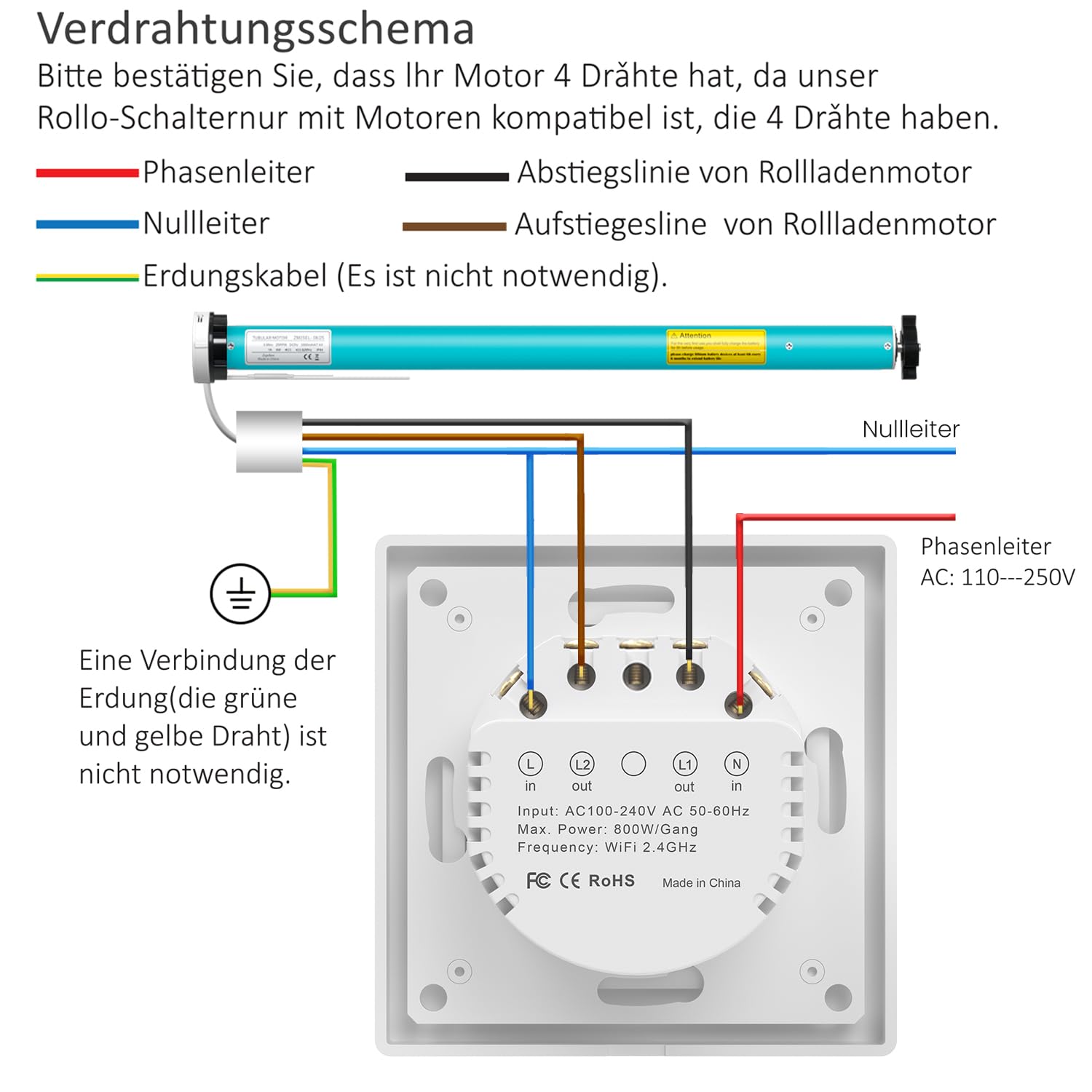
تصوير جي وضاحت: A detailed wiring diagram showing the connections for the AVATTO roller shutter switch. The diagram illustrates connections for Live (L), Neutral (N), L1 (Ascending line for roller shutter motor), and L2 (Descending line for roller shutter motor). An optional ground wire connection is also shown. The switch itself has input and output terminals clearly labeled.
- Phase Conductor (Live): Connect the Live wire (typically brown or black) to the 'L in' terminal.
- غير جانبدار موصل: Connect the Neutral wire (typically blue) to the 'N in' terminal.
- Ascending Line (Motor Up): Connect the motor's ascending wire to the 'L1 out' terminal.
- Descending Line (Motor Down): Connect the motor's descending wire to the 'L2 out' terminal.
- گرائونڊنگ ڪيبل: Connecting the grounding cable (green and yellow wire) is not strictly necessary for the switch's operation but is recommended for safety if available.
4.2 جسماني تنصيب
The AVATTO switch is designed for flexible installation and fits standard 55mm frames. It can be installed independently or combined with other AVATTO modules.

تصوير جي وضاحت: This image displays the modular design of the AVATTO switch, showing the main switch unit, the mounting frame, and the glass cover. It illustrates how the switch can be installed independently in an 80x80mm frame, combined with other AVATTO modules (like light switches, sockets, thermostats) in multi-gang frames, and how damaged switches can be replaced.
- After wiring, secure the switch module into the wall box.
- Attach the removable cover frame (80 x 80 mm) to the switch module.
- Snap the glass touch surface onto the frame.
- سرڪٽ برڪر تي بجلي بحال ڪريو.
5. سيٽ اپ ۽ ڪنيڪشن
5.1 App Remote Control (Smart Life / Tuya App)
The AVATTO Smart WLAN Roller Shutter Switch can be controlled remotely using the Smart Life or Tuya app.
- Download the "Smart Life" or "Tuya Smart" app from your smartphone's app store (available for iOS and Android).
- پنهنجي کاتي ۾ رجسٽر ٿيو يا لاگ ان ٿيو.
- پڪ ڪريو ته توهان جو اسمارٽ فون 2.4GHz وائي فائي نيٽ ورڪ سان ڳنڍيل آهي.
- In the app, tap "+" to add a new device.
- Follow the in-app instructions to put the switch into pairing mode (usually by pressing and holding a button on the switch until an indicator light flashes).
- Select the device type (e.g., "Curtain Switch" or "Roller Shutter Switch") and complete the pairing process.

تصوير جي وضاحت: An image showing the AVATTO Smart WLAN Roller Shutter Switch alongside a smartphone displaying the control app. The app interface features "Open," "Pause," and "Close" buttons, a Wi-Fi indicator, and a percentage slider for precise control of the roller shutter position. The physical switch is shown with its glass touch surface and internal components.
5.2 Voice Control (Alexa / Google Assistant)
Once the switch is added to the Smart Life or Tuya app, you can link it to Amazon Alexa or Google Assistant for voice control.
- Open the Alexa or Google Home app.
- "Skills & Games" (Alexa) يا "Works with Google" (Google Home) سيڪشن ڏانهن وڃو.
- ڳولھيو "Smart Life" or "Tuya Smart" and enable the skill/service.
- Link your Smart Life/Tuya account when prompted.
- Discover devices. Your roller shutter switch should now appear and be controllable by voice.

تصوير جي وضاحت: This image illustrates the voice control capabilities of the AVATTO switch, showing a user interacting with an Alexa device (Echo Dot) to control curtains. Text bubbles show commands like "Alexa, set the curtain to 55%." Logos for Alexa, Google Home, Smart Life, and Tuya are displayed, indicating compatibility.
6. آپريٽنگ هدايتون
6.1 دستي ٽچ ڪنٽرول
The glass touch surface of the switch allows for direct control:
- تي ٽيپ ڪريو مٿي تير to open the blinds.
- تي ٽيپ ڪريو هيٺيون تير to close the blinds.
- تي ٽيپ ڪريو Center circle to pause the blinds at their current position.
The LED indicators on the switch show the current open percentage of the blinds.

تصوير جي وضاحت: An image demonstrating the precise percentage control feature. The AVATTO switch is shown with its LED indicators, which light up to represent different open percentages (0%, 30%, 40%, 50%, 60%, 80%, 100%). A smartphone app interface also shows a slider for setting the curtain position by percentage, with a visual representation of blinds opening to 50%.
6.2 ايپ ڪنٽرول
Using the Smart Life or Tuya app, you can:
- Open, close, or pause your blinds from anywhere.
- Set the blinds to a specific percentage of openness using a slider.
- ٽائمر فنڪشن: Create personalized schedules to automatically open or close your blinds at specific times (e.g., open at 7:00 AM, close at 10:00 PM).
- گروپ ڪنٽرول: Combine multiple AVATTO roller shutter switches into a group within the app for simultaneous control.
- Intelligent Linking: Connect the switch with other Tuya smart devices to create automated scenes (e.g., "Good Morning" scene opens blinds and turns on lights).
- پٺتي ڪنٽرول: The backlight of the switch can be switched on or off via the app settings.

تصوير جي وضاحت: This image demonstrates the timer control feature. A smartphone screen shows the "Schedule" interface in the Smart Life app, with entries for "17:30 Open Everyday" and "22:00 Close Once." Visuals of a window with blinds illustrate the effect of these schedules, showing blinds opening in the morning (07:00 ON) and closing at night (22:00 OFF).
7. سار سنڀال
To ensure the longevity and proper functioning of your AVATTO Smart WLAN Roller Shutter Switch:
- Clean the glass surface with a soft, dry, or slightly damp ڪپڙو. گھڙڻ وارا صاف ڪندڙ يا محلولن کان پاسو ڪريو.
- ڊوائيس کي وڌيڪ نمي يا انتهائي گرمي پد تي ظاهر نه ڪريو.
- Regularly check for any loose connections during routine electrical inspections (performed by a qualified professional).
8. مسئلا حل ڪرڻ
| مسئلو | ممڪن سبب | حل |
|---|---|---|
| Switch is unresponsive / Offline in app | No power; Wi-Fi disconnected; App issue. | Check circuit breaker. Ensure 2.4GHz Wi-Fi is active and strong. Restart router. Restart the switch by briefly turning off power at the breaker. Re-pair if necessary. |
| Blinds only partially open/close (calibration issue) | Incorrect motor travel limits or calibration. | Check the motor's own limit settings. Some motors require manual calibration. If the switch has an automatic calibration feature, ensure it's performed correctly. Consult motor manual if issue persists. |
| وائس ڪنٽرول ڪم نه ڪري رهيو آهي | Incorrect voice command; Skill not linked; Device not discovered. | Use precise commands (e.g., "Alexa, open [device name]"). Ensure Smart Life/Tuya skill is enabled and linked in Alexa/Google Home app. Re-discover devices. |
| ٽچ ڪنٽرول جواب نه ڏئي رهيا آهن | Power issue; Software glitch. | Check power. Briefly cycle power to the switch at the circuit breaker. |
9. وارنٽي ۽ سپورٽ
AVATTO products are designed for reliability and performance. For specific warranty information, please refer to the documentation provided with your purchase or contact AVATTO customer support.
For technical assistance or further inquiries, please visit the official AVATTO webسائيٽ تي وڃو يا انهن جي ڪسٽمر سروس ڊپارٽمينٽ سان رابطو ڪريو. وارنٽي دعوائن لاءِ پنهنجي خريداري جي رسيد رکو.


