تعارف
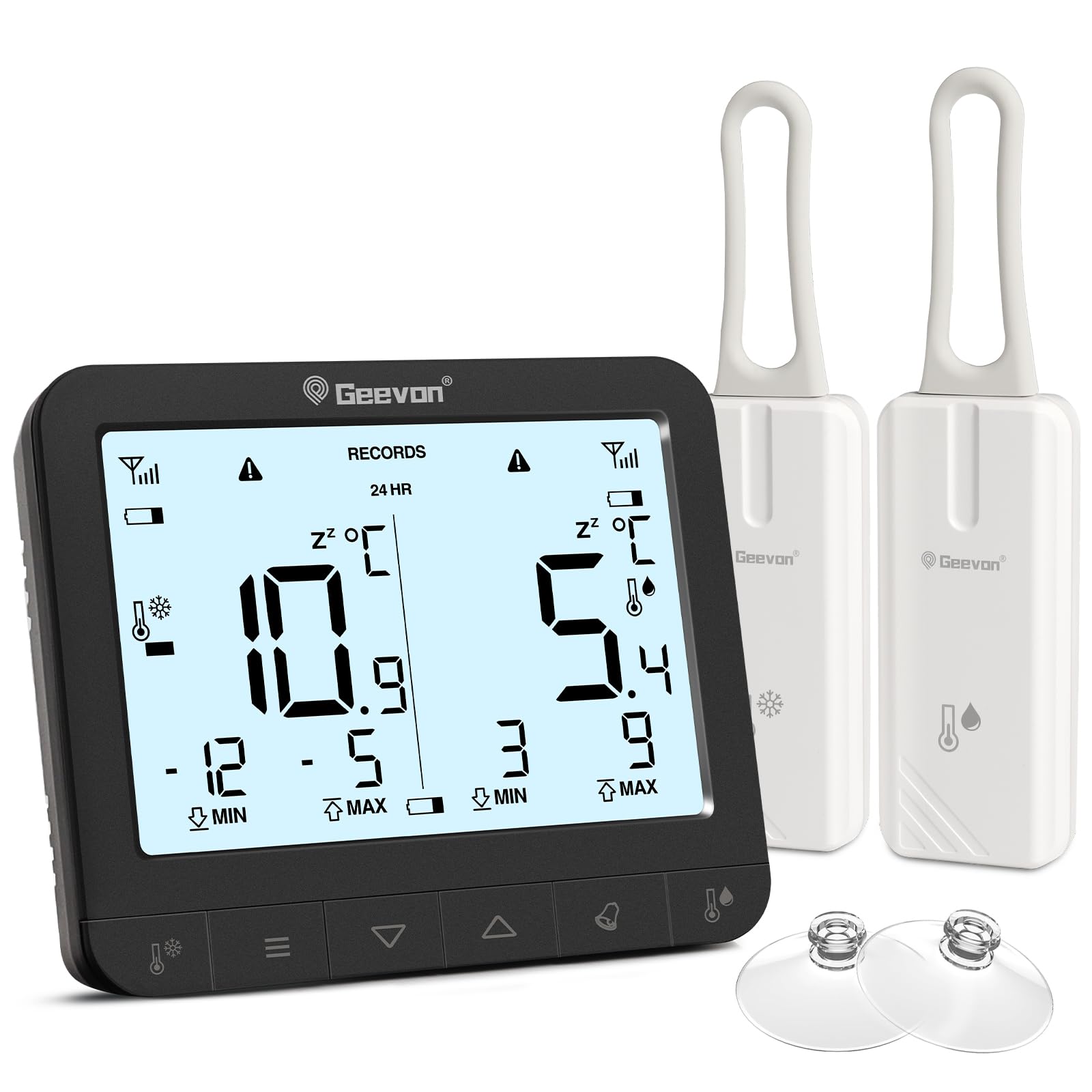
This manual provides detailed instructions for the setup, operation, and maintenance of your Geevon Wireless Digital Refrigerator Thermometer. This device is designed to monitor temperatures in your refrigerator, freezer, or other environments using two wireless sensors, ensuring optimal storage conditions for your items.
Please read this manual thoroughly before using the product to ensure correct operation and to maximize its lifespan.
پيڪيج مواد
پيڪنگ ڪرڻ تي، مھرباني ڪري تصديق ڪريو ته سڀئي جزا موجود آھن ۽ سٺي حالت ۾ آھن:
- 1 x Main Display Unit
- 2 x Wireless Sensors
- 6 x AAA Batteries (for main unit)
- 2 x CR2032 Batteries (pre-installed in sensors or included separately)
- 1 x استعمال ڪندڙ دستياب (هي دستاويز)
- 2 x Suction Cups (for sensor mounting)

The image displays the main unit, two sensors, and accessories including suction cups for installation.
سيٽ اپ جون هدايتون
1. بيٽري لڳائڻ
For the Main Display Unit:
- مکيه يونٽ جي پٺي تي بيٽري جي خاني کي ڳوليو.
- بيٽري جو ڍڪ کوليو.
- 6 AAA بيٽريون داخل ڪريو، صحيح قطبيت (+/-) کي ڏسندي.
- بيٽري جي ڍڪ کي محفوظ طور تي بند ڪريو.
For the Wireless Sensors:
- Locate the battery compartment on the back of each sensor.
- بيٽري جو ڍڪ کوليو.
- Insert 1 CR2032 battery into each sensor, observing the correct polarity (+/-).
- بيٽري جي ڍڪ کي محفوظ طور تي بند ڪريو.
The image illustrates the battery compartments for both the main unit and the wireless sensors.
2. سينسر لڳائڻ
The wireless sensors can be placed inside your refrigerator, freezer, or any other area where temperature monitoring is desired. Ensure the sensors are not submerged in liquid and are placed in a location where they can transmit signals to the main unit.
- لٽڪائڻ: Use the integrated loop to hang the sensor from a shelf or rack.
- مقناطيسي ڳنڍڻ: The sensors have built-in magnets for attachment to metallic surfaces.
- سکشن کپ: Attach the provided suction cups to the sensor for mounting on smooth surfaces like glass or plastic.

This image demonstrates different ways to position the wireless sensors within a refrigerator or freezer.
The main display unit can be placed on a countertop using its integrated stand or mounted on a metallic surface using its rear magnets.
آپريٽنگ هدايتون
ڊسپلي ختمview

The main display unit shows current temperatures for two channels, along with max/min records and status icons.
The display shows temperatures for two channels (CH1 and CH2), along with their respective maximum (MAX) and minimum (MIN) recorded temperatures. Signal strength indicators for each sensor and battery level indicators are also present.
1. Temperature Unit Selection (℃/℉)
On the back of the main display unit, locate the small "C/F" button. Press this button to toggle between Celsius (℃) and Fahrenheit (℉) temperature units.

This image highlights the C/F switch on the back of the main unit and other key features.
2. Max/Min Temperature Records
The display shows the maximum and minimum temperatures recorded over a 24-hour period. To view historical max/min records (since the last reset or power cycle), briefly press the "UP" or "DOWN" buttons on the main unit. To reset the max/min records, press and hold the "CLEAR" button (usually indicated by a trash can icon or similar) for a few seconds.
3. 2-Channel Alarm Setting
The thermometer allows you to set high and low temperature alarms for each channel.
- Briefly press the channel button (e.g., "CH1" or "CH2" button, or a general "Channel" button) to enter alarm setting mode for that channel.
- Use the "UP" and "DOWN" buttons to adjust the desired high and low temperature thresholds.
- Press and hold the "Alarm" button (often indicated by a bell icon) to toggle the alarm function ON or OFF for the selected channel.
- An audible alarm will sound if the temperature exceeds the set high threshold or falls below the set low threshold.

This image illustrates the alarm function, showing how to set upper and lower temperature limits for alerts.
4. بيڪ لائيٽ فنڪشن
To illuminate the display for easier reading in low-light conditions, touch the light bulb icon on the top of the main unit. The backlight will activate for approximately 10 seconds.
اهم خاصيتون
- Dual Wireless Sensors: Monitor two separate locations simultaneously.
- وسيع درجه حرارت جي حد: Measures temperatures from -40°C to 37°C (-40°F to 98.6°F).
- وڌ ۾ وڌ / گھٽ ۾ گھٽ رڪارڊ: Tracks the highest and lowest temperatures recorded over 24 hours or historically.
- ibleڻ وارو الارم: Alerts you when temperatures exceed or fall below preset thresholds.
- گھٽ بيٽري جو اشارو: Displays icons for low battery on both the main unit and sensors.
- پوئتي روشني: Provides temporary illumination for clear reading in dim environments.
- ورسٽائل لڳائڻ: Main unit features a stand and magnets; sensors can be hung, magnetically attached, or secured with suction cups.
The thermometer is suitable for various applications, including refrigerators, freezers, and wine coolers.
سار سنڀال
- صفائي: مکيه يونٽ ۽ سينسر کي نرم، ڊي سان صاف ڪريوamp cloth. Do not use abrasive cleaners or immerse the devices in water.
- بيٽري مٽائڻ: Replace batteries promptly when the low battery indicator appears on the display. Refer to the "Battery Installation" section for instructions.
- اسٽوريج: جيڪڏهن ڊوائيس کي گهڻي عرصي تائين ذخيرو ڪري رهيا آهيو، ته پوءِ ليڪيج کي روڪڻ لاءِ سڀئي بيٽريون ڪڍي ڇڏيو. ٿڌي، سڪل جاءِ تي ذخيرو ڪريو.
گھٽ بيٽري جو اشارو
The display unit features separate low battery indicators for the main unit and each sensor. When a battery icon appears, it indicates that the corresponding battery needs replacement.

This image highlights the low battery indicators for the sensors and the main display unit.
مشڪلاتون
| مسئلو | ممڪن سبب | حل |
|---|---|---|
| مکيه يونٽ تي ڪابه ڊسپلي ناهي. | بيٽريون مئل يا غلط نصب ٿيل آهن. | بيٽري جي پولارٽي چيڪ ڪريو ۽ تازي AAA بيٽرين سان تبديل ڪريو. |
| Sensor reading "---" or inaccurate. | Sensor batteries are dead, sensor is out of range, or interference. | Replace sensor CR2032 batteries. Move sensor closer to the main unit. Avoid placing near large metal objects or electronics that may cause interference. |
| الارم نه ٿو لڳي. | Alarm function is off or thresholds are set too wide. | Ensure the alarm is enabled for the desired channel. Adjust alarm thresholds to appropriate levels. |
| بيڪ لائيٽ ڪم نه ڪري رهي آهي. | Main unit batteries are low or depleted. | Replace main unit AAA batteries. |
وضاحتون
| برانڊ | جيون |
| ماڊل نمبر | 86218 |
| پيداوار جا طول و عرض (مکيه يونٽ) | 16 x 4.8 x 17.5 سينٽي (6.3 x 1.9 x 6.9 انچ) |
| وزن | 310 گرام (0.68 پائونڊ) |
| مکيه يونٽ پاور | 6 x AAA بيٽريون (شامل) |
| سينسر پاور | 1 x CR2032 Battery per sensor (included) |
| درجه حرارت جي حد | -40 ° C کان 37 ° C (-40 ° F کان 98.6 ° F) |
| ماپ جي درستگي | ± 0.1 ℉/℃ |
| ڊسپلي جو قسم | ڊجيٽل LCD |
| خاص خاصيتون | Low Battery Indicator, Backlit Display, Max/Min Record, 2-Channel Alarm |
| مواد | Acrylonitrile Butadiene Styrene (ABS) |
وارنٽي ۽ سپورٽ
Geevon is committed to providing high-quality products. For any questions, issues, or support needs regarding your Geevon Refrigerator Thermometer, please contact our customer service. We offer lifetime consultation service for our products.
Please refer to your purchase documentation or the official Geevon webمخصوص وارنٽي شرطن ۽ رابطي جي معلومات لاءِ سائيٽ.
آن لائن سپورٽ: Contact Seller (GEEVON UK)


