1. پراڊڪٽ ختمview
The Inateck NEO Magic Keyboard is designed to enhance your iPad experience, offering a full-size keyboard, a precision touchpad, and a floating cantilever design. It connects directly to your iPad via a Smart Connector adapter, eliminating the need for Bluetooth pairing or separate charging.

شڪل 1.1: Inateck NEO Magic Keyboard with an iPad in floating mode. The keyboard features a multi-color backlit layout and a large touchpad.
2. مطابقت
This keyboard is compatible with specific iPad models. Please verify your iPad's model number (Axxxx) on the back of your device before use.
- آئي پيڊ ايئر 11 انچ: M3 (2025), M2 (2024), 5th Gen (2022), 4th Gen (2020)
- iPad پرو 11 انچ: 4th Gen (2022), 3rd Gen (2021), 2nd Gen (2020), 1st Gen (2018)
Note: Not compatible with iPad 10th Gen (2022) or iPad Pro 11-inch (2024).
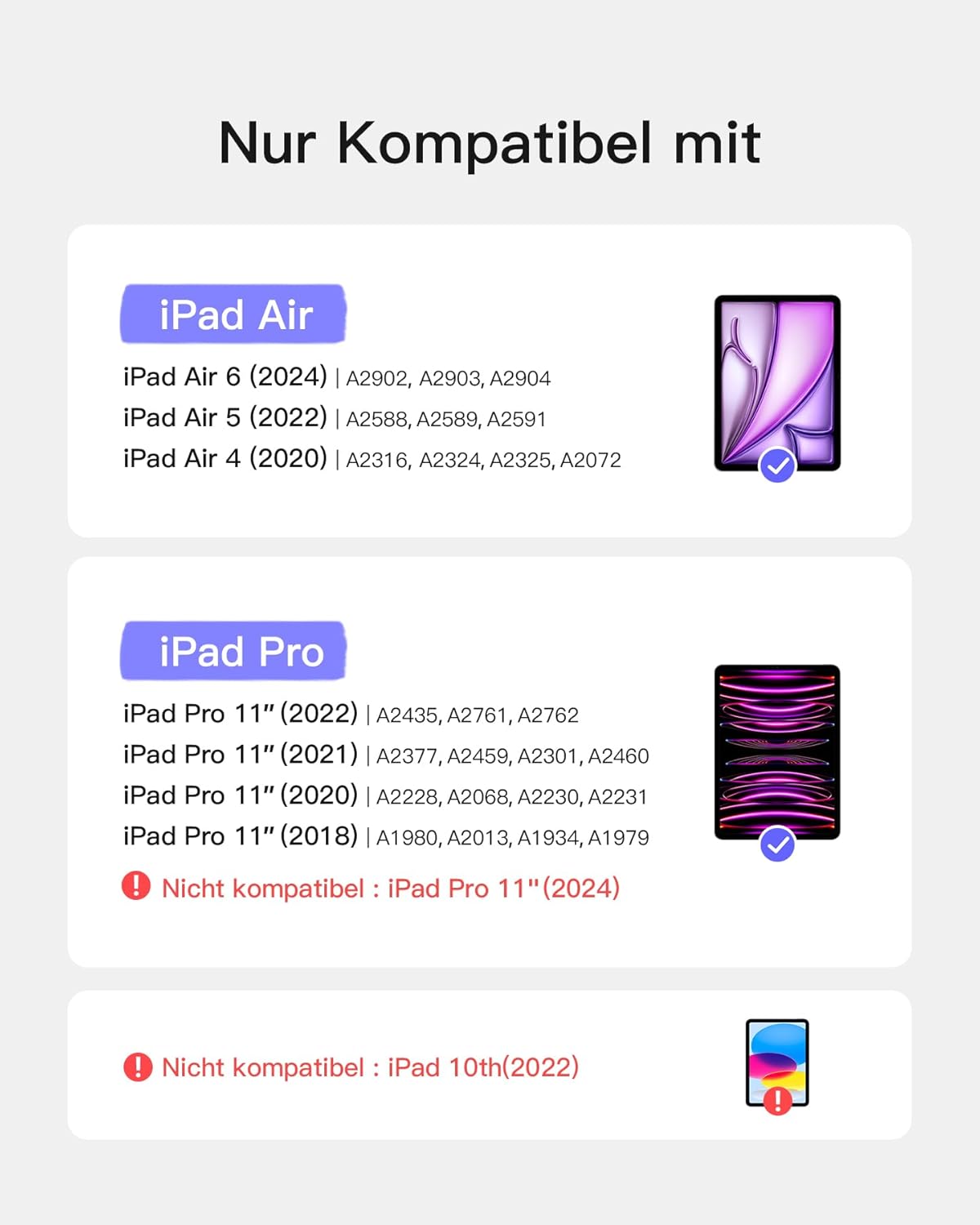
شڪل 2.1: Visual guide detailing compatible iPad Air and iPad Pro 11-inch models, along with incompatible models.
3. سيٽ اپ
The Inateck NEO Magic Keyboard features a plug-and-play design for instant connection.
3.1 ڪي بورڊ کي ڳنڍڻ
- Align your compatible iPad with the magnetic back cover of the keyboard case. The iPad will snap into place securely.
- Locate the compact Inateck adapter (USB-C to Pogo Pin) provided with the keyboard.
- Insert the Pogo Pin end of the adapter into the Smart Connector port on the keyboard case.
- Insert the USB-C end of the adapter into the USB-C port on your iPad.
The keyboard will instantly connect and draw power directly from your iPad. No Bluetooth pairing is required.

شڪل 3.1: Illustration of the plug-and-play connection using the Smart Connector adapter, highlighting the direct power and data transfer.
3.2 پاور سپلائي
The keyboard is powered directly by your iPad through the Smart Connector adapter. It does not require an internal battery or separate charging.
Important: The keyboard cannot charge your iPad.

شڪل 3.2: Diagram showing the keyboard drawing power from the iPad when connected, and the iPad's USB-C port being used for power input to the keyboard.
4. آپريٽنگ هدايتون
4.1 Floating Design and Viewاننگز
The keyboard features a floating cantilever design with strong magnetic attachment, allowing for adjustable viewing angles from 75° to 130°.
- Attach your iPad magnetically to the back panel of the keyboard case.
- Adjust the iPad's angle by gently tilting it to your preferred viewing position. The magnetic hinges will hold it securely.

شڪل 4.1: Illustration of the floating design, showing the magnetic attachment points and the adjustable viewing angles (75° to 130°).
4.2 بيڪ لائيٽ آپريشن
The keyboard features a 3-zone mixed backlight with adjustable brightness levels for comfortable typing in various lighting conditions.
- To turn on/off backlight: کي دٻايو Fn ڪي + بلب ٻاريو چاٻي
- روشني کي ترتيب ڏيڻ لاء: کي دٻايو Fn ڪي + مٿي تير or هيٺيون تير keys (or dedicated brightness keys if available) to cycle through three brightness levels.
- To change backlight color (if applicable): کي دٻايو Fn ڪي + ساڄي تير or کاٻي تير keys to cycle through available color modes.

شڪل 4.2: A user typing on the keyboard in a dimly lit environment, showcasing the multi-color backlit keys.
4.3 Precision Touchpad
The full-surface precision touchpad supports multi-touch gestures for seamless navigation and control of your iPad.
- اڪيلو آڱر ٽيپ: Click/select.
- ٻه آڱريون اسڪرول: مٿي/هيٺ يا کاٻي/ساڄي اسڪرول ڪريو.
- زوم ڪرڻ لاءِ چوٽي: مواد کي زوم ان/آئوٽ ڪريو.
- ٽن آڱرين سان مٿي سوائپ ڪريو: ايپ سوئچر تائين رسائي ڪريو.
- ٽي آڱريون کاٻي/ ساڄي سوائپ ڪريو: کليل ايپس جي وچ ۾ مٽايو.
For a complete list of iPadOS gestures, refer to your iPad's user guide or settings.

شڪل 4.3: ڌماڪو ٿيو view of the touchpad, illustrating its glass surface and internal components for precise and smooth touch interaction.
5. سار سنڀال
To ensure the longevity and optimal performance of your Inateck NEO Magic Keyboard, follow these maintenance guidelines:
- صفائي: نرم، لِنٽ کان خالي ڪپڙو استعمال ڪريو ٿورڙو ڊيampened with water or a mild cleaning solution to wipe the keyboard and touchpad surfaces. Avoid harsh chemicals or abrasive materials.
- اسٽوريج: When not in use, keep the keyboard closed to protect the screen of your iPad and the keyboard keys. Store in a dry, cool place away from direct sunlight.
- سنڀالڻ: Avoid dropping the keyboard or exposing it to excessive force, which could damage internal components or the magnetic connection.
6. مسئلا حل ڪرڻ
If you encounter issues with your Inateck NEO Magic Keyboard, refer to the following common troubleshooting steps:
- ڪي بورڊ جواب نه ڏئي رهيو آهي:
- Ensure the Smart Connector adapter is securely plugged into both the keyboard and the iPad's USB-C port.
- Remove and reattach the iPad to the keyboard case to re-establish the connection.
- پنهنجو iPad ٻيهر شروع ڪريو.
- Intermittent connection/disconnection:
- Check for any debris or obstructions on the Smart Connector pins on the keyboard and the USB-C port on the iPad. Clean gently if necessary.
- Ensure the iPad is firmly seated in the magnetic case.
- Avoid excessive movement or bending of the adapter cable during use.
- بيڪ لائيٽ ڪم نه ڪري رهي آهي:
- Ensure the keyboard is properly connected and receiving power from the iPad.
- دٻايو Fn + بلب ٻاريو key to toggle the backlight.
- دٻايو Fn + مٿي / اتر جو تير keys to adjust brightness.
- Touchpad not responding or inaccurate:
- Ensure the touchpad surface is clean and free of moisture or debris.
- Check iPad settings for touchpad sensitivity and gesture preferences.
- ڪيبورڊ کي ڊسڪنيڪٽ ڪريو ۽ ٻيهر ڳنڍيو.
- Keyboard drains iPad battery quickly:
- The keyboard draws power from the iPad. Prolonged use, especially with high backlight brightness, may affect iPad battery life.
- Reduce backlight brightness or turn it off when not needed.
- Disconnect the keyboard when not in active use to conserve iPad battery.
- USB-C port on adapter only charges, no data/display output:
- The USB-C port on the adapter is designed primarily for power passthrough to the keyboard and does not support data transfer or external display output.
- For data transfer or external display, connect accessories directly to the iPad's USB-C port (after detaching the keyboard if necessary).
- Keyboard only works after iPad lock screen:
- This is expected behavior for some iPadOS configurations. You may need to manually unlock your iPad before the keyboard becomes fully active.
7. وضاحتون
| خاصيت | تفصيل |
|---|---|
| برانڊ | انٽيڪ |
| ماڊل نمبر | KB19117-BK-DE |
| طول و عرض | 25.22 x 19.43 x 1.78 سينٽي |
| وزن | 689 جي |
| رابطي ٽيڪنالاجي | Smart Connector (via adapter) |
| پاور قسم | USB (powered by iPad) |
| پٺاڻ | 3-zone mixed backlight, RGB color support |
| خاص خصوصيت | Floating Stand |
| مواد | پلاسٽڪ |
| ڪي بورڊ لي آئوٽ | QWERTZ (German) |
8. وارنٽي ۽ سپورٽ
For warranty information and customer support, please refer to the official Inateck webسائيٽ تي وڃو يا سڌو سنئون انهن جي ڪسٽمر سروس سان رابطو ڪريو. خريداري جي ثبوت طور پنهنجي خريداري جي رسيد رکو.
Inateck Official Webسائيٽ: www.inateck.com


