1. تعارف
Thank you for choosing the HBN Digital Outdoor Timer Socket. This device is designed to provide flexible and reliable control over your outdoor electrical appliances, such as garden lighting, pool pumps, and holiday decorations. With its 8 programmable settings, random function, and IP44 weather resistance, it offers convenience and energy efficiency. Please read this manual thoroughly before use to ensure proper operation and safety.
2. حفاظتي هدايتون
- Ensure the timer is correctly installed and connected to a suitable power outlet.
- Do not exceed the maximum load capacity of 16A/3680W. Overloading can cause damage or fire.
- The timer is rated IP44 for outdoor use, meaning it is protected against splashing water from any direction. However, do not immerse the device in water or expose it to direct, heavy rainfall for extended periods.
- ڊوائيس کي نه کوليو ۽ نه ئي مرمت ڪرڻ جي ڪوشش ڪريو. سڀني سروسنگ کي قابل اهلڪارن جي حوالي ڪريو.
- Keep children away from the device. The integrated child lock provides additional safety.
- Always unplug the timer from the power outlet before cleaning.
3. پيڪيج مواد
توھان جي پيڪيج ۾ ھيٺيون شيون شامل ھجن:
- HBN Digital Outdoor Timer Socket (x2)
- هدايت نامو (هي دستاويز)
4. پراڊڪٽ ختمview
The HBN Digital Outdoor Timer Socket features a clear digital display and intuitive buttons for easy programming. Below is an illustration of the device and its main components.
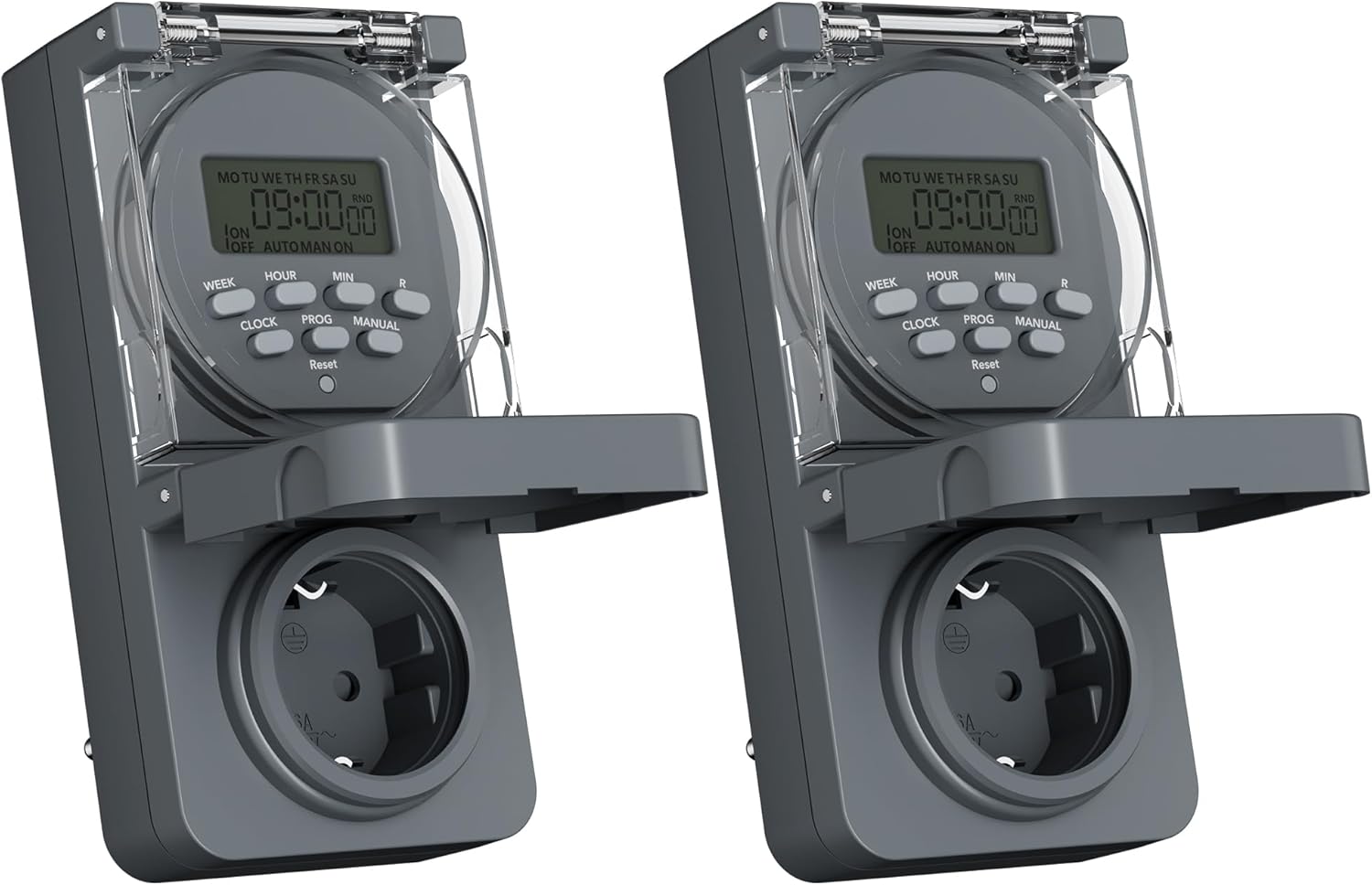
Image 1: Two HBN Digital Outdoor Timer Sockets, front view.

Image 2: Close-up of the timer's display and control buttons.
بٽڻ افعال:
- هفتو: Selects the day(s) of the week for programming.
- ڪلاڪ: Adjusts the hour setting.
- منٽ: Adjusts the minute setting.
- گھڙي: Exits programming mode and displays the current time. Used to set the current time.
- پيشڪش: Enters and cycles through the 8 ON/OFF program settings.
- دستور: Toggles between ON, AUTO, and OFF modes.
- RND (Random): Activates or deactivates the random function.
- تبديل ڪريو Clears all settings and returns the timer to factory defaults. Use a pointed object (e.g., a pen tip) to press.
5. سيٽ اپ
5.1 Initial Charging and Reset
Before first use, or after a long period of inactivity, plug the timer into a live power outlet for at least 30 minutes to charge the internal backup battery. This ensures that settings are retained during power outages.
After charging, press the ري سيٽ ڪريو button using a pointed object to clear any pre-existing settings and ensure a fresh start.
5.2 موجوده وقت ۽ ڏينهن مقرر ڪرڻ
- کي دٻايو ۽ رکو گھڙي بٽڻ
- رکڻ دوران گھڙي، دٻايو هفتو repeatedly to set the current day of the week (MO, TU, WE, TH, FR, SA, SU).
- رکڻ دوران گھڙي، دٻايو ڪلاڪ repeatedly to set the current hour (12-hour or 24-hour format).
- رکڻ دوران گھڙي، دٻايو منٽ repeatedly to set the current minute.
- جاري ڪريو گھڙي بٽڻ. موجوده وقت ۽ ڏينهن هاڻي مقرر ٿيل آهن.
6. آپريٽنگ هدايتون
6.1 Setting ON/OFF Programs
The timer allows you to set up to 8 ON/OFF programs. Each program consists of an ON time and an OFF time, along with specific days of the week.

تصوير 3: اڳوڻيamples of setting ON and OFF times for different programs.
- کي دٻايو واڌو button once. The display will show "1 ON". This is for setting the first ON time.
- دٻايو هفتو repeatedly to select the desired day(s) for this program. Options include individual days, weekdays (MO TU WE TH FR), weekends (SA SU), all days (MO TU WE TH FR SA SU), or various combinations.
- دٻايو ڪلاڪ آن ٽائيم لاءِ گهربل ڪلاڪ مقرر ڪرڻ لاءِ.
- دٻايو منٽ آن وقت لاءِ گهربل منٽ مقرر ڪرڻ لاءِ.
- دٻايو واڌو again. The display will show "1 OFF". This is for setting the first OFF time.
- Repeat steps 2-4 to set the day(s), hour, and minute for the OFF time. Ensure the day selection matches the ON time if you want the program to apply to the same days.
- دٻائڻ جاري رکو واڌو to cycle through programs 2 ON, 2 OFF, up to 8 ON, 8 OFF. Repeat the setting process for each program as needed.
- سڀ گهربل پروگرام سيٽ ڪرڻ کان پوءِ، دٻايو گھڙي پروگرامنگ موڊ مان نڪرڻ ۽ موجوده وقت جي ڊسپلي ڏانهن موٽڻ لاءِ بٽڻ دٻايو.
6.2 Random Function
The random function is designed to simulate presence by randomly turning the connected appliance ON and OFF within a specific time window, typically around your programmed ON/OFF times. This can deter potential intruders.

Image 4: The random function (RND) activated on the timer display.
- بي ترتيب فنڪشن کي چالو ڪرڻ لاءِ، دٻايو آر اين ڊي button. The display will show "RND".
- To deactivate, press the آر اين ڊي button again. "RND" will disappear from the display.
6.3 Manual Control (ON/AUTO/OFF)
You can manually override the programmed settings using the دستور بٽڻ
- دٻايو دستور once: The timer switches to ON mode (output is continuously ON).
- دٻايو دستور again: The timer switches to آٽو mode (follows programmed settings).
- دٻايو دستور a third time: The timer switches to بند mode (output is continuously OFF).
6.4 Summer/Winter Time Adjustment
To adjust for daylight saving time:
- کي دٻايو ۽ رکو گھڙي بٽڻ
- رکڻ دوران گھڙي، دٻايو دستور button. The display will show "+1h" for summer time or revert to normal for winter time.
7. سار سنڀال
7.1 صفائي
To clean the timer, unplug it from the power outlet. Wipe the exterior with a soft, damp ڪپڙو. رگڙيندڙ صاف ڪندڙ، محلول استعمال نه ڪريو، يا ڊوائيس کي پاڻي ۾ نه ٻوڙيو.
7.2 اسٽوريج
When not in use for extended periods, store the timer in a cool, dry place, away from direct sunlight and extreme temperatures.
8. مسئلا حل ڪرڻ
- Timer not turning ON/OFF as programmed:
- Check if the timer is in آٽو mode (not ON or OFF manually).
- Verify that the programmed ON/OFF times and days are set correctly.
- Ensure the connected appliance is working and properly plugged into the timer.
- ڊسپلي خالي آهي:
- Ensure the timer is plugged into a live power outlet.
- The internal backup battery might be completely drained. Plug the timer in for at least 30 minutes to charge it.
- پاور آئوٽ ٿيڻ کان پوءِ سيٽنگون گم ٿي وينديون آهن.tage:
- The internal backup battery may not be sufficiently charged. Ensure the timer is regularly connected to power. If settings are lost, re-enter them after charging.
- Random function not working:
- کي يقيني بڻايو آر اين ڊي function is activated (RND icon visible on display).
- The random function operates around programmed times; ensure at least one program is set.
9. وضاحتون

Image 5: Back of the timer showing electrical specifications.
| خاصيت | تفصيل |
|---|---|
| ماڊل | CP-GOE22-1 |
| بجلي جي فراهمي | 230V~، 50Hz |
| وڌ ۾ وڌ لوڊ | 16A / 3680W |
| تحفظ ڪلاس | IP44 (سپلاش پروف) |
| پروگرامن جو تعداد | 8 آن / بند پروگرام |
| Minimum Switching Time | 1 منٽ |
| ڪنٽرول موڊس | آن، آٽو، آف |
| خاص افعال | Random function, Summer/Winter time, 24-hour mode |
| بيڪ اپ بيٽري | Integrated (retains settings during power outagآهي) |
| طول و عرض (تقريبن) | 5.5D x 8.5W x 12H سينٽي ميٽر |
| شيءِ جو وزن | 160 گرام |
| مواد | پلاسٽڪ |
| يو پي سي | 810079587476 |
| ٺاهيندڙ | Ergo I&E CO.,LTD |
10. وارنٽي ۽ سپورٽ
For warranty information or technical support, please refer to the documentation provided at the point of purchase or contact your retailer. Keep your proof of purchase for any warranty claims.


