1. تعارف
This manual provides comprehensive instructions for the Mycket portable DAB/DAB+/FM radio, Model D009. It covers setup, operation, maintenance, and troubleshooting to ensure optimal performance and longevity of your device. Please read this manual carefully before using the product.
The Mycket D009 radio features advanced signal reception technology for clear audio, Bluetooth 5.0 for wireless streaming, USB playback, AUX-in connectivity, a dual alarm clock, and a sleep timer. Its integrated rechargeable battery offers portability for use in various environments.
2. حفاظتي هدايتون
- ڊوائيس کي مينهن، نمي، يا انتهائي گرمي پد جي سامهون نه رکو.
- ڊوائيس کي مضبوط اثرن لاءِ ڇڏڻ يا تابع ڪرڻ کان پاسو ڪريو.
- ڊوائيس کي پاڻ ڌار نه ڪريو يا مرمت ڪرڻ جي ڪوشش نه ڪريو. سڀني سروسنگ کي قابل اهلڪارن جي حوالي ڪريو.
- ڊوائيس کي گرمي جي ذريعن جهڙوڪ ريڊيئيٽر، گرمي رجسٽر، اسٽو، يا ٻين سامان کان پري رکو (بشمول ampلائفائرز) جيڪي گرمي پيدا ڪن ٿا.
- Use only the specified charging cable and power adapter (5V via USB) to charge the device.
- Ensure proper ventilation around the device during operation and charging.
- مقامي ضابطن جي مطابق بيٽرين ۽ اليڪٽرانڪ حصن کي ذميواري سان ختم ڪريو.
3. پراڊڪٽ ختمview
3.1 پيڪيج مواد
- 1 x Mycket Portable DAB Radio (Model D009)
- 1 x USB چارجنگ ڪيبل
- 1 x استعمال ڪندڙ دستياب
3.2 ڊوائيس لي آئوٽ ۽ ڪنٽرول
Familiarize yourself with the main components and controls of your Mycket radio.

تصوير 1: سامهون view of the Mycket D009 portable DAB radio, showing the speaker grille, LCD display, control buttons (MODE, OK, O/M, FAV, 1-4), and the telescopic antenna extended. The right side shows the DC 5V USB-C port, reset button, and headphone jack.
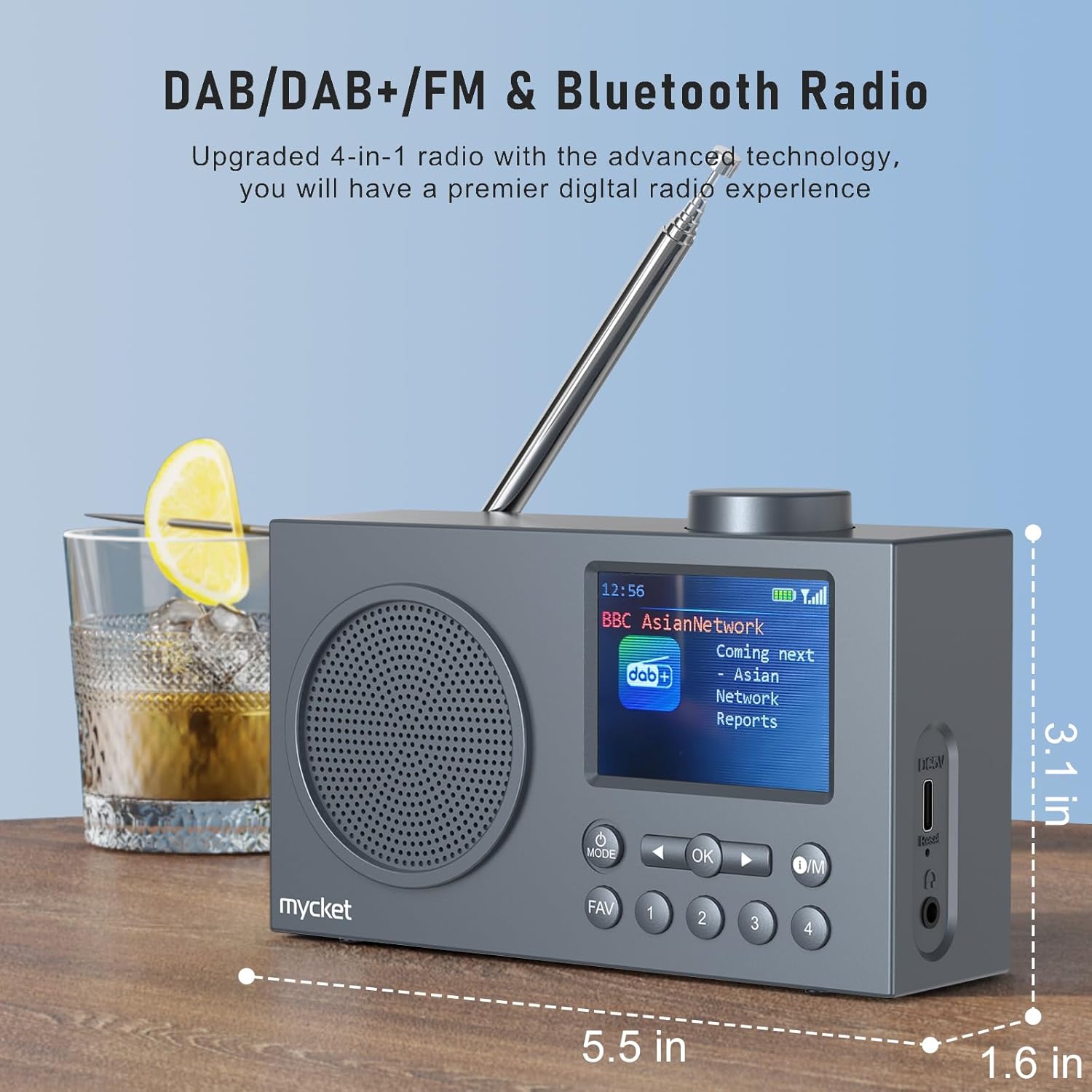
تصوير 2: پاسي view of the Mycket D009 radio illustrating its compact dimensions: approximately 5.5 inches (length), 1.6 inches (width), and 3.1 inches (height). The image also highlights its DAB/DAB+/FM and Bluetooth capabilities.
- ڏيکاريو: 2.4-inch TFT color display for station information, time, and settings.
- اسپيڪر: Integrated Hi-Fi speaker for audio output.
- Telescopic Antenna: For optimal radio signal reception.
- موڊ بٽڻ: Switches between DAB, FM, Bluetooth, USB, and AUX modes.
- OKيڪ بٽڻ: چونڊن جي تصديق ڪري ٿو يا مينيو ۾ داخل ٿئي ٿو.
- او/ايم بٽڻ: Power On/Off and Menu access.
- FAV بٽڻ: Accesses favorite presets.
- نمبر بٽڻ (1-4): Direct access to stored presets.
- Navigation Buttons (Left/Right): Navigates menus or tunes stations.
- حجم نوب: آڊيو جي مقدار کي ترتيب ڏئي ٿو.
- DC 5V USB-C Port: اندروني بيٽري چارج ڪرڻ لاءِ.
- ري سيٽ بٽڻ: Resets the device (use a thin object to press).
- 3.5mm هيڊ فون جڪ: ذاتي ٻڌڻ لاءِ.
4. سيٽ اپ
4.1 بيٽري کي چارج ڪرڻ
The radio is equipped with a built-in 2200mAh lithium battery. Before first use, fully charge the device.
- Connect the provided USB charging cable to the DC 5V USB-C port on the side of the radio.
- USB ڪيبل جي ٻئي ڇيڙي کي هڪ مطابقت رکندڙ USB پاور اڊاپٽر (شامل نه آهي) يا ڪمپيوٽر USB پورٽ سان ڳنڍيو.
- The charging indicator on the display will show the charging status. A full charge typically takes approximately 2.5 hours and provides up to 12 hours of playback time at 70% volume.

تصوير 3: The Mycket D009 radio display showing a full battery indicator, emphasizing its long playback time on a single charge.
4.2 اينٽينا ايڊجسٽمينٽ
بهترين ريڊيو استقبال لاءِ، ٽيليسڪوپڪ اينٽينا کي مڪمل طور تي وڌايو. بهترين سگنل جي معيار لاءِ ان جي پوزيشن کي ترتيب ڏيو.
4.3 شروعاتي پاور آن
کي دٻايو ۽ رکو او/ايم button to power on the radio. The display will light up, and the device will typically start in the last used mode or initiate a DAB scan if it's the first use.
5. آپريٽنگ هدايتون
5.1 سوئچنگ موڊس
کي دٻايو موڊ button repeatedly to cycle through available modes: DAB, FM, Bluetooth, USB, and AUX.
5.2 DAB/DAB+ Radio Operation
- استعمال ڪندي DAB موڊ تي سوئچ ڪريو موڊ بٽڻ
- The radio will automatically perform a full scan for available DAB/DAB+ stations upon first use or if no stations are found. To initiate a manual scan, press and hold the OK button, then select "Full Scan" from the menu.
- Once the scan is complete, use the navigation buttons (Left/Right) to browse through the list of available stations.
- دٻايو OK to select and listen to a station.

تصوير 4: The Mycket D009 radio display showing a DAB station and highlighting the auto-scan and 40 preset features (20 DAB & 20 FM).
5.2.1 Storing DAB Presets
The radio supports up to 20 DAB presets.
- Tune to the desired DAB station.
- Press and hold one of the number buttons (1-4) يا جي FAV button to save the current station to a preset slot. Follow the on-screen prompts to select a slot if using the FAV button.
- To recall a preset, briefly press the corresponding number button or the FAV button and select from the list.
5.3 ايف ايم ريڊيو آپريشن
- استعمال ڪندي FM موڊ تي سوئچ ڪريو موڊ بٽڻ
- To auto-scan for FM stations, press and hold the OK button. The radio will scan and store available stations.
- To manually tune, use the navigation buttons (Left/Right) to adjust the frequency.
- دٻايو OK to confirm the station.
5.3.1 Storing FM Presets
The radio supports up to 20 FM presets, similar to DAB presets.
- گهربل FM اسٽيشن تي ٽيون.
- Press and hold one of the number buttons (1-4) يا جي FAV button to save the current station.
- To recall a preset, briefly press the corresponding number button or the FAV button and select from the list.
5.4 Bluetooth 5.0 Pairing
Connect your smartphone or tablet to the radio via Bluetooth for wireless audio streaming.
- استعمال ڪندي بلوٽوٿ موڊ تي سوئچ ڪريو موڊ button. The radio display will show "Bluetooth Pairing" or similar.
- توهان جي موبائل ڊوائيس تي، بلوٽوت کي فعال ڪريو ۽ دستياب ڊوائيسز لاء ڳولا ڪريو.
- Select "Mycket D009" from the list of devices.
- Once paired, the radio will confirm the connection, and you can play audio from your device through the radio.

تصوير 5: The Mycket D009 radio displaying "Playing" in Bluetooth mode, next to a smartphone showing "Mycket D009" as a connected Bluetooth device.
5.5 USB پلے بیک
MP3 آڊيو کيڏيو files سڌو USB ڊرائيو مان.
- MP3 تي مشتمل USB ڊرائيو داخل ڪريو files USB پورٽ ۾.
- استعمال ڪندي USB موڊ تي سوئچ ڪريو موڊ بٽڻ
- ريڊيو خودڪار طريقي سان MP3 کي ڳوليندو ۽ هلائڻ شروع ڪندو. files. Use the navigation buttons to skip tracks.
5.6 AUX-ان ڪنيڪشن
Connect external audio devices using a 3.5mm audio cable (not included).
- Connect one end of a 3.5mm audio cable to the AUX-in port on the radio.
- ٻئي ڇيڙي کي پنهنجي ٻاهرين ڊوائيس جي هيڊ فون جيڪ يا آڊيو آئوٽ پٽ سان ڳنڍيو.
- استعمال ڪندي AUX موڊ تي سوئچ ڪريو موڊ بٽڻ
- توهان جي ٻاهرين ڊوائيس مان پلے بیک کي ڪنٽرول ڪريو.
5.7 الارم ڪلاڪ فنڪشن
Set up to two independent alarms.
- کي دٻايو ۽ رکو او/ايم مينيو داخل ڪرڻ لاءِ بٽڻ.
- Navigate to "Alarm Settings" using the navigation buttons and press OK.
- الارم 1 يا الارم 2 چونڊيو.
- Set the alarm time, source (DAB, FM, or Buzzer), and volume.
- دٻائي سيٽنگن جي تصديق ڪريو OK.
5.8 سليپ ٽائمر فنڪشن
مخصوص مدت کان پوءِ ريڊيو کي خودڪار طريقي سان بند ڪرڻ لاءِ سيٽ ڪريو.
- کي دٻايو ۽ رکو او/ايم مينيو داخل ڪرڻ لاءِ بٽڻ.
- Navigate to "Sleep Timer" and press OK.
- Select the desired duration (e.g., 15, 30, 60 minutes).
- The radio will automatically power off after the set time.
5.9 هيڊ فون جو استعمال
Connect 3.5mm headphones to the headphone jack for private listening. The internal speaker will be muted automatically.
6. سار سنڀال
- صفائي: ريڊيو جي ٻاهرين حصي کي صاف ڪرڻ لاءِ نرم، سڪل ڪپڙو استعمال ڪريو. رگڙيندڙ ڪلينر يا سالوينٽس استعمال نه ڪريو.
- بيٽري جي سنڀال: بيٽري جي زندگي کي وڌائڻ لاءِ، بيٽري کي بار بار مڪمل طور تي چارج ڪرڻ کان پاسو ڪريو. ڊوائيس کي باقاعدي طور تي چارج ڪريو، جيتوڻيڪ ڊگهي عرصي تائين استعمال ۾ نه هجي.
- اسٽوريج: ريڊيو کي سڌي سج جي روشني ۽ انتهائي گرمي پد کان پري ٿڌي، سڪل جاءِ تي ذخيرو ڪريو.
7. مسئلا حل ڪرڻ
| مسئلو | ممڪن سبب | حل |
|---|---|---|
| ڪابه بجلي ناهي / ريڊيو آن نٿو ٿئي. | بيٽري ختم ٿي وئي آهي. | Charge the radio using the provided USB cable. |
| خراب ريڊيو رسيپشن (DAB/FM). | Antenna not fully extended or positioned correctly. Weak signal area. | Fully extend and adjust the telescopic antenna. Try moving the radio to a different location. Perform a full scan for stations. |
| بلوٽوٽ جوڙڻ ناڪام ٿي. | Radio not in Bluetooth mode. Device too far. Bluetooth not enabled on external device. | Ensure the radio is in Bluetooth mode. Keep devices within range (approx. 10 meters). Enable Bluetooth on your external device and search for "Mycket D009". |
| اسپيڪر مان ڪو به آواز نه ٿو اچي. | Volume too low. Headphones connected. | Increase the volume. Disconnect headphones if not intended for private listening. |
| USB پلے بیک ڪم نه ڪري رهيو آهي. | USB drive not inserted correctly. Incompatible file فارميٽ. | Ensure USB drive is fully inserted. Check that files MP3 فارميٽ ۾ آھن. |
| ڊوائيس غير جوابده. | عارضي سافٽ ويئر جي خرابي. | Press the reset button on the side of the radio using a thin object (e.g., a paperclip). |
8. وضاحتون
| برانڊ | مڪيٽ |
| ماڊل | ڊي 009 |
| ريڊيو موڊس | ڊي اي بي، ڊي اي بي+، ايف ايم |
| بلوٽوت ورزن | 5.0 |
| پلے بیک جا اختيار | FM, DAB, DAB+, Bluetooth, USB MP3, AUX-in |
| اسپيڪر آئوٽ پاور پاور | 5 واٽ |
| اسپيڪر يونٽ | 4 Ω10 W 78 mm x 1 |
| ڏيکاريو | 2.4 انچ TFT رنگ LCD |
| اڳواٽ | 40 (20 DAB, 20 FM) |
| بيٽري جو قسم | Built-in Lithium-ion (18650) |
| بيٽري جي گنجائش | 2200 mAh (3.7V - 2.2 Ah) |
| پلے بیک وقت | Approx. 8-9 hours at 70% volume (up to 12 hours) |
| چارج ڪرڻ وقت | لڳ ڀڳ. 2.5 ڪلاڪ |
| پاور ان پٽ | USB ذريعي 5V |
| طول و عرض (پراڊڪٽ) | Approx. 14 cm (L) x 4 cm (W) x 7.8 cm (H) |
| آئوٽ پٽ ڪنيڪشن | 3.5mm هيڊ فون جيڪ |
9. وارنٽي ۽ سپورٽ
Mycket products are designed for reliability and performance. This product comes with:
- 12-مهيني وارنٽي: Enjoy a hassle-free 12-month warranty from the date of purchase.
- ڪسٽمر سپورٽ: For any questions, issues, or support needs, please contact Mycket customer service.
مھرباني ڪري وارنٽي دعوائن لاءِ خريد ڪرڻ جو پنھنجو ثبوت رکو.


