1. تعارف
This manual provides detailed instructions for setting up, operating, and maintaining your BenQ EW2790U 27-inch 4K monitor. Please read this manual thoroughly before using the monitor to ensure proper functionality and to prevent damage.
2. حفاظت جي ڄاڻ
باهه، بجليءَ جي جھٽڪي ۽ زخم جي خطري کي گهٽائڻ لاءِ هميشه انهن بنيادي حفاظتي احتياطن تي عمل ڪريو:
- مانيٽر کي مينهن يا نمي جي سامهون نه رکو.
- مانيٽر نه کوليو casing؛ سروسنگ کي قابل اهلڪارن جي حوالي ڪريو.
- مانيٽر جي چوڌاري مناسب وائيٽليشن کي يقيني بڻائي.
- Use only the power cord and adapter provided by BenQ.
- بجلي جي طوفان دوران يا ڊگهي عرصي تائين استعمال نه ٿيڻ تي مانيٽر کي ان پلگ ڪريو.
3. پيڪيج مواد
پڪ ڪريو ته سڀئي شيون توهان جي پيڪيج ۾ موجود آهن:
- BenQ EW2790U 27-inch 4K Monitor
- پاور ڪنڊ
- HDMI ڪيبل
- USB-سي ڪيبل
- تڪڙو شروع ھدايت
- وارنٽي ڪارڊ
4. سيٽ اپ
4.1 اسٽينڊ کي گڏ ڪرڻ
- ڇڪڻ کان بچڻ لاءِ مانيٽر جو مُنهن نرم، صاف مٿاڇري تي هيٺ رکو.
- اسٽينڊ بيس کي اسٽينڊ جي گردن سان ڳنڍيو ۽ ان کي مهيا ڪيل اسڪرو سان محفوظ ڪريو.
- Align the stand assembly with the mounting slot on the back of the monitor and push until it clicks into place.

Figure 4.1: Assembled BenQ EW2790U monitor.
4.2 ڳنڍيندڙ ڪيبل
ضروري ڪيبلز کي مانيٽر ۽ پنهنجي ڪمپيوٽر سان ڳنڍيو:
- طاقت: پاور ڪنڊ کي مانيٽر جي پاور ان پٽ سان ڳنڍيو ۽ پوءِ پاور آئوٽليٽ سان.
- وڊيو:
- HDMI: Connect an HDMI cable from your computer's HDMI output to one of the monitor's HDMI ports (HDMI 1, 2, or 3).
- USB-سي: Connect a USB-C cable from your computer's USB-C port to the monitor's USB-C (65W) port for video, data, and power delivery.
- USB ڊائون اسٽريم: Connect USB-A devices to the USB-A 3.2 downstream ports on the monitor.
- آڊيو: هيڊ فونز کي هيڊ فون جيڪ سان ڳنڍيو جيڪڏهن گهربل هجي.

شڪل 4.2: پوئتي view of BenQ EW2790U showing connectivity ports.

شڪل 4.3: تفصيلي view of BenQ EW2790U input/output ports.
4.3 Adjusting Ergonomics
The EW2790U monitor offers various adjustments for comfortable viewing:
- اونچائي جي ترتيب: مانيٽر کي پنهنجي پسند جي اکين جي سطح تائين مٿي يا هيٺ ڪريو.
- جھلڻ: اسڪرين جي عمودي زاويه کي ترتيب ڏيو.
- گھمڻ: اسڪرين کي افقي طور تي گھمايو.
- محور: Rotate the screen 90 degrees for portrait mode.

Figure 4.4: BenQ EW2790U monitor pivot adjustment.
5. مانيٽر کي هلائڻ
5.1 پاور آن/آف
Press the Power key located on the bottom right of the monitor to turn it on or off.

Figure 5.1: Monitor controls: Scenario hotkey, 5-way controller, and Power key.
5.2 آن اسڪرين ڊسپلي (OSD) مينيو
Use the 5-way controller on the bottom bezel to navigate the OSD menu and adjust settings such as brightness, contrast, color mode, and input source.
5.3 Scenario Hotkey
The Scenario hotkey allows quick access to custom or preset optimal monitor settings for various uses like work, studying, gaming, or watching movies.
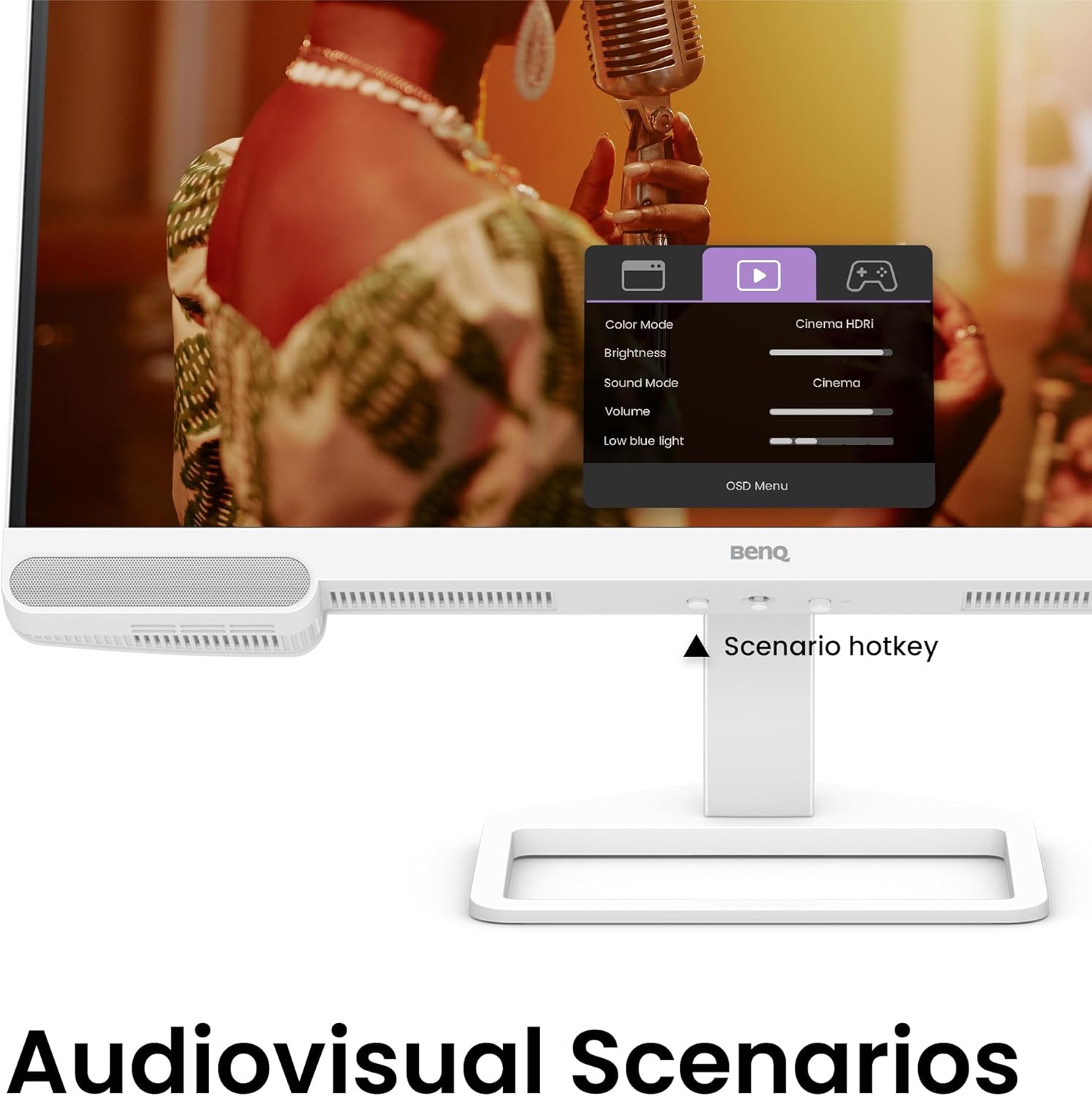
Figure 5.2: OSD menu accessed via Scenario hotkey.
5.4 AI Contrast Technology
The exclusive AI Contrast technology intelligently adjusts the contrast based on the displayed content, optimizing image quality without affecting other areas of the screen.

Figure 5.3: Demonstration of AI Contrast technology.
5.5 بلٽ ان اسپيڪر
The monitor includes a pair of 5W built-in speakers for audio output. Adjust the volume through the OSD menu or your connected device.

Figure 5.4: BenQ EW2790U built-in 5W speakers.
6. سار سنڀال
6.1 مانيٽر جي صفائي
- هميشه صاف ڪرڻ کان اڳ مانيٽر کي انپلگ ڪريو.
- استعمال ڪريو نرم، lint-آزاد ڪپڙو روشنيءَ سان ڊيampپاڻي يا نرم، غير رگڙيندڙ صاف ڪندڙ سان صاف ڪيو وڃي.
- صاف ڪندڙ کي سڌو سنئون اسڪرين تي نه اسپري ڪريو.
- Avoid using alcohol, ammonia, or abrasive cleaners, as they may damage the screen or casing.
6.2 اسٽوريج
Store the monitor in a cool, dry place away from direct sunlight and extreme temperatures. If storing for an extended period, consider using the original packaging for protection.
7. مسئلا حل ڪرڻ
| مسئلو | ممڪن سبب | حل |
|---|---|---|
| اسڪرين تي ڪوبه تصوير نه آهي | پاور ڪيبل ڪٽيل آهي؛ وڊيو ڪيبل ڪٽيل آهي؛ غلط ان پٽ سورس چونڊيو ويو آهي. | Ensure power and video cables are securely connected. Press the Scenario hotkey to select the correct input source. |
| تصوير ڌنڌلي يا بگڙيل آهي. | غلط ريزوليوشن؛ ڍلو وڊيو ڪيبل. | Set the display resolution to 3840x2160. Check video cable connections. |
| .الهائيندڙن مان آواز ڪونهي | آواز تمام گهٽ آهي؛ خاموش آهي؛ ڪمپيوٽر تي غلط آڊيو آئوٽ پٽ چونڊيو ويو آهي. | Adjust volume via OSD menu or computer settings. Ensure monitor is selected as audio output device. |
| AI Contrast not working as expected | Feature disabled; Specific content not optimized. | Check OSD settings to ensure AI Contrast is enabled. Performance may vary with different content. |
8. وضاحتون
| خاصيت | تفصيل |
|---|---|
| اسڪرين جي ماپ | 27 انچ |
| قرارداد | 3840x2160 (4K يو ايڇ ڊي) |
| اسپيڪٽ ريشو | 16:9 |
| Color Coverage | 95% P3 |
| AI Contrast Technology | ها |
| بلٽ ان اسپيڪرز | 2 x 5W |
| رابطي | 1x USB Type-C (65W), 3x HDMI (2.0), USB-C 3.2 downstream, USB-A 3.2 downstream, Headphone Jack |
| Ergonomic ڊيزائن | اوچائي جي ترتيب، جھڪاءُ، گھمڻ، محور |
| شيءِ جو وزن | 21.4 پائونڊ |
| پيداوار جي ماپ (LxWxH) | 17 x 8 x 21 انچ |
9. وارنٽي ۽ سپورٽ
Your BenQ EW2790U monitor is covered by a manufacturer's warranty. Please refer to the warranty card included in your package for specific terms and conditions. For technical support, product registration, or service inquiries, please visit the official BenQ webسائيٽ يا انهن جي ڪسٽمر سروس کاتي سان رابطو ڪريو.
Official BenQ Webسائيٽ: www.benq.com


