1. تعارف
Thank you for choosing the Taiahiro Bk6301 Wireless Mechanical Gaming Keyboard and Mouse Combo. This manual provides detailed instructions for setting up, operating, and maintaining your new peripheral devices. This combo offers versatile connectivity options including 2.4G wireless, Bluetooth 5.0, and wired USB-C, ensuring compatibility with various devices.
2. پيڪيج مواد
مھرباني ڪري تصديق ڪريو ته سڀ شيون توھان جي پيڪيج ۾ موجود آھن:
- Taiahiro Bk6301 Wireless Mechanical Gaming Keyboard
- Taiahiro Wireless Gaming Mouse
- USB 2.4G Receiver (stored in mouse battery compartment)
- USB-C کان USB-A چارجنگ/ڊيٽا ڪيبل
- استعمال ڪندڙ دستي
- 1 AA Battery (for mouse, may be pre-installed or included separately)

Image 2.1: Contents of the Taiahiro Bk6301 Keyboard and Mouse Combo package, including the keyboard, mouse, USB receiver, and USB-C cable.
3. پراڊڪٽ ختمview
3.1 ڪي بورڊ جون خاصيتون
- 98-ڪي لي آئوٽ: Compact design with a full numeric keypad.
- ميڪيڪل بليو سوئچز: Provide tactile and audible feedback for typing.
- آر جي بي بيڪ لائيٽنگ: حسب ضرورت روشني جا اثر.
- Adjustable Keyboard Stand: Allows for ergonomic positioning.
- ملٽي موڊ ڪنيڪٽوٽي: Supports 2.4G wireless, Bluetooth 5.0, and wired USB-C.
- Rechargeable بيٽري: Built-in 2000mAh battery for wireless operation.
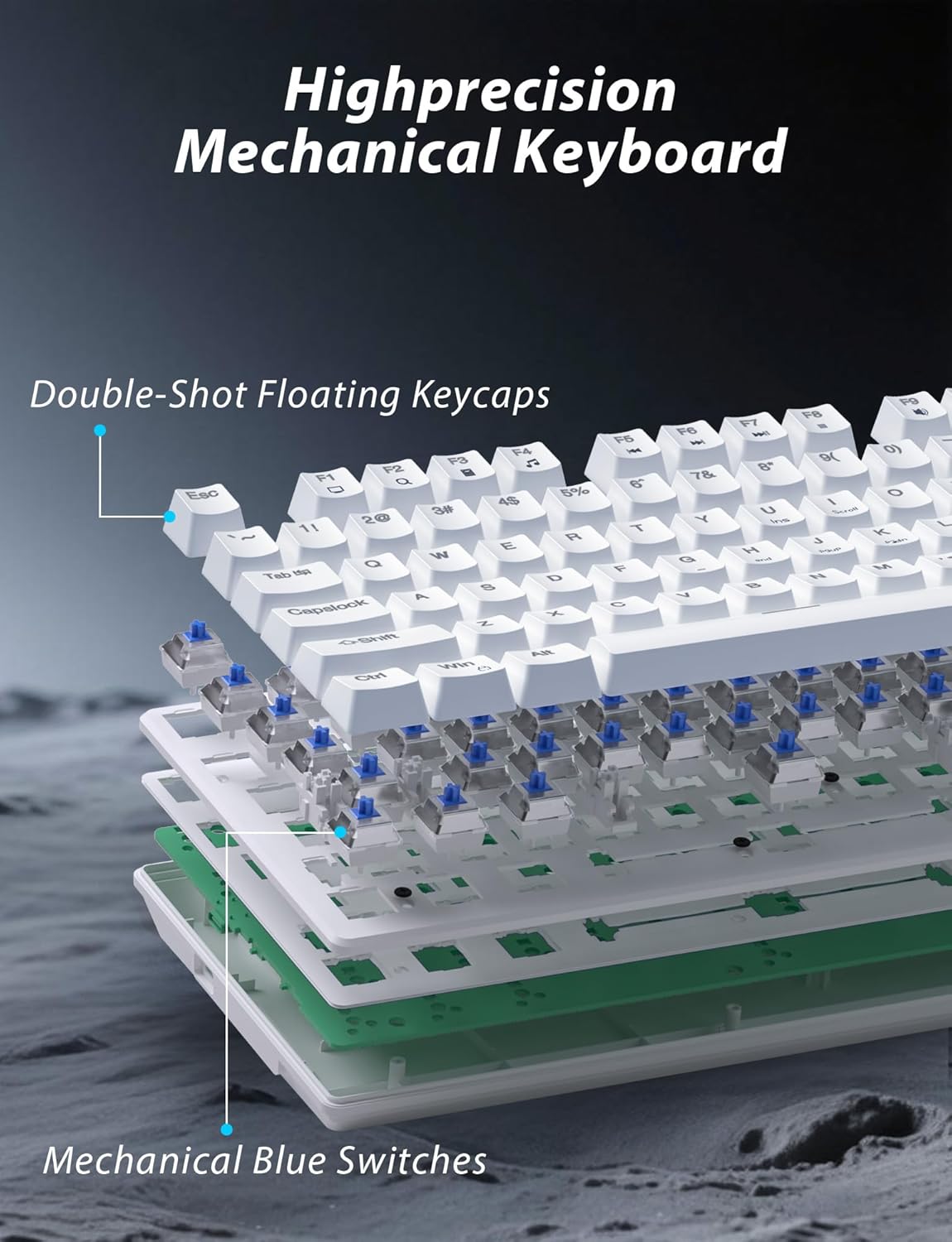
تصوير 3.1: ڦاٽي پيو view illustrating the internal structure of the mechanical keyboard, highlighting the double-shot floating keycaps and mechanical blue switches.

تصوير 3.2: پاسي view of the keyboard demonstrating its ergonomic design and adjustable stand for comfortable use.
3.2 مائوس جون خاصيتون
- Ergonomic ڊيزائن: Shaped for comfortable grip.
- ترتيب ڏيڻ وارو DPI: Four levels (800/1600/2400/3200) for precision control.
- اڳتي/پوئتي بٽڻ: Convenient side buttons for navigation.
- ڊبل موڊ ڪنيڪٽوٽي: Supports 2.4G wireless and Bluetooth.

Image 3.3: The wireless gaming mouse, highlighting its ergonomic shape and four adjustable DPI levels.
4. سيٽ اپ جون هدايتون
4.1 Keyboard Connection
The keyboard supports three connection modes: 2.4G wireless, Bluetooth, and wired USB-C.

Image 4.1: The keyboard displaying its three connectivity options: Bluetooth, 2.4GHz wireless, and USB-C wired connection.
2.4G وائرليس موڊ:
- Locate the USB 2.4G receiver, typically stored in the mouse's battery compartment.
- USB رسيور داخل ڪريو توهان جي ڪمپيوٽر تي موجود USB پورٽ ۾.
- On the keyboard, slide the mode switch (usually located on the top edge or bottom) to the '2.4G' position.
- ڪيبورڊ پاڻمرادو ڳنڍجي ويندو.
بلوٽوٽ موڊ:
- Slide the mode switch on the keyboard to the 'BT' (Bluetooth) position.
- The keyboard's indicator light will flash, indicating it is in pairing mode.
- On your device (computer, laptop, smartphone), open Bluetooth settings and search for new devices.
- Select "Taiahiro Bk6301" or a similar name from the list of available devices to pair.
- هڪ ڀيرو جوڙيو ويندو، اشاري جي روشني مضبوط ٿي ويندي.
وائرڊ USB-C موڊ:
- مهيا ڪيل USB-C ڪيبل کي ڪيبورڊ جي USB-C پورٽ سان ڳنڍيو.
- ٻئي ڇيڙي (USB-A) کي پنهنجي ڪمپيوٽر تي موجود USB پورٽ سان ڳنڍيو.
- The keyboard will function as a wired device and will charge simultaneously.
4.2 Mouse Connection
The mouse supports 2.4G wireless and Bluetooth connectivity.

Image 4.2: The underside of the mouse, illustrating the battery compartment for one AA battery and the storage slot for the tiny USB receiver.
بيٽري لڳائڻ:
- مائوس جي هيٺئين پاسي بيٽري جو ڪمپارٽمينٽ کوليو.
- Insert one AA battery, ensuring correct polarity.
- بيٽري جي ڪمري کي بند ڪريو.
2.4G وائرليس موڊ:
- Ensure the USB 2.4G receiver is plugged into your computer.
- Slide the mode switch on the underside of the mouse to the '2.4G' position.
- مائوس کي خودڪار طريقي سان ڳنڍڻ گهرجي.
بلوٽوٽ موڊ:
- Slide the mode switch on the underside of the mouse to the 'BT' (Bluetooth) position.
- The mouse will enter pairing mode.
- On your device, open Bluetooth settings and search for new devices.
- Select "Taiahiro Mouse" or a similar name from the list to pair.
5. آپريٽنگ هدايتون
5.1 ڪي بورڊ جا ڪم
پٺتي ڪنٽرول:
ڪيبورڊ ۾ ڪسٽمائيزبل آر جي بي بيڪ لائيٽنگ جي خاصيت آهي.
- بيڪ لائيٽ موڊ تبديل ڪريو: دٻايو Fn + گھر to cycle through 18 different lighting effects.
- روشني کي ترتيب ڏيو: دٻايو ايف اين + ↑ (مٿي تير) or Fn + ↓ (هيٺ تير) to adjust between 5 brightness levels.
- رفتار کي ترتيب ڏيو: دٻايو ايف اين + ← (کاٻو تير) or Fn + → (ساڄو تير) to adjust between 5 lighting speed levels.

Image 5.1: Keyboard layout highlighting the function key combinations for controlling backlight modes, brightness, and speed.
ملٽي ميڊيا فنڪشن:
Access multimedia controls by pressing the Fn key in combination with the designated F-keys (F1-F12).
- Fn+F1: ميڊيا پليئر
- Fn+F2: حجم ھيٺ
- Fn+F3: حجم مٿي
- Fn+F4: گونگا
- Fn+F5: روڪ
- Fn+F6: اڳيون ٽريڪ
- Fn+F7: راند/روڪ
- Fn+F8: ايندڙ ٽريڪ
- Fn+F9: اي ميل
- Fn+F10: Web برائوزر
- Fn+F11: منهنجو ڪمپيوٽر
- Fn+F12: حساب ڪندڙ
5.2 مائوس جا ڪم
ڊي پي آءِ ايڊجسٽمينٽ:
کي دٻايو DPI بٽڻ (located behind the scroll wheel) to cycle through the four DPI settings: 800, 1600, 2400, and 3200. Each press changes the sensitivity, allowing you to adjust cursor speed to your preference.
6. سار سنڀال
6.1 صفائي
- ڪي بورڊ: Use a soft, dry cloth to wipe the surface. For deeper cleaning, use compressed air to remove debris from between keys. Avoid using harsh chemicals or abrasive materials.
- مائوس: مائوس جي مٿاڇري کي نرم، ٿوري ڊي سان صاف ڪريو.amp cloth. Ensure no liquid enters the internal components.
6.2 بيٽري جو انتظام
- ڪي بورڊ: The keyboard has a built-in rechargeable battery. Connect the USB-C cable to a power source (e.g., computer USB port, USB wall adapter) to charge. The indicator light will show charging status.
- مائوس: The mouse uses one AA battery. Replace the battery when the mouse performance degrades or it stops responding. Ensure proper polarity when inserting a new battery.
7. مسئلا حل ڪرڻ
If you encounter issues with your Taiahiro keyboard and mouse combo, please refer to the following solutions:
| مسئلو | ممڪن حل |
|---|---|
| Keyboard/Mouse not responding (2.4G) |
|
| Keyboard/Mouse not connecting (Bluetooth) |
|
| Keyboard backlight not working or stuck |
|
| چاٻيون جواب نه ڏئي رهيون آهن يا ٻٽي ٽائيپ ڪري رهيون آهن |
|
8. وضاحتون
| خاصيت | تفصيل |
|---|---|
| ماڊل نمبر | بڪ 6301 |
| رابطي | بلوٽوٿ 5.0، 2.4G وائرليس، USB-C وائرڊ |
| ڪي بورڊ جو قسم | مشيني گيمنگ ڪي بورڊ |
| ڪيڏي ترتيب | 98 Keys (with Numeric Keypad) |
| سوئچ جو قسم | ميڪيڪل بليو سوئچز |
| ڪي بورڊ Backlight | آر جي بي (18 موڊ، 5 چمڪ، 5 اسپيڊ ليول) |
| ڪي بورڊ جي بيٽري | 2000mAh ريچارج لائق |
| مائوس جي ڊي پي آءِ ليولز | 800/1600/2400/3200 |
| ماؤس جي بيٽري | 1 x AA بيٽري |
| مطابقت رکندڙ ڊوائيسز | Personal Computer, Laptop, Smartphone |
| شيءِ جو وزن | 2.72 پائونڊ (ڪامبو) |
| پيڪيج جي ماپ | 15 x 5.59 x 3.11 انچ |
9. وارنٽي ۽ سپورٽ
9.1 وارنٽي ڄاڻ
Taiahiro products are covered by a limited warranty from the date of purchase. Please refer to the warranty card included in your package or visit the official Taiahiro website for detailed warranty terms and conditions. This warranty typically covers manufacturing defects and material faults under normal use.
9.2 ڪسٽمر سپورٽ
For technical assistance, troubleshooting, or any questions regarding your Taiahiro Bk6301 combo, please contact our customer support team. You can find contact information on the Taiahiro official website or through your purchase platform. When contacting support, please have your product model number (Bk6301) and purchase details ready.


