1. پراڊڪٽ ختمview
The Imou Cruiser Dual 2 is an advanced 10-megapixel Pan-Tilt-Zoom (PTZ) IP/Wi-Fi security camera designed for comprehensive outdoor surveillance. It features a dual-lens system, offering both wide-angle and detailed views, along with full-color night vision capabilities and integrated IR and red/blue warning lights for enhanced security.
This manual provides detailed instructions for the installation, operation, and maintenance of your Imou Cruiser Dual 2 camera.
اهم خاصيتون:
- ڊبل لينس سسٽم: Combines two cameras for a broader overview and detailed zoom.
- 10 Megapixel Resolution: صاف ۽ تيز وڊيو فو پهچائي ٿوtage.
- پين-ٽلٽ-زوم (PTZ): Allows remote adjustment of camera angle (355° pan, 90° tilt).
- مڪمل رنگين رات جو نظارو: Provides color images even in low-light conditions.
- آئي آر روشني: Standard infrared night vision for discreet monitoring.
- Red & Blue Warning Lights: Active deterrence feature to ward off intruders.
- وائي فائي ڪنيڪشن: آسان وائرليس سيٽ اپ ۽ رسائي.
- ٻه طرفي آڊيو: رابطي لاءِ بلٽ ان مائڪروفون ۽ اسپيڪر.

شڪل 1.1: سامهون view of the Imou Cruiser Dual 2 camera, showcasing its dual-lens design and integrated lights.
2. سيٽ اپ ۽ تنصيب
2.1 دٻي ۾ ڇا آهي
- Imou Cruiser Dual 2 Camera
- پاور اڊاپٽر
- چڙهڻ وارو نمونو
- ماؤنٽنگ اسڪرو ۽ وال پلگ
- پنروڪ ڪنيڪٽر (ايٿرنيٽ ڪيبل لاءِ، جيڪڏهن لاڳو هجي)
- تڪڙو شروع ھدايت
2.2 جسماني تنصيب
Before mounting, ensure the camera is within range of your Wi-Fi network and a power outlet. The camera can be mounted on a wall or under an eave.
- جڳھ چونڊيو: هڪ مناسب ٻاهرين جڳهه چونڊيو جيڪا گهربل فراهم ڪري viewing angle and is protected from direct heavy rain.
- لڳائڻ لاءِ تيار ڪريو: Use the provided mounting template to mark the screw positions on the wall or ceiling.
- سوراخ سوراخ: Drill holes at the marked positions. Insert wall plugs if mounting on masonry.
- ڪئميرا کي محفوظ ڪريو: Attach the camera's mounting bracket to the surface using the screws.
- پاور Connectنيو: پاور اڊاپٽر کي ڪئميرا سان ڳنڍيو ۽ ان کي پاور آئوٽليٽ ۾ لڳايو.
- زاويه ترتيب ڏيو: Loosen the adjustment screws on the bracket to set the initial camera angle, then tighten them.

شڪل 2.1: Imou Cruiser Dual 2 camera mounted on an exterior brick wall, demonstrating a typical installation scenario.

شڪل 2.2: Imou Cruiser Dual 2 camera installed under an eave, providing overhead surveillance.
2.3 ايپ ڊائون لوڊ ۽ ڊوائيس جوڙڻ
- Download Imou Life App: ڳولھيو "Imou Life" in your mobile app store (App Store for iOS, Google Play for Android) and download the application.
- اڪائونٽ ٺاهيو: Open the Imou Life app and follow the on-screen instructions to create a new account or log in if you already have one.
- ڊوائيس شامل ڪريو: نئون ڊوائيس شامل ڪرڻ لاءِ ايپ جي مٿي ساڄي ڪنڊ ۾ "+" آئڪن تي ٽيپ ڪريو.
- QR ڪوڊ اسڪين ڪريو: ڪئميرا يا ان جي پيڪنگنگ تي موجود QR ڪوڊ اسڪين ڪريو.
- وائي فائي سان ڳنڍيو: Follow the app's instructions to connect the camera to your 2.4GHz Wi-Fi network. Ensure your phone is connected to the same Wi-Fi network during setup.
- مڪمل سيٽ اپ: هڪ دفعو ڳنڍيل، پنهنجي ڪئميرا کي نالو ڏيو ۽ سيٽ اپ جو عمل مڪمل ڪريو.
3. آپريشن
3.1 زنده View ۽ PTZ ڪنٽرول
From the Imou Life app, select your camera to access the live view. You can use the on-screen controls to:
- پان: Swipe left or right on the live view to rotate the camera horizontally (up to 355°).
- جھلڻ: Swipe up or down to adjust the camera vertically (up to 90°).
- وڏو ڪريو: Pinch in or out on the screen to digitally zoom in or out of the image.

شڪل 3.1: Diagram illustrating the 355° pan and 90° tilt capabilities of the Imou Cruiser Dual 2, providing extensive coverage.
3.2 رڪارڊنگ ۽ پلے بیک
The camera supports continuous recording or event-triggered recording to a local Micro SD card (not included) or to the Imou Cloud storage (subscription may be required).
- رسائي رڪارڊنگ: In the Imou Life app, navigate to the camera's settings or playback section to view رڪارڊ ٿيل footage.
- ڊائون لوڊ ڪريو فوtage: Select desired clips and download them to your mobile device.
3.3 نائيٽ ويزن موڊس
The Imou Cruiser Dual 2 offers multiple night vision options:
- Infrared Mode (IR): Provides black and white video using infrared LEDs for discreet monitoring in complete darkness.
- مڪمل رنگ موڊ: Utilizes built-in spotlights to illuminate the area, providing full-color video at night.
- اسمارڊ موڊ: The camera operates in IR mode and automatically switches to full-color mode when motion is detected, activating the spotlights.
3.4 Active Deterrence
The camera features integrated red and blue warning lights and a siren to deter potential intruders.
- چالو ڪرڻ: These features can be configured in the Imou Life app to activate automatically upon motion detection or manually triggered.
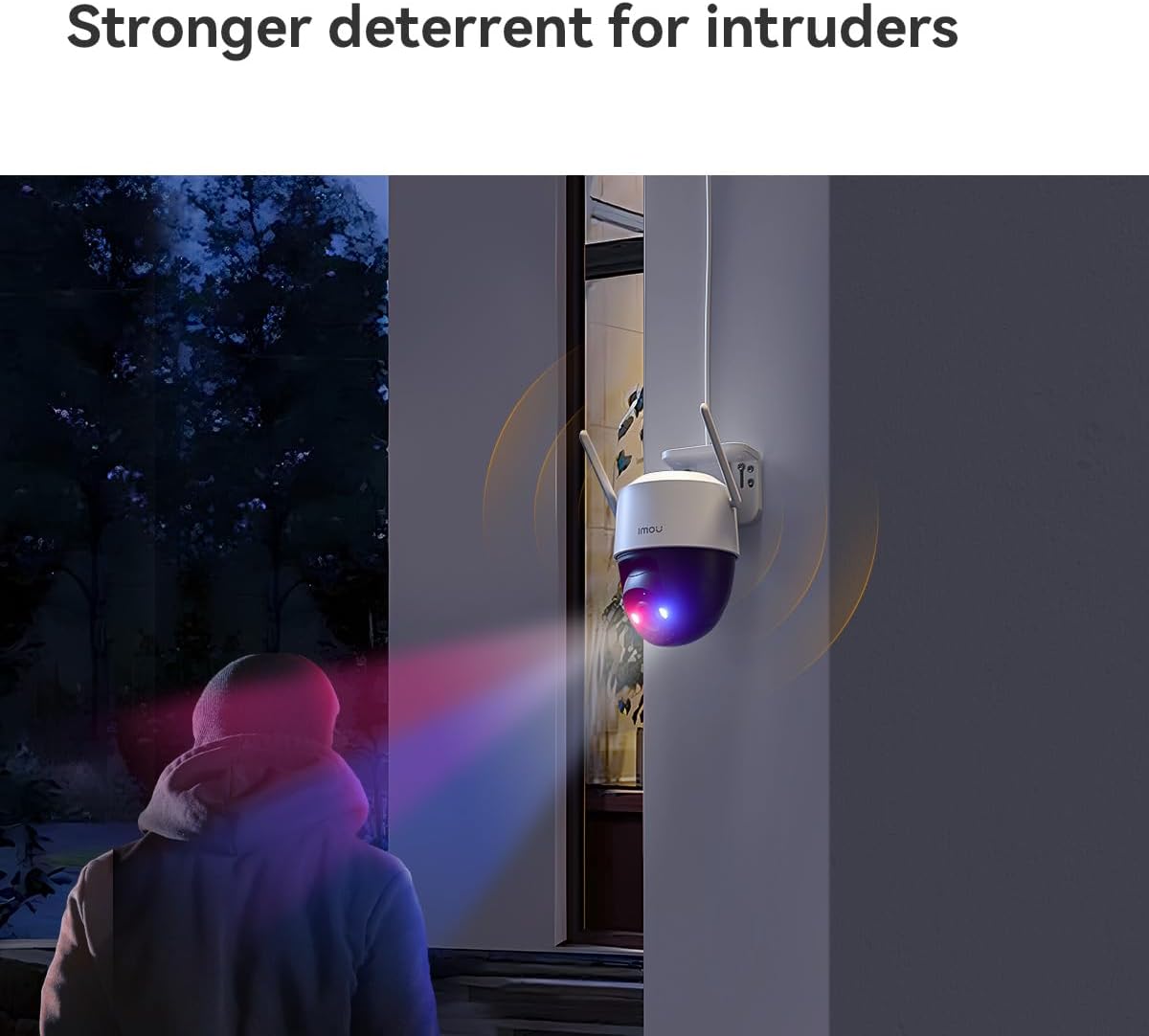
شڪل 3.2: The Imou Cruiser Dual 2 camera actively deterring an intruder with its flashing red and blue warning lights.
4. سار سنڀال
4.1 ڪئميرا صاف ڪرڻ
- ڪئميرا لينس ۽ هائوسنگ کي باقاعدي طور تي نرم، ڊي سان صاف ڪريوamp مٽي ۽ مٽي کي هٽائڻ لاء ڪپڙو.
- Avoid using harsh chemicals or abrasive cleaners, as these can damage the lens or finish.
4.2 فرم ویئر تازه ڪاريون
Ensure your camera's firmware is up to date for optimal performance and security. The Imou Life app will typically notify you of available updates. Follow the in-app instructions to perform firmware upgrades.
4.3 اسٽوريج مينيجمينٽ
If using a Micro SD card for local storage, periodically check its status in the app. Old footage may be overwritten automatically when the card is full. Consider backing up important footagاي باقاعدي طور تي.
5. مسئلا حل ڪرڻ
عام مسئلا ۽ حل:
| مسئلو | ممڪن حل |
|---|---|
| ڪئميرا پاور نه آهي |
|
| وائي فائي سان ڳنڍڻ کان قاصر |
|
| خراب تصوير جو معيار |
|
| حرڪت جي چڪاس ڪم نه ڪندي |
|
6. وضاحتون
| خاصيت | تفصيل |
|---|---|
| ماڊل | ڪروزر ڊوئل 2 |
| قرارداد | 10 Megapixel (5+5MP Dual Camera) |
| لينس | 3.6 ملي ميٽر |
| پين / ٽائل رينج | Pan 0~355°, Tilt 0~90° |
| رات جو نظارو | IR, Full-color, Smart Mode |
| رابطي | وائي فائي (2.4GHz) |
| اسٽوريج جا اختيار | Micro SD Card, Cloud Storage |
| طول و عرض (L x W x H) | 20.2 x 12.5 x 16 سينٽي |
| وزن | 680.39 گرام (تقريبن 1.5 پائونڊ) |
| بجلي جي فراهمي | ڊي سي 12 وي (اڊاپٽر شامل آهي) |
7. وارنٽي ۽ سپورٽ
For warranty information, technical support, or further assistance, please refer to the official Imou website or contact Imou customer service directly. Details can typically be found on the product packaging or the Imou Life app's support section.
آن لائين وسيلا: www.imoulife.com


