تعارف
Thank you for choosing Raycon Bone Conduction Headphones. This manual provides essential information for the proper use, setup, and maintenance of your device. Please read it thoroughly before use.
These headphones utilize bone conduction technology, allowing you to hear audio while keeping your ears open to your surroundings. They are designed for active lifestyles, featuring a lightweight, water-resistant build and a secure fit.
پيڪيج مواد
- Raycon Bone Conduction Headphones
- مقناطيسي چارجنگ ڪيبل
- استعمال ڪندڙ جو دستياب (ھي دستاويز)
پيداوار ختمview
Familiarize yourself with the components of your Raycon Bone Conduction Headphones.

شڪل 1: سامهون view of the Raycon Bone Conduction Headphones. The image shows the purple headphones with the Raycon logo visible on the left side, highlighting the open-ear design and the flexible band connecting the two ear pieces.

شڪل 2: پاسي view of the Raycon Bone Conduction Headphones. This image displays the control buttons located on the right ear piece, along with the charging port area. The overall lightweight and ergonomic design is visible.
اهم خاصيتون:
- کليل ڪن ڊيزائن: Allows situational awareness.
- هڏن جي وهڪري ٽيڪنالاجي: Delivers audio through cheekbones.
- IP68 پاڻي جي مزاحمت: Protection against sweat, rain, and spills.
- گھٽ وزن جي تعمير: Comfortable for extended wear.
- Adjustable Conduction Buds: For personalized sound and awareness balance.
- بلوٽوٽ 5.3: Stable wireless connectivity.
- 13-ڪلاڪ راند جو وقت: Extended battery life.
سيٽ اپ ڪريو
1. هيڊفون چارج ڪرڻ
پهرين استعمال کان اڳ، پنهنجا هيڊفون مڪمل طور تي چارج ڪريو.
- Connect the magnetic charging cable to the charging port on your headphones.
- ڪيبل جي ٻئي ڇيڙي کي USB پاور اڊاپٽر (شامل نه آهي) يا ڪمپيوٽر جي USB پورٽ سان ڳنڍيو.
- ايل اي ڊي انڊيڪيٽر چارجنگ اسٽيٽس ڏيکاريندو (مثال طور، چارجنگ لاءِ ڳاڙهو، مڪمل چارج ٿيل لاءِ نيرو).
- مڪمل چارج ٿيڻ ۾ عام طور تي 1.5-2 ڪلاڪ لڳن ٿا.
2. پاور آن/آف
- پاور آن ڪرڻ: Press and hold the Power button for 3 seconds until the LED indicator flashes blue and you hear a power-on prompt.
- پاور آف ڪرڻ: Press and hold the Power button for 5 seconds until the LED indicator flashes red and you hear a power-off prompt.
3. بلوٽوٽ جوئر
پنھنجا ھيڊفون پنھنجي بلوٽوٿ-فعال ڊوائيس (اسمارٽ فون، ٽيبليٽ، ليپ ٽاپ) سان جوڙيو.
- پڪ ڪريو ته هيڊفون بند ٿيل آهن.
- پاور بٽڻ کي 5-7 سيڪنڊن لاءِ دٻايو ۽ رکو جيستائين LED اشارو متبادل طور تي ڳاڙهي ۽ نيرو چمڪي، جيڪو جوڙڻ واري موڊ کي ظاهر ڪري ٿو.
- پنهنجي ڊوائيس تي، بلوٽوٿ سيٽنگز ڏانهن وڃو ۽ بلوٽوٿ کي فعال ڪريو.
- ڳولھيو available devices and select "Raycon Bone Conduction" (or similar name).
- Once connected, the LED indicator will flash blue slowly, and you will hear a connection confirmation.
- جيڪڏهن رينج ۾ هجي ته، پاور آن ٿيڻ تي هيڊفونز پاڻمرادو آخري جوڙيل ڊوائيس سان ٻيهر ڳنڍجي ويندا.
آپريٽنگ هدايتون
هيڊفون پائڻ
Place the headphones with the transducers resting on your cheekbones, just in front of your ears. The band should wrap around the back of your head.
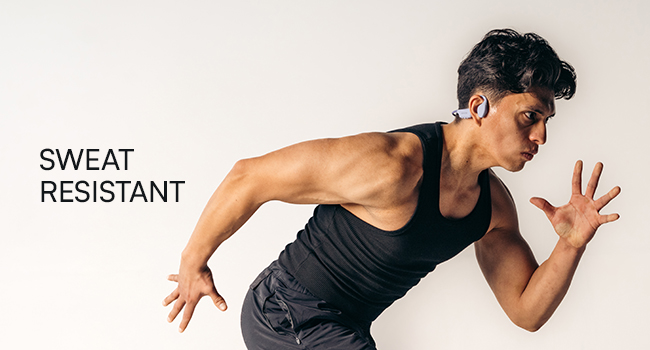
Figure 3: Illustration demonstrating the correct placement of the bone conduction headphones on the head, with the transducers positioned on the cheekbones near the ears. This image emphasizes the open-ear design.
The adjustable conduction buds allow you to slide them closer to your ear for louder sound or pull them back for increased environmental awareness. Experiment to find your preferred balance.
بٽڻ افعال
| بٽڻ / عمل | فنڪشن |
|---|---|
| پاور بٽڻ (3 سيڪنڊن کي دٻايو ۽ رکو) | پاور آن |
| پاور بٽڻ (5 سيڪنڊن کي دٻايو ۽ رکو) | Power Off / Enter Pairing Mode |
| ملٽي فنڪشن بٽڻ (سنگل پريس) | موسيقي هلايو/روڪيو، ڪال جو جواب ڏيو/ختم ڪريو |
| ملٽي فنڪشن بٽڻ (ڊبل پريس) | ايندڙ ٽريڪ |
| ملٽي فنڪشن بٽڻ (ٽرپل پريس) | اڳيون ٽريڪ |
| Volume Up (+) Button (Single Press) | حجم وڌايو |
| Volume Down (-) Button (Single Press) | حجم گھٽائڻ |
| Volume Up (+) Button (Press & Hold) | وائيس اسسٽنٽ کي فعال ڪريو |
ڪالون ٺاهڻ ۽ وصول ڪرڻ
- جواب ڏيو ڪال: هڪ ڀيرو ملٽي فنڪشن بٽڻ کي دٻايو.
- ڪال ختم ڪريو: Press the Multi-function Button once during a call.
- ڪال رد ڪريو: 2 سيڪنڊن لاءِ ملٽي فنڪشن بٽڻ کي د andايو ۽ رکو.
- آواز جو اسسٽنٽ: Press and hold the Volume Up (+) button to activate your device's voice assistant (Siri, Google Assistant, etc.).
سار سنڀال ۽ سنڀال
- صفائي: هيڊفون کي نرم سان صاف ڪريو، ڊيamp ڪپڙو. استعمال نه ڪريو سخت ڪيميائي يا گھڻائي صاف ڪندڙ.
- پاڻي جي مزاحمت (IP68): These headphones are IP68 rated, meaning they are protected against dust and can withstand immersion in water up to 1.5 meters for up to 30 minutes. However, they are not designed for swimming or prolonged underwater use. Ensure the charging port is dry before charging.
- اسٽوريج: هيڊفونز کي سڌي سج جي روشني ۽ انتهائي گرمي پد کان پري ٿڌي، سڪل جاءِ تي رکو.
- بيٽري جي سنڀال: بيٽري جي زندگي کي وڌائڻ لاءِ، هيڊفونز کي بار بار مڪمل طور تي چارج ڪرڻ کان پاسو ڪريو. انهن کي باقاعدي طور تي چارج ڪريو، جيتوڻيڪ ڊگهي عرصي تائين استعمال ۾ نه هجي.
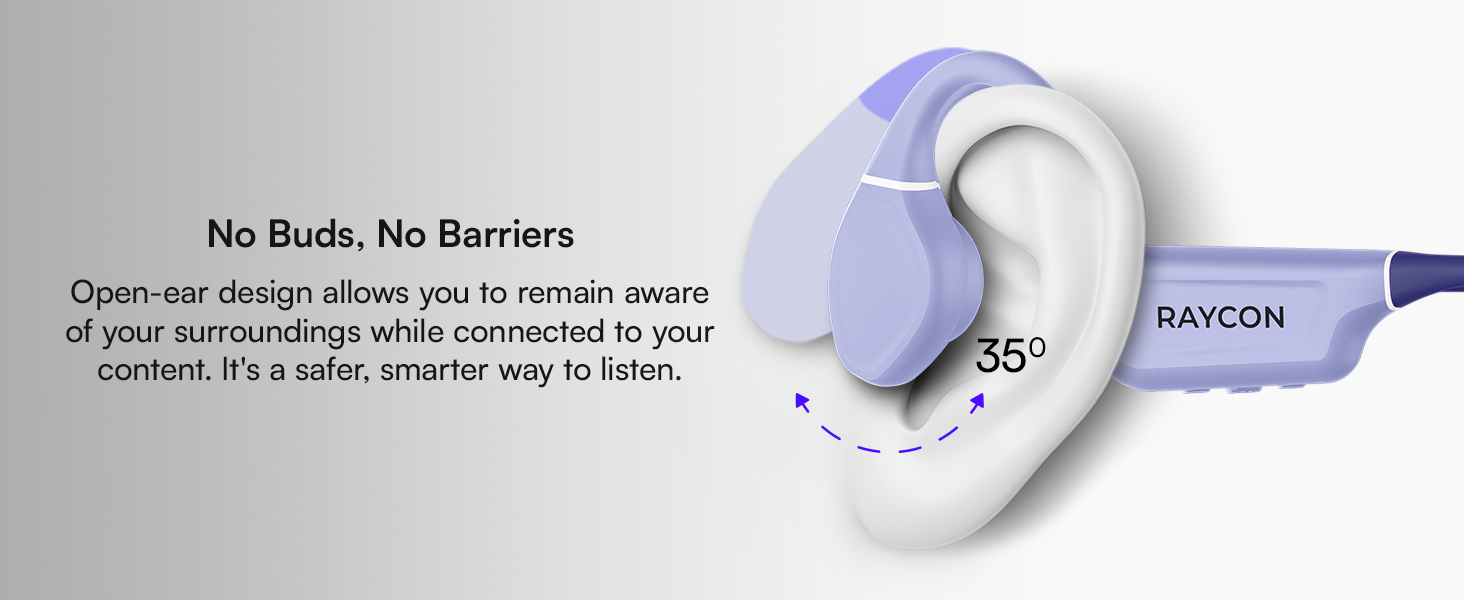
Figure 4: Image illustrating the water-resistant feature of the Raycon Bone Conduction Headphones, with water droplets splashing around them. This visually confirms their suitability for use in various weather conditions or during workouts.
مشڪلاتون
| مسئلو | ممڪن حل |
|---|---|
| هيڊفون آن نه ٿا ٿين. | Ensure the headphones are charged. Connect to the charging cable and check the LED indicator. |
| ڊوائيس سان جوڙو نه ٿو ٺاهي سگهجي. |
|
| ڪابه آواز يا گهٽ آواز ناهي. |
|
| خراب ڪال معيار. |
|
وضاحتون
| خاصيت | تفصيل |
|---|---|
| ماڊل نالو | بون ڪنڊڪشن هيڊفون |
| ماڊل نمبر | RBB842-24E |
| رابطي ٽيڪنالاجي | وائرليس (بلوٽوٿ 5.3) |
| بلوٽوٿ رينج | 33 فوٽ (10 ميٽر) تائين |
| آڊيو ڊرائيور جو قسم | هڏن جي ڪنڊڪشن ڊرائيور |
| آڊيو ڊرائيور جي ماپ | 16 ملي ميٽر |
| تعدد جي حد | 20 هرٽز - 20 ڪلو هرٽز |
| حساسيت | 91 ڊي بي |
| رڪاوٽ | 8 اوم |
| بيٽري جي زندگي | 13 ڪلاڪ تائين |
| پاڻي جي مزاحمت جي سطح | IP68 |
| مواد | Acrylonitrile Butadiene Styrene (ABS)، سلڪون |
| شيءِ جو وزن | 5.6 اونس |
| شامل اجزاء | مقناطيسي چارجنگ ڪيبل |
| يو پي سي | 811162032804 |
وارنٽي ۽ سپورٽ
وارنٽي جي معلومات ۽ ڪسٽمر سپورٽ لاءِ، مھرباني ڪري سرڪاري Raycon جو حوالو ڏيو webسائيٽ تي وڃو يا سڌو سنئون انهن جي ڪسٽمر سروس سان رابطو ڪريو. وارنٽي دعوائن لاءِ خريداري جو ثبوت رکو.
آن لائن سپورٽ: گهمڻ Raycon Global Support اڪثر پڇيا ويندڙ سوالن، مسئلن جي حل جي رهنمائي، ۽ رابطي جي اختيارن لاءِ.
حفاظت جي ڄاڻ
- مصنوعات کي جدا نه ڪريو، مرمت ڪريو، يا تبديل ڪريو.
- Do not expose the product to fire or extreme heat.
- ٻڌڻ جي نقصان کي روڪڻ لاء وڌايل عرصي تائين وڏي مقدار ۾ ٻڌڻ کان پاسو ڪريو.
- Use caution when using headphones in situations requiring awareness of your surroundings.
- ٻارن جي پهچ کان پري رکو.


