Masajoy Wireless Headset User Manual
ماڊل: اسپارڪ 06
تعارف
The Masajoy Wireless Headset with Mic for Work (Model: Spark 06) is designed to provide clear and reliable audio communication for various professional and personal uses. Featuring multiple connection modes, AI noise cancellation, and a comfortable design, this headset is ideal for business video conferencing, online courses, and call center environments.

Figure 1: Masajoy Wireless Headset and included accessories.
دٻي ۾ ڇا آهي
مھرباني ڪري تصديق ڪريو ته سڀئي جزا پيڪيج ۾ موجود آھن:
- Wireless Headset with Mic for Work
- USB A / C Dongle
- USB C to 3.5MM Cable
- ٽائپ سي چارجنگ ڪيبل
- استعمال ڪندڙ دستي
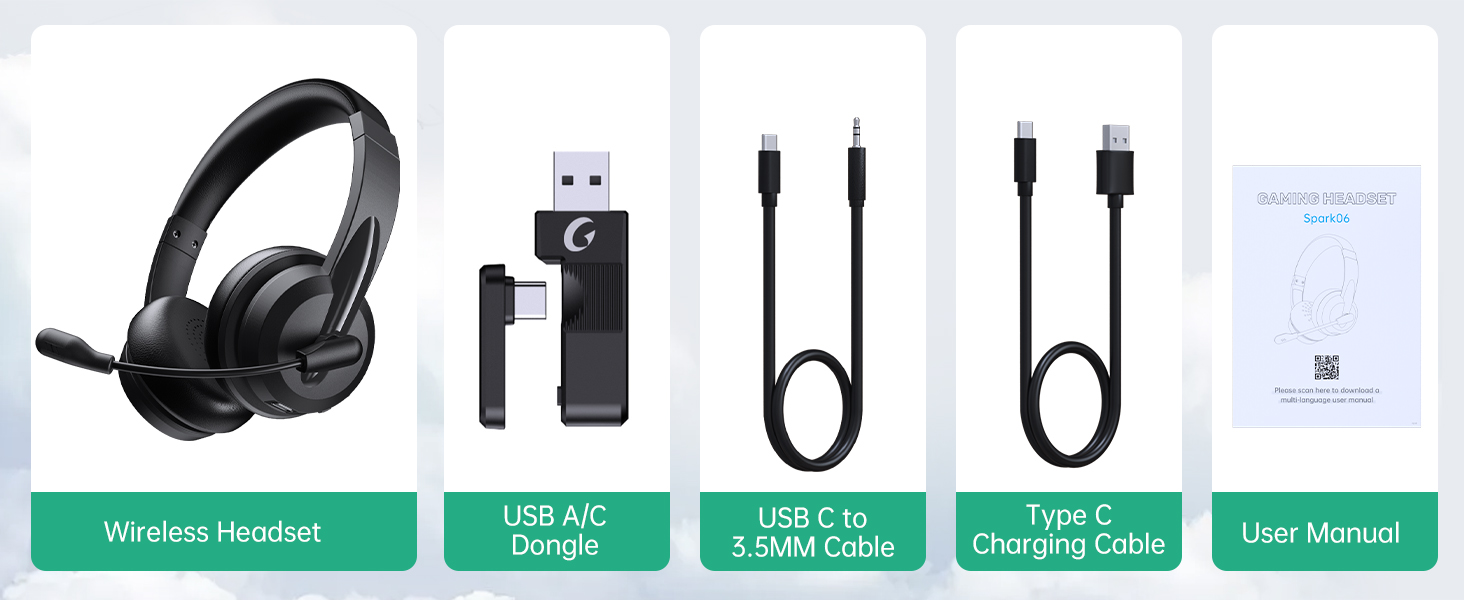
شڪل 2: پيڪيج جو مواد.
سيٽ اپ ڪريو
هيڊ سيٽ کي چارج ڪرڻ
Before first use, fully charge the headset. Connect the Type C Charging Cable to the headset's charging port and the other end to a USB power source (e.g., computer USB port, wall adapter). The charging indicator light will show the charging status.
- مڪمل چارج وقت: تقريبن 2.5 ڪلاڪ
- ڳالهائڻ جو وقت: 30 ڪلاڪ تائين
- ميوزڪ پلے بیک وقت: 25 ڪلاڪ تائين

Figure 3: Long Battery Life for Extended Use.
ڪنيڪشن موڊس
The Masajoy headset supports three connection modes:
-
Bluetooth V5.3 Connection:
For wireless connection to Bluetooth-enabled devices (e.g., smartphones, laptops). Ensure the headset is in pairing mode (refer to operating instructions for details). ڳولھيو "Spark 06" in your device's Bluetooth settings and connect.
-
2.4G Wireless (USB A/C Dongle):
For wireless connection to computers without Bluetooth or for a dedicated connection. Plug the USB A or USB C dongle into an available USB port on your computer. The headset will automatically connect to the dongle.
-
Wired 3.5mm Audio Cable:
For a wired connection to devices with a 3.5mm audio jack. Connect one end of the USB C to 3.5MM Cable to the headset's USB-C port and the other end to your device's 3.5mm audio jack. This mode is useful when battery is low or for devices that do not support wireless connections.

Figure 4: Dual Connection Options (Bluetooth & 2.4G Wireless).
NOTE: This headset does not support dual device connection simultaneously.
آپريٽنگ هدايتون
پاور آن / آف
- To Power On: Press and hold the Power button until you hear a voice prompt.
- To Power Off: Press and hold the Power button until you hear a voice prompt.
حجم ڪنٽرول
Use the volume control buttons located on the headset to adjust the listening volume.
AI Noise Cancelling Microphone
The headset features advanced AI noise cancellation to reduce background noise during calls. This feature enhances clarity for the listener.
NOTE: This AI Noise Cancelling feature is only available when connected via Bluetooth.

Figure 5: AI Noise Cancelling in action.
مائڪروفون ميوٽ فنڪشن
To mute the microphone, simply rotate the microphone boom to the upright position. A voice prompt will confirm "MIC mute". To unmute, rotate the microphone boom back down.

Figure 6: Microphone Mute Control by Rotation.
آرام ۽ ڊيزائن
The headset is designed for all-day wear with protein memory foam ear cups that are soft and breathable, preventing overheating. The adjustable and expandable headband ensures a comfortable fit for most head shapes.

Figure 7: Comfortable and Breathable Design.
وضاحتون
| خاصيت | تفصيل |
|---|---|
| ماڊل نالو | اسپارڪ 06 |
| رابطي ٽيڪنالاجي | Wireless (Bluetooth V5.3, 2.4G), Wired (3.5mm) |
| شور ڪنٽرول | AI Noise Cancellation (Bluetooth mode only), Passive Noise Cancellation |
| بيٽري جي زندگي (ڳالهائڻ جو وقت) | 30 ڪلاڪ تائين |
| بيٽري جي زندگي (ميوزڪ پلے بیک) | 25 ڪلاڪ تائين |
| چارج ڪرڻ وقت | لڳ ڀڳ. 2.5 ڪلاڪ |
| وائرلیس رينج | Up to 36 feet (11 meters) for Bluetooth |
| آڊيو ڊرائيور جي ماپ | 40 ملي ميٽر |
| مائڪروفون حساسيت | 43 ڊي بي |
| هيڊ فون جيڪ | USB-C (for charging/wired audio) |
| مطابقت رکندڙ ڊوائيسز | PC, Mac, Laptop, Chromebook, tablet, smartphones, MP3 players, PS5, PS4, Xbox one, gaming systems with an aux port |
| مواد | Faux Leather, Polycarbonate (PC), Metal, Acrylonitrile Butadiene Styrene (ABS) |
| شيءِ جو وزن | 10.2 اونس |
| رنگ | ڪارو |
سار سنڀال
- صفائي: هيڊ سيٽ صاف ڪرڻ لاءِ نرم، سڪل ڪپڙو استعمال ڪريو. رگڙيندڙ ڪلينر يا سالوينٽس استعمال نه ڪريو.
- اسٽوريج: هيڊ سيٽ کي سڌي سج جي روشني ۽ انتهائي گرمي پد کان پري ٿڌي، سڪل جاءِ تي رکو.
- بيٽري جي سنڀال: بيٽري جي زندگي کي وڌائڻ لاءِ، هيڊ سيٽ کي بار بار مڪمل طور تي چارج ڪرڻ کان پاسو ڪريو. ان کي باقاعدي طور تي چارج ڪريو، جيتوڻيڪ ڊگهي عرصي تائين استعمال ۾ نه هجي.
- سنڀالڻ: Avoid dropping the headset or subjecting it to strong impacts. Do not twist or bend the microphone boom excessively beyond its intended rotation.
مشڪلاتون
| مسئلو | ممڪن سبب | حل |
|---|---|---|
| هيڊ سيٽ آن نٿو ٿئي. | گھٽ بيٽري. | Charge the headset fully using the provided Type C charging cable. |
| بلوٽوٿ ذريعي ڳنڍي نه ٿو سگهجي. | Headset not in pairing mode; device Bluetooth off; out of range. | Ensure headset is in pairing mode. Turn Bluetooth on your device. Move headset closer to the device (within 36 feet). |
| هيڊ سيٽ مان ڪوبه آواز ناهي. | Volume too low; incorrect audio output selected on device; headset not connected. | Increase headset volume. Check device's audio output settings. Re-establish connection. |
| مائڪروفون ڪم نه ڪري رهيو آهي. | Microphone muted; incorrect input device selected; AI Noise Cancellation issue. | Ensure microphone boom is not in the upright (muted) position. Check device's microphone input settings. Note that AI Noise Cancellation is only active in Bluetooth mode. |
| Poor sound quality / static. | مداخلت؛ حد کان ٻاهر؛ گهٽ بيٽري. | Move away from other wireless devices. Move closer to the connected device. Charge the headset. |
وارنٽي ۽ سپورٽ
Masajoy products are designed for reliability and performance. For warranty information and technical support, please refer to the official Masajoy website or contact customer service using the details provided in the original product packaging or purchase receipt.
توھان پڻ دورو ڪري سگھو ٿا Masajoy Store on Amazon وڌيڪ پراڊڪٽ جي معلومات ۽ سپورٽ وسيلن لاءِ.


