1. تعارف
Thank you for choosing the DAREU EK98pro Wireless Mechanical Keyboard. This manual provides essential information for setting up, operating, and maintaining your new keyboard. Please read it thoroughly to ensure optimal performance and longevity of your device.

Image 1.1: DAREU EK98pro Wireless Mechanical Keyboard (Mystic Violet)
2. پيڪيج مواد
پڪ ڪريو ته سڀئي شيون پيڪيج ۾ موجود آهن:
- Keyboard Body (1)
- Connection Cable (USB-C to USB-A) (1)
- 2.4GHz وائرليس رسيور (1)
- Keycap/Switch Puller (1)
- استعمال ڪندڙ مينوئل (1)

تصوير 2.1: پيڪيج جو مواد
3. مصنوعات جون خاصيتون
3.1 Gasket Mount Structure
The EK98pro features a gasket-mounted design with a 6-layer padding system, including an extended integrated silicone pad and PCB single key slotting. This construction optimizes resilience and stability, providing a softer, more elastic feel and effectively reducing cavity noise for a solid typing experience.

Image 3.1: Gasket Structure Exploded View
3.2 HIFI Dream Linear Switches
Equipped with creamy pre-lubed HIFI Dream linear switches, offering a lighter and cleaner sound profile similar to linear red switches. The keyboard also features pre-lubed steel stabilizers for enhanced consistency on larger keys.
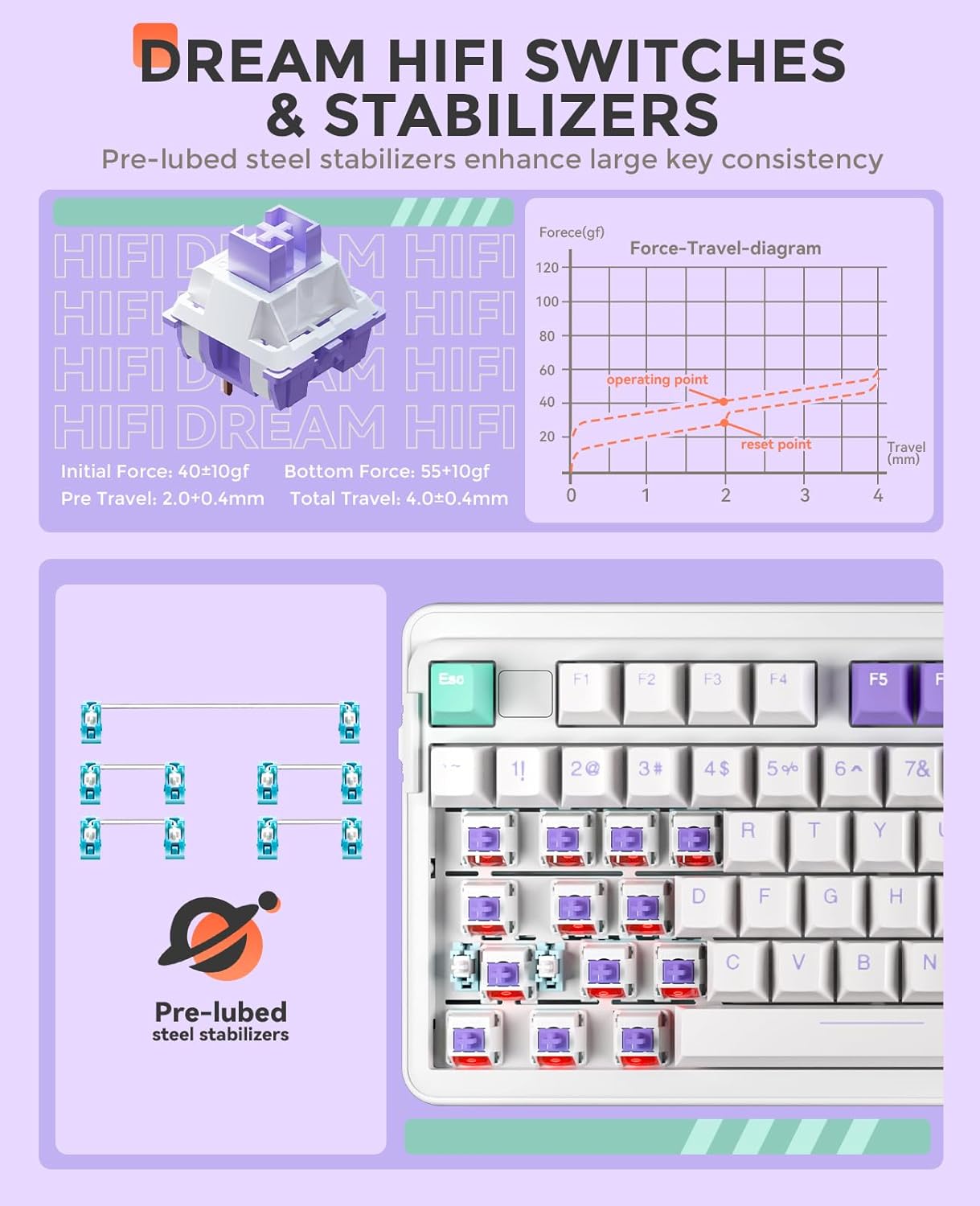
Image 3.2: HIFI Dream Switches and Stabilizers
3.3 Hot-Swappable PCB
The keyboard features a hot-swappable PCB, supporting both 3-pin and 5-pin mechanical switches. This allows for easy customization and replacement of switches without soldering.

Image 3.3: Hot-Swappable PCB Socket
3.4 پي بي ٽي ڪي ڪيپس
All keycaps are made of durable, non-greasy PBT material, ensuring longevity and resistance to wear without fading.
3.5 آر بي جي بائيٽ لائٽنگ
The keyboard features south-facing RGB LEDs, providing optimal visibility of up to 16 RGB backlit modes and 16.8 million colors. Brightness and speed are adjustable. All RGB macros and keys can be customized via the driver software.

Image 3.4: 16.8 Million RGB Lighting
3.6 4000mAh بيٽري
A built-in 4000mAh high-capacity battery provides extended usage. Expect approximately 45 days of playtime with backlighting off, and about 7 days with backlighting on (based on continuous 4 hours of playtime/day).

Image 3.5: High-Capacity Battery
3.7 98% Layout
The compact 98% layout (97 keys) saves desktop space while retaining essential arrow keys and a number pad, suitable for both gaming and work.
3.8 ترتيب ڏيڻ وارا پير
The keyboard includes 2-stage adjustable feet, allowing you to set the typing angle for ergonomic comfort.

Image 3.6: 2-Stagاي ترتيب ڏيڻ وارا پير
4. سيٽ اپ ۽ ڪنيڪشن
The DAREU EK98pro supports three connection modes: Wired (USB-C), 2.4GHz Wireless, and Bluetooth 5.0.

Image 4.1: Tri-Mode Connection Overview
4.1 موڊ سوئچ
A physical switch located on the left side of the keyboard allows you to select the desired connection mode: Wireless (2.4G), Wired (A), or Bluetooth (BT).
4.2 وائرڊ ڪنيڪشن
- Set the mode switch to 'A' (Wired).
- Connect the provided USB-C cable to the keyboard's USB-C port and the other end to your computer's USB-A port.
- ڪيبورڊ پاڻمرادو سڃاڻي ويندو ۽ استعمال لاءِ تيار ٿي ويندو.
4.3 2.4GHz وائرليس ڪنيڪشن
- Set the mode switch to 'Wireless' (2.4G).
- Insert the 2.4GHz wireless receiver into an available USB-A port on your computer.
- The keyboard will automatically connect to the receiver.
4.4 بلوٽوٿ ڪنيڪشن
The keyboard can connect to up to three different Bluetooth devices simultaneously.
- Set the mode switch to 'BT' (Bluetooth).
- On your device (computer, tablet, smartphone), turn on Bluetooth and search for 'EK98 Pro'.
- To connect to the first Bluetooth device, press and hold Fn + 1! for 3 seconds until the indicator light flashes. Select 'EK98 Pro' on your device to pair.
- To connect to a second Bluetooth device, press and hold Fn + 2@ 3 سيڪنڊن لاء.
- To connect to a third Bluetooth device, press and hold Fn + 3# 3 سيڪنڊن لاء.
- هڪ ڀيرو جوڙيو ويو، اشاري جي روشني چمڪائڻ بند ٿي ويندي.
Video 4.1: DAREU EK98pro Purple Wireless Mechanical Keyboard in action, demonstrating typing and RGB effects.
Video 4.2: DAREU EK98pro Purple Creamy Wireless Mechanical Keyboard showcasing its features and typing sound.
5. آپريٽنگ هدايتون
5.1 فنڪشن ڪيز (Fn جو مجموعو)
- Fn+F1: منهنجو ڪمپيوٽر
- Fn+F2: هوم صفحو
- Fn+F3: اي ميل
- Fn+F4: حساب ڪندڙ
- Fn+F5: روڪ
- Fn+F6: اڳيون ٽريڪ
- Fn+F7: راند/روڪ
- Fn+F8: ايندڙ ٽريڪ
- Fn+F9: حجم ھيٺ
- Fn+F10: حجم مٿي
- Fn+F11: گونگا
- Fn + F12 (3 seconds): Switch for Win/Mac system
- Fn + Esc (3 seconds): ري سيٽ ڪريو
- Fn + Win (3 seconds): Win lock/unlock
5.2 Backlight ڪنٽرول
- Fn + [ { : Switch backlight effects (16 modes)
- Fn + ] } : بيڪ لائيٽ جا رنگ تبديل ڪريو
- ايف اين + ↑: LED Brightness +
- ايف اين + ↓: LED Brightness -
- Fn + ←: رفتار -
- ايف اين + →: اسپيڊ +
5.3 Driver Customization
Download the official DAREU driver from their website to unlock advanced customization options:
- Home page settings
- فنڪشن سيٽنگون
- LED effect settings
- Macro edit page
- Text template edit page

Image 5.1: Driver Macro Customization Interface
6. سار سنڀال
6.1 صفائي
Use a soft, dry cloth to clean the keyboard. For deeper cleaning, use the provided keycap puller to remove keycaps and clean underneath with compressed air or a small brush.
6.2 گرم-سوپنگ سوئچز
سوئچ کي تبديل ڪرڻ لاءِ:
- Carefully remove the keycap using the keycap puller.
- Use the switch puller to gently grip the switch from the top and bottom, then pull upwards to remove it.
- Align the pins of the new 3-pin or 5-pin switch with the holes on the PCB and press down firmly until it clicks into place.
- ڪي ڪيپ ٻيهر ڳنڍيو.
7. مسئلا حل ڪرڻ
7.1 ڪي بورڊ جواب نه ڏئي رهيو آهي
- Ensure the keyboard is charged. Connect the USB-C cable to charge.
- Check the mode switch on the left side of the keyboard to ensure it's set to the correct connection mode (Wired, 2.4GHz, or Bluetooth).
- For 2.4GHz wireless, ensure the receiver is properly inserted into a USB port.
- For Bluetooth, ensure your device's Bluetooth is on and the keyboard is paired. Try re-pairing if necessary (Fn + 1/2/3 for 3 seconds).
- Try connecting the keyboard via USB-C cable directly to rule out wireless issues.
7.2 آر جي بي بيڪ لائيٽ جا مسئلا
- پڪ ڪريو ته ڪيبورڊ فعال آهي.
- استعمال ڪندي روشني کي ترتيب ڏيو Fn + ↑ or Fn + ↓.
- استعمال ڪندي اثرات ذريعي چڪر ڪريو ايف اين + [ { and colors using ايف اين + ] }.
- If issues persist, perform a factory reset by holding Fn + Esc 3 سيڪنڊن لاء.
8. وضاحتون
| خاصيت | تفصيل |
|---|---|
| ڪي بورڊ جو قسم | Mechanical Keyboard (97 keys) |
| ڪنيڪشن | Wired (USB-C), 2.4GHz Wireless, Bluetooth 5.0 |
| ڪيپ ڪيپ | پي بي ٽي ڊبل انجيڪشن |
| سوئچز | HIFI Dream Linear (Pre-lubed, Hot-swappable 3/5 pin) |
| لائف سينٽر مٽايو | 50 ملين ڪلڪ |
| پٺاڻ | RGB (16.8 Million Colors, 16 Modes, South-facing LED) |
| بيٽري | 4000mAh |
| چارج ڪرڻ وقت | لڳ ڀڳ. 7.5 ڪلاڪ |
| Working Time (Wireless) | Backlight Off: Approx. 96 hours (45 days) Backlight Max: Approx. 32 hours (7 days) |
| مطابقت | Windows XP/7/8/10/11, MacOS |
| پيداوار جي ماپ | 15.43"ليٽر x 5.9"ڊبليو x 1.57"ايڇ (392 x 150 x 40 ملي ميٽر) |
| شيءِ جو وزن | 2.04 پائونڊ (925 گرام) |
9. وارنٽي ۽ سپورٽ
For warranty information and technical support, please refer to the DAREU official webسائيٽ تي وڃو يا سڌو سنئون انهن جي ڪسٽمر سروس سان رابطو ڪريو. وارنٽي دعوائن لاءِ پنهنجي خريداري جي رسيد رکو.


