1. تعارف
This manual provides essential information for the safe and effective operation of your ION Audio Retro Glow Boombox. This device combines classic audio playback with modern connectivity, featuring an AM/FM radio, cassette player/recorder, Bluetooth 5.3, USB, and SD card playback capabilities. Please read this manual thoroughly before use and retain it for future reference.
2. حفاظت جي ڄاڻ
- يونٽ کي پاڻي يا نمي کي ظاهر نه ڪريو.
- يونٽ کي گرمي جي ذريعن جي ويجهو يا سڌي سج جي روشني ۾ رکڻ کان پاسو ڪريو.
- مناسب وينٽيليشن کي يقيني بڻايو؛ ڪنهن به وينٽيليشن جي سوراخن کي نه روڪيو.
- ٺاهيندڙ طرفان بيان ڪيل صرف منسلڪ / لوازمات استعمال ڪريو.
- بجليءَ جي طوفانن دوران يا ڊگھي عرصي لاءِ غير استعمال ٿيڻ دوران يونٽ کي انپلگ ڪريو.
- سڀني خدمتن جو حوالو ڏيو قابل خدمت اهلڪارن ڏانهن.
3. ڇا شامل آهي
پيڪنگ کولڻ وقت، پڪ ڪريو ته هيٺ ڏنل سڀئي شيون موجود آهن ۽ سٺي حالت ۾ آهن:
- ION Audio Retro Glow Boombox
- پاور ڪيبل
- جلدي بازياب گائيڊ
4. پراڊڪٽ ختمview
The Retro Glow Boombox features a translucent housing with multi-colored LED lights that synchronize with music. It includes dual full-range speakers for robust audio output.
سامهون پينل

شڪل 1: سامهون view of the Retro Glow Boombox, showcasing the cassette deck, radio tuner, and illuminated dual speakers.
مٿيون ڪنٽرول

شڪل 2: تفصيلي view of the top panel, including volume, bass, treble controls, cassette function buttons (Pause, Stop/Eject, F.FWD, REW, Play, REC), and mode selectors (Tape, Aux, Radio, Bluetooth/USB/SD).
Side Panel and Rear
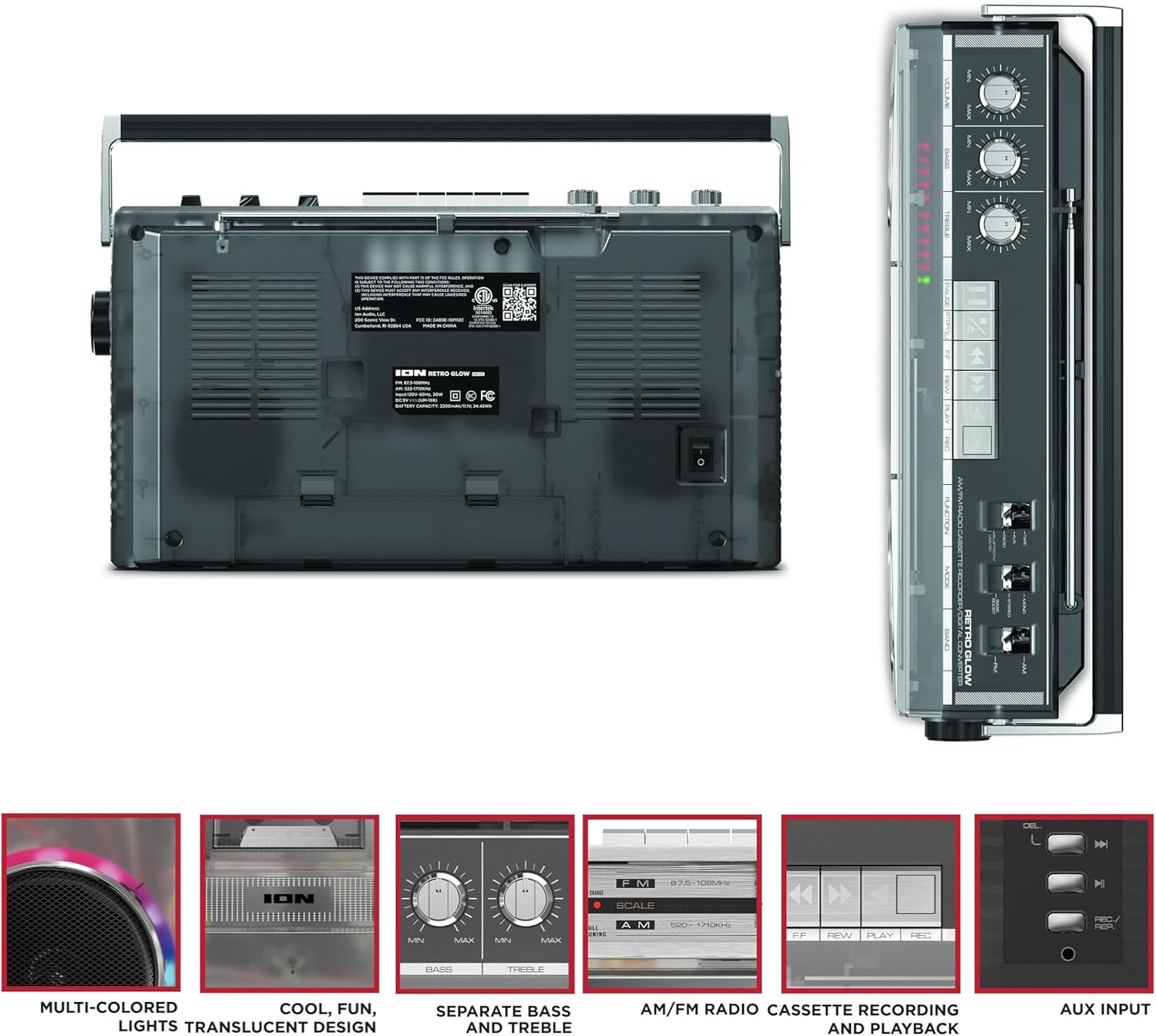
Figure 3: Side panel illustrating the USB port, SD card slot, and playback control buttons. The rear panel includes the power input and battery compartment.
5. سيٽ اپ
Powering the Boombox
The Retro Glow Boombox can be powered via the included AC power cable or by batteries for portable use.
- اي سي پاور: Connect the power cable to the AC input on the rear of the unit and then to a wall outlet.
- بيٽري پاور: Open the battery compartment on the rear and insert the required batteries (type and quantity specified in specifications).

شڪل 4: پوئتي view of the boombox, highlighting the power input and the battery compartment for portable operation.
6. آپريٽنگ هدايتون
جنرل آپريشن
- پاور آن / آف: Use the power switch to turn the unit on or off.
- حجم ڪنٽرول: Adjust the 'VOLUME' knob on the top panel to increase or decrease the sound level.
- ٽون ڪنٽرول: Use the 'BASS' and 'TREBLE' knobs to customize the audio output to your preference.
- LED بتيون: The multi-colored LED lights around the speakers dance in sync with the music. Refer to the Quickstart Guide for specific controls to change light modes or turn them off.
ريڊيو جي ڪارڪردگي
- Switch the 'FUNCTION' selector to 'RADIO'.
- Select 'AM' or 'FM' using the 'BAND' switch.
- Extend the telescopic antenna for optimal FM reception. For AM, rotate the unit for best reception.
- Use the 'TUNING' knob to scan for stations.
Cassette Player/Recorder
- پلے بیک: Press the 'STOP/EJ' button to open the cassette door. Insert a cassette tape and close the door. Press 'PLAY' to begin playback.
- رڪارڊنگ: To record from the radio, built-in microphone, or an external source (via Aux input), ensure a blank cassette is inserted. Select the desired source using the 'FUNCTION' switch. Press the 'REC' button (often simultaneously with 'PLAY') to start recording.
- فاسٽ فارورڊ/وائنڊ: Use the 'F.FWD' and 'REW' buttons for tape navigation.
بلوٽوت ڪنيڪشن
- Switch the 'FUNCTION' selector to 'BLUETOOTH/USB/SD'. The unit will enter pairing mode.
- On your Bluetooth-enabled device, search for 'Retro Glow Boombox' and select it to pair.
- Once paired, you can stream audio wirelessly to the boombox.
USB and SD Card Playback
- Insert a USB drive or SD card into the respective slot on the side panel.
- Switch the 'FUNCTION' selector to 'BLUETOOTH/USB/SD'. The unit should automatically detect and begin playing audio fileداخل ٿيل ميڊيا مان.
- Use the playback control buttons (play/pause, skip forward/backward) on the side panel to manage your audio.
معاون ان پٽ
- 3.5mm آڊيو ڪيبل (شامل نه آهي) استعمال ڪندي هڪ ٻاهرين آڊيو ڊوائيس (مثال طور، اسمارٽ فون، MP3 پليئر) کي 'AUX' ان پٽ سان ڳنڍيو.
- Switch the 'FUNCTION' selector to 'AUX'. Audio from your external device will play through the boombox speakers.
7. سار سنڀال
- صفائي: يونٽ جي ٻاهرين حصي کي صاف ڪرڻ لاءِ نرم، سڪل ڪپڙو استعمال ڪريو. رگڙيندڙ صاف ڪندڙ يا محلول استعمال نه ڪريو.
- ڪيسٽ ڊيڪ جي سنڀال: ٽيپ جي سرن کي باقاعدي طور تي صاف ڪريو ۽ رولرز کي ڪپهه جي سواب سان هلڪو صاف ڪريو.ampبهترين آواز جي معيار کي يقيني بڻائڻ ۽ ٽيپ جي نقصان کي روڪڻ لاءِ آئسوپروپيل الڪوحل سان ڀريل.
- اسٽوريج: When not in use, store the boombox in a cool, dry place away from direct sunlight and extreme temperatures.
8. مسئلا حل ڪرڻ
ڪابه طاقت
- پڪ ڪريو ته پاور ڪيبل يونٽ ۽ ڪم ڪندڙ پاور آئوٽليٽ ٻنهي سان محفوظ طور تي ڳنڍيل آهي.
- If using batteries, check if they are inserted correctly and are not depleted.
ڪو آواز
- Check the volume level on the boombox and the connected audio source (if applicable).
- Ensure the correct function mode (Radio, Tape, Bluetooth, USB/SD, Aux) is selected.
- For cassette playback, verify the tape is inserted correctly and the heads are clean.
بلوٽوٿ جوڙڻ جا مسئلا
- Make sure the boombox is in Bluetooth pairing mode.
- Ensure your Bluetooth device is within range (typically 30 feet or 10 meters).
- ڊوائيس کي ختم ڪرڻ ۽ ٻيهر جوڙڻ جي ڪوشش ڪريو.
9. وضاحتون
| پيداوار جي ماپ | 9.25 x 16.25 x 5.25 انچ |
| شيءِ جو وزن | 8.93 پائونڊ |
| رابطي ٽيڪنالاجي | Bluetooth 5.3, USB, SD Card, Aux Input |
| اسپيڪر جو قسم | Stereo, Full-Range |
| طاقت جو ذريعو | AC Power Cable, Rechargeable Battery (approx. 10-hour life) |
| خاص خاصيتون | AM/FM Radio, Cassette Player/Recorder, Multi-colored LED Lights, Retro VU Meters, Separate Bass and Treble Controls |
10. وارنٽي ۽ سپورٽ
For warranty information or technical support, please refer to the Quickstart Guide included with your product or visit the official ION Audio website. Keep your purchase receipt as proof of purchase may be required for warranty claims.


