تعارف
Welcome and thank you for choosing the HTC Wireless Earbuds TWS6 5.3. This manual provides detailed instructions to help you set up, operate, and maintain your earbuds for optimal performance. Please read this manual thoroughly before using your device.
پيڪيج مواد
مھرباني ڪري تصديق ڪريو ته سڀ شيون توھان جي پيڪيج ۾ موجود آھن:
- 2 x HTC Earbuds
- 1 x USB-C چارجنگ ڪيبل
- 1 x چارجنگ ڪيس
- 2 جوڙا x رٻڙ جي اِرٽِپس (اسٽار/ليٽر)
- 1 x Quick Start Guide (physical document)

پيداوار ختمview
Familiarize yourself with the components of your HTC TWS6 earbuds.
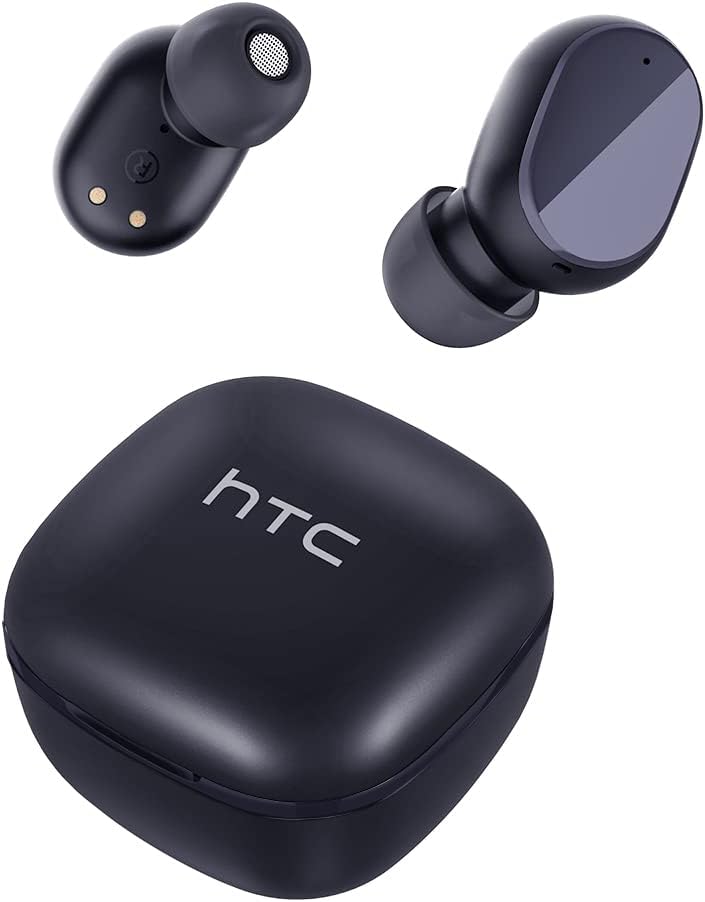

سيٽ اپ ڪريو
Earbuds ۽ Case کي چارج ڪرڻ
پهرين استعمال کان اڳ، ائربڊس ۽ چارجنگ ڪيس کي مڪمل طور تي چارج ڪريو.
- ائربڊس کي چارجنگ ڪيس ۾ رکو.
- USB-C ڪيبل کي ڪيس تي چارجنگ پورٽ ۽ پاور سورس سان ڳنڍيو.
- ڪيس تي لڳل اشاري جي روشني چارجنگ جي حالت ڏيکاريندي.
- A full charge provides approximately 5 hours of playback for earbuds and up to 22 hours with the charging case.

بلوٽوٽ جوئر
پنهنجي ائربڊس کي پنهنجي ڊوائيس سان جوڙڻ لاءِ انهن قدمن تي عمل ڪريو:
- چارجنگ ڪيس کوليو. ائربڊس پاڻمرادو پيئرنگ موڊ ۾ داخل ٿي ويندا.
- پنهنجي ڊوائيس (اسمارٽ فون، ٽيبليٽ، وغيره) تي، بلوٽوٿ کي فعال ڪريو.
- ڳولھيو "HTC TWS6" موجود بلوٽوٿ ڊوائيسز جي فهرست ۾.
- Select "HTC TWS6" to connect. A voice prompt will confirm successful pairing.

Earbuds پائڻ
For optimal sound quality and comfort, choose the correct eartip size and wear the earbuds properly.
- Select the eartips (S, M, L) that best fit your ears.
- هر ائربڊ کي پنهنجي ڪن جي ڪينال ۾ نرميءَ سان داخل ڪريو.
- Rotate slightly to ensure a secure and comfortable fit.
آپريٽنگ هدايتون
سمارٽ ٽچ ڪنٽرول
The HTC TWS6 earbuds feature intuitive touch controls:
- موسيقي هلايو/روڪ ڪريو: ٻنهي ائربڊ تي هڪ ڀيرو ٽيپ ڪريو.
- اڳيون ٽريڪ: ساڄي ائربڊ تي ٻٽي ٽيپ ڪريو.
- پويون ٽريڪ: کاٻي ائربڊ تي ٻٽي ٽيپ ڪريو.
- حجم مٿي ساڄي ائربڊ تي ٽي ڀيرا ٽيپ ڪريو.
- حجم ھيٺ کاٻي ائربڊ تي ٽي ڀيرا ٽيپ ڪريو.
- جواب/آخر ڪال: ٻنهي ائربڊ تي هڪ ڀيرو ٽيپ ڪريو.
- ڪال رد ڪريو: 2 سيڪنڊن لاءِ ٻئي ائربڊ کي دٻايو ۽ رکو.
- وائس اسسٽنٽ کي فعال ڪريو. 3 سيڪنڊن لاءِ ٻئي ائربڊ کي دٻايو ۽ رکو.

پاور آن / آف
جڏهن چارجنگ ڪيس مان ڪڍيا ويندا آهن ته ائربڊس پاڻمرادو آن ٿي ويندا آهن ۽ جڏهن واپس ڪيس ۾ رکيا ويندا آهن ۽ لڪ بند ڪيو ويندو آهي ته پاور بند ٿي ويندي آهي.
To manually power on, press and hold the touch area for 3 seconds. To manually power off, press and hold the touch area for 5 seconds.
سار سنڀال ۽ سنڀال
صفائي
بهترين ڪارڪردگي ۽ صفائي کي يقيني بڻائڻ لاءِ پنهنجا ائربڊس ۽ چارجنگ ڪيس باقاعدي صاف ڪريو.
- ائربڊس ۽ چارجنگ ڪيس کي صاف ڪرڻ لاءِ نرم، سڪل، لِنٽ فري ڪپڙو استعمال ڪريو.
- ڪنن جا ٽُڪا ڪڍو ۽ انهن کي هلڪي صابڻ ۽ پاڻي سان صاف ڪريو، پوءِ ٻيهر ڳنڍڻ کان اڳ چڱيءَ طرح سڪيو.
- استعمال نه ڪريو abrasive cleaners يا solvents.
پاڻي جي مزاحمت (IPX5)
The HTC TWS6 earbuds are IPX5 sweatproof, meaning they are resistant to splashes and sweat.
نوٽ: They are not designed for submersion in water. Avoid exposing them to heavy rain, showering, or swimming. Ensure the charging port is dry before charging.

ذخيرو
جڏهن استعمال ۾ نه هجي، ته ائربڊس کي انهن جي چارجنگ ڪيس ۾ محفوظ ڪريو ته جيئن انهن جي حفاظت ٿئي ۽ انهن کي چارج رکيو وڃي.
سخت گرمي پد کان پري ٿڌي، سڪل جاءِ تي ذخيرو ڪريو.
مشڪلاتون
| مسئلو | حل |
|---|---|
| ائربڊس نه ملائي رهيا آهن | Ensure earbuds are charged. Turn off and on Bluetooth on your device. Forget "HTC TWS6" from your device's Bluetooth list and re-pair. |
| صرف هڪ ائربڊ ڪم ڪري رهيو آهي | Place both earbuds back into the charging case, close the lid, then open it again. Ensure both earbuds are charged. |
| گهٽ آواز يا خراب آواز جو معيار | Adjust volume on your device. Clean eartips and earbud mesh. Try different eartip sizes for a better seal. |
| چارج ڪرڻ جو مسئلو | Check USB-C cable and power adapter. Ensure charging contacts on earbuds and case are clean and dry. |
| ائربڊس بار بار ڊسڪنيڪٽ ٿين ٿا | Ensure your device is within the Bluetooth range (approx. 10 meters/33 feet) and there are no significant obstructions. |
جيڪڏهن مسئلا برقرار رهن، مهرباني ڪري ڪسٽمر سپورٽ سان رابطو ڪريو.
وضاحتون
| خاصيت | تفصيل |
|---|---|
| ماڊل نالو | TWS6 |
| بلوٽوت ورزن | 5.3 |
| رابطي ٽيڪنالاجي | وائرليس |
| وائرليس ڪميونيڪيشن ٽيڪنالاجي | بلوٽوٿ |
| بيٽري جي زندگي (ايربڊس) | 5 ڪلاڪ |
| ڪُل راند جو وقت (ڪيس سان) | 22 ڪلاڪ |
| چارج ڪرڻ وقت (ڪيس) | تقريبن 5 ڪلاڪ |
| پاڻي جي مزاحمت جي سطح | IPX5 (پسڻ کان بچاءُ وارو) |
| ڪنٽرول جو طريقو | ڇڪڻ |
| مائڪروفون | Yes (with ENC) |
| مطابقت رکندڙ ڊوائيسز | Android and iOS Smartphones, Gaming Devices |
| مواد | پلاسٽڪ |
| شيءِ جو وزن | 3.17 اونس |
| يو پي سي | 734257974554 |
| شور ڪنٽرول | موافقت وارو شور منسوخي |
| آڊيو ڊرائيور جو قسم | متحرڪ ڊرائيور |
| رڪاوٽ | 199.99 اوم |
وارنٽي ۽ سپورٽ
HTC provides a 360-day warranty extension for this product, as detailed in the product information.
For technical assistance, warranty claims, or any inquiries, please contact HTC customer support.
ڪسٽمر سپورٽ: Refer to the contact information provided in your product packaging or visit the official HTC website for the most up-to-date support options.


