تعارف
The ATTACK SHARK X1 Superlight Wireless Gaming Mouse is engineered for high-performance gaming and versatile daily use. Featuring a PAW3395PRO gaming sensor, tri-mode connectivity (2.4G wireless, Bluetooth, and wired USB-C), and an innovative magnetic charging dock with RGB lighting, the X1 mouse provides precision, speed, and convenience. Its ultra-lightweight design and durable switches ensure comfort and longevity for extended use.
پيڪيج مواد
- ATTACK SHARK X1 Superlight Wireless Gaming Mouse
- Magnetic RGB Charging Dock
- USB-C کان USB-A ڪيبل
- 2.4GHz Wireless Receiver (Nano Dongle)
- استعمال ڪندڙ جو دستياب (ھي دستاويز)

Image: The ATTACK SHARK X1 mouse shown alongside its magnetic charging dock.
پيداوار ختمview
The X1 mouse features a lightweight ergonomic design with programmable buttons and a high-precision optical sensor. The accompanying magnetic charging dock provides convenient charging and also houses the 2.4GHz wireless receiver.
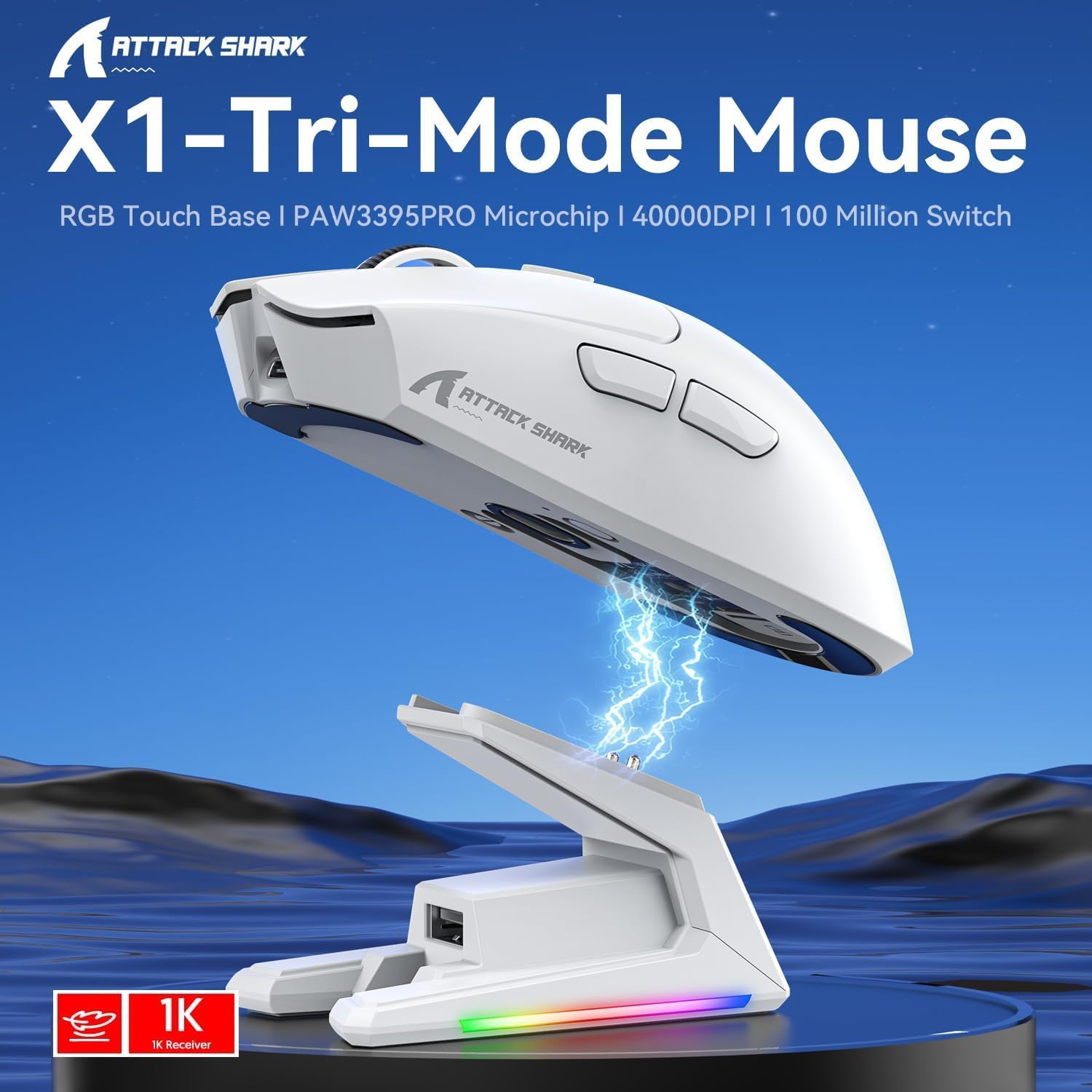
تصوير: مٿانview of the X1 Tri-Mode Mouse highlighting its key features.
Mouse Components:
- کاٻي/ساڄي ڪلڪ بٽڻ: Standard mouse buttons with durable OMRON switches.
- اسڪرول ويل: عمودي اسڪرولنگ ۽ وچين ڪلڪ جي ڪارڪردگي لاءِ.
- DPI بٽڻ: Located on top for quick sensitivity adjustments.
- پاسي جا بٽڻ: Two programmable buttons on the left side for forward/backward navigation or custom macros.
- USB-C پورٽ: وائرڊ ڪنيڪشن ۽ چارجنگ لاءِ.
- پاور/موڊ سوئچ: Located on the bottom, allows switching between OFF, 2.4G, and Bluetooth modes.
- PAW3395PRO Sensor: High-performance optical sensor for precise tracking.
Charging Dock Components:
- Magnetic Charging Pins: Align with the mouse for effortless charging.
- RGB Lighting Strip: حسب ضرورت روشني جا اثر.
- Touch-Sensitive Panel: For controlling RGB lighting on the dock.
- USB-A پورٽ: For connecting the 2.4GHz wireless receiver.
- USB-C چارجنگ پورٽ: For powering the dock.

تصوير: ويجهو تصوير view of the charging dock's USB data interface for the 2.4G receiver and the Type-C charging interface.
سيٽ اپ ڪريو
1. وائرڊ ڪنيڪشن:
- Connect the USB-C end of the provided cable to the mouse's USB-C port.
- ڪيبل جي USB-A ڇيڙي کي پنهنجي ڪمپيوٽر تي موجود USB پورٽ سان ڳنڍيو.
- Ensure the power/mode switch on the bottom of the mouse is set to the 'OFF' position. The mouse will function in wired mode and charge simultaneously.

Image: The X1 mouse connected to a laptop via its USB-C cable, demonstrating wired mode and charging capability.
2. 2.4GHz وائرليس ڪنيڪشن:
- Plug the 2.4GHz wireless receiver into an available USB-A port on your computer or into the USB-A port on the charging dock.
- Set the power/mode switch on the bottom of the mouse to the '2.4G' position.
- مائوس کي خودڪار طريقي سان رسيور سان ڳنڍڻ گهرجي.
3. بلوٽوٿ ڪنيڪشن:
- Set the power/mode switch on the bottom of the mouse to the 'BT' position.
- ماؤس پيئرنگ موڊ ۾ داخل ٿيندو (اشاري جي روشني چمڪي سگهي ٿي).
- توهان جي ڪمپيوٽر يا ڊوائيس تي، بلوٽوٿ سيٽنگون ڏانهن وڃو ۽ نوان ڊوائيسز ڳوليو.
- Select 'ATTACK SHARK X1' (or similar name) from the list of available devices to pair. The mouse supports memory for up to 3 Bluetooth devices.
آپريٽنگ هدايتون
ڊي پي آءِ ايڊجسٽمينٽ:
The X1 mouse features a dedicated DPI button on its top surface. Press this button to cycle through the preset DPI levels. The mouse supports up to 40,000 DPI with 6 programmable sensitivity presets. The current DPI level may be indicated by an LED color change (refer to the Web Cloud Driver for specific indications).

تصوير: تفصيلي view of the PAW3395PRO gaming sensor, emphasizing its high precision.
Web Cloud Driver Software:
The ATTACK SHARK X1 utilizes an innovative web-based cloud driver for customization, eliminating the need for software installation. Access the driver through your web browser to configure advanced functions such as:
- DPI adjustment and custom profiles
- پولنگ جي شرح سيٽنگون
- Competitive mode activation
- Custom button assignments
- Macro recording and personalized key mapping
The open-source driver automatically identifies your computer system. Refer to the product packaging or official webمخصوص لاء سائيٽ URL تائين رسائي حاصل ڪرڻ لاء Web Cloud Driver.

Image: Screenshot of the X1 Web Cloud Driver interface, showing options for key settings, macros, and other functions.
RGB Lighting Customization (Dock):
The magnetic charging dock features an integrated touch-sensitive panel that allows you to customize its RGB lighting effects. Tap the panel to cycle through different lighting modes. Press and hold the panel to turn the RGB lighting on or off.
چارج ۽ بيٽري جي زندگي
The X1 mouse can be charged via the included USB-C cable or by placing it on the magnetic charging dock. The dock provides effortless charging; simply align the mouse with the charging pins for instant power-up. A full charge typically takes approximately 2 hours and provides up to 65 hours of continuous working time.

Image: The X1 mouse magnetically docked for charging, showcasing the RGB lighting of the dock.

Image: An illustration depicting the optimized battery life of the X1 mouse, indicating efficient power usage.
سار سنڀال
To ensure the longevity and optimal performance of your ATTACK SHARK X1 mouse and charging dock, follow these maintenance guidelines:
- صفائي: Use a soft, dry cloth to wipe down the mouse and dock. For stubborn dirt, a slightly damp cloth can be used, but ensure no moisture enters the internal components or charging pins. Avoid harsh chemicals or abrasive materials.
- سينسر جي سنڀال: Keep the optical sensor on the bottom of the mouse clean and free of dust or debris to maintain accurate tracking.
- اسٽوريج: When not in use for extended periods, store the mouse and dock in a cool, dry place away from direct sunlight and extreme temperatures.
- چارجنگ پن: Periodically inspect the charging pins on the dock and the corresponding contacts on the mouse for any residue or corrosion. Clean gently with a cotton swab if necessary.
مشڪلاتون
If you encounter issues with your ATTACK SHARK X1 mouse, refer to the following common troubleshooting steps:
- مائوس جواب نه ڏئي رهيو آهي:
- پڪ ڪريو ته مائوس چارج ٿيل آهي.
- Check the power/mode switch on the bottom of the mouse is set to the correct connection mode (2.4G, BT, or OFF for wired).
- For 2.4G wireless, ensure the receiver is properly plugged into a USB port. Try a different USB port.
- بلوٽوٿ لاءِ، پڪ ڪريو ته توهان جي ڊوائيس تي بلوٽوٿ فعال آهي ۽ مائوس جوڙو ٿيل آهي. مائوس کي ٻيهر جوڙو ٺاهڻ جي ڪوشش ڪريو.
- Try connecting the mouse via the USB-C cable to see if it functions in wired mode.
- Inconsistent Tracking or Cursor Lag:
- مائوس جي تري ۾ موجود آپٽيڪل سينسر کي صاف ڪريو.
- پڪ ڪريو ته توهان مائوس کي مناسب مٿاڇري تي استعمال ڪري رهيا آهيو (مثال طور، هڪ مائوس پيڊ).
- 2.4G وائرليس موڊ ۾ مداخلت جي جانچ ڪريو (مثال طور، ٻيا وائرليس ڊوائيسز).
- Adjust DPI settings using the DPI button or Web Cloud Driver.
- چارج جا مسئلا:
- Ensure the USB-C cable is securely connected to the charging dock and a power source.
- Verify the mouse is correctly seated on the magnetic charging dock, ensuring the pins make proper contact.
- Try charging directly via the USB-C cable connected to the mouse.
- Web Cloud Driver Not Accessible:
- پڪ ڪريو ته توهان جي ڪمپيوٽر ۾ هڪ فعال انٽرنيٽ ڪنيڪشن آهي.
- جي تصديق ڪريو URL لاءِ Web Cloud Driver is entered correctly.
- هڪ مختلف ڪوشش ڪريو web برائوزر.
وضاحتون
| خاصيت | وصف |
|---|---|
| ماڊل | X1 |
| رابطي | Tri-Mode: 2.4G Wireless, Bluetooth 5.2, Wired USB-C |
| سينسر | PixArt PAW3395PRO Optical Gaming Sensor |
| ڊي پي آءِ رينج | Up to 40,000 DPI (6 programmable presets) |
| آئي پي ايس | 650 آئي پي ايس |
| تڪڙ | 50 جي |
| سوئچز | OMRON Mechanical Switches (100 Million Clicks lifespan) |
| وزن | Approx. 53g (Ultra-light) |
| بيٽري جي زندگي | 65 ڪلاڪ تائين (مسلسل استعمال) |
| چارج ڪرڻ | Magnetic Charging Dock / USB-C Wired |
| پولنگ جي شرح | 1000Hz (1ms response) |
| طول و عرض (پيڪيج) | 7.09 x 4.53 x 2.17 انچ |
| شيءِ جو وزن (پيڪيج ٿيل) | 7.7 اونس |
وارنٽي ۽ سپورٽ
For warranty information and technical support, please refer to the official ATTACK SHARK webسائيٽ تي وڃو يا سڌو سنئون انهن جي ڪسٽمر سروس سان رابطو ڪريو. ڪنهن به وارنٽي دعوائن لاءِ خريداري جي ثبوت طور پنهنجي خريداري جي رسيد رکو.
وڌيڪ مدد لاء، دورو ڪريو جي ATTACK SHARK Store on Amazon.


