1. تعارف
This manual provides instructions for the proper use and maintenance of your ttec SoundFlow OWS Wireless Bluetooth Earphones, model KM156. Please read this manual thoroughly before using the product to ensure optimal performance and longevity.
The ttec SoundFlow OWS earphones feature an open-ear design for situational awareness, dynamic acoustic system for clear sound, and Bluetooth 5.4 for stable wireless connectivity.
2. پيڪيج مواد
پڪ ڪريو ته سڀئي شيون توهان جي پراڊڪٽ پيڪيج ۾ موجود آهن:
- ttec SoundFlow OWS Wireless Bluetooth Earphones (Left and Right)
- چارج ڪيس
- USB-C چارجنگ ڪيبل
- استعمال ڪندڙ دستي
3. پراڊڪٽ ختمview
Familiarize yourself with the components of your ttec SoundFlow OWS earphones.

Image 3.1: ttec SoundFlow OWS Earphones and Charging Case. The image displays the two black earphones with ear hooks, positioned above their open black charging case.
Earphone Components:
- ڪن جو ٿلهو: ڪن جي مٿان هڪ محفوظ ۽ آرامده فٽ فراهم ڪري ٿو.
- اسپيڪر يونٽ: آڊيو آئوٽ فراهم ڪري ٿو.
- مائڪروفون: ڪالن ۽ وائس ڪمانڊ لاءِ.
- Touch Sensor Area: For controlling music, calls, and other functions.
- رابطا چارج ڪرڻ: پاور لاءِ چارجنگ ڪيس سان ڳنڍي ٿو.

Image 3.2: Close-up of an earbud highlighting the touch sensor area. The image shows a detailed view of the earbud's outer surface, indicating the touch-sensitive zone for controls.
چارجنگ ڪيس جا حصا:
- Earphone Slots: ائرفون کي محفوظ طور تي رکي ٿو ۽ چارج ڪري ٿو.
- USB-C چارجنگ پورٽ: ڪيس داخل ڪرڻ لاءِ.
- LED اشارو: چارجنگ جي حيثيت ۽ بيٽري جي سطح ڏيکاري ٿو.
4. سيٽ اپ
4.1 ائرفون ۽ ڪيس کي چارج ڪرڻ
پهرين استعمال کان اڳ، ائرفون ۽ چارجنگ ڪيس کي مڪمل طور تي چارج ڪريو.
- Place the earphones into the charging case. Ensure the charging contacts align.
- USB-C چارجنگ ڪيبل کي ڪيس تي چارجنگ پورٽ سان ۽ ٻئي ڇيڙي کي پاور سورس سان ڳنڍيو (مثال طور، USB وال اڊاپٽر، ڪمپيوٽر USB پورٽ).
- The LED indicator on the case will show the charging status. Once fully charged, the indicator will change or turn off.
A full charge provides up to 6 hours of earphone use, and the charging case provides up to 30 hours of additional battery life. The Charge&Go feature allows 2.5 hours of use from a 15-minute charge.
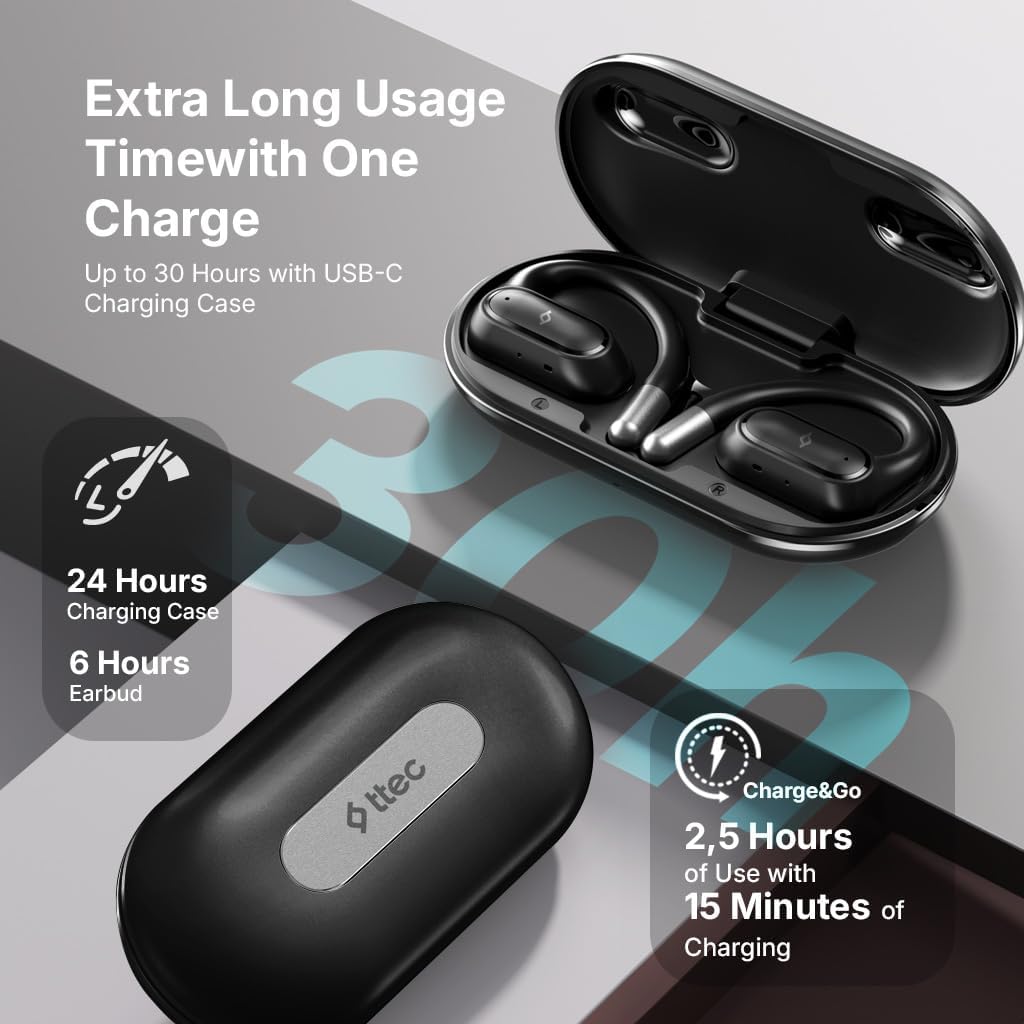
Image 4.1: Charging case displaying battery life. The image illustrates the charging case with text indicating 24 hours from the charging case, 6 hours from earbuds, and 2.5 hours of use from 15 minutes of charging.
4.2 بلوٽوٿ ڊيوائس سان جوڙڻ
To connect your earphones to a smartphone or other Bluetooth-enabled device:
- پڪ ڪريو ته ائرفون چارج ٿيل آهن ۽ چارجنگ ڪيس ۾ رکيل آهن.
- Open the charging case. The earphones will automatically enter pairing mode, and their LED indicators will flash.
- توهان جي ڊوائيس تي، بلوٽوت کي فعال ڪريو ۽ دستياب ڊوائيسز جي ڳولا ڪريو.
- Select "ttec SoundFlow" from the list of found devices.
- Once connected, the earphone LED indicators will stop flashing or turn off, and you will hear a confirmation tone.
جيڪڏهن ڊوائيس تي بلوٽوٿ فعال هجي ته ڪيس مان هٽائڻ تي ائرفون پاڻمرادو آخري جوڙيل ڊوائيس سان ٻيهر ڳنڍجي ويندا.
5. آپريٽنگ هدايتون
5.1 ائرفون پائڻ
Gently place the ear hook over your ear and position the speaker unit comfortably in front of your ear canal. The open-ear design allows you to remain aware of your surroundings.

Image 5.1: A person cycling while wearing the ttec SoundFlow OWS earphones. The image highlights the open-ear design, allowing the user to stay connected to their surroundings.

Image 5.2: A woman wearing a ttec SoundFlow earbud, demonstrating the comfortable and secure fit. The image also indicates the lightweight design: 8.2g per earbud and 52g for the charging case.
5.2 ٽچ ڪنٽرول
The earphones feature touch sensors for easy control of various functions:
| عمل | فنڪشن |
|---|---|
| سنگل ٽيپ (L/R) | موسيقي هلايو/روڪ ڪريو، ڪال جو جواب ڏيو |
| ڊبل ٽيپ (L) | اڳيون ٽريڪ |
| ڊبل ٽيپ (ر) | ايندڙ ٽريڪ |
| ٽرپل ٽيپ (ايل/ر) | وائيس اسسٽنٽ کي فعال ڪريو |
| ڊگھو پريس (L/R) | Reject Call, End Call |
5.3 راند جو طريقو
The earphones feature a low-latency game mode for an enhanced gaming and video experience. This mode reduces audio delay to 50ms.
- To activate Game Mode: Refer to the specific instructions in the quick start guide or product packaging for the exact touch gesture to enable/disable game mode. (Typically a specific tap sequence or long press).
- When Game Mode is active, you may notice a slight change in audio profile, optimized for lower latency.

Image 5.3: ttec SoundFlow earphones and charging case, surrounded by gaming console symbols, highlighting the 50ms low latency feature for an optimized gaming and video experience.
6. سار سنڀال
6.1 صفائي
- ائرفون ۽ چارجنگ ڪيس کي نرم، سڪل، لِنٽ فري ڪپڙي سان صاف ڪريو.
- گھڙڻ وارا صاف ڪندڙ، الڪوحل، يا ڪيميائي محلول استعمال نه ڪريو.
- Ensure charging contacts are clean and dry to prevent charging issues.
6.2 پاڻي ۽ پسين جي مزاحمت
The ttec SoundFlow OWS earphones are IPX6 rated, meaning they are resistant to high-pressure water jets from any direction. This makes them suitable for use during workouts and in light rain.
- ائرفونز کي پاڻي ۾ نه ٻوڙيو.
- Ensure the earphones are dry before placing them back into the charging case to prevent damage.

Image 6.1: A man running outdoors, illustrating the sweat and water-resistant design of the ttec SoundFlow earphones, which are IPX6 rated.
6.3 اسٽوريج
جڏهن استعمال ۾ نه هجي، ته ائرفون کي انهن جي چارجنگ ڪيس ۾ محفوظ ڪريو ته جيئن انهن جي حفاظت ٿئي ۽ انهن کي چارج رکيو وڃي. انتهائي گرمي پد کان پري ٿڌي، سڪل جاءِ تي ذخيرو ڪريو.
7. مسئلا حل ڪرڻ
جيڪڏهن توهان کي پنهنجي ائرفون سان مسئلا درپيش اچن ٿا، ته هيٺ ڏنل عام حلن جو حوالو ڏيو:
| مسئلو | حل |
|---|---|
| ائرفون جوڙا نه پيا لڳن | Ensure earphones are charged. Turn off and on Bluetooth on your device. Forget the device in your Bluetooth settings and re-pair. |
| صرف هڪ ائرفون ڪم ڪري رهيو آهي | Place both earphones back in the case, close the lid, then open again. Ensure both are charged. |
| آواز ڪونهي | Check device volume. Ensure earphones are connected. Try playing different audio. |
| چارج ڪرڻ جا مسئلا | Ensure charging cable is securely connected. Clean charging contacts on earphones and case. Try a different USB-C cable or power source. |
جيڪڏهن مسئلو برقرار رهي، مهرباني ڪري ڪسٽمر سپورٽ سان رابطو ڪريو.
8. وضاحتون
| خاصيت | تفصيل |
|---|---|
| ماڊل نالو | SoundFlow |
| ماڊل نمبر | KM156 |
| رابطي ٽيڪنالاجي | وائرليس (بلوٽوٿ 5.4) |
| فارم فيڪٽر | True Wireless, Open-Ear |
| ائيربود وزن | 8.2 گرام (هر هڪ) |
| چارج ڪيس وزن | 52 گرام |
| Earbud جي بيٽري جي زندگي | 6 ڪلاڪن تائين (هڪ چارج تي) |
| ڪل بيٽري جي زندگي (ڪيس سان) | 30 ڪلاڪ تائين |
| فاسٽ چارجنگ | 15 min charge for 2.5 hours use (Charge&Go) |
| پاڻي جي مزاحمت | IPX6 Rated (Sweat and Water Resistant) |
| گھٽ ويڪرائي | 50 ايم ايس (گيم موڊ) |
| ٺاهيندڙ | ٽي ٽي سي |
9. وارنٽي ۽ سپورٽ
Your ttec SoundFlow OWS Wireless Bluetooth Earphones are covered by a manufacturer's warranty. For detailed warranty information, please refer to the warranty card included in your product packaging or visit the official ttec webسائيٽ.
For technical support, troubleshooting assistance, or to inquire about replacement parts, please contact ttec customer service through their official channels. Contact information can typically be found on the product packaging or the official ttec webسائيٽ.


