1. تعارف
Thank you for choosing the IMOU CE2P Smart Plug. This manual provides detailed instructions for the safe and efficient use of your smart plug. The IMOU CE2P is designed to integrate seamlessly into your smart home ecosystem, offering features such as energy monitoring, remote control, and voice command capabilities. Please read this manual thoroughly before installation and operation.

Image 1.1: The IMOU CE2P Smart Plug can be used with a wide range of household appliances, enabling smart control and energy management.
2. حفاظت جي ڄاڻ
محفوظ آپريشن کي يقيني بڻائڻ ۽ نقصان کي روڪڻ لاءِ، مھرباني ڪري ھيٺ ڏنل حفاظتي احتياطن تي عمل ڪريو:
- Do not exceed the maximum load of 16A / 3680W.
- ڊوائيس صرف اندر اندر استعمال ڪريو.
- پاڻي ۽ وڌيڪ نمي واري ماحول کان پري رهو.
- ڊوائيس کي جدا ڪرڻ يا مرمت ڪرڻ جي ڪوشش نه ڪريو.
- پڪ ڪريو ته پلگ مڪمل طور تي ڀت جي ساکٽ ۾ داخل ٿيل آهي.
- صاف ڪرڻ کان پهريان ڊوائيس کي پاور آئوٽ مان انپلگ ڪريو.
- This product is made from flame-retardant material for enhanced safety.
3. پيڪيج مواد
The IMOU CE2P Smart Plug package typically includes:
- IMOU CE2P سمارٽ پلگ
- استعمال ڪندڙ جو دستياب (ھي دستاويز)
4. پراڊڪٽ ختمview
The IMOU CE2P Smart Plug features a compact design with an integrated power button and indicator light. Key functionalities include:
- پاور بٽڻ/انڊيڪيٽر لائيٽ: Press to manually turn the plug on/off. The light indicates power status and pairing mode.
- پاور پن: Standard EU Type F (Schuko) plug for wall outlets.
- ساکٽ: Standard EU Type F (Schuko) socket for connecting appliances.

تصوير 4.1: مٿيview of the IMOU CE2P Smart Plug highlighting its features such as flame-retardant material, easy setup, voice control, scheduling, remote control, group control, energy monitoring, local control, and family sharing.
5. سيٽ اپ
5.1. ائپ تنصيب
The IMOU CE2P Smart Plug is controlled via the IMOU Life App. Download the app from your device's app store:
- ڳولھيو "IMOU Life" on the Apple App Store (iOS) or Google Play Store (Android).
- ايپ انسٽال ڪريو ۽ هڪ اڪائونٽ ٺاهيو يا جيڪڏهن توهان وٽ اڳ ۾ ئي آهي ته لاگ ان ٿيو.
5.2. شروعاتي سيٽ اپ ۽ جوڙو ٺاهڻ
Follow these steps to connect your IMOU CE2P Smart Plug to your Wi-Fi network:
- Plug the IMOU CE2P Smart Plug into a wall outlet.
- Open the IMOU Life App.
- نئون ڊوائيس شامل ڪرڻ لاءِ مٿي ساڄي ڪنڊ ۾ "+" آئڪن تي ٽيپ ڪريو.
- Select "Smart Plug" or scan the QR code on the device or packaging.
- Follow the on-screen instructions to connect the plug to your 2.4 GHz Wi-Fi network. The plug uses Bluetooth for faster pairing, but requires a 2.4 GHz Wi-Fi connection for operation.
- Once connected, you can rename the plug for easier identification.

Image 5.1: The IMOU Life App provides a centralized interface for controlling all connected devices, including the smart plug.
6. آپريٽنگ هدايتون
6.1. بنيادي آن/آف ڪنٽرول
- دستي سنڀال: Press the power button on the smart plug to manually turn the connected appliance on or off.
- ائپ ڪنٽرول: Open the IMOU Life App, select your smart plug, and tap the power icon to toggle its state.
6.2. توانائي جي نگراني
The IMOU CE2P Smart Plug features energy monitoring to track the power consumption of connected devices. You can view real-time usage and historical data within the IMOU Life App.
- In the app, navigate to the smart plug's details page.
- Access the "Energy Monitoring" section to view daily, weekly, or monthly consumption reports.
- You can set your electricity tariff in the app settings to estimate energy costs.

Image 6.1: The IMOU Life App provides detailed energy consumption data, allowing users to monitor and manage power usage.

Image 6.2: Monitor the energy consumption of appliances like microwaves directly from your smartphone.
6.3. شيڊولنگ ۽ ٽائمر
Automate your appliances by setting schedules and timers:
- In the IMOU Life App, select your smart plug and go to the "Schedule" or "Timer" section.
- Set specific times for the plug to turn on or off daily, weekly, or on custom days.
- Use timers for countdown functions, e.g., turn off after 30 minutes.

Image 6.3: Automate your home by setting schedules for various appliances, such as turning on an air conditioner or lamp مخصوص وقتن تي.
6.4. وائيس ڪنٽرول (Alexa ۽ Google Home)
The IMOU CE2P Smart Plug is compatible with Amazon Alexa and Google Home, allowing for hands-free control:
- Ensure your smart plug is connected to the IMOU Life App.
- Amazon Alexa يا گوگل هوم ايپ کوليو.
- Enable the "IMOU Life" skill/service.
- Link your IMOU Life account.
- ڊوائيسز ڳوليو. توهان جو سمارٽ پلگ ظاهر ٿيڻ گهرجي.
- هاڻي توهان وائس ڪمانڊ استعمال ڪري سگهو ٿا جهڙوڪ:
- "Alexa, turn on [Plug Name]"
- "Hey Google, turn off [Plug Name]"

Image 6.4: The IMOU CE2P Smart Plug supports voice control through Amazon Alexa and Google Home.
6.5. مادي جو انضمام
The IMOU CE2P Smart Plug is Matter certified, allowing for unified control across various smart home ecosystems. To integrate with Matter:
- Ensure your Matter controller (e.g., Apple HomePod, Google Nest Hub, Amazon Echo) is set up and updated.
- Follow the Matter pairing instructions provided by your specific Matter controller. This typically involves scanning a Matter QR code or entering a setup code.
- Once paired, you can control the IMOU CE2P Smart Plug through your preferred Matter-compatible app alongside other smart devices.
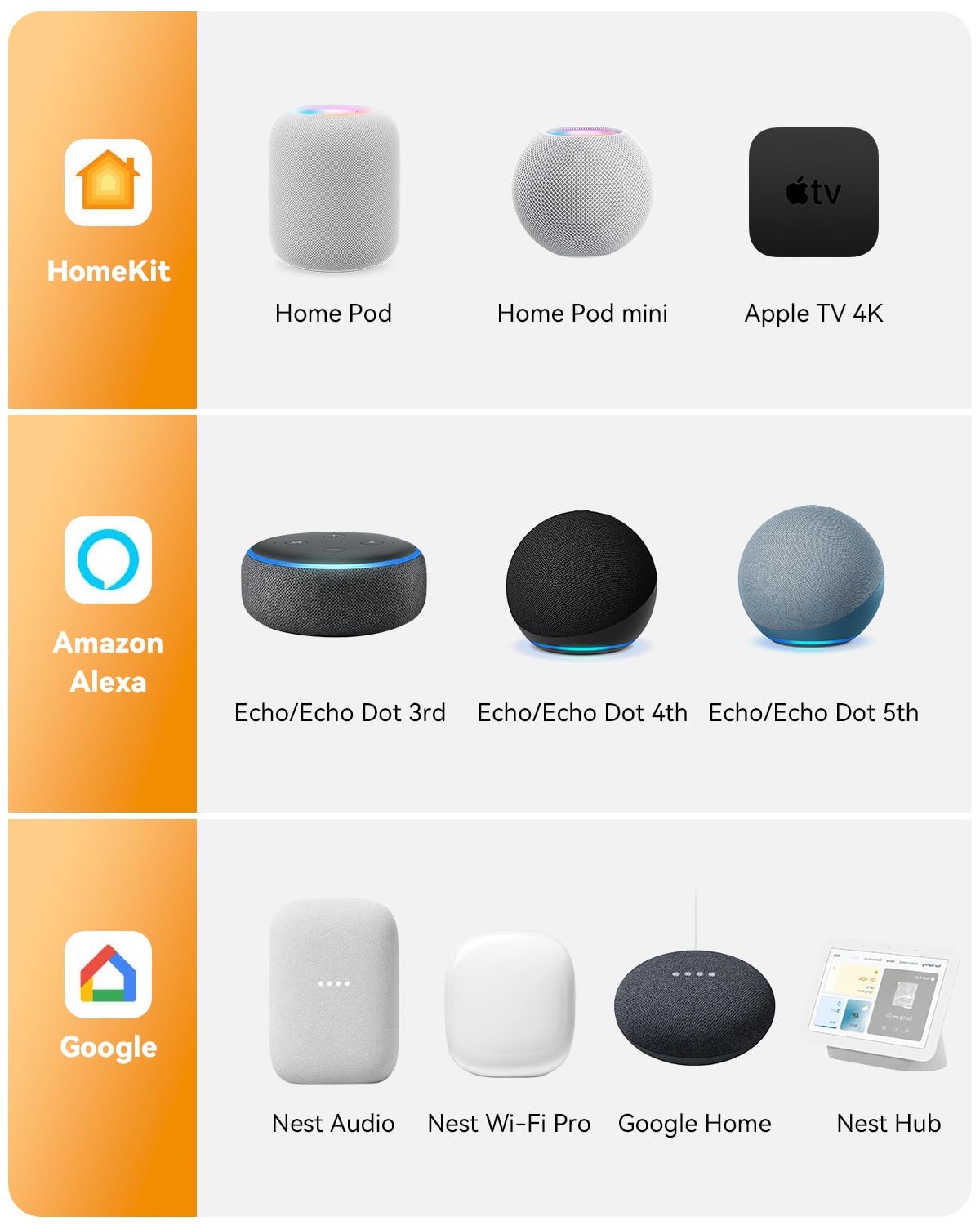
Image 6.5: The IMOU CE2P Smart Plug is compatible with major smart home platforms, including those supporting Matter.
7. سار سنڀال
To maintain your IMOU CE2P Smart Plug in optimal condition:
- ڊوائيس کي نرم، سڪل ڪپڙي سان صاف ڪريو. مائع صاف ڪندڙ يا ايروسول استعمال نه ڪريو.
- Ensure the plug is disconnected from the power source before cleaning.
- ڊوائيس کي انتهائي گرمي پد يا سڌي سج جي روشني کي ظاهر ڪرڻ کان بچاء.
- Regularly check for firmware updates through the IMOU Life App to ensure the best performance and security.
8. مسئلا حل ڪرڻ
If you encounter issues with your IMOU CE2P Smart Plug, refer to the following common problems and solutions:
| مسئلو | ممڪن سبب | حل |
|---|---|---|
| Plug not connecting to Wi-Fi | Incorrect Wi-Fi password, 5GHz Wi-Fi network, too far from router. |
|
| وائس ڪنٽرول ڪم نه ڪري رهيو آهي | IMOU Life skill not enabled, incorrect device name, internet connectivity issues. |
|
| توانائي جي نگراني جو ڊيٽا غلط يا غائب آهي. | App synchronization issue, temporary network problem. |
|
| پلگ غير جوابده آهي | پاور اوtage, device malfunction, overloaded circuit. |
|
9. وضاحتون
| خاصيت | تفصيل |
|---|---|
| ماڊل نمبر | IOT-CE2P |
| برانڊ | امو |
| طول و عرض (L x W x H) | 14.7 x 14.7 x 14.7 سينٽي |
| وزن | 130 گرام |
| موجوده درجه بندي | 16 اي |
| جلدtage | 220 وولٽ |
| وڌ ۾ وڌ لوڊ | 3680 ڊبليو |
| رابطي | 2.4 GHz Wi-Fi, Bluetooth (for pairing only) |
| مطابقت | Matter, Amazon Alexa, Google Home |
| مواد | Polycarbonate (Flame-Retardant) |
| آپريٽنگ موڊ | چالو بند |
10. وارنٽي ۽ سپورٽ
وارنٽي جي معلومات ۽ ٽيڪنيڪل سپورٽ لاءِ، مھرباني ڪري سرڪاري Imou جو حوالو ڏيو webسائيٽ تي وڃو يا انهن جي ڪسٽمر سروس سان رابطو ڪريو. خريداري جي ثبوت طور پنهنجي خريداري جي رسيد رکو.
ٺاهيندڙ: امو
Webسائيٽ: www.imoulife.com


