تعارف
Thank you for choosing the Spigen Active Noise Cancelling Headphones SA-HP P10. These headphones are designed to provide an immersive audio experience with advanced noise cancellation, powerful sound, and convenient features for various uses including commuting, gaming, and music listening. Please read this manual carefully to ensure proper use and optimal performance of your new headphones.
پيڪيج مواد
پڪ ڪريو ته سڀئي شيون پيڪيج ۾ موجود آهن:
- Spigen Active Noise Cancelling Headphones SA-HP P10
- USB-C Charging Cable (50cm)
- AUX Audio Cable (1.2m)
- کڻڻ وارو ٿلهو
- استعمال ڪندڙ جو دستياب (ھي دستاويز)

Image: The Spigen SA-HP P10 headphones, a 50cm USB-C charging cable, and a 1.2m AUX audio cable, representing the complete package contents.
پيداوار ختمview
Familiarize yourself with the headphone components and controls.
ڪنٽرول ۽ بندرگاهن:
- پاور بٽڻ: Press and hold to power on/off. Short press for play/pause or answer/end calls.
- حجم بٽڻ (+/-): Short press to adjust volume. Long press to skip tracks.
- ANC/شفافيت موڊ سوئچ: Toggle to activate Active Noise Cancellation (ANC) or Transparency Mode.
- USB-C پورٽ: هيڊفون چارج ڪرڻ لاءِ.
- 3.5mm آڊيو جيڪ: AUX ڪيبل استعمال ڪندي وائرڊ ڪنيڪشن لاءِ.
- مائڪروفون: Integrated 5-MIC system for clear calls and ANC.
سيٽ اپ ڪريو
1. هيڊفون چارج ڪرڻ:
- Connect the USB-C charging cable to the headphone's USB-C port and a power source.
- ايل اي ڊي انڊيڪيٽر چارجنگ اسٽيٽس ڏيکاريندو. مڪمل چارج ٿيڻ ۾ لڳ ڀڳ 2 ڪلاڪ لڳن ٿا.
- پڪ ڪريو ته هيڊفون مڪمل طور تي چارج ٿيل آهن پهرين استعمال کان پهريان.
2. پاور آن/بند:
- پاور آن ڪرڻ لاءِ، پاور بٽڻ کي دٻايو ۽ رکو جيستائين LED اشارو روشن نه ٿئي.
- پاور آف ڪرڻ لاءِ، پاور بٽڻ کي دٻايو ۽ رکو جيستائين LED اشارو بند نه ٿئي.
3. بلوٽوٽ جوڙي:
- With the headphones powered off, press and hold the Power Button for 5 seconds until the LED indicator flashes blue and red, indicating pairing mode.
- On your device (smartphone, tablet, computer), enable Bluetooth and search for "Spigen SA-HP P10".
- ڳنڍڻ لاءِ هيڊفون چونڊيو. ڪاميابي سان جوڙيو ويو ته LED اشارو مضبوط نيرو ٿي ويندو.
- The headphones support Bluetooth 5.4 for seamless pairing and multi-device connectivity.
4. Spigen Audio App:
- Download the "Spigen Audio" app from your device's app store.
- Connect your headphones to the app for customizable sound profiles, EQ settings, and firmware updates.
Image: The Spigen Audio App interface, displaying options for sound profiles (Default, Pop, Bass, Rock) and noise control modes (Multi-Mode ANC, Transparency, Normal, Indoor, Commuting, Noisy).
آپريٽنگ هدايتون
1. Active Noise Cancellation (ANC) & Transparency Mode:
- Use the dedicated ANC/Transparency Mode switch on the headphones to toggle between modes.
- ANC موڊ: Reduces external noise by up to 43dB, ideal for focused listening.
- شفافيت موڊ: ماحول جي آوازن کي گذرڻ جي اجازت ڏئي ٿو، توهان کي توهان جي آس پاس جي ماحول کان باخبر رکي ٿو.
- Customize ANC levels and modes (Indoor, Commuting, Noisy) via the Spigen Audio App.
Image: The Spigen SA-HP P10 headphones with visual cues indicating 43dB Active Noise Cancelling, 5-Mode Hybrid Adaptive ANC, Transparency Mode, and Clear Calls with 5 MICs.
2. گيمنگ موڊ:
- Activate Gaming Mode via the Spigen Audio App for crystal-clear, low-latency audio transmission.
- This mode is optimized for an uninterrupted gaming experience.
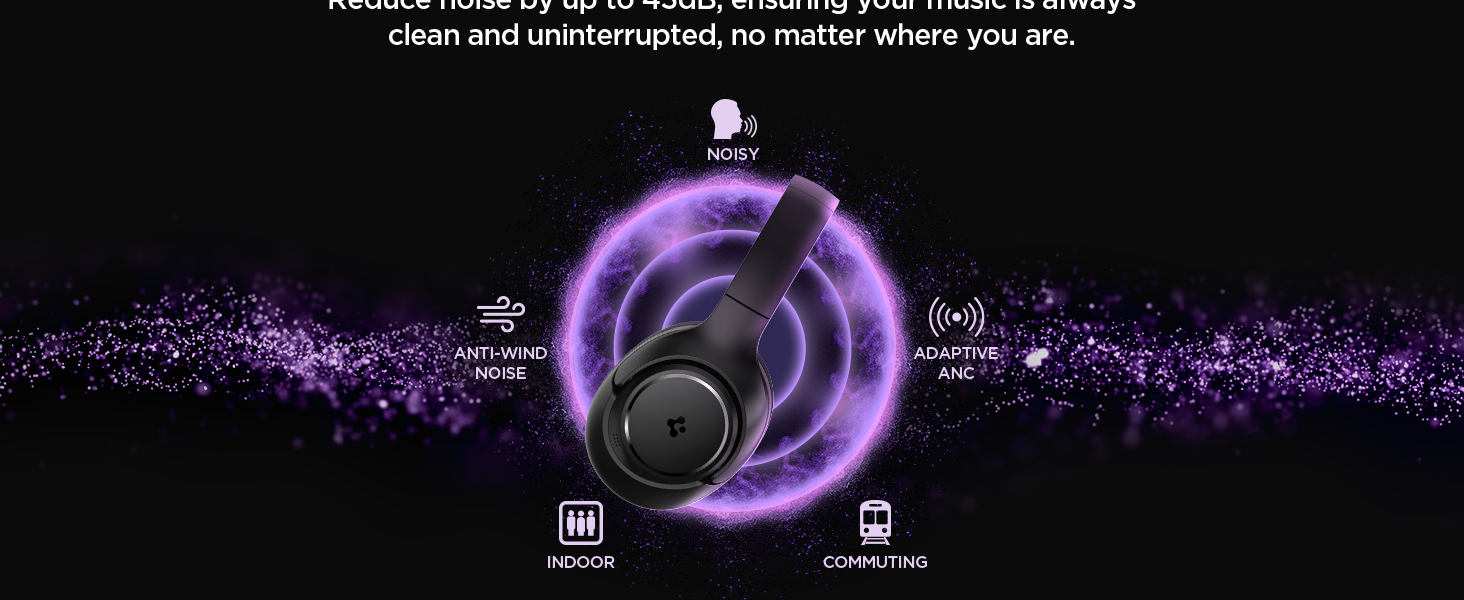
Image: Spigen SA-HP P10 headphones positioned next to a smartphone and a game controller, emphasizing the low-latency feature for an enhanced gaming experience.
3. ڪال ڪرڻ:
- جواب/آخر ڪال: پاور بٽڻ کي مختصر دٻايو.
- ڪال رد ڪريو: پاور بٽڻ کي ڊگھو دٻايو.
- The 5-MIC system ensures clear voice pickup and ambient noise reduction during calls.
سار سنڀال
Cleaning EarPads:
- The ear pads are detachable for easy cleaning.
- Gently remove the ear pads from the headphones.
- نرم سان صاف ڪريو، ڊيamp ڪپڙو ۽ هلڪو صابڻ. ٻيهر ڳنڍڻ کان اڳ مڪمل طور تي هوا ۾ سڪي وڃڻ ڏيو.
- سخت ڪيميائي يا رگڻ واري مواد استعمال نه ڪريو.

Image: Hands gently cleaning a detachable earpad of the Spigen SA-HP P10 headphones with a white cloth, demonstrating the ease of maintenance.
مشڪلاتون
- طاقت ناهي: پڪ ڪريو ته هيڊفون مڪمل طور تي چارج ٿيل آهن.
- جوڙي نه ٿو سگهجي: Make sure headphones are in pairing mode (flashing blue/red LED). Turn off and on your device's Bluetooth.
- آواز جا مسئلا: Check volume levels on both headphones and your device. Ensure headphones are within Bluetooth range. Try re-pairing.
- ANC ڪم نه ڪري رهيو آهي: Ensure ANC mode is activated via the switch or app.
وضاحتون
| ماڊل نالو | SA-HP P10 |
| بلوٽوت ورزن | 5.4 |
| بيٽري جي زندگي | 60 ڪلاڪ تائين |
| فعال شور منسوخي | 43dB تائين |
| ڊرائيور جي ماپ | 40mm متحرڪ ڊرائيور |
| مائڪروفون | 5-MIC System |
| ڪنٽرول جو طريقو | App / On-device Buttons |
| شيءِ جو وزن | 273 گرام (9.6 آونس) |
| پيداوار جي ماپ | 3.22 x 6.31 x 7.75 انچ |
وارنٽي ۽ سپورٽ
For warranty information or technical support, please visit the official Spigen website or contact Spigen customer service directly. Keep your purchase receipt for warranty claims.


