تعارف
Transform your iPad into a versatile workstation with the Epico iPad Keyboard Case. This innovative accessory features a detachable keyboard with seven-colour backlighting, a multi-finger gesture touchpad, and comprehensive iPadOS shortcuts. Designed for both functionality and protection, it enhances your iPad experience for typing, watching, and browsing.

Image: The Epico iPad Keyboard Case with an iPad inserted, shown in a tilted typing position.
خاصيتون
- بيڪ لِٽ ڪي بورڊ: Seven distinct backlight colours with adjustable brightness levels for comfortable typing in any lighting condition.
- Touchpad Functionality: Multi-finger gesture touchpad provides precise control and enhanced navigation capabilities.
- Shortcut Integration: Comprehensive range of iPadOS shortcuts built into the keyboard for efficient device control and workflow optimisation.
- ورسٽائل ڊيزائن: Includes detachable keyboard and tilted backside stand for multiple viewing angles and usage modes.
- Power Solution: Equipped with Li-ion battery and USB-C charging capability, operating independently from iPad's power source.
پيڪيج مواد
- Epico iPad Keyboard Case
- USB-C کان USB-C چارجنگ ڪيبل
- استعمال ڪندڙ جو دستياب (ھي دستاويز)
سيٽ اپ ڪريو
1. ڪي بورڊ کي چارج ڪرڻ
Before first use, fully charge the keyboard. Connect the provided USB-C to USB-C charging cable to the keyboard's USB-C port and the other end to a compatible USB-C power adapter (not included).
تصوير: پاسي view of the keyboard case, highlighting the USB-C charging port.
2. Inserting Your iPad
- Gently align your iPad with the case's frame.
- Press firmly but carefully to secure the iPad into the protective shell. Ensure all edges are properly seated.

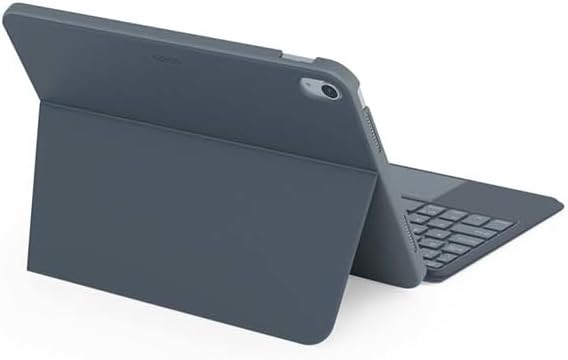
تصوير: پوئين پاسي view of the Epico iPad Keyboard Case, demonstrating the secure fit of the iPad.
3. iPad سان جوڙڻ
- Turn on the keyboard by sliding the power switch (usually located on the side or back of the keyboard).
- پنهنجي iPad تي، وڃو سيٽنگون > بلوٽوٿ.
- Enable Bluetooth. The keyboard should appear in the "Other Devices" list as "Epico Keyboard" or similar.
- Tap on the keyboard name to pair. Follow any on-screen prompts.
- Once paired, the keyboard's indicator light will change, and it will be ready for use.
آپريٽنگ هدايتون
ڪي بورڊ جو استعمال
The keyboard functions like a standard QWERTY keyboard. Ensure the keyboard is paired with your iPad before typing.

تصوير: سامهون view of the Epico iPad Keyboard Case, displaying the full keyboard layout and touchpad.
Backlight ڪنٽرول
- کي دٻايو بلب ٻاريو key (often near the function keys) to cycle through backlight colours.
- دٻايو ايف اين + روشني بلب key to adjust backlight brightness levels.
ٽچ پيڊ اشارو
The integrated touchpad supports multi-finger gestures for enhanced navigation:
- اڪيلو آڱر ٽيپ: کاٻي ڪلڪ ڪريو.
- ٻن آڱرين سان ٽيپ: ساڄي ڪلڪ ڪريو (حوالو مينيو).
- ٻن آڱرين سان اسڪرول: مٿي/هيٺ يا کاٻي/ساڄي اسڪرول ڪريو.
- زوم ڪرڻ لاءِ پنچ ڪريو: مواد کي زوم ان/آئوٽ ڪريو.
- Refer to iPadOS settings for additional gesture customization.
iPadOS Shortcuts
The keyboard includes dedicated function keys for common iPadOS shortcuts. These may vary slightly by iPadOS version, but typically include:
- گهر: گھر جي اسڪرين ڏانھن واپس وڃو.
- ڳولهي: Activate Spotlight search.
- روشني ڪنٽرول: اسڪرين جي روشني کي ترتيب ڏيو.
- ميڊيا ڪنٽرول: Play/Pause, Previous/Next track.
- حجم ڪنٽرول: سسٽم جي مقدار کي ترتيب ڏيو.
- اسڪرين کي لاڪ ڪيو: Lock your iPad.
سار سنڀال
صفائي
- Use a soft, lint-free cloth to wipe the exterior of the case and keyboard.
- ضدي نشانن لاءِ، ٿورو ڊيampur پاڻيءَ سان ڪپڙو يا نرم، غير ابريندڙ صاف ڪندڙ.
- Avoid getting moisture into the keyboard keys or ports.
- سخت ڪيميڪل، محلول، يا رگڙيندڙ مواد استعمال نه ڪريو.
ذخيرو
جڏهن گهڻي وقت تائين استعمال ۾ نه هجي، ته ڪي بورڊ ڪيس کي ٿڌي، سڪل جاءِ تي رکو. پڪ ڪريو ته بيٽري جي زندگي بچائڻ لاءِ ڪي بورڊ بند آهي.
مشڪلاتون
- ڪي بورڊ ڳنڍجي نه رهيو آهي:
Ensure the keyboard is charged and turned on. Check iPad's Bluetooth settings to confirm it's enabled and the keyboard is paired. Try unpairing and re-pairing the keyboard.
- چاٻيون جواب نه ڏئي رهيون آهن:
Check battery level. Restart both the keyboard and your iPad. Ensure no debris is lodged under the keys.
- بيڪ لائيٽ ڪم نه ڪري رهي آهي:
Ensure the keyboard is on and charged. Cycle through backlight settings using the dedicated key.
- Touchpad not responding:
Ensure the touchpad is enabled (some keyboards have a function key to toggle it). Check iPadOS settings for touchpad functionality.
وضاحتون
| برانڊ | ايپيڪو |
| ماڊل نالو | Epico Keyboard Case |
| مطابقت رکندڙ ڊوائيسز | ايپل iPad |
| رابطي | بلوٽوٿ |
| پٺاڻ | 7-Colour, Adjustable Brightness |
| ٽچ پيڊ | Multi-finger Gesture Support |
| چارجنگ پورٽ | USB-C |
| طاقت جو ذريعو | بلٽ ان لي آئن بيٽري |
| شيءِ جو وزن | 15.9 آونس (تقريبن 450 گرام) |
| پيداوار جي ماپ (LxWxH) | 9.94 x 7.24 x 0.48 انچ (تقريبن 25.25 x 18.39 x 1.22 سينٽي ميٽر) |
| مواد | پلاسٽڪ، ڌاتو |
وارنٽي ۽ سپورٽ
This Epico product is covered by a manufacturer's warranty. Please refer to the warranty card included with your purchase or visit the official Epico webتفصيلي وارنٽي شرطن ۽ ضابطن لاءِ سائيٽ.
For technical support, troubleshooting assistance, or inquiries about your product, please contact Epico customer service through their official webسائيٽ يا توهان جي خريداري جي رسيد تي ڏنل رابطي جي معلومات.


