1. تعارف
Thank you for choosing LIVIKEY Clip-On Earbuds. These open-ear headphones are designed for ultimate comfort and a secure fit, perfect for daily use, sports, and workouts. Featuring Bluetooth 5.4, long battery life, and IPX5 water resistance, they provide a superior audio experience while keeping you aware of your surroundings. Please read this manual carefully before using the product to ensure proper operation and maintenance.

Image: LIVIKEY Clip-On Earbuds in their charging case, with one earbud shown separately. The earbuds are black with a sleek, open-ear clip design.
2. پيڪيج مواد
مھرباني ڪري ھيٺ ڏنل شين لاءِ پيڪيج چيڪ ڪريو:
- LIVIKEY Clip-On Earbuds (Left & Right) x 1 pair
- چارجنگ ڪيس x 1
- USB قسم-سي چارجنگ ڪيبل x 1
- يوزر مينوئل x 1

Image: A visual representation of the package contents, including the open-ear earbuds, charging case, user manual, and Type-C charging cable.
3. سيٽ اپ
3.1 ائربڊس ۽ ڪيس کي چارج ڪرڻ
پهرين استعمال کان اڳ، ائربڊس ۽ چارجنگ ڪيس کي مڪمل طور تي چارج ڪريو. مهيا ڪيل USB ٽائپ-سي ڪيبل کي ڪيس تي چارجنگ پورٽ ۽ پاور سورس سان ڳنڍيو. ڪيس تي انڊيڪيٽر لائيٽ چارجنگ اسٽيٽس ڏيکاريندي.
- هڪ ڀيرو چارج ڪرڻ سان 10 ڪلاڪن تائين پلے بیک ملي ٿو.
- The charging case provides an additional 40 hours, totaling up to 50 hours of listening time.
- Fast-charging: 5 minutes of charging provides 1 hour of playback.

Image: A graphic showing the battery performance: 10 hours on a single charge, 50 hours with the charging case, and 100 days of standby time.
3.2 توهان جي ڊوائيس سان جوڙڻ
- Open the charging case. The earbuds will automatically enter pairing mode, and the indicator lights will flash.
- پنهنجي ڊوائيس (اسمارٽ فون، ٽيبليٽ، ڪمپيوٽر) تي، بلوٽوٿ کي فعال ڪريو.
- ڳولھيو "LIVIKEY T20" in the list of available Bluetooth devices.
- Select "LIVIKEY T20" to connect. Once connected, the earbud indicator lights will turn off.
جيڪڏهن ڊوائيس تي بلوٽوٿ فعال هجي ته ڪيس مان ڪڍڻ تي ائربڊس پاڻمرادو آخري جوڙيل ڊوائيس سان ٻيهر ڳنڍجي ويندا.
3.3 How to Wear the Earbuds
The LIVIKEY Clip-On Earbuds are designed for a comfortable and secure fit. Follow these steps for optimal wearing:
- Identify the small and big parts of the earbud.
- Place the small part on your ear, with the big part positioned behind your earlobe.
- Adjust the earbud downward until it sits comfortably and securely on your ear.

Image: A three-step diagram illustrating how to properly wear the clip-on earbuds: identifying parts, placing on the ear, and adjusting for comfort.

Image: A comparison graphic highlighting the benefits of the ear clip design over traditional in-ear, ear hook, and headset designs, emphasizing comfort and stability.
4. آپريٽنگ هدايتون
4.1 ٽچ ڪنٽرول
The LIVIKEY Clip-On Earbuds feature smart touch controls for easy management of music and calls.

Image: A visual guide to the touch controls on the earbuds, showing actions for single tap, double tap, triple tap, and long press.
| عمل | فنڪشن | ائربڊ (L/R) |
|---|---|---|
| Tap X1 | موسيقي کي هلايو / روڪيو | ايل/آر |
| Tap X1 | جواب ڏيو / ڪال ختم ڪريو | ايل/آر |
| Tap X2 | Access Voice Assistant | ايل/آر |
| Tap X3 | اڳيون گيت | L |
| Tap X3 | ايندڙ گيت | R |
| ڊگهو پريس | حجم ھيٺ | L |
| ڊگهو پريس | حجم مٿي | R |
4.2 پاور آن/آف
- پاور آن: چارجنگ ڪيس کوليو، ۽ ائربڊ پاڻمرادو پاور آن ٿي ويندا.
- بجلي بند: ائربڊس کي واپس چارجنگ ڪيس ۾ رکو ۽ ڍڪ بند ڪريو. اهي خودڪار طريقي سان بند ٿي ويندا ۽ چارج ٿيڻ شروع ٿي ويندا.
5. سار سنڀال
5.1 صفائي
- ائربڊس ۽ چارجنگ ڪيس کي باقاعدي طور تي نرم، سڪل، لِنٽ فري ڪپڙي سان صاف ڪريو.
- گھڙڻ وارا صاف ڪندڙ، الڪوحل، يا ڪيميائي محلول استعمال نه ڪريو.
- پڪ ڪريو ته ٻنهي ائربڊس ۽ ڪيس تي چارجنگ ڪانٽيڪٽس صاف ۽ سڪل آهن.
5.2 اسٽوريج
- ائربڊس کي انهن جي چارجنگ ڪيس ۾ محفوظ ڪريو جڏهن استعمال ۾ نه هجي ته انهن کي محفوظ رکڻ ۽ چارج رکڻ لاءِ.
- سخت گرمي پد (گرم يا ٿڌو) يا وڌيڪ نمي ۾ ذخيرو ڪرڻ کان پاسو ڪريو.

Image: A close-up of a man wearing an earbud while it's raining, illustrating the IPX5 water resistance feature. While the earbuds are water-resistant, they should not be submerged.
6. مسئلا حل ڪرڻ
| مسئلو | ممڪن سبب | حل |
|---|---|---|
| ائربڊس نه ملائي رهيا آهن | Low battery, out of range, pairing mode not active | Charge earbuds and case. Ensure earbuds are in pairing mode. Move closer to the device. |
| هڪ earbud مان ڪوبه آواز ناهي | Low battery, not properly connected, individual earbud issue | Ensure both earbuds are charged. Re-pair the earbuds. Try resetting the earbuds (refer to manufacturer's webجيڪڏهن ضرورت هجي ته مخصوص ري سيٽ هدايتن لاءِ سائيٽ). |
| غريب آواز جي معيار | Weak Bluetooth signal, interference, dirty earbuds | Move closer to the device. Avoid strong electromagnetic interference. Clean earbuds. |
| ائربڊس چارج نه ٿي رهيا آهن | Dirty charging contacts, faulty cable/charger | Clean charging contacts on earbuds and case. Try a different USB-C cable and charger. |
7. وضاحتون
| خاصيت | وصف |
|---|---|
| ماڊل نالو | تي20 |
| رابطي ٽيڪنالاجي | وائرليس (بلوٽوٿ 5.4) |
| ائيربود وزن | 4.3g (في ائربڊ) |
| اسپيڪر سائيز | 12mm |
| راند جو وقت (سنگل چارج) | 10 ڪلاڪ تائين |
| ڪُل راند جو وقت (ڪيس سان) | 50 ڪلاڪ تائين |
| چارجنگ پورٽ | USB قسم-سي |
| پاڻي جي مزاحمت | IPX5 |
| ڪنٽرول جو طريقو | ڇڪڻ |
| شور ڪنٽرول | Passive Noise Cancellation (CVC for calls) |
| تعدد جي حد | 20 هرٽز - 20,000 هرٽز |
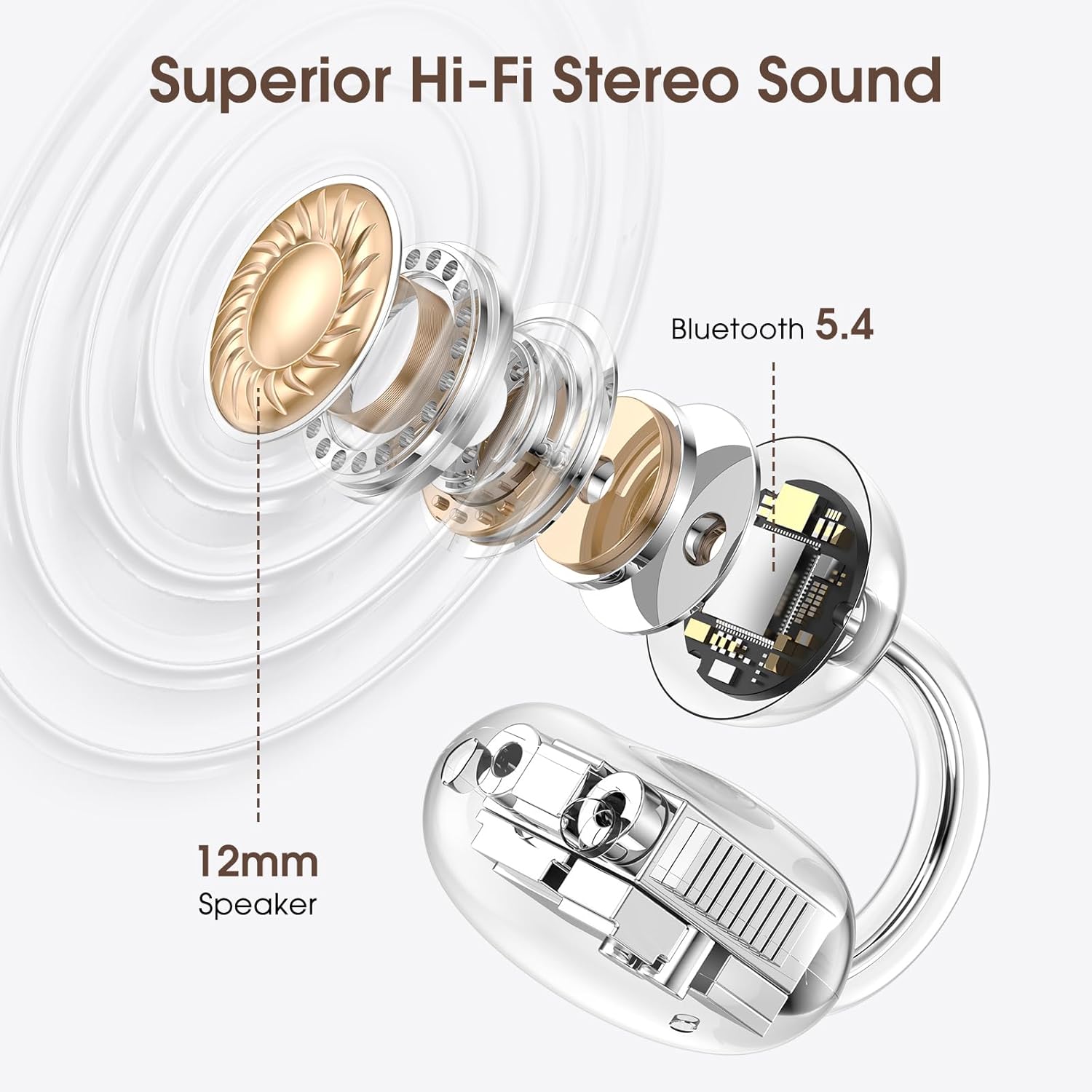
تصوير: هڪ ڌماڪو ٿيو view diagram highlighting the 12mm speaker for superior Hi-Fi stereo sound and the integrated Bluetooth 5.4 chip for stable connectivity.

تصوير: هڪ تفصيلي view of a Bluetooth 5.4 chip, emphasizing its role in providing faster transmission speeds and more stable connections for the earbuds.
8. وارنٽي ۽ سپورٽ
LIVIKEY products are designed and manufactured to the highest quality standards. This product is covered by a standard manufacturer's warranty. For detailed warranty information, please refer to the warranty card included in your package or visit the official LIVIKEY webسائيٽ.
If you encounter any issues or have questions regarding your LIVIKEY Clip-On Earbuds, please contact our customer support team:
- اي ميل: [پراڊڪٽ پيڪنگنگ يا سرڪاري جو حوالو ڏيو webسائيٽ]
- Webسائيٽ: LIVIKEY Official Store on Amazon
Please have your product model (T20) and purchase information ready when contacting support.


