1. تعارف
The Beafon Silverline ML10 LTE Desk Phone is designed for ease of use and reliability, offering essential communication features with enhanced safety options. This manual provides detailed instructions for setting up, operating, and maintaining your device.
اهم خاصيتون شامل آهن:
- 4G LTE Desk Phone connectivity
- Hearing Aid Compatible (HAC M4/T4)
- Programmable SOS emergency numbers with included SOS wristband/necklace (433 MHz range)
- Three quick dial keys for photos or symbols
- Digital announcement when pressing keys
- Extra-large XXL digits on display
- Extra loud ringer (90 dB) and earpiece volume (+40 dB)
- Hands-free function and Bluetooth LE
- SMS functionality and Audio Booster button

2. اهم حفاظتي ڄاڻ
Please read all safety instructions before using the device to prevent injury or damage. Keep this manual for future reference.
- ڊوائيس کي انتهائي گرمي پد، سڌي سج جي روشني، يا نمي جي سامهون نه رکو.
- صرف منظور ٿيل لوازمات ۽ پاور اڊاپٽر استعمال ڪريو.
- ڊوائيس کي مضبوط اثرن لاءِ ڇڏڻ يا تابع ڪرڻ کان پاسو ڪريو.
- پاڻ ڊوائيس کي ڌار ڪرڻ يا مرمت ڪرڻ جي ڪوشش نه ڪريو. قابل سروس اهلڪارن سان رابطو ڪريو.
- Keep the device away from medical devices, such as pacemakers, to avoid interference.
3. پيڪيج مواد
پڪ ڪريو ته سڀئي شيون پيڪيج ۾ موجود آهن:
- Beafon Silverline ML10 LTE Desk Phone unit
- هينڊ سيٽ ۽ ڪوئل ٿيل تار
- پاور اڊاپٽر
- USB charger cable (USB-C)
- SOS wristband
- SOS necklace
- Lithium-ion battery (pre-installed or separate)
- استعمال ڪندڙ جو دستياب (ھي دستاويز)
4. پراڊڪٽ ختمview
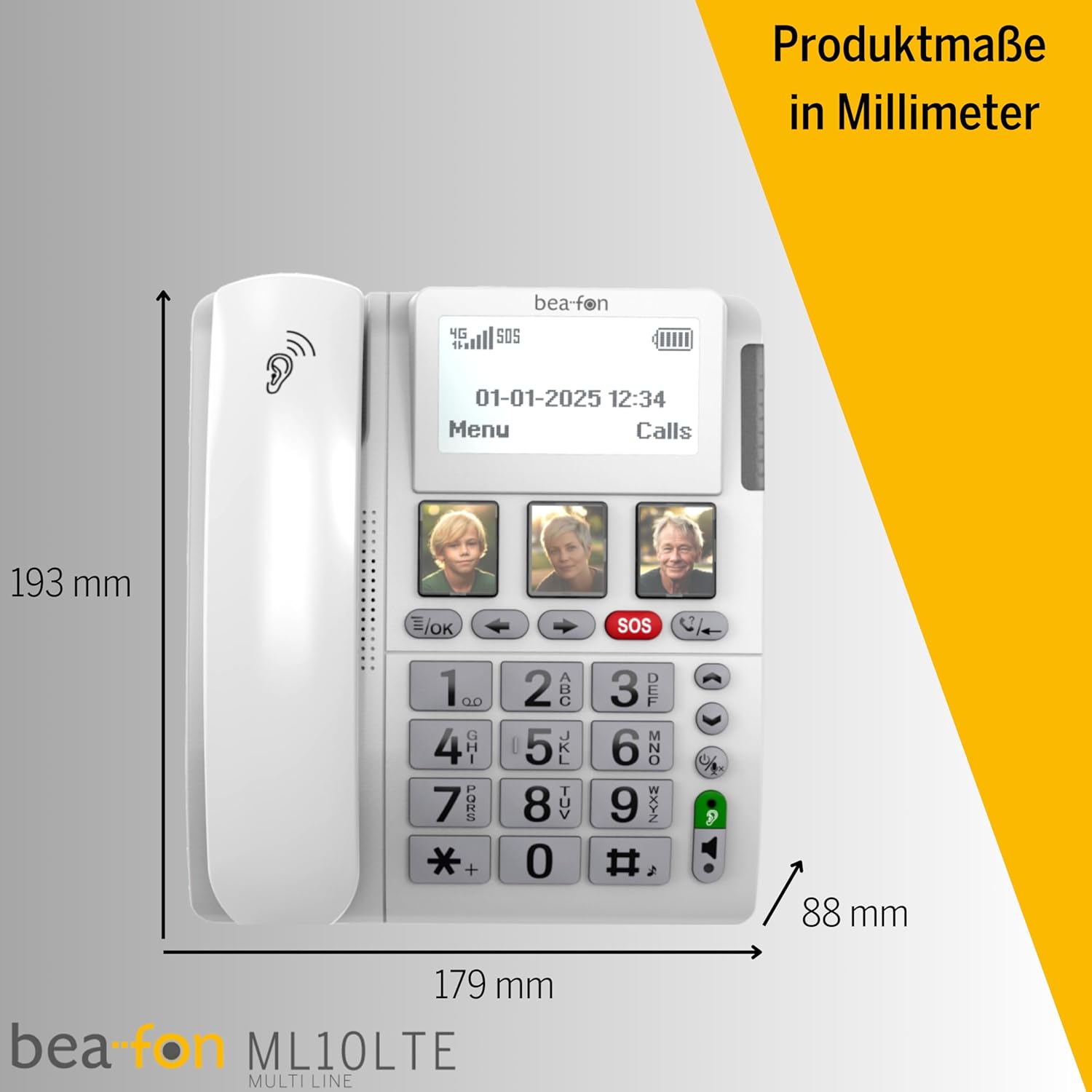
Familiarize yourself with the various parts of your Beafon ML10 desk phone.


5. سيٽ اپ
5.1. سم ڪارڊ داخل ڪرڻ
- Ensure the phone is powered off and disconnected from the power source.
- Locate the SIM card slot, usually on the back or side of the device.
- Insert a Nano SIM card into the designated slot, ensuring correct orientation.
- سم ڪارڊ سلاٽ جو ڍڪ محفوظ طور تي بند ڪريو.
5.2. ڳنڍڻ واري طاقت
- Connect the USB-C charger cable to the phone's charging port.
- پاور اڊاپٽر کي وال آئوٽليٽ ۾ لڳايو.
- The phone can operate on battery power via 4G LTE, eliminating the need for a fixed line connection.
5.3. شروعاتي پاور آن ۽ ٻولي جي چونڊ
- Press and hold the Power button until the display turns on.
- پنهنجي پسنديده ٻولي چونڊڻ لاءِ اسڪرين تي ڏنل هدايتن تي عمل ڪريو.
- The phone will automatically search for a 4G LTE network.

6. آپريٽنگ هدايتون
6.1. ڪالون ڪرڻ ۽ وصول ڪرڻ
- ڪال ڪرڻ: Lift the handset, dial the number using the large keypad, and press the green call button.
- ڪال وصول ڪرڻ: When the phone rings (up to 90 dB), lift the handset or press the hands-free button to answer.
- هٿ-مفت فنڪشن: Press the dedicated hands-free button to activate speakerphone during a call.
6.2. Quick Dial Keys
The phone features three programmable quick dial keys (I, II, III) that can be customized with photos or symbols for easy access to frequently called contacts.
- پروگرامنگ: Navigate to the phone's menu, select 'Quick Dial Settings', and assign a contact number to each key. You can also associate a photo or symbol.
- استعمال ڪندي: Simply press the desired quick dial key to call the assigned contact.
6.3. SOS Emergency Function
The SOS function allows you to quickly contact pre-selected emergency numbers. It includes an SOS button on the phone and a separate SOS wristband/necklace.
- Programming SOS Numbers: Access the 'SOS Settings' in the menu to program up to five emergency contact numbers.
- Activating SOS (Phone): Press and hold the red SOS button on the phone. The phone will automatically call the programmed numbers in sequence until an answer is received.
- Activating SOS (Wristband/Necklace): Press the button on the SOS wristband or necklace. This will trigger the phone to initiate the emergency call sequence. The wristband/necklace has a range of 433 MHz.


6.4. ٻيا ڪم
- ايس ايم ايس: The phone supports sending and receiving text messages. Access the 'Messages' menu to compose or read SMS.
- Audio Booster: Press the Audio Booster button during a call to temporarily increase the earpiece volume for clearer audio.
- بلوٽوت LE: Use Bluetooth Low Energy to connect compatible wireless accessories.
- HAC Compatibility: The phone is certified HAC M4/T4, making it suitable for users with hearing aids.
7. سار سنڀال
7.1. ڊوائيس صاف ڪرڻ
پنهنجي فون کي بهترين حالت ۾ رکڻ لاءِ:
- فون جي مٿاڇري کي نرم، ڊي سان صاف ڪريوamp ڪپڙو.
- استعمال نه ڪريو سخت ڪيميائي يا rasرندڙ صاف ڪندڙ.
- Ensure no moisture enters openings such as the microphone or speaker.
7.2. بيٽري جي سنڀال
The phone is powered by a Lithium-ion battery. To prolong battery life:
- بيٽري کي بار بار مڪمل طور تي چارج ڪرڻ کان پاسو ڪريو.
- Charge the phone regularly, especially if not in use for extended periods.
- جڏهن استعمال ۾ نه هجي ته ڊوائيس کي ٿڌي، سڪل جڳهه ۾ ذخيرو ڪريو.
8. مسئلا حل ڪرڻ
If you encounter issues with your Beafon ML10, refer to the following common problems and solutions:
| مسئلو | ممڪن حل |
|---|---|
| فون آن نٿو ٿئي | Check if the power adapter is correctly connected and the battery is charged. Ensure the battery is properly inserted. |
| ڪالون نه ٿو ڪري سگھجي ۽ نه ئي وصول ڪري سگھجي ٿو | Verify that the SIM card is correctly inserted and activated. Check for network signal strength on the display. Restart the phone. |
| SOS function not working | Ensure SOS numbers are correctly programmed. Check the battery level of the SOS wristband/necklace. Verify the wristband/necklace is within range (433 MHz). |
| غريب آڊيو معيار | Adjust the earpiece volume. Ensure the microphone is not blocked. If using hands-free, ensure you are close to the phone. |
| ڊسپلي خالي يا منجهيل آهي. | Try restarting the phone by holding the power button. If unresponsive, disconnect power and re-connect. |
9. وضاحتون
Technical details of the Beafon Silverline ML10 LTE Desk Phone:
| خاصيت | تفصيل |
|---|---|
| برانڊ | Beafon |
| ماڊل نمبر | 15031162187 |
| آپريٽنگ سسٽم | RTOS |
| فون جو قسم | نانو سم |
| رابطي | 4G LTE, Bluetooth LE |
| بيٽري جي جوڙجڪ | ليٿيم-آئن (1 شامل آهي) |
| طاقت جو ذريعو | بيٽري سان هلندڙ |
| رينجر جو حجم | 90 ڊي بي تائين |
| Earpiece Volume | +40 ڊي بي |
| ٻڌڻ جي مدد سان مطابقت | HAC M4/T4 |
| SOS Wristband/Necklace Range | 433 MHz |
| وزن | 210 گرام |
| ڪالر ID | ها |
| ملٽي لائن آپريشن | سنگل لائن آپريشن |
10. وارنٽي ۽ سپورٽ
Information regarding the specific warranty period and detailed support contact information for the Beafon Silverline ML10 LTE Desk Phone is not available in the provided product data. Please refer to the product packaging or the manufacturer's official website for the most current warranty terms and customer support details.


