1. پراڊڪٽ ختمview
The ORICO 40Gbps M.2 NVMe SSD Enclosure (Model CNM2-U4-GY) is designed for high-speed data transfer and external storage. It features a built-in cooling fan and an aluminum alloy shell to ensure optimal thermal management during intensive use. This enclosure supports M-Key NVMe SSDs and is compatible with various interfaces including USB4, Thunderbolt 4/3, USB 3.2, USB 3.1, and USB 3.0.

تصوير 1.1: مٿيview of the ORICO 40Gbps M.2 NVMe SSD Enclosure.
2. پيڪيج مواد
مھرباني ڪري تصديق ڪريو ته سڀ شيون پيڪيج ۾ موجود آھن:
- 1 x ORICO 40Gbps NVMe SSD Enclosure
- 1 x 2-in-1 USB Cable (USB-C to USB-C 40Gbps, USB-C to USB-A 10Gbps)
- 1 x حرارتي سلڪون پيڊ
- 1 x اسڪوائر
- Screws for SSD installation
- استعمال ڪندڙ دستي

Image 2.1: Contents included in the ORICO NVMe SSD Enclosure package.
3. وضاحتون
| خاصيت | وصف |
|---|---|
| ماڊل نمبر | CNM2-U4-GY |
| انٽرفيس | USB4 (40Gbps), Thunderbolt 4/3, USB 3.2/3.1/3.0 |
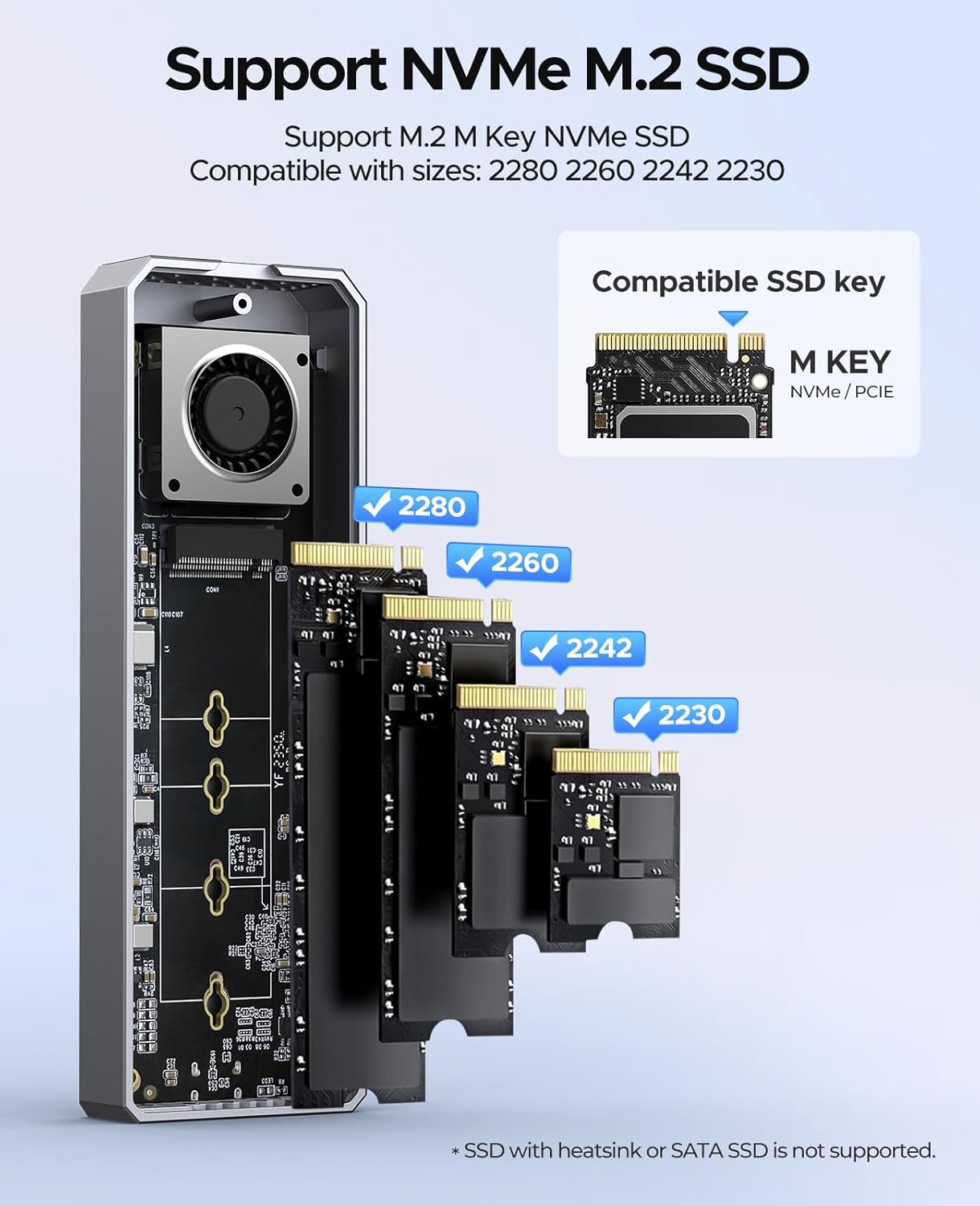
| SSD مطابقت | M-Key 2230/2242/2260/2280 NVMe SSDs (up to 8TB) |
| کولنگ سسٽم | Built-in Fan, Aluminum Alloy Shell, Silicone Thermal Pads |
| ڊيٽا جي منتقلي جي رفتار | Up to 40Gbps (Read: 3500 MB/s, Write: 3000 MB/s) |
| طول و عرض (LxWxH) | 5.83 x 1.93 x 0.71 انچ |
| وزن | 9.1 اونس |
| مواد | المونيم مصر |
| سپورٽ ٿيل OS | ونڊوز، ميڪوس، لينڪس، اينڊرائيڊ |
Note: Not compatible with Intel CPUs prior to 12th Gen. Not recommended for SN750, 970 EVO Plus, or P3 SSDs. SATA SSDs are not supported.
4. سيٽ اپ ۽ تنصيب
پنھنجي M.2 NVMe SSD کي انڪلوزر ۾ انسٽال ڪرڻ لاءِ ھيٺين قدمن تي عمل ڪريو:
- ڪپڙا هٽايو: Use the provided screwdriver to unscrew the retaining screw and gently slide open the upper cover of the enclosure.
- انسٽال ڪريو M.2 SSD: Insert your M.2 NVMe SSD into the M.2 interface at a 45-degree angle. Gently push down the SSD and secure it with the provided screw to fix it in place. Ensure the SSD is M-Key compatible and of size 2230, 2242, 2260, or 2280.
- ٿرمل پيڊ لاڳو ڪريو: Place the silicone thermal pad onto the installed SSD. This helps in heat dissipation.
- مڪمل تنصيب: Close the upper cover and secure it with the retaining screw.

Image 4.1: Step-by-step guide for M.2 NVMe SSD installation.

Image 4.2: Supported M.2 NVMe SSD types and sizes.
5. آپريشن
Once the SSD is installed, connect the enclosure to your host device using the provided 2-in-1 USB cable. The enclosure is plug-and-play and does not require additional drivers for most operating systems.
5.1 ڊيٽا جي منتقلي
Utilize the USB-C to USB-C cable for 40Gbps transfer speeds when connecting to compatible Thunderbolt 3/4 or USB4 ports. For devices with USB-A ports, use the USB-C to USB-A cable for speeds up to 10Gbps. The enclosure supports UASP and TRIM commands for optimized performance and SSD longevity.

Image 5.1: Enclosure connected to a laptop for data transfer.
5.2 بجلي پهچائڻ
The USB-C to USB-C cable also supports 100W Power Delivery (PD) fast charging, allowing for simultaneous data transfer and device charging if your host device supports it.

Image 5.2: The versatile 2-in-1 data cable for the enclosure.
6. کولنگ سسٽم
The ORICO NVMe SSD Enclosure incorporates a multi-level cooling system to maintain optimal operating temperatures for your SSD, preventing performance throttling and ensuring stability during prolonged use.
- بلٽ ان کولنگ فين: An integrated fan actively circulates air to dissipate heat. The fan operates at 7000 RPM, producing approximately 40-60 decibels of sound.
- المونيم مصر شيل: The entire enclosure is constructed from aluminum alloy, which acts as a large heatsink to draw heat away from the SSD.
- Silicone Thermal Pads: These pads create direct contact between the SSD and the aluminum casing, enhancing thermal conductivity.
تصوير 6.1: اندروني view highlighting the built-in cooling fan.

Image 6.2: Illustration of the multi-level cooling design.
7. مطابقت
The enclosure offers broad compatibility with various devices and operating systems:
7.1 Host Device Compatibility
- Intel 12th Gen CPUs and later
- Apple M1/M2/M3/M4 chips
- AMD CPUs
- Compatible with devices featuring Thunderbolt 3/4, USB4, USB 3.2, USB 3.1, and USB 3.0 interfaces.
Note: Not compatible with Intel CPUs prior to 12th Gen, including older Apple devices.
7.2 آپريٽنگ سسٽم مطابقت
- ونڊوز
- macOS
- iPad OS
- لينڪس
- Android

تصوير 7.1: مٿيview ڊوائيس ۽ سسٽم جي مطابقت جو.
8. مسئلا حل ڪرڻ
If you encounter issues with your ORICO NVMe SSD Enclosure, consider the following:
- ملفوظات نه مليا:
- پڪ ڪريو ته ايس ايس ڊي صحيح طرح سان نصب ٿيل آهي ۽ انڪلوزر اندر محفوظ آهي.
- Try connecting the enclosure to a different USB/Thunderbolt port on your device.
- جيڪڏهن موجود هجي ته مختلف USB ڪيبل سان ٽيسٽ ڪريو.
- Verify that your host device's operating system is up to date and has the necessary drivers for USB/Thunderbolt.
- ڊسڪ مئنيجمينٽ (ونڊوز) يا ڊسڪ يوٽيلٽي (macOS) چيڪ ڪريو ته ڏسو ته ڊرائيو سڃاتي وئي آهي پر شروع نه ڪئي وئي آهي يا فارميٽ نه ڪئي وئي آهي.
- سست منتقلي جي رفتار:
- Ensure you are using a 40Gbps compatible port (Thunderbolt 3/4 or USB4) and the USB-C to USB-C cable for maximum speed.
- Confirm your SSD is capable of high speeds.
- ٻيون ايپليڪيشنون بند ڪريو جيڪي شايد سسٽم وسيلن يا ڊسڪ I/O استعمال ڪري رهيون هجن.
- Check for background processes like antivirus scans.
- گهڻو گرم ٿيڻ:
- Ensure the thermal silicone pad is correctly placed on the SSD.
- Avoid obstructing the ventilation holes on the enclosure.
- While the fan helps, continuous heavy load can still generate heat. Allow the device to cool if it becomes excessively hot.
- SSD Not Supported:
- Confirm your SSD is an M-Key NVMe SSD and not a SATA M.2 SSD. SATA M.2 SSDs are not compatible.
- Refer to the specifications for specific SSD models that are not recommended (e.g., SN750, 970 EVO Plus, P3).
9. وارنٽي ۽ سپورٽ
ORICO جون شيون عام طور تي ٺاهيندڙ جي وارنٽي سان گڏ اينديون آهن. مھرباني ڪري پنھنجي پيڪيج ۾ شامل وارنٽي ڪارڊ ڏسو يا سرڪاري ORICO جو دورو ڪريو. webتفصيلي وارنٽي شرطن ۽ ضابطن لاءِ سائيٽ.
For technical support, product inquiries, or warranty claims, please contact ORICO customer service through their official channels. Contact information can usually be found on the ORICO webسائيٽ يا پيداوار جي پيڪنگنگ ۾.
When contacting support, please have your product model number (CNM2-U4-GY) and purchase information readily available.


