1. تعارف
The Arylic A100 is a 100W×2 high-power stereo amplifier designed for home audio systems. It integrates wireless streaming capabilities including WiFi, Bluetooth, and AirPlay, along with support for various online music services and FM radio. The device features dual microphone input jacks for karaoke and multiroom audio functionality, allowing synchronized or independent playback across multiple rooms.
This manual provides detailed instructions for the setup, operation, and maintenance of your Arylic A100 amplifier. Please read it thoroughly before use to ensure proper functionality and to maximize your listening experience.

This image highlights the comprehensive features of the Arylic A100, including its support for WiFi, AirPlay, Bluetooth, FM Radio, KTV, and multiroom audio, making it a versatile audio solution.
2. اهم حفاظتي ڄاڻ
- طاقت جو ذريعو: يونٽ کي صرف مخصوص وولٽ جي AC پاور آئوٽليٽ سان ڳنڍيوtage. Ensure the power cord is securely plugged in.
- وينٽيليشن: وينٽيليشن جي سوراخن کي نه روڪيو. يونٽ جي چوڌاري مناسب هوا جي وهڪري کي يقيني بڻايو وڃي ته جيئن وڌيڪ گرم ٿيڻ کان بچي سگهجي.
- پاڻي ۽ نمي: يونٽ کي مينهن، نمي، يا ٽِپڻ/ ڦُلندڙ مائع جي سامهون نه رکو. مائع سان ڀريل شيون، جهڙوڪ گلدان، ڊوائيس تي نه رکو.
- گرمي: يونٽ کي گرمي جي ذريعن جهڙوڪ ريڊيئيٽر، گرمي رجسٽر، اسٽو، يا ٻين سامان کان پري رکو (بشمول ampلائفائرز) جيڪي گرمي پيدا ڪن ٿا.
- صفائي: صرف سڪل ڪپڙي سان صاف ڪريو.
- خدمت ڪرڻ: ھن پراڊڪٽ کي پنھنجي خدمت ڪرڻ جي ڪوشش نه ڪريو. س servني خدمتن جو حوالو ڏيو قابل سروس اهلڪارن کي.
- انتوننا: Ensure all antennas (WiFi, Bluetooth, FM) are properly connected for optimal performance.
3. پيڪيج مواد
پڪ ڪريو ته هيٺ ڏنل سڀئي شيون توهان جي پيڪيج ۾ شامل آهن:
- Arylic A100 Ampلائفائر يونٽ
- پاور ڪيبل
- ريموٽ ڪنٽرول
- وائي فائي اينٽينا
- بلوٽوت انٽينا
- FM Antenna (wire type)
- استعمال ڪندڙ جو دستياب (ھي دستاويز)
4. پراڊڪٽ ختمview
4.1 فرنٽ پينل

This image displays the front panel of the Arylic A100 amplifier, featuring the power button, display screen, volume knob, mode button, preset buttons (1-6), playback controls, and dual microphone inputs with a USB port.
4.2 ريئر پينل

This image illustrates the rear panel of the Arylic A100 amplifier, detailing all connection ports including antennas, audio inputs/outputs, speaker terminals, LAN port, and power input.

هي خاڪو هڪ تفصيلي مهيا ڪري ٿو view of both the front and rear panels of the Arylic A100, with all buttons, ports, and terminals clearly labeled for easy identification.
5. سيٽ اپ
5.1 جسماني رابطا
- اينٽينا ڳنڍيو: Screw the provided WiFi, Bluetooth, and FM antennas into their respective ports on the rear panel.
- اسپيڪر ڳنڍيو: Connect your passive speakers to the R (Right) and L (Left) speaker terminals on the rear panel. Ensure correct polarity (+ to + and - to -).
- Connect Audio Sources (Optional):
- For analog devices (e.g., CD player), use the لائن ۾ RCA ports.
- For turntables, use the فون ۾ RCA ports and connect the turntable's ground wire to the جي اين ڊي ٽرمينل
- For digital audio sources (e.g., TV, game console), use the OPT In (optical) or Coaxial In بندرگاهن.
- پاور Connectنيو: Plug the power cable into the AC Power Input on the rear panel, then plug the other end into a wall outlet.

This image shows the Arylic A100 amplifier connected to a pair of speakers and a CD player, demonstrating the use of Line In and Line Out connections for analog audio equipment.

This image illustrates the Arylic A100 amplifier connected to a turntable, highlighting its dedicated Phono In input for vinyl playback.

This image shows the Arylic A100 amplifier connected to a television, demonstrating its capability to play high-quality digital sound from a TV source.
5.2 Network Setup (WiFi / LAN)
The Arylic A100 supports both wired (LAN) and wireless (WiFi) network connections for streaming services and multiroom functionality.
- Wired Connection (Recommended for Stability):
- Connect an Ethernet cable from your router to the لين پورٽ on the rear panel of the A100. The device will automatically connect to the network.

This image demonstrates connecting an Ethernet cable to the LAN port on the Arylic A100 for a stable wired network connection.
- وائرليس ڪنيڪشن (وائي فائي):
- Ensure the WiFi antenna is connected.
- Download the "Go Control" or "4Stream" app from your mobile device's app store.
- Follow the in-app instructions to connect the A100 to your home WiFi network. This typically involves selecting the A100 from a list of devices and entering your WiFi password.
6. آپريٽنگ هدايتون
6.1 بنيادي آپريشن
- پاور آن / آف: کي دٻايو پاور بٽڻ سامهون واري پينل تي.
- حجم جي ترتيب: گھمايو واليم نوب to increase or decrease the audio output.
- ان پٽ چونڊ: کي دٻايو واليم نوب to cycle through available input sources (WiFi, Bluetooth, Line In, Phono In, Optical, Coaxial, FM, USB).
- اڳواٽ چونڊ: استعمال ڪريو پري سيٽ بٽڻ (1-6) to quickly access saved radio stations or streaming playlists.
6.2 Wireless Audio Streaming
The A100 supports various wireless streaming technologies:
- بلوٽوٿ:
- چونڊيو بلوٽوت ان پٽ سورس طور.
- On your mobile device, search for "Arylic A100" in the Bluetooth settings and pair.
- WiFi Streaming (AirPlay, Spotify Connect, DLNA, UPnP):
- Ensure the A100 is connected to your WiFi network (see Section 5.2).
- Use compatible apps (e.g., Spotify, Apple Music) on your mobile device to stream audio to the A100 via AirPlay or Spotify Connect.
- The A100 is compatible with a wide range of online streaming music platforms and protocols, including Spotify, Amazon Music, TuneIn, iHeartRadio, QQ Music, TIDAL, Napster, and more.

This image displays the logos of several popular music services and platforms that are compatible with the Arylic A100 amplifier, highlighting its broad streaming capabilities.
6.3 ايف ايم ريڊيو
The A100 features a built-in FM radio tuner.
- پڪ ڪريو ته ايف ايم اينٽينا ڳنڍيل آهي.
- Select FM as the input source.
- The unit supports automatic scanning of local FM channels.
- You can preset multiple favorite channels using the preset buttons for quick access.

This close-up image of the Arylic A100's display panel shows the FM radio interface, indicating a tuned frequency and station information.
6.4 Microphone Input (KTV Function)
The A100 includes dual microphone input jacks for karaoke or public address applications.
- ٻن مائڪروفونن تائين ڳنڍيو مائڪ 1 ۽ مائڪ 2 input jacks on the front panel.
- Adjust microphone volume as needed.

This image shows a person using a microphone connected to the Arylic A100 amplifier, demonstrating its karaoke (KTV) functionality.
6.5 Multiroom Functionality
By setting up multiple Arylic devices in different rooms, you can create a multiroom audio system.
- Synchronized Playback: Play the same song in all connected rooms simultaneously.
- Independent Playback: Play different songs in different rooms at the same time.
- Control multiroom settings using the "Go Control" or "4Stream" app.
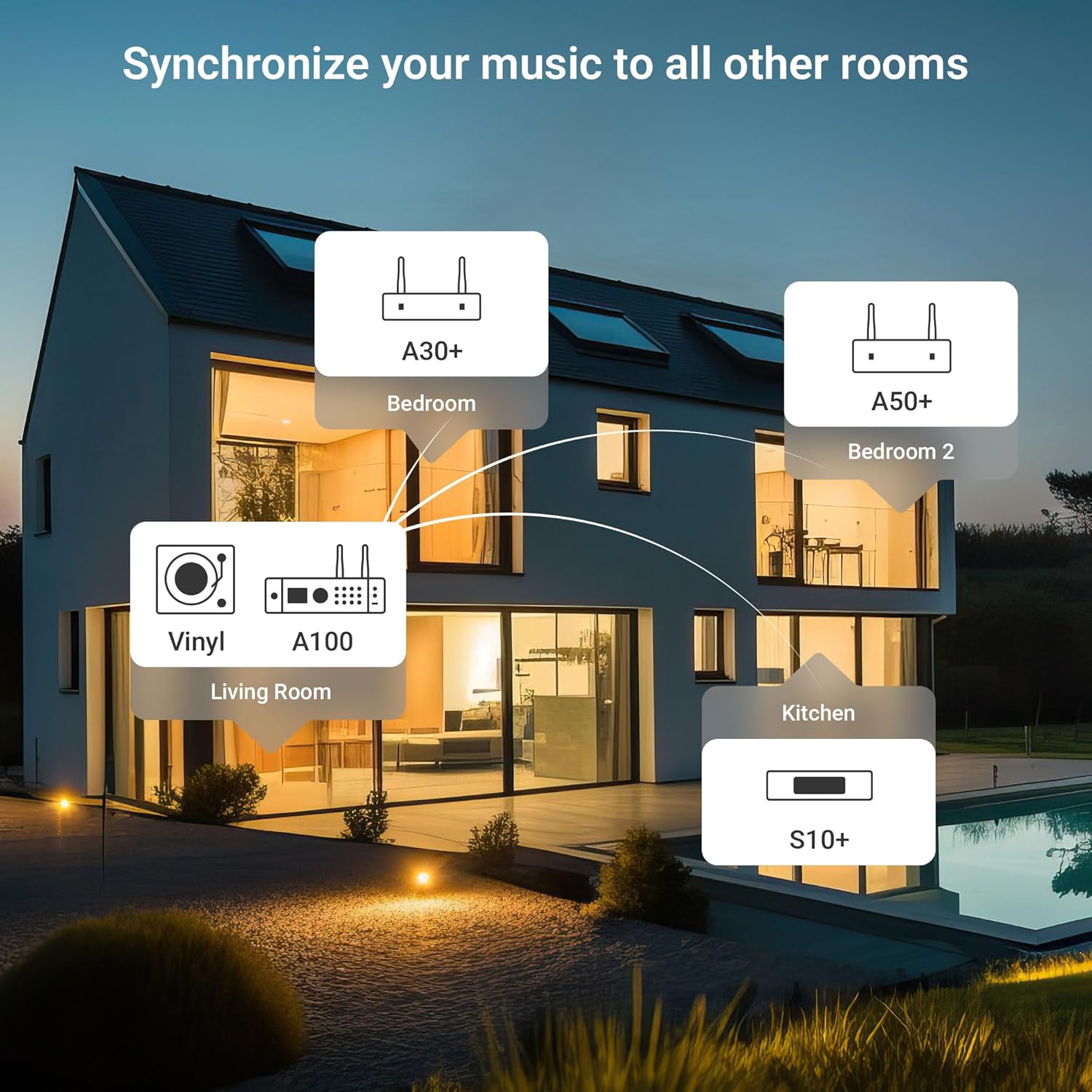
This diagram illustrates a multiroom audio setup, showing how various Arylic devices, including the A100, can be distributed throughout a home to play synchronized or independent music.
6.6 App Control (Go Control / 4Stream)
The "Go Control" and "4Stream" apps provide comprehensive control over the A100 ampوierيڪ زنده
- ڊائون لوڊ: Obtain the apps from your mobile device's app store.
- افعال: Adjust volume, switch input sources, manage multiroom zones, and apply equalizer (EQ) settings.

This image displays multiple screenshots of the "Go Control" mobile application, showcasing its interface for managing audio settings, input sources, and multiroom configurations.
6.7 USB پلے بیک
The A100 supports audio playback from USB storage devices.
- آڊيو تي مشتمل هڪ USB ڊرائيو داخل ڪريو files into either the front or rear USB port.
- Select USB as the input source.
- Playback can be controlled via the front panel buttons or the mobile app.

This image illustrates a USB drive connected to the Arylic A100 amplifier, with a smartphone screen displaying a music playlist, indicating USB playback functionality.
7. سار سنڀال
- صفائي: يونٽ جي ٻاهرين حصي کي صاف ڪرڻ لاءِ نرم، سڪل ڪپڙو استعمال ڪريو. مائع صاف ڪندڙ يا ايروسول استعمال نه ڪريو.
- وينٽيليشن: وقتاً فوقتاً چيڪ ڪريو ته وينٽيليشن جا سوراخ مٽي ۽ ملبي کان صاف آهن.
- اسٽوريج: جيڪڏهن يونٽ کي گهڻي عرصي تائين ذخيرو ڪري رهيا آهيو، ته ان کي بجلي جي فراهمي کان ڌار ڪريو ۽ ان کي ٿڌي، سڪل جاءِ تي ذخيرو ڪريو.
8. مسئلا حل ڪرڻ
| مسئلو | ممڪن سبب | حل |
|---|---|---|
| طاقت نه آهي | پاور ڪيبل ڳنڍيل نه آهي؛ پاور آئوٽليٽ فعال نه آهي. | پڪ ڪريو ته پاور ڪيبل محفوظ طريقي سان ڳنڍيل آهي. آئوٽليٽ کي ٻئي ڊوائيس سان جانچيو. |
| ڪوبه آواز ٻاھر نه | Incorrect input source selected; Speaker cables loose; Volume too low; Mute activated. | Select the correct input source. Check speaker connections. Increase volume. Deactivate mute. |
| وائي فائي سان connectنجي نٿو سگھي | Incorrect WiFi password; Router too far; WiFi antenna not connected. | Verify WiFi password. Move unit closer to router or use wired LAN. Ensure WiFi antenna is connected. Re-run app setup. |
| بلوٽوٿ جوڙڻ ناڪام ٿيو | Bluetooth not selected as input; Device already paired to another unit; Bluetooth antenna not connected. | Select Bluetooth input. Disconnect from other devices. Ensure Bluetooth antenna is connected. Try pairing again. |
| خراب ايف ايم ريڊيو استقبال | FM antenna not properly positioned or connected. | Adjust the position of the FM wire antenna. Ensure it is fully extended and connected. Consider an external FM antenna for improved reception. |
| مائڪرو فون ڪم نه ڪري رهيو آهي | Microphone not plugged in correctly; Microphone volume too low. | Ensure microphones are securely plugged into Mic 1/2 jacks. Adjust microphone volume. |
9. وضاحتون
| خاصيت | تفصيل |
|---|---|
| ماڊل | A100 |
| ٻاھر نڪرڻ جي طاقت | 100W x 2 (into 4 Ohms) |
| وائرليس ڪنيڪشن | WiFi, Bluetooth, AirPlay, Spotify Connect, DLNA, UPnP |
| آڊيو انپٽ | Line In (RCA), Phono In (RCA), Optical In, Coaxial In, USB (front & rear), Dual Microphone (front) |
| آڊيو آئوٽٽ | Speaker Terminals (R/L), Line Out (RCA) |
| خاص خاصيتون | FM Radio, Multiroom Audio, App Control (Go Control/4Stream), Built-in Power Supply with Toroidal Transformer, TPA3255 Amplifier Chip, ESS 9023P DAC |
| پيڪيج جي ماپ | 14 x 10.8 x 4.4 انچ |
| شيءِ جو وزن | 3 پائونڊ |
| ٺاهيندڙ | راڪوئٽ ٽيڪنالاجي (شينزين) ڪمپني، لميٽيڊ |
10. وارنٽي ۽ سپورٽ
For warranty information and technical support, please refer to the official Arylic website or contact your local dealer. Keep your purchase receipt for warranty claims.
ٺاهيندڙ: راڪوئٽ ٽيڪنالاجي (شينزين) ڪمپني، لميٽيڊ
وڌيڪ مدد لاء، دورو ڪريو جي Arylic Store on Amazon.


