تعارف
The Polyend Step is a programmable 4-track drum machine pedal designed to provide rhythmic backing for musicians and guitar players. It offers a versatile and easy-to-use solution for practice, songwriting, and live performances. With a wide array of samples, customizable sequencing, and intuitive controls, the Polyend Step allows you to create unique and dynamic drum parts.
اهم خاصيتون
- Programmable 4-track Drum Machine Pedal with 2,000+ Samples
- 16-step Sequencing for detailed rhythm creation
- 350 Rhythms to choose from across various genres
- Stereo I/O for flexible connectivity
- 200+ Kits for diverse sound palettes
سيٽ اپ گائيڊ
Follow these steps to set up your Polyend Step Drum Machine Pedal:
- پاور ڪنيڪشن: Connect a 9V 200mA center-negative power supply to the power input port on the pedal.
- ان پٽ ڪنيڪشن: Connect your instrument (e.g., guitar) to the L (MONO) or R 1/4" input jacks. For mono signals, use the L (MONO) input.
- آئوٽ پٽ ڪنيڪشن: Connect the L (MONO) or R 1/4" output jacks to your amplifier, audio interface, or mixer. For mono output, use the L (MONO) output.
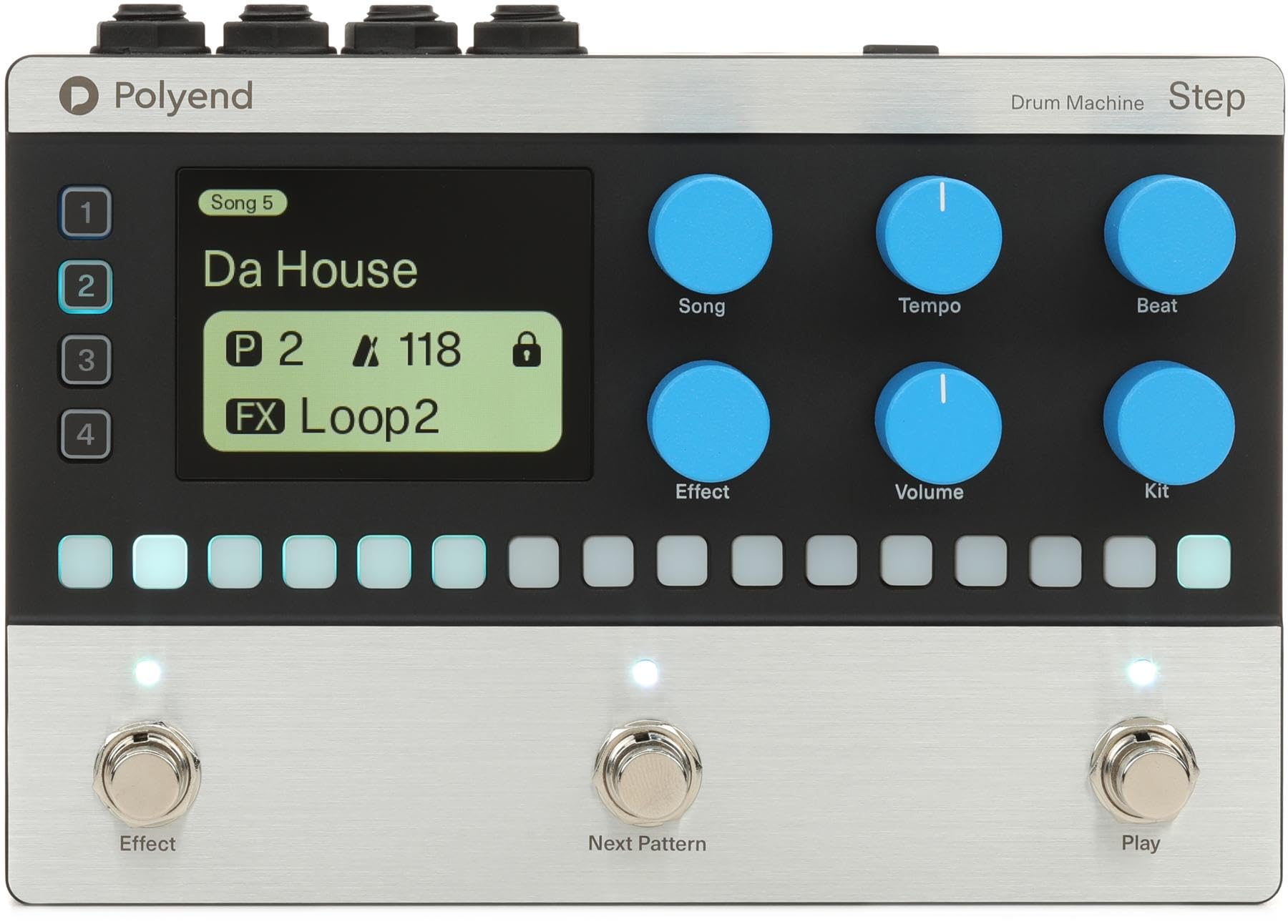
آپريٽنگ هدايتون
ڪنٽرول ختمview
- ڊسپلي اسڪرين: Shows current style, tempo, BPM, and other functional status information.
- GROUP/SAVE Knob: Switches to the group page, toggles parameters, adjusts values, and enters the slot save interface when held. In Tap Tempo mode, it adjusts BPM.
- SETTING/VOLUME Knob: Switches to the setting page, toggles parameters, adjusts values, and enters/exits global settings when held. It also adjusts the drum machine volume.
- FILL/TAP Footswitch (Left): Activates the fill function with a single tap. Enters Tap Tempo mode when held, allowing you to adjust playback speed by tapping.
- STOP/PLAY Footswitch (Right): Starts or stops drum machine playback.
بنيادي آپريشن
- پلے بیک شروع ڪرڻ: Tap the STOP/PLAY footswitch (right) to begin playing the selected drum pattern. The LED will flash red and blue at the current BPM.
- پلے بیک کي روڪڻ: Tap the STOP/PLAY footswitch (right) again to stop playback. The LED will flash white.
- Activating Fill: During playback, tap the FILL/TAP footswitch (left) to activate a drum fill.
- Adjusting Tempo (Tap Tempo): Hold the FILL/TAP footswitch (left) for one second to enter Tap Tempo mode. Tap the footswitch repeatedly to set the desired BPM. The LED will flash according to the new BPM.
- Changing Rhythm Patterns: Use the GROUP/SAVE knob to navigate through different rhythm patterns and banks. Turn the knob to select a new pattern.
- حجم کي ترتيب ڏيڻ: Use the SETTING/VOLUME knob to adjust the overall volume of the drum machine.
- Accessing Global Settings: Hold the SETTING/VOLUME knob to enter global settings, where you can adjust frequency response and other parameters.
وضاحتون
| خاصيت | تفصيل |
|---|---|
| ماڊل نالو | قدم |
| انداز | جديد |
| ڪنيڪٽر جو قسم | 3.5mm جيڪ، 6.35mm جيڪ |
| رابطي ٽيڪنالاجي | MIDI, Audio Jacks |
| طاقت جو ذريعو | Battery Powered (requires 9V 200mA center-negative power supply) |
| هيڊ فون جيڪ | 3.5mm جيڪ |
| ٺاهيندڙ | پولينڊ |
| شيءِ جو وزن | 2.83 پائونڊ |
| پيداوار جي ماپ | 11.4 x 5.65 x 3.6 انچ |
| ASIN | B0F4MPRD1J |
| شيون ماڊل نمبر | RM |
| جسماني مواد | Metal or Plastic |
| رنگ جو نالو | ڪارو |
| مواد جو قسم | ڌاتو، پلاسٽڪ |
| مهارت جي سطح | سڀ |
| ماپ | 5.65 x 11.4 x 3.6 انچ |
سار سنڀال
- صفائي: پيڊل جي ٻاهرين حصي کي صاف ڪرڻ لاءِ نرم، سڪل ڪپڙو استعمال ڪريو. رگڙيندڙ صاف ڪندڙ يا محلولن کان پاسو ڪريو.
- اسٽوريج: پيڊل کي سڌي سج جي روشني ۽ انتهائي گرمي پد کان پري ٿڌي، سڪل جاءِ تي رکو.
- سنڀالڻ: Handle the pedal with care to prevent damage to knobs, switches, and jacks.
مشڪلاتون
- آواز ناهي: Ensure all cables (power, input, output) are securely connected. Check the volume settings on the pedal and your connected audio equipment. Verify the power supply meets the required specifications (9V 200mA center-negative).
- غير متوقع رويو: If the pedal behaves unexpectedly, try disconnecting and reconnecting the power supply to perform a soft reset. If issues persist, consult the manufacturer's support resources.
- فوٽ سوئچ غير جوابده: Ensure the footswitches are clean and free from debris. If a footswitch is still unresponsive, contact customer support.
وارنٽي ۽ سپورٽ
For warranty information, technical support, or service inquiries, please refer to the official Polyend webسائيٽ تي وڃو يا سڌو سنئون انهن جي ڪسٽمر سروس سان رابطو ڪريو. وارنٽي دعوائن لاءِ خريداري جو ثبوت رکو.


