1. تعارف
Thank you for choosing the Altera Homestep Walking Pad. This manual provides essential information for the safe and efficient use of your new walking pad. Please read all instructions carefully before operation and retain this manual for future reference.
2. حفاظتي هدايتون
To reduce the risk of serious injury, read all important precautions and instructions in this manual and on your walking pad before use.
- هميشه واڪنگ پيڊ کي هڪ برابر، مستحڪم مٿاڇري تي رکو.
- آپريشن دوران ٻارن ۽ پالتو جانورن کي واڪنگ پيڊ کان پري رکو.
- Ensure adequate clear space around the walking pad (at least 0.6 meters on all sides).
- Do not use the walking pad if you weigh more than 90 kg (198 lbs).
- مناسب ايٿليٽڪ بوٽ پائڻ.
- Always attach the safety key clip to your clothing before starting the walking pad.
- جيڪڏهن توهان کي بي هوشي، چڪر، يا درد محسوس ٿئي ته فوري طور تي ورزش بند ڪريو.
- Unplug the walking pad from the power outlet when not in use or before cleaning/maintenance.
- Do not operate the walking pad if it has a damaged cord or plug, or if it is not working properly.
3. پيڪيج مواد
- Altera Homestep Walking Pad
- ريموٽ ڪنٽرول
- پاور ڪيبل
- استعمال ڪندڙ جو دستياب (ھي دستاويز)
4. پراڊڪٽ ختمview
Familiarize yourself with the main components and features of your Altera Homestep Walking Pad.

Image 4.1: The Altera Homestep Walking Pad shown with its remote control.

تصوير 4.2: تفصيلي view of the LED display and remote control buttons. The display shows Time, Speed, Distance, and Calories. The remote has buttons for Speed Control (+/-), Mode (M), Start/Hold, and Stop.

Image 4.3: Diagram illustrating remote control functions: '+' to increase speed, 'M' to change mode, '-' to reduce speed, 'START/HOLD' to start/continue, and 'STOP' to pause.

تصوير 4.4: View of the walking pad's underside, highlighting anti-slip leveling feet, transport wheels, and the manual power switch.

Image 4.5: Diagram showing the multi-layered running belt construction, including wear-resistant surface, noise reduction, impact absorption, and high-resistance support layers.
5. سيٽ اپ
- پيڪ ڪريو: Carefully remove the walking pad and all components from the packaging.
- لڳائڻ: Place the walking pad on a flat, stable, and non-slip surface. Ensure there is sufficient space around the unit for safe operation.
- پاور ڪنيڪشن: Connect the power cable to the walking pad and then to a grounded electrical outlet.
- حفاظت جي چاٻي: Locate the safety key. This key must be in place for the walking pad to operate. Attach the clip of the safety key to your clothing before starting.
- پاور آن: Flip the manual power switch (refer to Image 4.4) to the 'ON' position. The LED display should illuminate.
6. آپريٽنگ هدايتون
6.1 ريموٽ ڪنٽرول استعمال ڪندي
The walking pad is controlled via the included remote control. Ensure the remote has working batteries.
- Start/Hold: Press the "START/HOLD" button to begin or resume your workout. The walking pad will start at a low speed.
- روڪيو: Press the "STOP" button to pause or end your workout.
- رفتار ترتيب ڏيڻ: Use the "+" button to increase speed and the "-" button to decrease speed. The speed range is 1 km/h to 6 km/h.
- موڊ جي چونڊ: Press the "M" button to cycle through different display modes (Time, Speed, Distance, Calories).
6.2 ايل ايل ڊسپلي
The integrated LED display provides real-time feedback on your workout progress (refer to Image 4.2).
- ٽائيم: توهان جي ورزش جي مدت ڏيکاري ٿو.
- رفتار: Shows your current walking speed in km/h.
- DIST: Indicates the distance you have walked.
- ڪريل: توهان جي سيشن دوران ساڙيل ڪيلورين جو اندازو لڳائي ٿو.
6.3 Adjustable Incline
The Altera Homestep Walking Pad features two manual incline positions to vary your workout intensity.
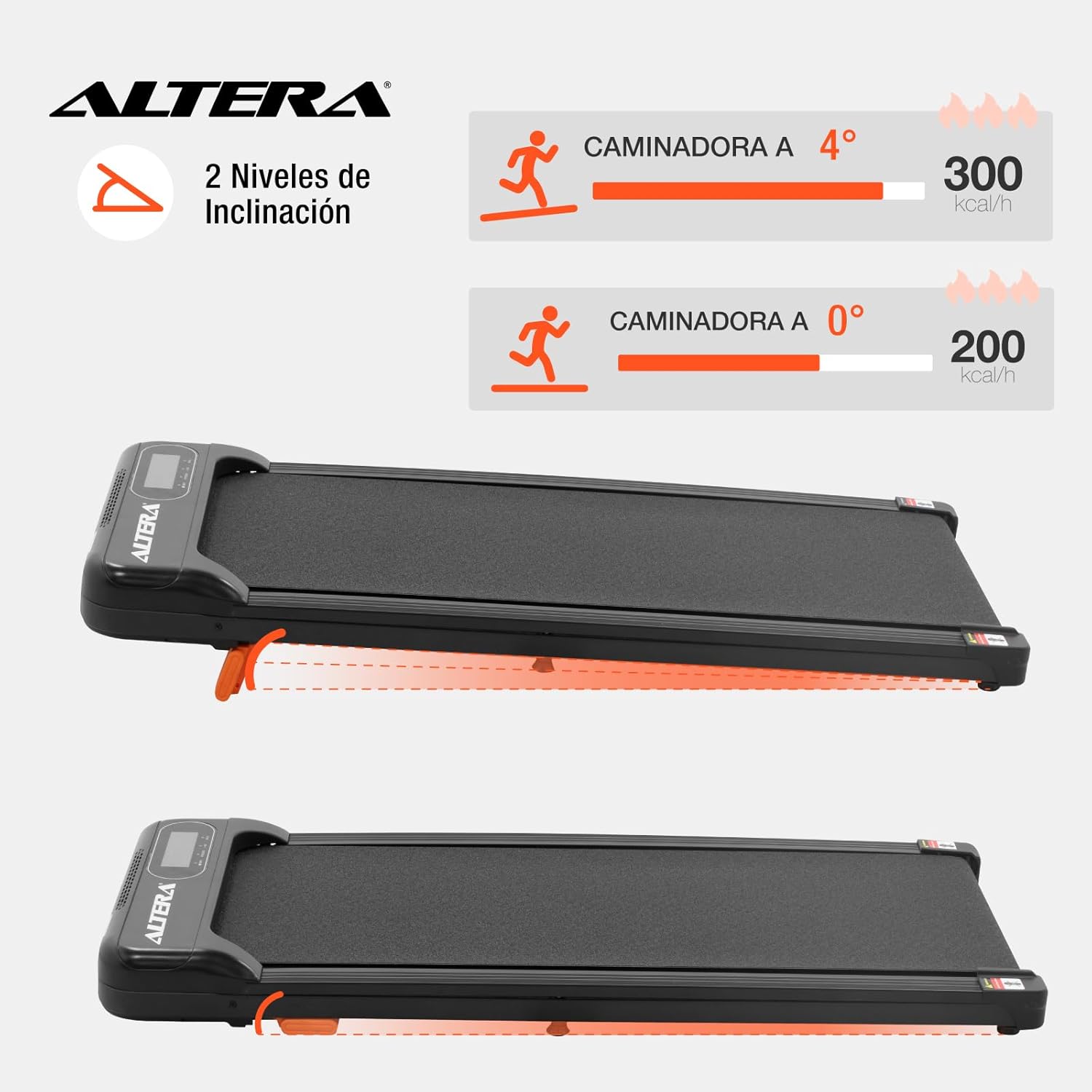
Image 6.1: Illustration of the two incline levels: 0 degrees (flat) and 4 degrees (inclined), showing estimated calorie burn difference.
To adjust the incline:
- Ensure the walking pad is turned off and unplugged.
- Carefully lift the front of the walking pad.
- Deploy or retract the small orange support feet located at the front underside of the unit to select your desired incline level.
- Ensure the support feet are securely locked in place before resuming use.
6.4 ٽرانسپورٽ ۽ اسٽوريج
The walking pad is designed for easy storage and portability.
- To move the unit, ensure it is powered off and unplugged.
- Lift the front end slightly to engage the transport wheels (refer to Image 4.4).
- Roll the walking pad to your desired storage location. Its compact design allows it to fit in small spaces.
7. سار سنڀال
باقاعده سار سنڀال توهان جي واڪنگ پيڊ جي ڊگهي عمر ۽ بهترين ڪارڪردگي کي يقيني بڻائي ٿي.
- صفائي: واڪنگ پيڊ کي اشتهار سان صاف ڪريوamp هر استعمال کان پوءِ ڪپڙو. گھڙڻ وارا صاف ڪندڙ يا محلول استعمال نه ڪريو.
- بيلٽ ونگڻ: The walking belt may require lubrication periodically. Refer to the manufacturer's guidelines for specific lubrication instructions and recommended lubricants.
- بيلٽ ٽينشن: Check the walking belt tension regularly. If the belt slips or feels loose, it may need adjustment. Consult a qualified technician if you are unsure how to adjust it.
- اسٽوريج: Store the walking pad in a dry, cool place away from direct sunlight and moisture.
8. مسئلا حل ڪرڻ
| مسئلو | ممڪن سبب | حل |
|---|---|---|
| Walking pad does not start. |
|
|
| بيلٽ سلپ ٿئي ٿي يا هٻڪي ٿي. |
|
|
| ريموٽ ڪنٽرول جواب نه ڏئي رهيو آهي. |
|
|
9. وضاحتون

Image 9.1: Technical specifications table and dimensional diagram of the Altera Homestep Walking Pad.
| خاصيت | تفصيل |
|---|---|
| ماڊل نمبر | CAM-HOM-02 |
| موٽر پاور | 1.5 ايڇ |
| رفتار جي حد | 1 - 6 ڪلوميٽر في ڪلاڪ |
| وڌ ۾ وڌ استعمال ڪندڙ وزن | 90 ڪلوگرام (198 پائونڊ) |
| انڪلائن ليولز | 2 (manual, up to 4 degrees) |
| رننگ بيلٽ جا طول و عرض | 95 سينٽي x 36 سينٽي ميٽر |
| پيداوار جي ماپ (L x W x H) | 110 x 46 x 10 سينٽي |
| پيداوار جو وزن | 17 ڪلو |
| مواد | ڌاتو، پلاسٽڪ |
| خاصيتون | Bluetooth, Portable, LED Display, Anti-slip belt, Transport wheels |
| طاقت جو ذريعو | Electric Cord (110V) |
10. وارنٽي ۽ سپورٽ
For warranty information or technical support, please refer to the contact details provided with your purchase or visit the official Altera webسائيٽ. وارنٽي دعوائن لاءِ خريداري جو ثبوت رکو.


