تعارف
The KiiBoom Jade75 is a 75% layout mechanical keyboard featuring a unique resin molding and CNC+UV crafted case. It offers versatile connectivity options including Bluetooth 5.0, 2.4GHz wireless, and USB-C wired modes. Designed for customization, it supports QMK/VIA programming and hot-swappable switches, alongside dynamic RGB backlighting. This manual provides detailed instructions for setting up, operating, and maintaining your KiiBoom Jade75 keyboard.
پيڪيج مواد
Upon unboxing your KiiBoom Jade75 keyboard, please verify that all the following items are included:
- KiiBoom Jade75 Mechanical Keyboard
- USB-سي ڪيبل
- ڪيپ ڪيپيندڙ
- مٽائڻ وارو
- استعمال ڪندڙ دستي
- Additional Switches (if included in specific package)
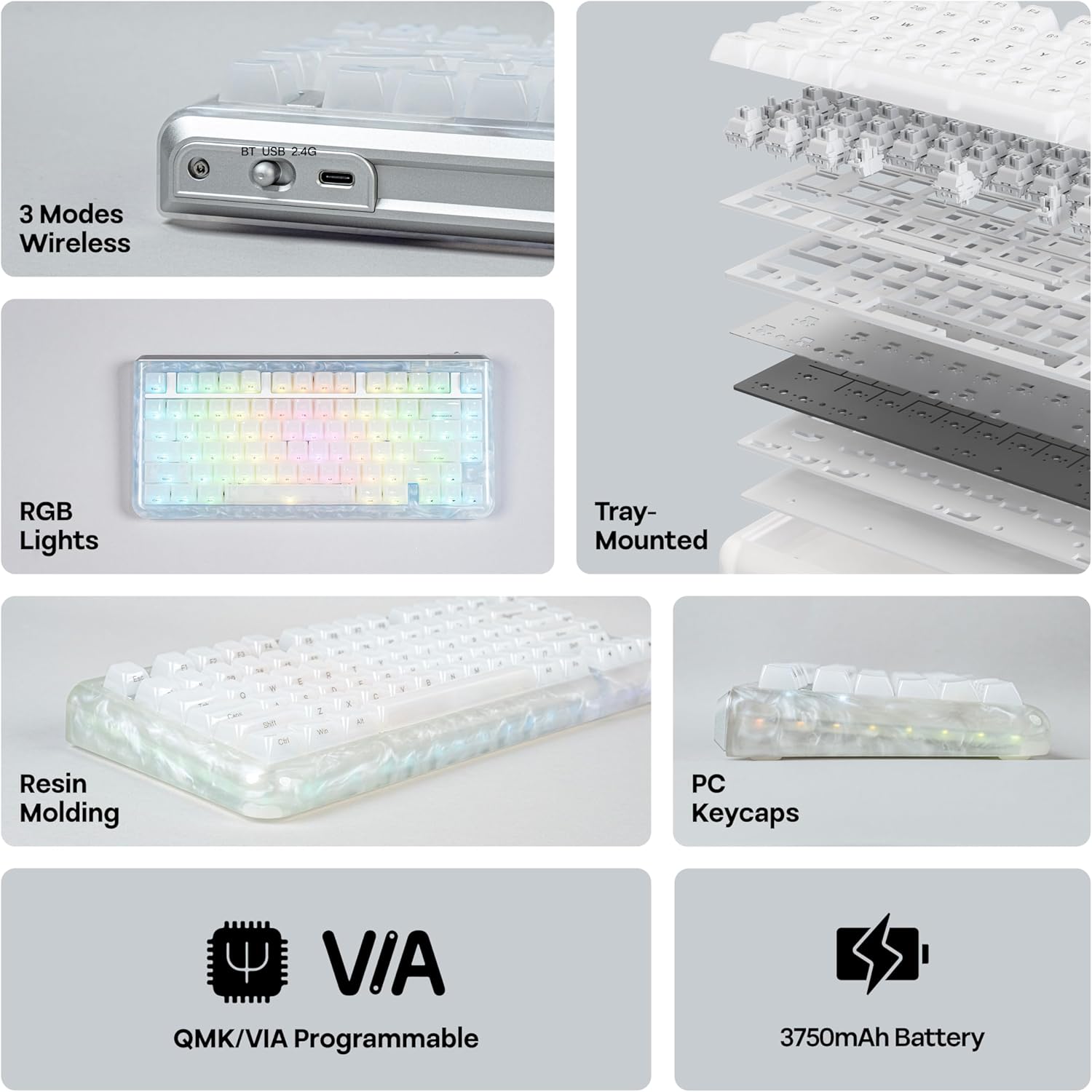
Image: KiiBoom Jade75 keyboard with its accessories, including a USB-C cable, keycap puller, and switch puller.
Video: An unboxing of the KiiBoom Jade75 keyboard, showcasing the packaging, included accessories, and a demonstration of the typing sound and RGB lighting.
پيداوار ختمview
The KiiBoom Jade75 features a compact 75% layout, combining essential keys with a space-saving design. Its resin molding provides a durable and aesthetically pleasing translucent case, complemented by a tray-mounted design for a stable typing experience. The keyboard is equipped with south-facing RGB backlighting for vibrant illumination.
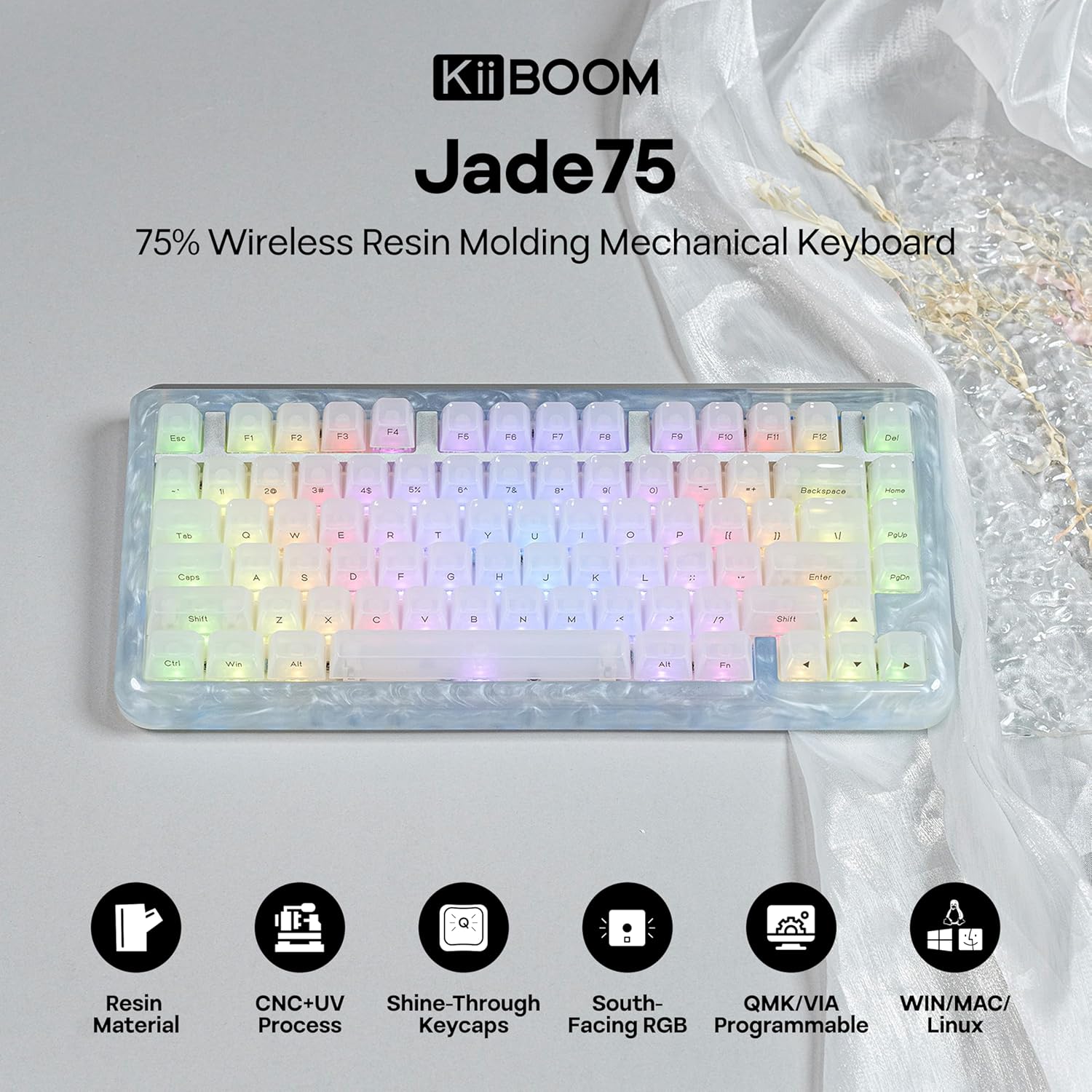
تصوير: مٿي کان هيٺ تائين view of the KiiBoom Jade75 keyboard, showcasing its 75% layout, translucent resin case, and keycap design.
سيٽ اپ ۽ ڪنيڪشن
The KiiBoom Jade75 offers three connectivity modes: 2.4GHz wireless, Bluetooth 5.0, and USB-C wired. Choose the mode that best suits your device and usage.
1. USB-C وائرڊ موڊ
- مهيا ڪيل USB-C ڪيبل کي ڪيبورڊ جي USB-C پورٽ سان ڳنڍيو.
- ڪيبل جي ٻئي پڇاڙيءَ کي پنهنجي ڪمپيوٽر تي موجود USB پورٽ ۾ لڳايو.
- ڪيبورڊ پاڻمرادو سڃاڻي ويندو ۽ استعمال لاءِ تيار ٿي ويندو.
2. 2.4GHz وائرليس موڊ
- 2.4GHz USB رسيور ڳوليو (عام طور تي ڪيبورڊ تي هڪ خاني ۾ ذخيرو ٿيل هوندو آهي).
- 2.4GHz رسيور کي پنهنجي ڪمپيوٽر تي موجود USB پورٽ ۾ لڳايو.
- On the keyboard, switch the mode selector to 2.4G.
- ڪيبورڊ کي خودڪار طريقي سان رسيور سان ڳنڍڻ گهرجي. جيڪڏهن نه، دٻايو Fn + R جوڙڻ شروع ڪرڻ.
3. بلوٽوٿ 5.0 موڊ
ڪيبورڊ ٽن بلوٽوٿ ڊوائيسز کي سپورٽ ڪري ٿو.
- On the keyboard, switch the mode selector to BT.
- دٻايو ۽ رکو Fn + Q, Fn + W، يا Fn + E for 3-5 seconds until the corresponding key flashes, indicating pairing mode.
- On your device (computer, tablet, smartphone), enable Bluetooth and search for "KiiBoom Jade75".
- جوڙڻ لاءِ ڪيبورڊ چونڊيو. ڪنيڪٽ ٿيڻ کان پوءِ چاٻي چمڪائڻ بند ٿي ويندي.
- جوڙيل بلوٽوٿ ڊوائيسز جي وچ ۾ سوئچ ڪرڻ لاءِ، دٻايو Fn + Q, Fn + W، يا Fn + E مختصر طور.

Image: Visual representation of the KiiBoom Jade75's three connectivity modes: Bluetooth, 2.4GHz wireless, and USB-C, showing compatibility with laptops, PCs, tablets, and gaming consoles.
QMK/VIA ڪسٽمائيزيشن
The KiiBoom Jade75 is QMK/VIA programmable, allowing for extensive customization of key assignments, macros, and lighting effects. This feature is ideal for users who require a personalized keyboard layout and functionality.
- Download the VIA software from the official KiiBoom website or the VIA GitHub repository.
- Connect your keyboard to your computer via USB-C cable.
- Launch the VIA software. The software should automatically detect your Jade75 keyboard.
- Use the VIA interface to remap keys, create custom macros, adjust lighting settings, and define different layers for various functions.
- Changes are applied in real-time to the keyboard.
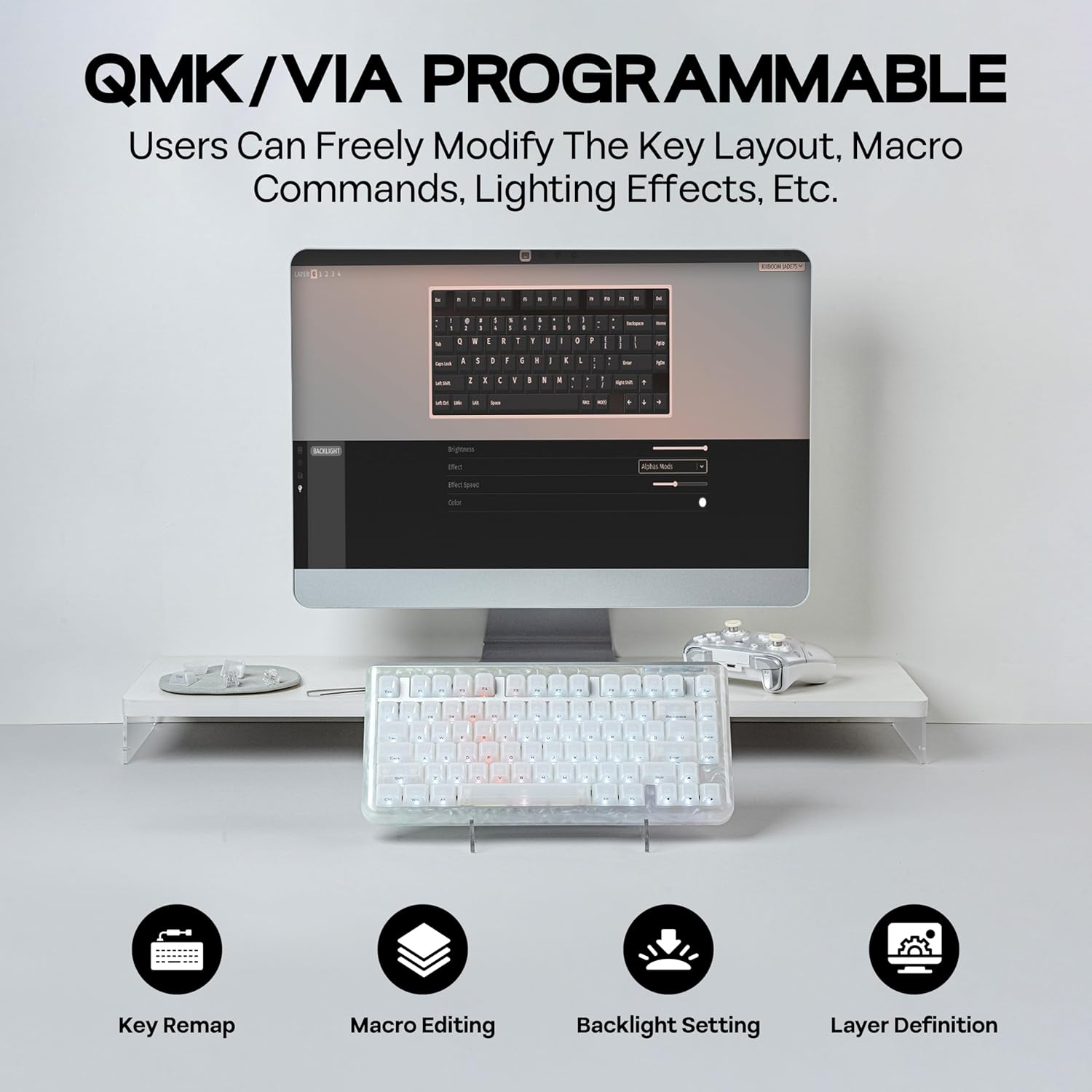
Image: A computer screen displaying the QMK/VIA software interface, illustrating options for key remapping, macro editing, backlight settings, and layer definition for the KiiBoom Jade75 keyboard.
آر جي بي لائٽنگ ڪنٽرول
The KiiBoom Jade75 features dynamic RGB backlighting with 16.8 million color options and various customizable modes. The south-facing RGB LEDs enhance the visual appeal, especially with the translucent resin case.
- Toggle Backlight Effects: دٻايو Fn + \| مختلف بيڪ لائيٽ موڊس ذريعي سائيڪل هلائڻ لاءِ.
- Toggle Sidelight Effects: دٻايو Fn+Z to change the sidelight effects.
- لائٽون آن/بند ڪريو: دٻايو Fn + Backspace to toggle the keyboard lighting on or off.
- روشني / رفتار کي ترتيب ڏيو: Use the VIA software for fine-tuning brightness, speed, and specific color settings.

Image: The KiiBoom Jade75 keyboard illuminated with colorful RGB backlighting, demonstrating various lighting effects and key combinations for control.
گرم مٽائي سگھڻ وارا سوئچ
The KiiBoom Jade75 features a hot-swappable PCB, allowing you to change mechanical switches without soldering. This enables easy customization of your typing feel and sound.
- ڪي ڪيپ هٽايو: گهربل ڪي ڪيپ کي نرميءَ سان هٽائڻ لاءِ ڪي ڪيپ ڇڪڻ وارو استعمال ڪريو.
- سوئچ هٽايو: Use the switch puller to carefully grip the top and bottom clips of the switch and pull it straight up.
- نئون سوئچ داخل ڪريو: Align the pins of the new switch with the holes on the PCB. Gently push the switch down until it clicks into place. Ensure the pins are not bent.
- ڪي ڪيپ تبديل ڪريو: ڪي ڪيپ کي واپس نئين سوئچ تي رکو.
نوٽ: Ensure the keyboard is disconnected or powered off before changing switches to prevent accidental key presses or damage.

تصوير: هڪ تفصيلي view of the KiiBoom Jade75's hot-swappable PCB, demonstrating the process of removing and inserting switches, along with a close-up of a KiiBoom Linear Switch and plate-mount stabilizer.
سار سنڀال
Proper maintenance ensures the longevity and performance of your KiiBoom Jade75 keyboard.
- ڪي ڪيپس جي صفائي: Use the keycap puller to remove keycaps. Clean them with mild soap and water, then dry thoroughly before reattaching.
- ڪيس جي صفائي: Wipe the resin case with a soft, damp ڪپڙو. سخت ڪيميڪلز کان پاسو ڪريو جيڪي ختم کي نقصان پهچائي سگهن ٿا.
- مٽي هٽائڻ: ڪي ڪيپس ۽ سوئچز جي وچ مان مٽي ۽ ملبہ هٽائڻ لاءِ دٻيل هوا استعمال ڪريو.
- بيٽري جي سنڀال: For optimal battery life, avoid fully discharging the keyboard frequently. Charge it regularly using the provided USB-C cable.
مشڪلاتون
If you encounter issues with your KiiBoom Jade75, refer to the following common solutions:
- ڪي بورڊ جواب نه ڏئي رهيو آهي:
- پڪ ڪريو ته ڪيبورڊ چارج ٿيل آهي يا USB-C ذريعي ڳنڍيل آهي.
- Check the mode switch (2.4G, BT, USB-C) is set correctly.
- For wireless modes, ensure the receiver is plugged in (2.4G) or Bluetooth is enabled and paired (BT).
- پنهنجي ڪمپيوٽر يا ڊوائس کي ٻيهر شروع ڪرڻ جي ڪوشش ڪريو.
- رجسٽر نه ٿيندڙ چاٻيون:
- Remove the keycap and switch for the affected key. Re-insert the switch firmly, ensuring pins are straight.
- Test with a different switch if available.
- آر بي جي روشني ڪم نه ڪندي:
- Ensure lighting is turned on (Fn + Backspace).
- Check lighting settings in the VIA software.
- بلوٽوٿ ڪنيڪشن:
- پڪ ڪريو ته ڪيبورڊ توهان جي ڊوائيس جي حد اندر آهي.
- Re-pair the keyboard with your device.
- ٻين وائرليس ڊوائيسز کان مداخلت لاء چيڪ ڪريو.
If issues persist, please contact KiiBoom customer support for further assistance.
وضاحتون
| خاصيت | تفصيل |
|---|---|
| برانڊ | KiiBoom |
| ماڊل | Jade75 |
| ترتيب | 75% |
| رابطي | 2.4GHz وائرليس، بلوٽوٿ 5.0، USB-C وائرڊ |
| ڪيس جو مواد | Resin Molding & CNC+UV Crafted |
| ڪي ڪيپ مواد | پي سي (Polycarbonate) |
| سوئچز | Hot-Swappable (KiiBoom Linear Switch) |
| پٺڀرائي | آر جي بي (ڏکڻ طرف مُنهن ڪندڙ) |
| پروگرام جي صلاحيت | QMK/VIA Compatible |
| مطابقت رکندڙ ڊوائيسز | گيمنگ ڪنسول، ليپ ٽاپ، پي سي، اسمارٽ فون، ٽيبليٽ |
| آپريٽنگ سسٽم | ونڊوز، ميڪ، لينڪس |
| پيداوار جي ماپ | 12.99"ليٽر x 12.99"ڊبليو x 1.77"ايڇ |
وارنٽي ۽ سپورٽ
KiiBoom products are designed for quality and durability. For warranty information, product support, or technical assistance, please visit the official KiiBoom webسائيٽ تي وڃو يا سڌو سنئون انهن جي ڪسٽمر سروس سان رابطو ڪريو. وارنٽي دعوائن لاءِ خريداري جو ثبوت رکو.
Official KiiBoom Store: KiiBoom Store on Amazon


