1. تعارف
This manual provides detailed instructions for the setup, operation, and maintenance of your Transformers GK01 Wireless Mechanical Keyboard. The GK01 is a versatile keyboard featuring tri-mode connectivity (Bluetooth 5.0, 2.4GHz wireless, and USB-C wired), a 101-key layout, RGB backlighting, and hot-swappable switches for a customizable typing experience.

Figure 1.1: Transformers GK01 Wireless Mechanical Keyboard.
2. پيڪيج مواد
مھرباني ڪري تصديق ڪريو ته ھيٺ ڏنل سڀ شيون توھان جي پيڪيج ۾ شامل آھن:
- Transformers GK01 Wireless Mechanical Keyboard
- USB-C کان USB-A ڪيبل
- 2.4GHz وائرليس USB ڊونگل
- 2-ان-1 ڪي ڪيپ ۽ سوئچ پلر
- استعمال ڪندڙ جو دستياب (ھي دستاويز)
- Spare Switches (2 pieces)
- ڪي بورڊ ڍڪ
3. سيٽ اپ ۽ ڪنيڪشن
3.1. Tri-Mode Connection Overview
The GK01 keyboard supports three connection modes: USB-C wired, 2.4GHz wireless, and Bluetooth 5.0. You can connect to up to five devices simultaneously and switch between them seamlessly.

Figure 3.1: Tri-Mode Connection Capabilities.
3.2. USB-C وائرڊ ڪنيڪشن
- ڪيبورڊ تي USB-C پورٽ ڳوليو.
- مهيا ڪيل USB-C ڪيبل جي هڪ پڇاڙي کي ڪيبورڊ سان ڳنڍيو.
- Connect the other end of the USB-C cable to an available USB-A port on your computer.
- ڪيبورڊ پاڻمرادو سڃاڻي ويندو ۽ استعمال لاءِ تيار ٿي ويندو.
3.3. 2.4GHz وائرليس ڪنيڪشن
- Locate the 2.4GHz wireless USB dongle.
- ڊونگل کي پنهنجي ڪمپيوٽر تي موجود USB-A پورٽ ۾ لڳايو.
- On the keyboard, ensure the mode switch (usually on the side or back) is set to 2.4GHz mode.
- ڪيبورڊ پاڻمرادو ڳنڍجي ويندو. جيڪڏهن نه، دٻايو Fn + R جوڙڻ شروع ڪرڻ.

Figure 3.2: USB-C Port and 2.4GHz Dongle Location.
3.4. بلوٽوٿ 5.0 ڪنيڪشن
The keyboard supports connecting to up to three Bluetooth devices (BT1, BT2, BT3).
- On the keyboard, set the mode switch to Bluetooth mode.
- مخصوص بلوٽوٿ چينل لاءِ پيئرنگ موڊ ۾ داخل ٿيڻ لاءِ، دٻايو ۽ رکو Fn + Q (BT1 لاءِ)، Fn + W (BT2 لاءِ)، يا Fn + E (for BT3) for 3-5 seconds until the indicator light flashes rapidly.
- On your device (PC, tablet, smartphone), open Bluetooth settings and search for new devices.
- Select "Transformers GK01" from the list of available devices.
- Once connected, the indicator light on the keyboard will stop flashing.
- جوڙيل بلوٽوٿ ڊوائيسز جي وچ ۾ سوئچ ڪرڻ لاءِ، بس دٻايو Fn + Q, Fn + W، يا Fn + E.
4. بنيادي آپريشن
4.1. Keyboard Layout and Anti-Ghosting
The GK01 features a 101-key layout, providing a full set of keys including a numeric keypad. All keys are equipped with anti-ghosting technology, ensuring that every keystroke is registered accurately, even when multiple keys are pressed simultaneously.
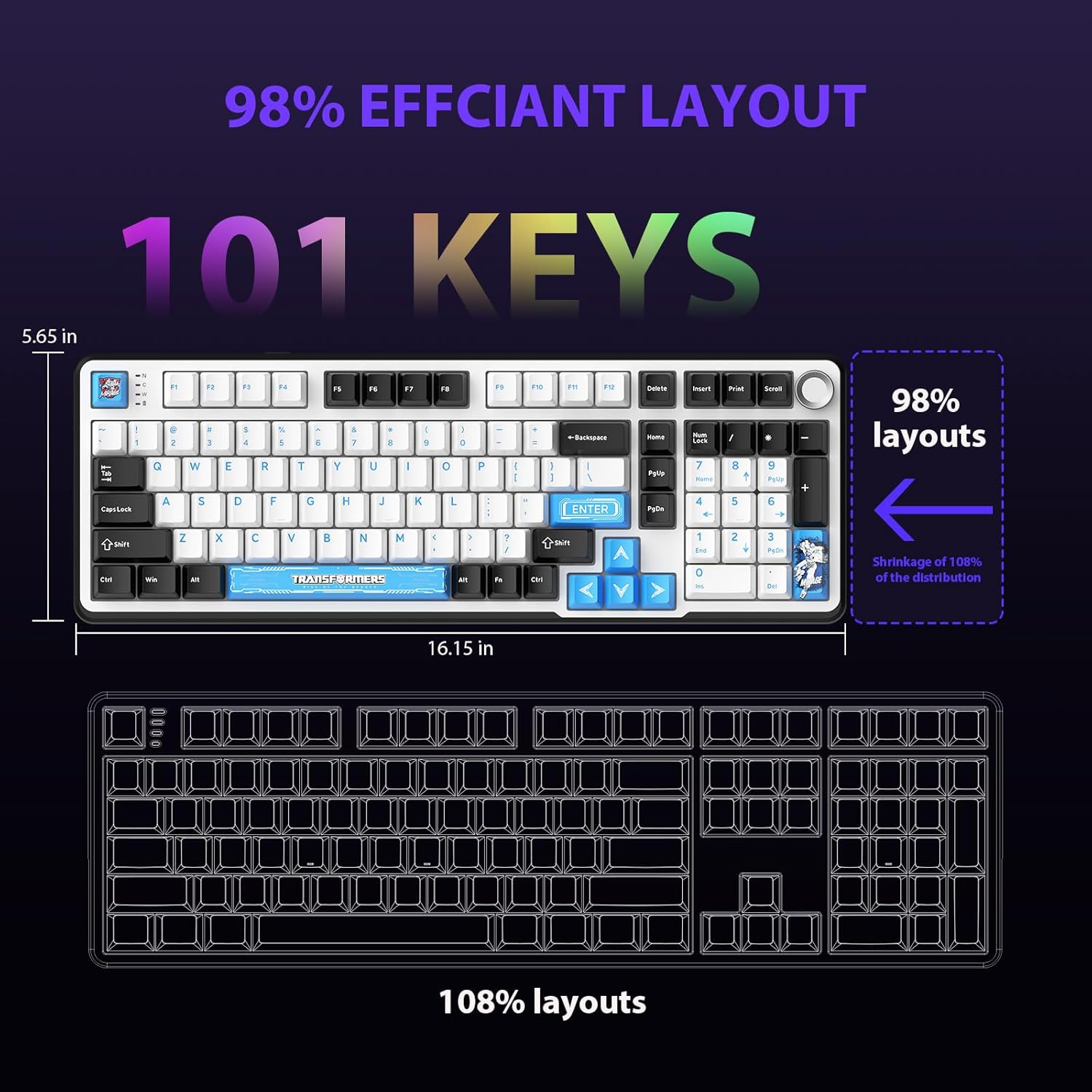
Figure 4.1: 101-Key Layout.
4.2. ملٽي ميڊيا ڪنٽرول نوب
The dedicated knob located on the top right of the keyboard provides convenient multimedia control:
- گھڙي جي طرف گھمايو: حجم وڌايو.
- گھڙيال جي مخالف طرف گھمايو: حجم گھٽايو.
- ھيٺ دٻايو: آڊيو کي خاموش/غير خاموش ڪريو.
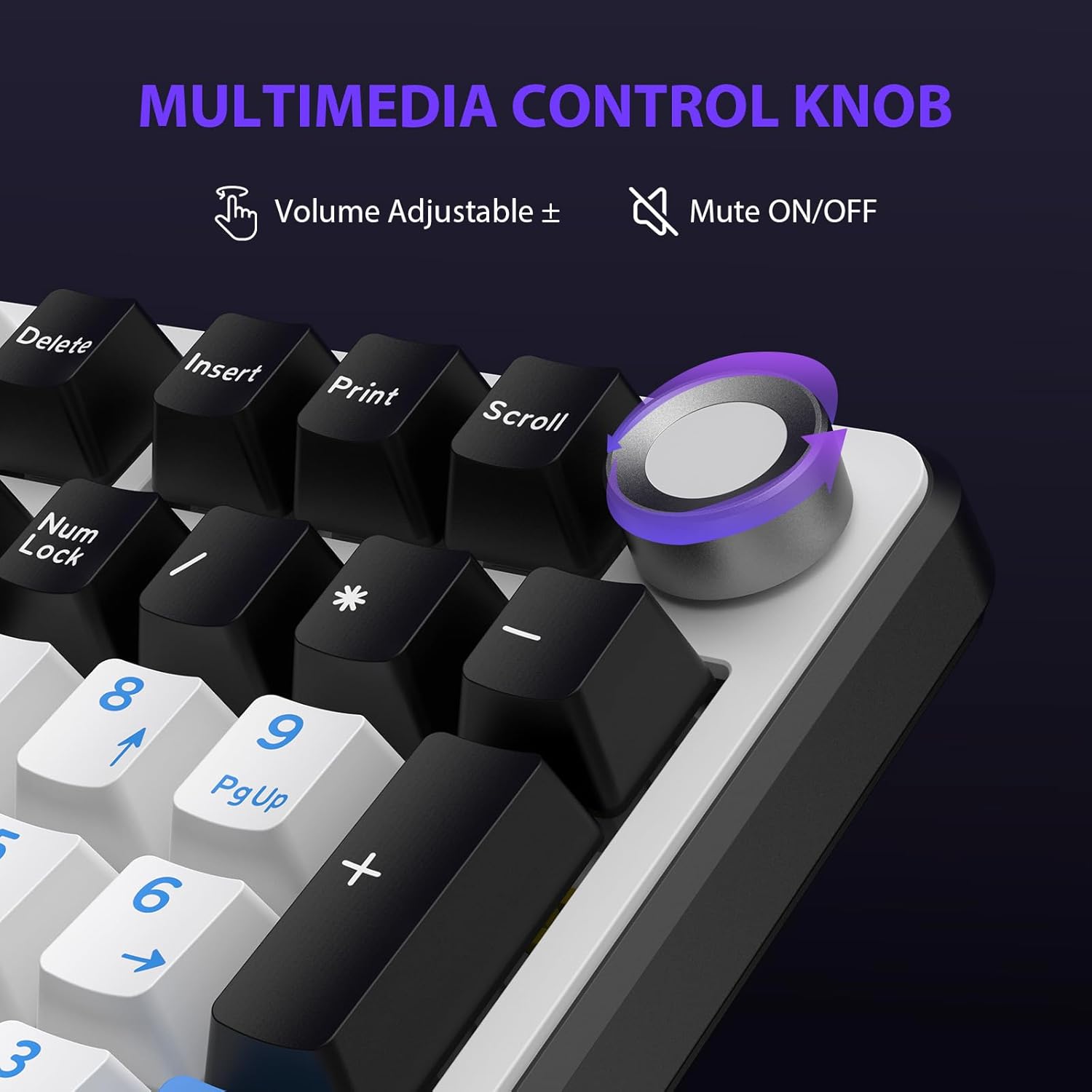
Figure 4.2: Multimedia Control Knob.
4.3. آر جي بي بيڪ لائيٽ ڪنٽرول
The GK01 keyboard features 16.8 million color RGB backlighting with various effects.
- Fn + [Right Arrow]: Adjust 5 brightness levels.
- Fn + [Left Arrow]: Adjust 5 speed levels for dynamic effects.
- Fn + [داخل]: Switch between 20 different backlight modes.
- Fn + [داخل]: Switch color order within certain modes.
- Fn + [X]: Turn off light / activate power-saving mode.
- Fn + [بيڪ اسپيس]: Switch color order within certain modes.

Figure 4.3: RGB Backlight Controls.
5. ترقي يافته خاصيتون
5.1. گرم مٽائڻ وارا سوئچ
The GK01 keyboard is equipped with pre-lubricated Cybertron linear switches and supports solder-free hot-swapping. This allows you to easily replace switches with compatible 3-pin or 5-pin mechanical switches without soldering.
سوئچ کي تبديل ڪرڻ لاءِ:
- Using the provided 2-in-1 keycap and switch puller, gently remove the keycap from the desired switch.
- Insert the switch puller onto the switch, ensuring it grips the top and bottom clips of the switch.
- پي سي بي تان هٽائڻ لاءِ سوئچ کي نرميءَ سان سڌو مٿي ڇڪيو.
- نئين سوئچ جي پنن کي پي سي بي تي سوراخن سان ترتيب ڏيو. پڪ ڪريو ته پن سڌو آهن ته جيئن موڙ کان بچي سگهجي.
- نئين سوئچ کي مضبوطيءَ سان جاءِ تي دٻايو جيستائين اهو ڪلڪ نه ڪري.
- ڪي ڪيپ ٻيهر ڳنڍيو.

Figure 5.1: Hot-Swappable Switch Replacement.
5.2. پروگراميبل سافٽ ويئر
The GK01 supports custom software for advanced customization, including key remapping, macro creation, and detailed RGB lighting effects.
- The software is compatible only with the Windows operating system.
- The keyboard must be connected via USB-C wired mode to use the software.
- For driver download, please visit the official Transformers Keyboard website or refer to the link provided in the product packaging.
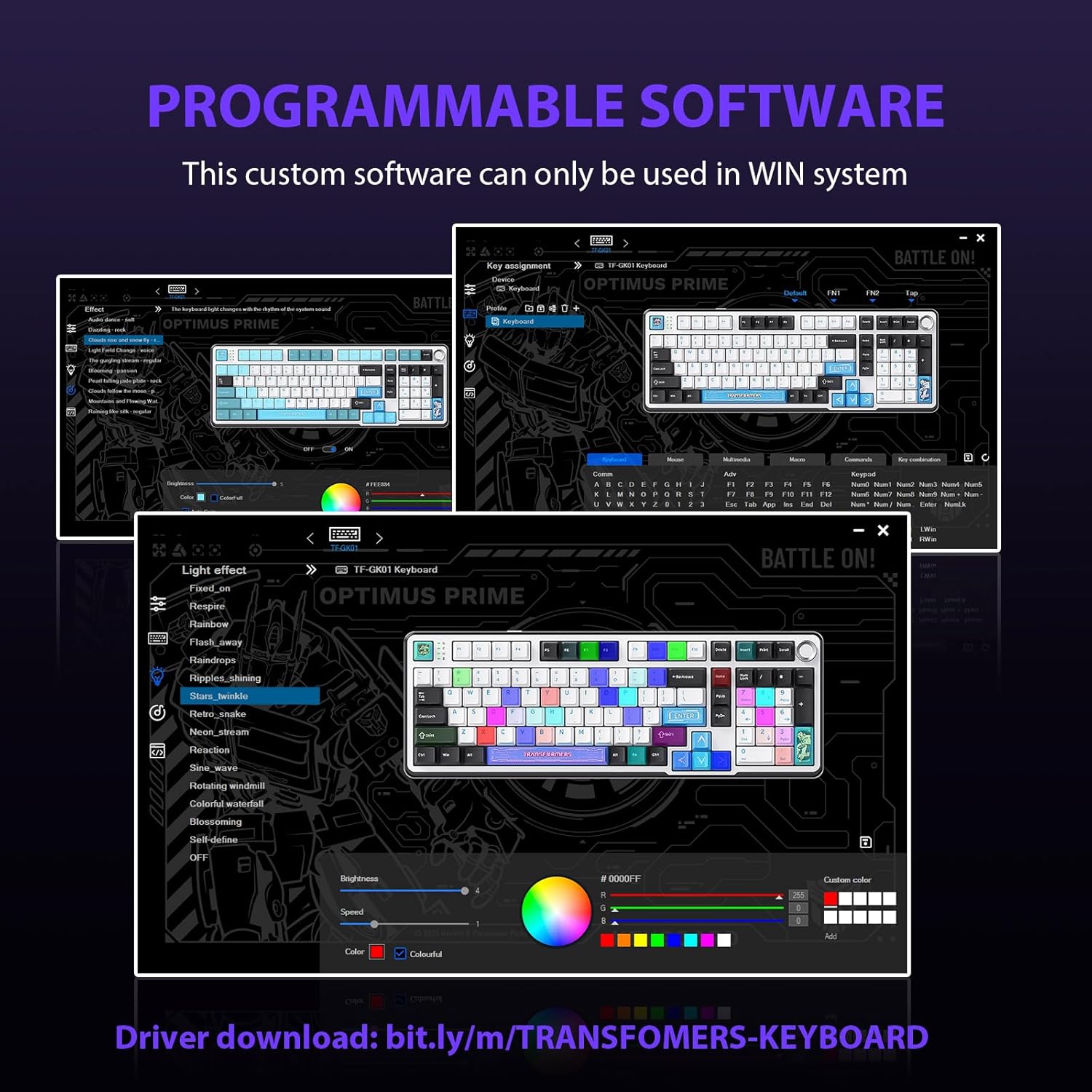
Figure 5.2: Programmable Software Interface.
5.3. گيسڪٽ تي لڳل جوڙجڪ
The keyboard features a five-layer sound-absorbing and shock-absorbing gasket mounted structure. This design effectively reduces hollow noise and provides a softer, more consistent typing feel by isolating the plate from the case.
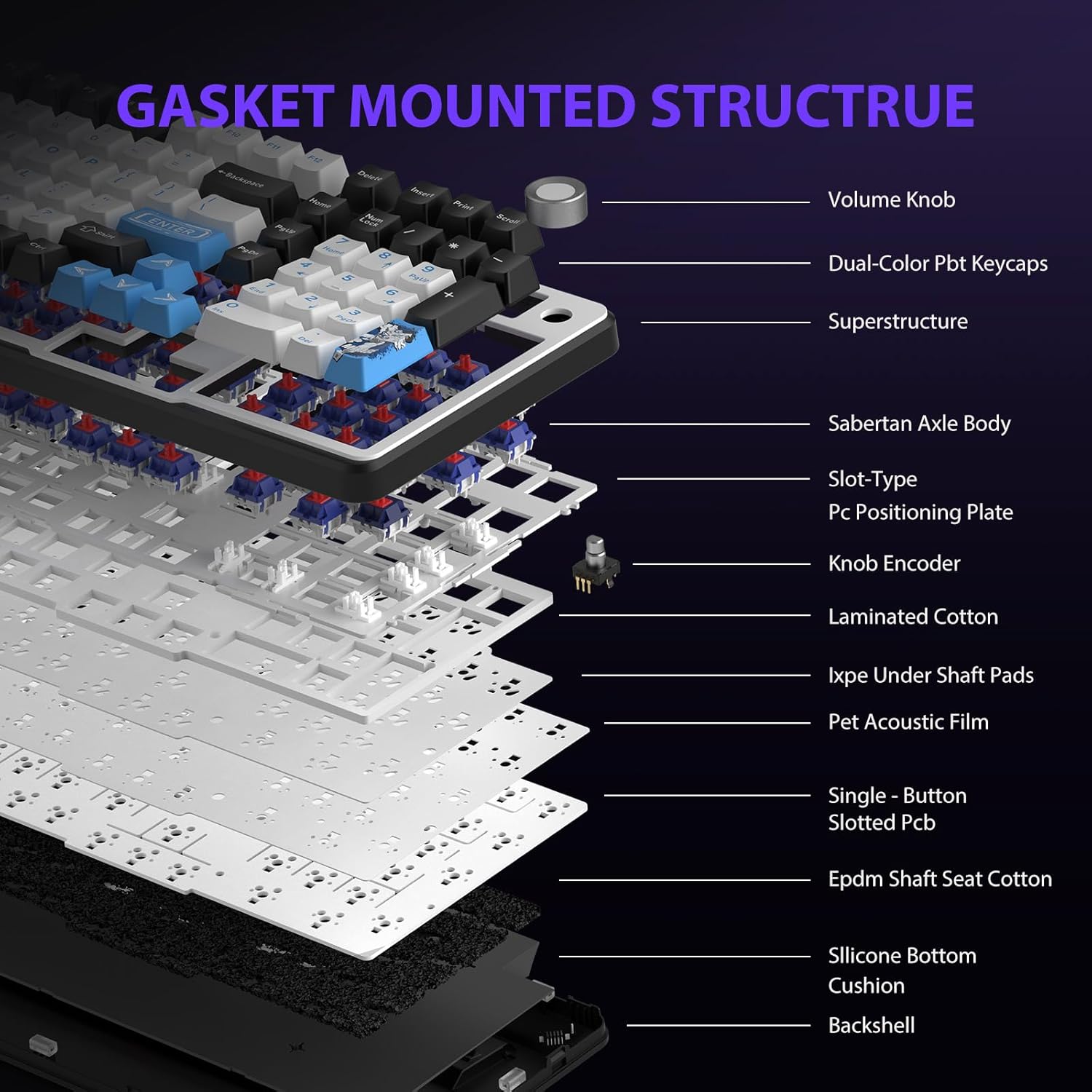
Figure 5.3: Gasket Mounted Structure Components.
6. بيٽري جو انتظام
The GK01 keyboard is equipped with a 4000mAh rechargeable battery.
- چارج ڪرڻ: Connect the keyboard to a USB power source using the provided USB-C cable. The indicator light will show charging status.
- بيٽري جي زندگي: A fully charged battery provides extended usage time. Actual battery life may vary based on usage patterns and RGB lighting intensity.
- بجلي جي بچت: The keyboard will enter a power-saving sleep mode after a period of inactivity to conserve battery. Press any key to wake it up.
7. سار سنڀال
7.1. ڪي بورڊ صاف ڪرڻ
- صفائي ڪرڻ کان اڳ ڪيبورڊ کي سڀني پاور ذريعن کان ڌار ڪريو.
- نرم، لِنٽ کان خالي ڪپڙو استعمال ڪريو ٿورڙو ڊيampڪي ڪيپس ۽ چيسس کي صاف ڪرڻ لاءِ پاڻي يا هلڪي صفائي واري محلول سان صاف ڪريو.
- ڪي ڪيپس جي وچ ۾ مٽي ۽ ملبي لاءِ، دٻيل هوا يا ننڍو برش استعمال ڪريو.
- سخت ڪيميائي يا ٻرندڙ مواد استعمال ڪرڻ کان پاسو ڪريو.
7.2. Keycap and Switch Care
- The PBT keycaps are designed for durability and fade resistance.
- Refer to Section 5.1 for instructions on safely removing and replacing keycaps and switches.
- Ensure the keyboard feet are clean and free of debris for stable placement.

Figure 7.1: Adjustable Keyboard Feet.
8. مسئلا حل ڪرڻ
| مسئلو | ممڪن سبب | حل |
|---|---|---|
| ڪي بورڊ وائرليس موڊ ۾ جواب نه ڏئي رهيو آهي. | Low battery, incorrect mode selected, dongle not connected, Bluetooth not paired. | Charge the keyboard. Ensure the mode switch is set correctly (2.4GHz or BT). Re-insert the 2.4GHz dongle. Re-pair Bluetooth connection. Try wired mode to confirm keyboard functionality. |
| چاٻيون رجسٽر نه ٿيڻ يا ٻٽي ٽائيپ ٿيڻ. | Loose switch, software issue, debris under keycap. | Ensure switches are fully seated. Clean under keycaps. If using programmable software, ensure it's updated or try resetting keyboard settings. |
| RGB backlight not working or stuck. | Backlight turned off, software conflict. | دٻايو Fn + X to toggle backlight. Check programmable software settings. |
| بلوٽوٿ ذريعي ڳنڍي نه ٿو سگهجي. | Keyboard not in pairing mode, device Bluetooth off, interference. | Ensure keyboard is in Bluetooth pairing mode (ايف اين + سوال/اولهه/اي long press). Ensure device Bluetooth is on and discoverable. Move closer to the device. |
9. وضاحتون
| خاصيت | تفصيل |
|---|---|
| ماڊل نمبر | ٽي ايف-جي ڪي 01 |
| رابطي | بلوٽوٿ 5.0، 2.4GHz وائرليس، USB-C وائرڊ |
| ڪي بورڊ جو قسم | مشيني |
| ترتيب | 101 ڪنجيون (مڪمل سائيز) |
| سوئچز | Pre-lubed Cybertron Linear Switches, Hot-Swappable (3-pin/5-pin compatible) |
| ڪيپ ڪيپ | Heat-sublimated PBT |
| پٺڀرائي | RGB (16.8 Million Colors, 20 modes, music rhythm effects via driver) |
| بيٽري جي گنجائش | 4000mAh |
| پيداوار جي ماپ | 16.15 x 5.65 x 1.63 انچ (41.02 x 14.35 x 4.14 سينٽي) |
| شيءِ جو وزن | 2.24 پائونڊ (1.02 ڪلوگرام) |
| مطابقت رکندڙ ڊوائيسز | ليپ ٽاپ، پي سي، اسمارٽ فون، ٽيبليٽ |
| خاص خاصيتون | Anti-Ghosting (all keys), Multimedia Control Knob, Programmable Keys (via software), Rechargeable |
10. وارنٽي ۽ سپورٽ
For information regarding warranty coverage, technical support, or service inquiries, please refer to the warranty card included with your product or visit the official Transformers Keyboard webسائيٽ.
ٺاهيندڙ: ٽرانسفارمر


