1. تعارف
The IRRADIO IR-203 Sound+ is a compact and portable wireless speaker designed for high-quality audio playback. Featuring Bluetooth 5.0 connectivity and a USB port for external media, it offers versatile listening options. Its robust design and long-lasting battery make it ideal for both home use and on-the-go entertainment.

شڪل 1.1: IRRADIO IR-203 Sound+ Wireless Speaker. This image shows the speaker from an angled perspective, highlighting its compact size and fabric grille.
2. حفاظت جي ڄاڻ
مھرباني ڪري ڊوائيس استعمال ڪرڻ کان پھريان سڀ حفاظتي ھدايتون احتياط سان پڙھو. مستقبل جي حوالي لاءِ ھي دستورالعمل رکو.
- اسپيڪر کي پاڻي يا گهڻي نمي جي سامهون نه رکو. هي پراڊڪٽ پنروڪ نه آهي.
- Avoid extreme temperatures. Do not place near heat sources or in direct sunlight.
- ڊوائيس کي ڌار نه ڪريو، مرمت نه ڪريو، يا تبديل نه ڪريو. اهو وارنٽي کي رد ڪري ڇڏيندو ۽ نقصان يا زخم جو سبب بڻجي سگهي ٿو.
- صرف مخصوص چارجنگ وول استعمال ڪريوtage (DC 5V/2A).
- ٻارن جي پهچ کان پري رکو.
3. پيڪيج مواد
پڪ ڪريو ته سڀئي شيون پيڪيج ۾ موجود آهن:
- IRRADIO IR-203 Sound+ Wireless Speaker
- USB چارجنگ ڪيبل
- استعمال ڪندڙ جو دستياب (ھي دستاويز)
4. پراڊڪٽ ختمview
4.1. ڪنٽرول ۽ بندرگاهون

شڪل 4.1: پاسي view of the speaker showing control buttons. From left to right: Mode button (M), Volume Down (-), Volume Up (+), Play/Pause/Next Track button (▶).

شڪل 4.2: پوئتي view of the speaker showing connectivity ports. From left to right: TF (MicroSD) card slot, USB-A port, ON/OFF switch, DC 5V charging port.
The speaker features intuitive controls on its top edge and essential connectivity ports on its rear panel.
- موڊ بٽڻ (M): بلوٽوٿ ۽ USB پلے بیک موڊز جي وچ ۾ سوئچ ڪرڻ لاءِ دٻايو.
- حجم گھٽ (-): حجم گھٽائڻ لاءِ دايو.
- حجم وڌايو (+): حجم وڌائڻ لاءِ دٻايو.
- Play/Pause/Next Track (▶): Press to play or pause audio. Long press to skip to the next track.
- TF ڪارڊ سلاٽ: سڌو آڊيو پلے بیک لاءِ مائڪرو ايس ڊي ڪارڊ داخل ڪريو.
- USB-A پورٽ: Insert a USB flash drive for direct audio playback.
- آن/آف سوئچ: اسپيڪر کي آن يا آف ڪرڻ لاءِ سلائڊ ڪريو.
- ڊي سي 5V پورٽ: Connect the USB charging cable here to charge the speaker.
5. سيٽ اپ
5.1. اسپيڪر کي چارج ڏيڻ
Before first use, fully charge the speaker. The battery capacity is 400 mAh.
- مهيا ڪيل USB چارجنگ ڪيبل کي اسپيڪر تي DC 5V پورٽ سان ڳنڍيو.
- Connect the other end of the USB cable to a compatible USB power adapter (DC 5V/2A recommended) or a computer USB port.
- چارجنگ انڊيڪيٽر لائيٽ روشن ٿيندي (رنگ مختلف ٿي سگهي ٿو) ته جيئن ڏيکاري سگهجي ته اسپيڪر چارج ٿي رهيو آهي.
- Charging typically takes approximately 2 hours for a full charge. The indicator light will change or turn off once charging is complete.
A full charge provides approximately 2 hours and 40 minutes of continuous playback at 50% volume.
5.2. پاور آن/آف
To power on the speaker, slide the ON/OFF switch to the 'ON' position. You will hear an audible prompt. To power off, slide the switch to the 'OFF' position.
6. آپريٽنگ هدايتون
6.1. بلوٽوٽ جوئر
The speaker uses Bluetooth 5.0 for stable wireless connection up to 10 meters.
- Ensure the speaker is powered on and in Bluetooth mode. If not, press the 'M' (Mode) button to switch to Bluetooth mode. The speaker will enter pairing mode, indicated by a flashing LED light and an audible prompt.
- پنهنجي ڊوائيس (اسمارٽ فون، ٽيبليٽ، ليپ ٽاپ) تي، بلوٽوٿ کي فعال ڪريو ۽ موجود ڊوائيسز جي ڳولا ڪريو.
- Select "IRRADIO IR-203 Sound+" from the list of found devices.
- Once paired, the speaker will provide an audible confirmation, and the LED light will stop flashing.
- هاڻي توهان اسپيڪر ذريعي پنهنجي ڊوائيس مان آڊيو هلائي سگهو ٿا.
نوٽ: اسپيڪر خودڪار طريقي سان آخري جوڙيل ڊوائيس سان ٻيهر ڳنڍڻ جي ڪوشش ڪندو جڏهن پاور آن ٿيندو.
6.2. USB/TF ڪارڊ پلے بیک
The speaker supports direct audio playback from a USB flash drive or a MicroSD (TF) card.
- Insert a USB flash drive into the USB-A port or a MicroSD card into the TF card slot.
- The speaker will automatically switch to USB/TF card mode and begin playing audio files (MP3, WAV, etc.) from the inserted storage device. If it does not switch automatically, press the 'M' (Mode) button to select the correct mode.
- Use the Play/Pause/Next Track button (▶) to control playback.
6.3. حجم ڪنٽرول
Use the '+' and '-' buttons on the speaker to adjust the volume. You can also control the volume from your connected device.
7. سار سنڀال
To ensure the longevity and optimal performance of your speaker, follow these maintenance guidelines:
- صفائي: Use a soft, dry cloth to wipe the speaker's surface. Do not use abrasive cleaners, alcohol, or chemical solvents.
- اسٽوريج: جڏهن گهڻي عرصي تائين استعمال ۾ نه هجي، ته اسپيڪر کي سڌي سج جي روشني ۽ انتهائي گرمي پد کان پري ٿڌي، سڪل جاءِ تي رکو.
- بيٽري جي سنڀال: بيٽري جي زندگي بچائڻ لاءِ، بيٽري کي بار بار مڪمل طور تي چارج ڪرڻ کان پاسو ڪريو. اسپيڪر کي باقاعدي چارج ڪريو، جيتوڻيڪ استعمال ۾ نه هجي.
8. مسئلا حل ڪرڻ
If you encounter issues with your IRRADIO IR-203 Sound+ speaker, refer to the following common problems and solutions:
| مسئلو | ممڪن سبب | حل |
|---|---|---|
| اسپيڪر آن نٿو ٿئي. | بيٽري ختم ٿي وئي آهي. | اسپيڪر کي گهٽ ۾ گهٽ 30 منٽن لاءِ چارج ڪريو. |
| آواز ڪونهي. | آواز تمام گهٽ يا خاموش آهي. غلط موڊ چونڊيو ويو آهي. | Increase volume on both speaker and connected device. Press 'M' button to switch modes. |
| بلوٽوٿ ذريعي جوڙي نه ٿو سگهجي. | اسپيڪر پيئرنگ موڊ ۾ ناهي. ڊوائيس تمام پري آهي. مداخلت. | Ensure speaker is in Bluetooth pairing mode (flashing LED). Move device closer to speaker (within 10m). Turn off other Bluetooth devices. |
| USB/TF ڪارڊ نه هلي رهيو آهي. | غلط file فارميٽ. ڪارڊ/ڊرائيو صحيح طرح سان داخل نه ڪيو ويو آهي. | آڊيو کي يقيني بڻايو files are in supported format (e.g., MP3). Reinsert the USB drive or TF card firmly. Press 'M' button to select USB/TF mode. |
جيڪڏهن انهن حلن جي ڪوشش ڪرڻ کان پوءِ به مسئلو برقرار رهي، مهرباني ڪري ڪسٽمر سپورٽ سان رابطو ڪريو.
9. وضاحتون
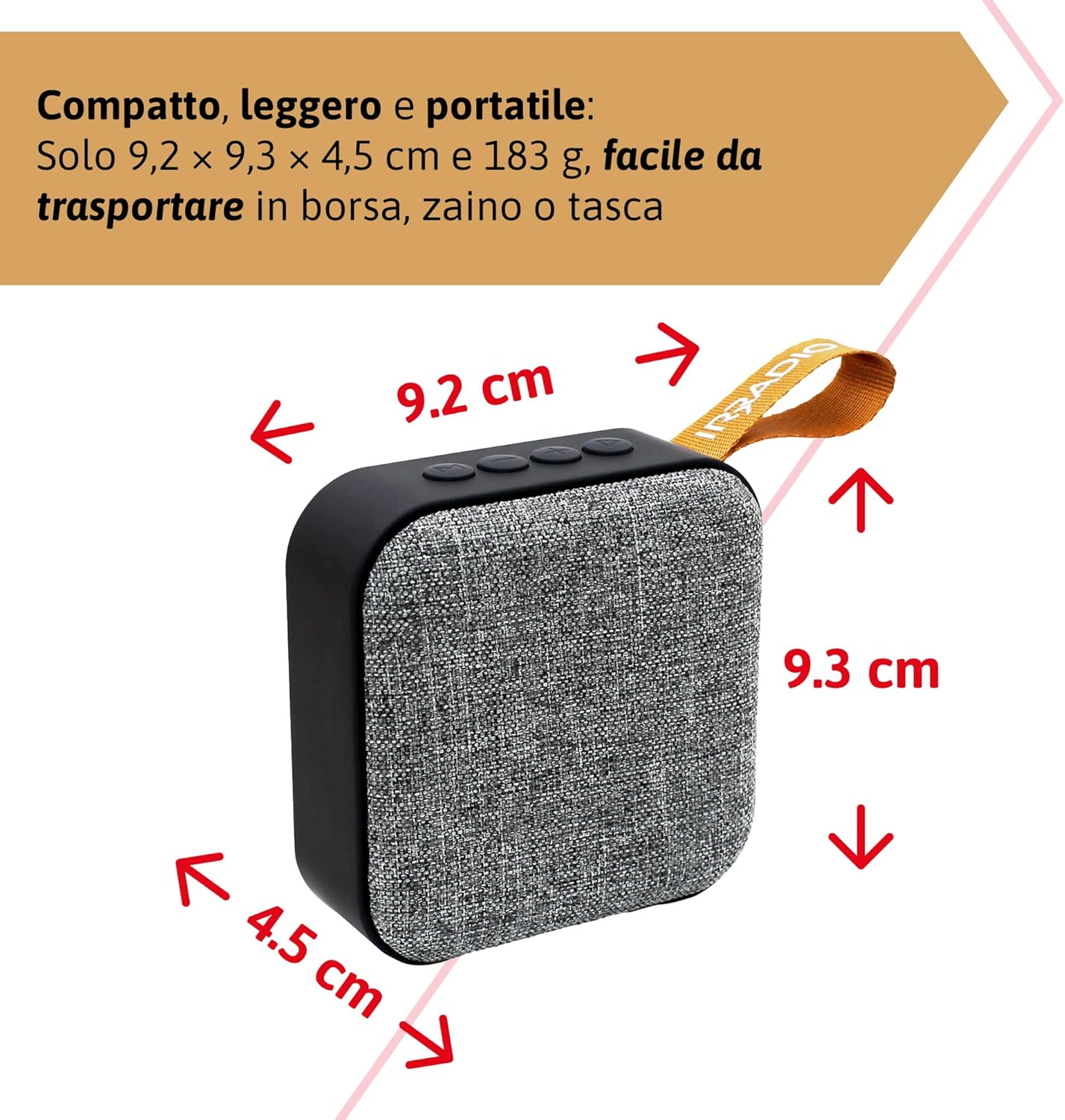
شڪل 9.1: Dimensions of the IRRADIO IR-203 Sound+ speaker: 9.2 cm (width) x 9.3 cm (height) x 4.5 cm (depth).
| خاصيت | تفصيل |
|---|---|
| ماڊل نالو | IR-203 Sound+ |
| شيون ماڊل نمبر | 550922126 |
| برانڊ | IRRADIO |
| پيداوار جي ماپ | 9.2 x 9.3 x 4.5 سينٽي |
| وزن | 183 گرام |
| اسپيڪر جو قسم | Woofer (Full Range 50mm Driver + Passive Radiator) |
| وڌ ۾ وڌ اسپيڪر آئوٽ پُٽ پاور | 3.5 واٽس آر ايم ايس |
| رابطي ٽيڪنالاجي | بلوٽوٿ 5.0، يو ايس بي |
| وائرليس ٽرانسميشن جو فاصلو | 10 ميٽر تائين (بغير رڪاوٽ) |
| آڊيو آئوٽ پٽ موڊ | اسٽيريو |
| بيٽري جي گنجائش | 400 ايم اي ايڇ (3.7 وولٽ، 1.48 وولٽ) |
| بيٽري جي زندگي | Approx. 2 hours 40 minutes (at 50% volume) |
| چارج ڪرڻ وقت | لڳ ڀڳ. 2 ڪلاڪ |
| چارجنگ ان پٽ | ڊي سي 5V/2A |
| مطابقت رکندڙ ڊوائيسز | Smartphones, Tablets, Laptops, Desktop Computers, MP3 Players, USB Flash Drives |
| رنگ | ڀورو |
| پنروڪ | نه |
10. وارنٽي ۽ سپورٽ
10.1. وارنٽي ڄاڻ
For information regarding warranty and returns, please refer to the purchase platform's policies. Typically, products purchased on Amazon.it can be returned within 30 days of receipt if you change your mind. For defective or damaged products, specific return policies apply.
For specific information on purchases made through the Marketplace, please consult the relevant help page on the platform.
10.2. ڪسٽمر سپورٽ
For further assistance, technical support, or inquiries about your IRRADIO IR-203 Sound+ speaker, please visit the official IRRADIO store page:


