تعارف
This manual provides instructions for the Karlsson KA6039GY LED Retro Flat Alarm Clock. Please read this manual carefully before use and retain it for future reference. This alarm clock combines a slim design with warm wooden details and an LED display, suitable for various environments.
پيداوار ختمview
The Karlsson KA6039GY LED Retro Flat Alarm Clock is constructed from durable MDF material and features an integrated wireless charging pad.
سامهون View
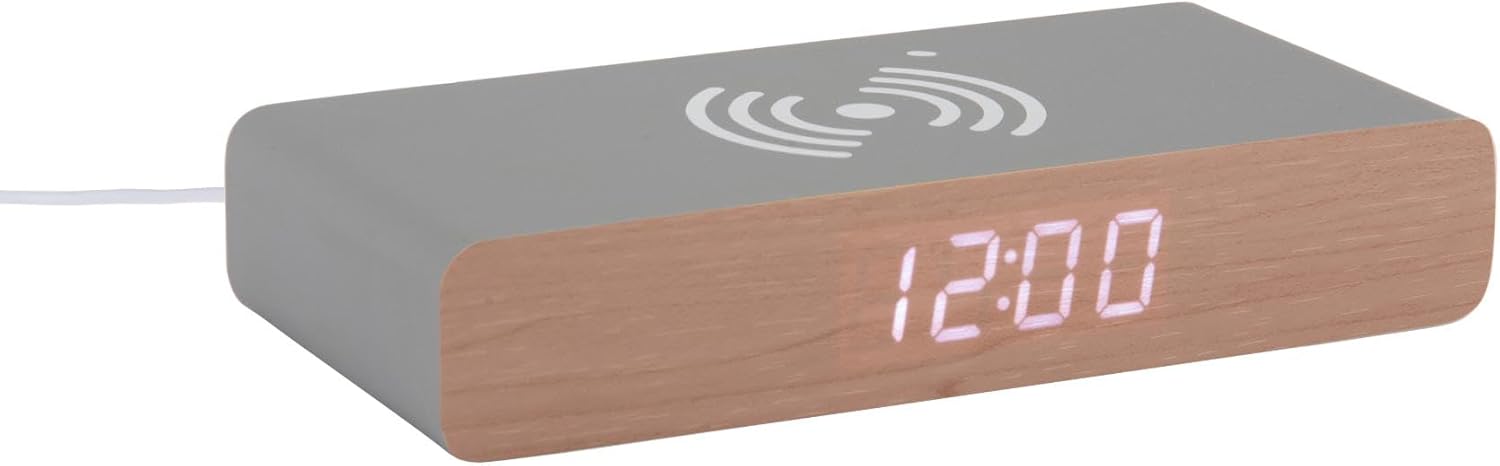
This image displays the front of the Karlsson KA6039GY alarm clock, highlighting its LED time display and the integrated wireless charging pad symbol on the top surface.
زاويه View

This image provides an angled perspective of the alarm clock, showcasing the LED display, the wireless charging icon, and the "KARLSSON" brand name printed on the side.
ريڙهه View ۽ ڪنٽرول

This image shows the back panel of the alarm clock, detailing the control buttons for settings and the power input port.
سيٽ اپ ڪريو
پاور ڪنيڪشن
- Connect the provided power cable to the power input port on the rear of the alarm clock.
- پاور ڪيبل جي ٻئي پڇاڙي کي مناسب پاور آئوٽليٽ ۾ لڳايو.
- The LED display will illuminate, indicating the device is powered on.
آپريٽنگ هدايتون
وقت مقرر ڪرڻ
- Locate the time setting button on the rear panel.
- Press and hold the time setting button until the hour digits begin to flash.
- Use the adjustment buttons (e.g., Up/Down or +/-) to set the correct hour.
- Press the time setting button again to switch to minute adjustment.
- Use the adjustment buttons to set the correct minutes.
- Press the time setting button one more time to confirm and exit time setting mode.
الارم کي ترتيب ڏيڻ
- Locate the alarm setting button on the rear panel.
- Press and hold the alarm setting button until the alarm hour digits begin to flash.
- Use the adjustment buttons to set the desired alarm hour.
- Press the alarm setting button again to switch to alarm minute adjustment.
- Use the adjustment buttons to set the desired alarm minutes.
- Press the alarm setting button one more time to confirm and exit alarm setting mode.
- To activate or deactivate the alarm, press the alarm setting button briefly. An indicator (e.g., a small icon) on the display will show if the alarm is active.
Using the Wireless Charging Function
The top surface of the alarm clock features an integrated wireless charging pad.
- Ensure the alarm clock is powered on.
- Place your Qi-compatible device (e.g., smartphone) directly onto the wireless charging symbol on the top surface.
- ڊوائيس کي اشارو ڏيڻ گهرجي ته اهو چارج ٿي رهيو آهي. جيڪڏهن نه، ته پيڊ تي ان جي پوزيشن کي ترتيب ڏيو.
سار سنڀال
سنڀال ۽ صفائي
To ensure the longevity and proper function of your alarm clock, follow these maintenance guidelines:
- صاف ڪرڻ کان اڳ بجليء کي ختم ڪريو.
- مٿاڇري کي نرم، سڪل، يا ٿوري ڊي سان صاف ڪريوamp cloth. Do not use abrasive cleaners, solvents, or chemical sprays.
- Avoid exposing the device to excessive moisture or direct sunlight.
- يونٽ کي ڌار ڪرڻ جي ڪوشش نه ڪريو.
مشڪلاتون
عام مسئلا ۽ حل
| مسئلو | ممڪن سبب | حل |
|---|---|---|
| ڊسپلي بند آهي | پاور ڪنيڪشن ناهي | Ensure the power cable is securely connected to the clock and the power outlet. |
| Time/Alarm cannot be set | بٽڻ دٻايو صحيح طور تي نه | Refer to the "Setting the Time" or "Setting the Alarm" sections and ensure buttons are pressed and held as instructed. |
| وائرليس چارج ڪم نه ڪري رهيو آهي | Device not Qi-compatible or misaligned | Ensure your device supports Qi wireless charging. Reposition the device on the charging pad. Check if the clock is powered on. |
| الارم نه ٿو لڳي | الارم چالو نه ٿيو | Ensure the alarm is activated (check for alarm indicator on display). |
وضاحتون
پيداوار جي وضاحت
- ماڊل: KA6039GY
- برانڊ: ڪارلسن
- مواد: ايم ڊي ايف
- رنگ: Mouse Grey
- طول و عرض (W x H): 7.6 سينٽي x 3 سينٽي ميٽر
- وزن: 486 جي
- طاقت جو ذريعو: مکيه طاقت
- خاصيتون: LED display, Wireless charging pad
وارنٽي ۽ سپورٽ
وارنٽي ڄاڻ
This product comes with a standard manufacturer's warranty. For specific warranty terms and conditions, please refer to the documentation included with your purchase or contact Karlsson customer support.
ڪسٽمر سپورٽ
For technical assistance, troubleshooting, or warranty claims, please contact your retailer or visit the official Karlsson webسائيٽ:


