1. تعارف
The Samsung Galaxy Z Flip7 FE is a compact and powerful foldable smartphone designed for convenience and performance. Its unique clamshell design allows for a large screen experience when unfolded and a pocket-friendly form factor when closed. This manual provides essential information for setting up, operating, maintaining, and troubleshooting your device.

The Samsung Galaxy Z Flip7 FE offers a compact design with a large display when unfolded.
Key features include a 50MP camera for high-quality photos, a long-lasting battery, and AI-powered insights accessible directly from the cover screen. The FlexMode allows for hands-free usage, enhancing video calls and photography.
2. سيٽ اپ
2.1 دٻي ۾ ڇا آهي
- Samsung Galaxy Z Flip7 FE Device
- تڪڙو شروع ھدايت
- سم ٽري Ejector
- USB ڪيبل (ٽائيپ-سي کان ٽائپ-سي تائين)
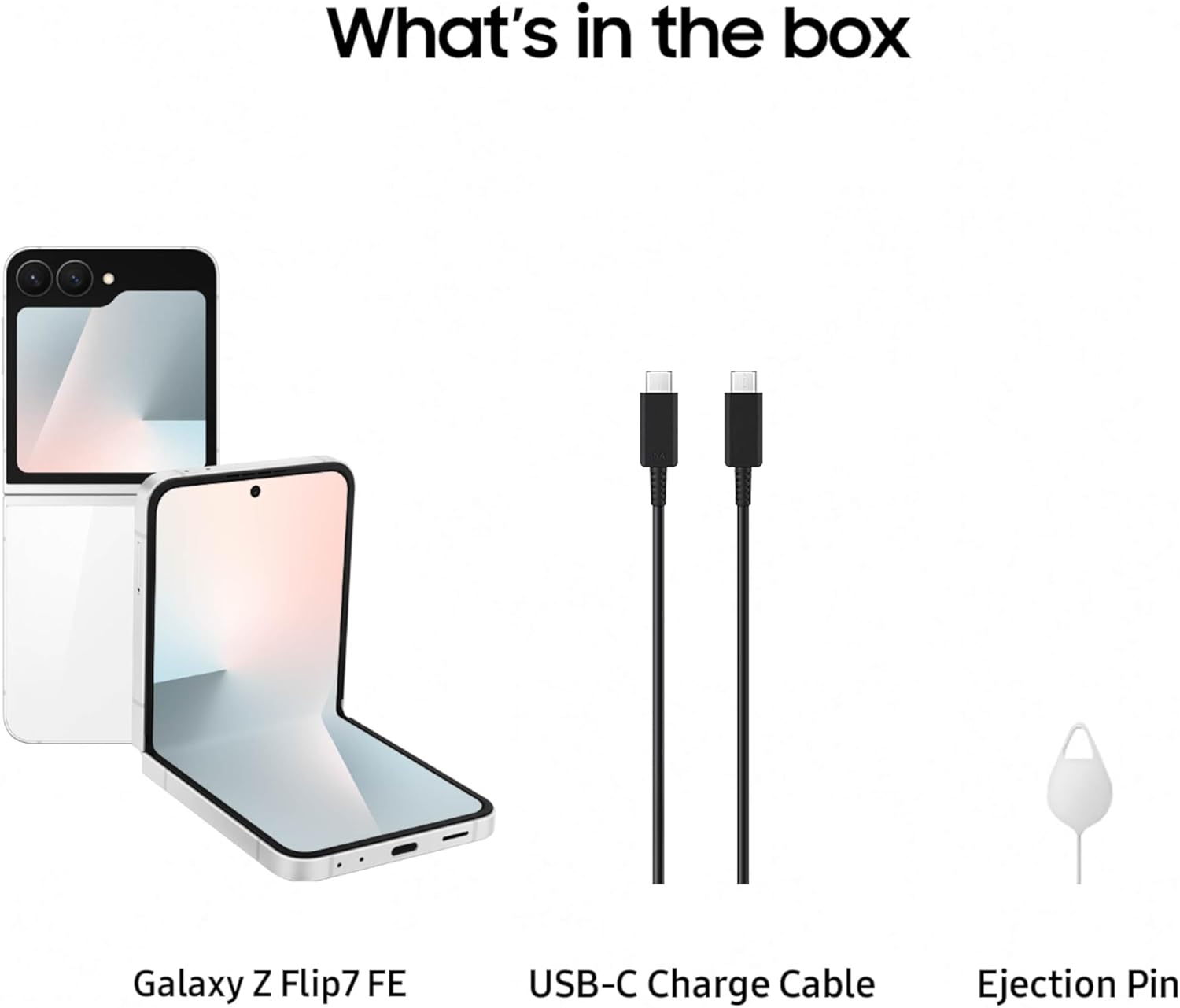
The package includes the Galaxy Z Flip7 FE, a USB-C charge cable, and a SIM tray ejector.
2.2 شروعاتي ڊوائيس سيٽ اپ
- سم ڪارڊ داخل ڪريو: Use the provided SIM tray ejector to open the SIM card slot and insert your Nano-SIM card.
- پاور آن: پاور/سائيڊ ڪي کي دٻايو ۽ رکو جيستائين سامسنگ لوگو ظاهر نه ٿئي.
- اسڪرين تي ڏنل هدايتن تي عمل ڪريو: The device will guide you through initial setup, including language selection, Wi-Fi connection, Google account setup, and data transfer options.
هي وڊيو هڪ پراڊڪٽ فراهم ڪري ٿيview of the Samsung Galaxy Z Flip7 FE, demonstrating its design and key features.
3. ڊوائيس کي هلائڻ
3.1 FlexMode
FlexMode allows you to partially fold your Galaxy Z Flip7 FE, enabling hands-free operation. This is ideal for video calls, watching content, or taking photos and selfies without needing a tripod. Simply fold the device to your desired angle, and the interface will adapt.

Utilize FlexMode for hands-free photography and video calls.
3.2 FlexWindow (Cover Screen)
The FlexWindow on the exterior of your device provides quick access to essential information and controls without needing to open the phone. You can check notifications, control music playback, view the time, weather, and access AI-powered insights like the 'Now Brief' for daily updates.

The FlexWindow provides quick access to information and AI-powered insights.
3.3 ڪيمرا جون خاصيتون
The Galaxy Z Flip7 FE features an impressive 50MP main camera, allowing you to capture clear and detailed photos. It also includes an ultra-wide lens for broader shots and supports 2x optical-quality zoom. The camera system is optimized for hands-free selfies and high-quality image capture in various conditions.

The 50MP camera system captures stunning details and hands-free selfies.
3.4 بيٽري ۽ چارج ڪرڻ
Equipped with a 4000 mAh battery, the Galaxy Z Flip7 FE is designed to provide long-lasting power for your daily tasks. The device supports fast charging and wireless charging, allowing for quick power-ups throughout your day.

The device features a 4000 mAh battery for extended usage.
3.5 AI Features and Connectivity
The Galaxy Z Flip7 FE integrates AI features such as Gemini Live and personalized wellness tips when paired with compatible Galaxy wearables like the Galaxy Ring. It also supports RCS Messaging for enhanced communication and Samsung Wallet for convenient digital payments and transfers.

Integrate with Galaxy wearables for comprehensive health tracking.

Utilize Samsung Wallet for secure and convenient digital transactions.

Enjoy enhanced messaging with RCS Messaging features.
4. سار سنڀال
4.1 اسڪرين سن Careال
The foldable screen is a key feature of your device. To ensure its longevity, avoid pressing hard on the screen with sharp objects. Keep the screen free from dust and debris, especially in the hinge area. Use a soft, lint-free cloth to clean the screen.
4.2 سافٽ ويئر اپڊيٽ
Regularly check for and install software updates to ensure optimal performance, security, and access to the latest features. You can typically find update options in your device's Settings menu under 'Software update'.
4.3 عام سنڀال
Protect your device from extreme temperatures, direct sunlight, and liquids. While the phone is designed for durability, using a protective case can further safeguard it from accidental drops and scratches.
5. مسئلا حل ڪرڻ
5.1 عام مسئلا
- ڊوائيس جواب نه ڏئي رهيو آهي: If your device freezes, press and hold the Power/Side key and Volume Down key simultaneously for more than 7 seconds to restart it.
- بيٽري جلدي ختم ٿيڻ: سيٽنگون > بيٽري ۽ ڊوائيس جي سنڀال ۾ پس منظر واري ايپ جي استعمال کي چيڪ ڪريو. اسڪرين جي چمڪ گھٽايو ۽ استعمال ۾ نه هجڻ تي وائي فائي، بلوٽوٿ، يا GPS جهڙيون غير ضروري خاصيتون بند ڪريو.
- ائپ حادثا: Ensure all apps are updated to their latest versions. Clear the cache and data for problematic apps in Settings > Apps.
5.2 Android Auto Compatibility
Some users have reported compatibility issues with Android Auto. If you experience problems connecting your Galaxy Z Flip7 FE to Android Auto, ensure your phone's software and the Android Auto application are fully updated. Consult Samsung support or your vehicle manufacturer for specific compatibility information and potential solutions.
6. وضاحتون
| خاصيت | تفصيل |
|---|---|
| ماڊل نالو | گليڪسي زي فلپ 7 ايف اي |
| شيون ماڊل نمبر | SM-F761UZWAXAA |
| آپريٽنگ سسٽم | اينڊرائيڊ 16، ون يو آءِ 8 |
| سي پي يو ماڊل | ايڪسينوس 2400 ايس 5 اي 9945 |
| ميموري رکڻ جي صلاحيت | 128 جي بي |
| رام ميموري انسٽال ٿيل سائيز | 8 جي بي |
| اسٽينڊنگ اسڪرين ڊسپلي سائيز | 6.7 انچ |
| قرارداد | 1080 x 2400 |
| ريفريش جي شرح | 120 هز |
| بيٽري جي گنجائش | 4000 مليamp ڪلاڪ |
| پيداوار جي ماپ | 6.5 x 2.83 x 0.27 انچ |
| شيءِ جو وزن | 11.7 اونس |
| ڪنيڪشن ٽيڪنالاجيز | بلوٽوٿ، اين ايف سي، يو ايس بي، وائي فائي |
| خاص خاصيتون | Always On Display, Built-In GPS, Fast Charging Support, Mobile Hotspot Capability, Wireless Charging |
7. وارنٽي ۽ سپورٽ
7.1 ٺاهيندڙ وارنٽي
Your Samsung Galaxy Z Flip7 FE comes with a 1-year manufacturer warranty in the US. Please refer to the warranty card included with your device or visit the official Samsung webتفصيلي شرطن ۽ شرطن لاء سائيٽ.
7.2 اختياري تحفظ جا منصوبا
Additional protection plans, such as Samsung Care+ Device Protection, are available for purchase to extend coverage beyond the standard manufacturer warranty. Options include 2-year plans or monthly subscriptions.
- Samsung Care+ Device Protection 2 YR
- Samsung Care+ Device Protection Monthly
- Complete Protect (covers eligible past and future purchases)
7.3 ڪسٽمر سپورٽ
وڌيڪ مدد، ٽيڪنيڪل سپورٽ، يا سروس جي پڇا ڳاڇا لاءِ، مھرباني ڪري سرڪاري سام سنگ سپورٽ جو دورو ڪريو. webسائيٽ تي وڃو يا انهن جي ڪسٽمر سروس سان رابطو ڪريو. توهان وڌيڪ معلومات ۽ سپورٽ وسيلا ڳولي سگهو ٿا سام سنگ اسٽور.


