1. تعارف
This manual provides detailed instructions for the installation, operation, and maintenance of your Hodozzy 9-inch Android Car Stereo. This unit is specifically designed for Ford F-150 models manufactured between 2009 and 2012. Please read this manual thoroughly before using the product to ensure proper function and safety.
2. حفاظت جي ڄاڻ
- پيشه ورانه تنصيب جي سفارش ڪئي وئي آهي: Due to the complexity of vehicle electrical systems, professional installation is highly recommended. Incorrect wiring can cause damage to the unit or the vehicle.
- بجلي جي فراهمي: پڪ ڪريو ته يونٽ 12V DC پاور سپلائي سان منفي گرائونڊ سان ڳنڍيل آهي.
- وائرنگ: Verify all wiring connections are secure and properly insulated to prevent short circuits. Pay close attention to the ignition power connection, as it may require sourcing a 12V ignition power from your truck.
- ڊرائيونگ جي حفاظت: يونٽ کي اهڙي طريقي سان نه هلايو جيڪو توهان کي ڊرائيونگ کان پريشان ڪري. هميشه روڊ جي حفاظت کي ترجيح ڏيو.
- گرمي پد: يونٽ کي ڊگهي عرصي تائين انتهائي گرمي پد يا سڌي سج جي روشني ۾ بي نقاب ڪرڻ کان پاسو ڪريو.
3. پيڪيج مواد
انسٽاليشن کان اڳ، مھرباني ڪري تصديق ڪريو ته ھيٺ ڏنل سڀ شيون توھان جي پيڪيج ۾ موجود آھن:
- Hodozzy 9-Inch Android Car Stereo Unit
- آر سي سي ڪيبل
- ريئر ڪئميرا ان پٽ ڪيبل
- GPS اينٽيننا
- USB ڪيبل (x2)
- استعمال ڪندڙ دستي
- مائڪروفون (MIC)
- Rear Camera (AHD wide-angle)
- پاور ڪيبل
- چڙهڻ جو سامان
- ريڊيو اينٽيننا
- ڪينبس ڊيڪوڊر
- تنصيب جو اوزار

Figure 3.1: Hodozzy Car Stereo Packing List
4. سيٽ اپ ۽ تنصيب
Installation of the Hodozzy Android Car Stereo requires careful attention to wiring. It is recommended to consult a professional for installation.
4.1 وائرنگ ڪنيڪشن
Refer to the wiring diagram below for proper connection of the power, audio, and accessory cables. Ensure all connections are secure.
- پاور ڪيبل: Connect the main power harness to your vehicle's electrical system. Note that the 12V ignition power may need to be sourced separately from your truck's original wiring.
- آر سي اي ان پٽ/آئوٽ پُٽ: ٻاهرين آڊيو/وڊيو ڊوائيسز لاءِ.
- ريورسنگ ڪئميرا ان پٽ: Connect the included rear camera.
- USB ڪيبل: ٻاهرين USB ڊوائيسز کي ڳنڍيو.
- جي پي ايس انٽنا: صاف جاءِ تي لڳايو view بهترين سگنل جي استقبال لاءِ آسمان جو.
- ريڊيو اينٽينا: پنهنجي گاڏي جي ريڊيو اينٽينا کي ڳنڍيو.

Figure 4.1: Cable Description and Wiring Diagram
4.2 يونٽ لڳائڻ
Use the provided mounting accessories to secure the unit in your Ford F-150 dashboard. Ensure the unit is firmly in place and does not obstruct any vehicle controls or airbags.
5. آپريٽنگ هدايتون
5.1 بنيادي آپريشن
- پاور آن / آف: پاور بٽڻ کي دٻايو ۽ رکو (جيڪڏهن موجود هجي) يا پنهنجي گاڏي جي اگنيشن کي آن ڪريو.
- حجم ڪنٽرول: Adjust using the on-screen controls or steering wheel controls.
- ٽچ اسڪرين: The 9-inch IPS touch screen provides an intuitive interface for all functions.
5.2 اينڊرائيڊ 15 سسٽم
The unit runs on the Android 15 operating system, offering a familiar smartphone-like experience. Navigate through apps, settings, and features using the touch screen.
5.3 ڪنيڪٽوٽي خاصيتون
5.3.1 وائرليس ڪار پلي ۽ اينڊرائيڊ آٽو
Connect your iPhone or Android smartphone wirelessly for seamless integration of navigation, music, calls, and messages. This feature enhances driving convenience and safety.
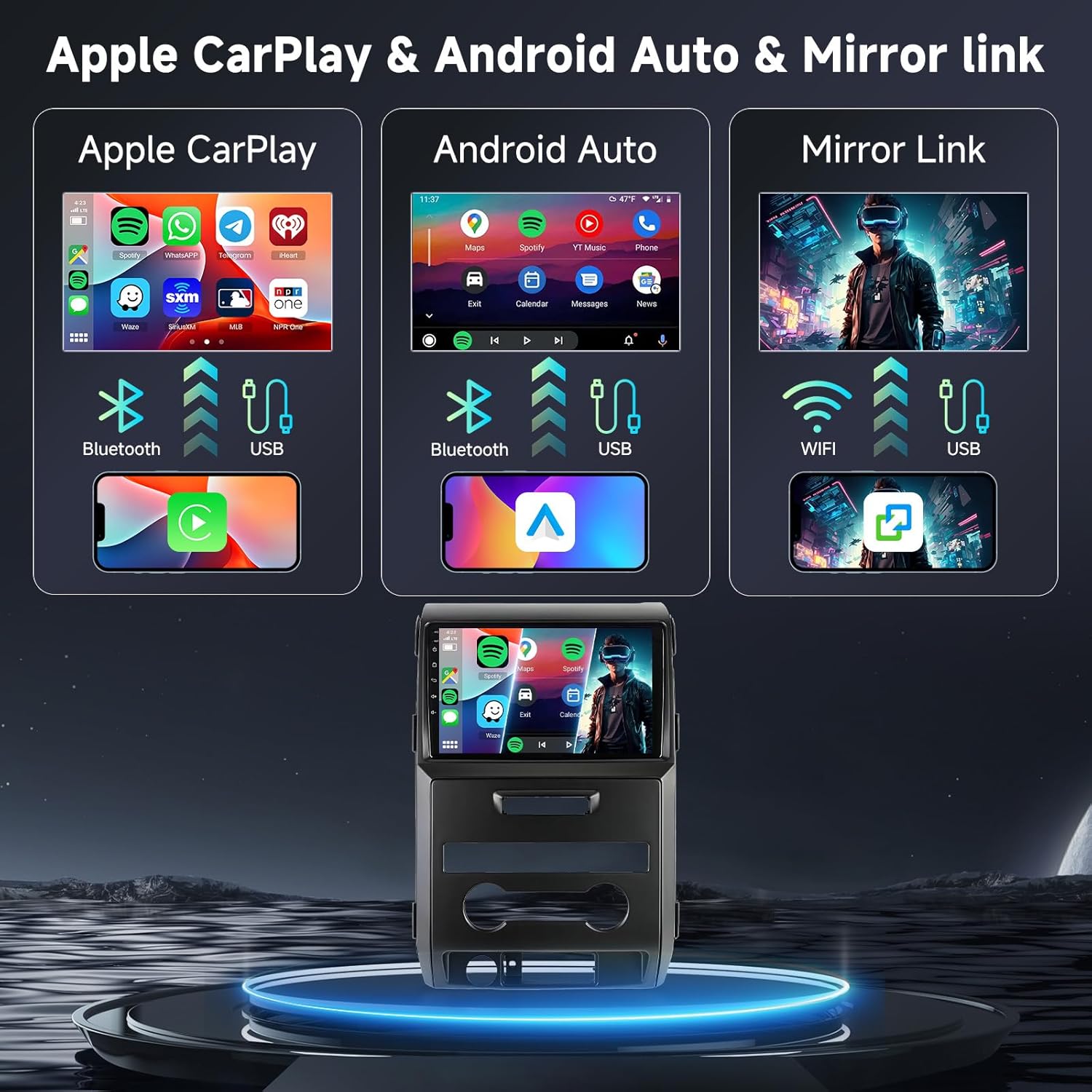
Figure 5.1: Wireless CarPlay, Android Auto, and Mirror Link
5.3.2 آئيني لنڪ
Mirror your smartphone's screen directly onto the car stereo display via WiFi or USB. This allows you to view content from your phone on the larger screen.
5.3.3 بلوٽوٽ
Pair your smartphone via Bluetooth for hands-free calling and audio streaming. Access your phone's contacts and call history directly from the stereo.

Figure 5.2: Bluetooth, FM/RDS Radio, and DSP Interface
5.3.4 وائي فائي
Connect the unit to a WiFi hotspot (e.g., from your smartphone) to access online features, download apps, and browse the internet.

Figure 5.3: WiFi Connectivity and System Performance
5.4 آڊيو خاصيتون
- DSP (Digital Signal Processor): Utilize the built-in 32-band EQ DSP settings to fine-tune your audio output for optimal sound quality.
- ايف ايم/آر ڊي ايس ريڊيو: Tune into your favorite FM radio stations. RDS (Radio Data System) provides additional information like station name and song title.
5.5 Navigation and Voice Control
The integrated GPS navigation system provides accurate directions. Use voice commands to control various functions, such as initiating calls or setting navigation destinations, for a hands-free experience.

Figure 5.4: Voice Control and GPS Navigation
5.6 پوئتي View Camera and Steering Wheel Control (SWC)
- ريڙهه View ڪئميرا: The included AHD wide-angle rear view ڪئميرا خودڪار طريقي سان پوئتي ڏيکاري ٿو view when reversing, enhancing parking safety.
- اسٽيئرنگ ويل ڪنٽرول: Connect the unit to your vehicle's steering wheel controls for convenient operation of audio and other functions without taking your hands off the wheel.

شڪل 5.5: پوئتي View Camera and Steering Wheel Control Interface
5.7 Customizable Interface
- Desktop Themes & Wallpapers: Personalize your unit with 59 unique desktop themes and 19 wallpaper choices.
- ورهايل اسڪرين: Utilize the split-screen feature to display multiple applications simultaneously, such as navigation and music playback.
6. سار سنڀال
- صفائي: اسڪرين ۽ يونٽ جي ٻاهرين حصي کي صاف ڪرڻ لاءِ نرم، سڪل ڪپڙو استعمال ڪريو. رگڙيندڙ صاف ڪندڙ يا محلولن کان پاسو ڪريو.
- سافٽ ويئر اپڊيٽ: بهتر ڪارڪردگي ۽ نئين خاصيتن تائين رسائي کي يقيني بڻائڻ لاءِ وقتي طور تي سافٽ ويئر اپڊيٽس جي جانچ ڪريو. اپڊيٽس عام طور تي ٺاهيندڙ جي ويب سائيٽ تي ملي سگهن ٿا. website or through the unit's system settings.
- ماحولياتي حالتون: Protect the unit from extreme heat, cold, and moisture.
7. مسئلا حل ڪرڻ
If you encounter issues with your Hodozzy car stereo, refer to the following common problems and solutions:
| مسئلو | ممڪن سبب | حل |
|---|---|---|
| يونٽ پاور نه آهي. | Incorrect power wiring (e.g., no 12V ignition power). Blown fuse. | Verify all power connections, especially the 12V ignition wire. Check vehicle and unit fuses. Consult a professional installer. |
| آواز ڪونهي. | Speaker wires disconnected. Volume too low. Mute function active. | Check speaker wire connections. Increase volume. Disable mute. |
| Bluetooth/CarPlay/Android Auto not connecting. | Incorrect pairing process. Device not discoverable. Software glitch. | Ensure Bluetooth is enabled on both devices. Re-pair the device. Restart both the stereo and the smartphone. |
| GPS سگنل ڪمزور يا غلط آهي. | GPS اينٽينا غلط طور تي رکيل يا بند ٿيل آهي. | پڪ ڪريو ته GPS اينٽينا صاف آهي view آسمان جو. اينٽينا ڪنيڪشن چيڪ ڪريو. |
| پوئين ڪئميرا نه ڏيکاري رهيو آهي. | Camera cable disconnected. Reverse trigger wire not connected. | Check camera and trigger wire connections. Ensure camera is powered. |
If the problem persists after attempting these solutions, please contact Hodozzy customer support.
8. وضاحتون
| خاصيت | تفصيل |
|---|---|
| ماڊل | 6G+128G 8-Core |
| ڊسپلي سائيز | 9 Inches IPS Touch Screen |
| آپريٽنگ سسٽم | Android 15 |
| پروسيسر | 8-ڪور |
| ياداشت (رام) | 6 جي بي |
| اسٽوريج (ROM) | 128 جي بي |
| رابطي | Wireless CarPlay, Android Auto, Mirror Link, Bluetooth, WiFi, USB |
| آڊيو خاصيتون | Built-in 32 EQ DSP, FM/RDS Radio |
| نيويگيشن | GPS Navigation (Worldwide map type) |
| وائس ڪنٽرول | Supported (via Microphone, Touchscreen) |
| پوئين ڪئميرا سپورٽ | Yes (AHD wide-angle camera included) |
| اسٽيئرنگ ويل ڪنٽرول | حمايت ڪئي |
| پيداوار جي ماپ | 25.4 x 4 x 38 سينٽي ميٽر؛ 2.05 ڪلوگرام |
| گاڏين جي سروس جو قسم | Truck (Ford F-150 2009-2012) |
| اصل جو ملڪ | چين |
9. وارنٽي ۽ سپورٽ
9.1 وارنٽي ڄاڻ
This Hodozzy car stereo unit comes with a 2 سال وارنٽي خريداري جي تاريخ کان. مھرباني ڪري وارنٽي جي دعوائن لاءِ خريداري جو ثبوت رکو. وارنٽي عام استعمال جي تحت پيداوار جي خرابين ۽ خرابين کي ڍڪيندي آهي. اهو غلط انسٽاليشن، غلط استعمال، حادثن، يا غير مجاز ترميمن جي ڪري ٿيندڙ نقصان کي ڍڪيندو ناهي.
9.2 ڪسٽمر سپورٽ
For technical assistance, troubleshooting, or warranty inquiries, please contact Hodozzy customer support:
اي ميل: hodozzyofficial@163.com
Please provide your product model and a detailed description of the issue when contacting support for faster resolution.


