1. حفاظت جي ڄاڻ
Please read all safety instructions carefully before using your iFFALCON TV. Retain this manual for future reference.
- برقي حفاظت: Do not expose the TV to rain or moisture. Ensure the power cord is securely plugged into a grounded outlet. Do not overload electrical outlets.
- لڳائڻ: Place the TV on a stable, level surface or mount it securely to a wall. Ensure adequate ventilation around the TV to prevent overheating. Do not block ventilation openings.
- صفائي: صفائي ڪرڻ کان اڳ ٽي وي کي ان پلگ ڪريو. نرم، سڪل ڪپڙو استعمال ڪريو. مائع ڪلينر يا ايروسول ڪلينر استعمال نه ڪريو.
- ٻار: Supervise children to prevent them from climbing on the TV or stand. Small parts can be a choking hazard.
- خدمت ڪرڻ: ٽي وي جي پاڻ خدمت ڪرڻ جي ڪوشش نه ڪريو. سڀني خدمت کي قابل خدمت اهلڪارن جي حوالي ڪريو.
2. دٻي ۾ ڇا آهي
پڪ ڪريو ته پيڪنگ ڪرڻ وقت سڀئي جزا موجود آهن:
- iFFALCON 85-Inch U85 Series QD-Mini LED 4K UHD Google Smart TV
- پاور ڪيبل
- ريموٽ لاءِ 2 x AAA بيٽريون
- 6 x اسٽينڊ اسڪرو
- Table stands (2 pieces)
- 5 x ڪيبل ڪلپس
- تڪڙو شروع ھدايت
- ٽي وي ريموٽ
3. سيٽ اپ
3.1 جسماني سيٽ اپ
Before powering on, ensure the TV is securely placed or mounted.
- اسٽينڊ لڳائڻ: If using the table stands, carefully attach them to the designated slots at the bottom of the TV using the provided stand screws. Ensure they are tightened securely.
- ڀت لڳائڻ: If wall mounting, follow the instructions provided with your wall mount kit. Ensure the mount is compatible with VESA standards for the 85U85 model.
- پاور ڪنيڪشن: پاور ڪيبل کي ٽي وي جي پاور ان پٽ سان ڳنڍيو ۽ پوءِ وال آئوٽليٽ سان.
- ٻاهرين ڊوائيسز: Connect any external devices (e.g., cable box, gaming console, Blu-ray player) to the appropriate HDMI or other input ports on the TV.

Image: The iFFALCON 85-Inch U85 Series TV, showcasing ان جي پتلي ڊيزائن ۽ متحرڪ ڊسپلي.
3.2 شروعاتي پاور آن ۽ گوگل ٽي وي سيٽ اپ
After connecting power, press the power button on the remote control or TV to turn it on.
- ريموٽ ڪنٽرول جوڙڻ: If the remote does not respond, insert the AAA batteries and follow on-screen instructions to pair it via Bluetooth.
- ٻولي جي چونڊ: پنھنجي پسند جي Chooseولي چونڊيو.
- نيٽ ورڪ ڪنيڪشن: Select your Wi-Fi network and enter the password. A stable internet connection is required for Google TV features.
- گوگل اڪائونٽ سائن ان: Sign in with your Google account to access Google TV features, personalized recommendations, and app downloads.
- Google Assistant Setup: Follow prompts to set up Google Assistant for voice control.

Image: A user interacting with the iFFALCON TV using hands-free voice control, demonstrating the integrated Google TV interface.
4. پنهنجو ٽي وي هلائڻ
4.1 ريموٽ ڪنٽرول افعال
The provided remote control allows full navigation and control of your iFFALCON TV.
- پاور بٽڻ: ٽي وي کي آن يا بند ڪري ٿو.
- نيويگيشن پيڊ: مينيو مان گذرڻ لاءِ هدايتي بٽڻ استعمال ڪريو ۽ چونڊڻ لاءِ OK بٽڻ استعمال ڪريو.
- جلد +/-: حجم جي سطح کي ترتيب ڏئي ٿو.
- چينل +/-: ٽي وي چينلز بدلائي ٿو.
- ان پٽ: ان پٽ سورس (HDMI 1، HDMI 2، وغيره) چونڊيندو آهي.
- گوگل اسسٽنٽ بٽڻ: Activates voice control. Press and speak your command.
- هوم بٽڻ: گوگل ٽي وي جي هوم اسڪرين تي واپس اچي ٿو.
- ايپ شارٽ ڪٽ بٽڻ: مشهور اسٽريمنگ سروسز تائين جلدي رسائي.
4.2 Smart Features and Google TV
Your iFFALCON U85 Series TV runs on Google TV, offering a personalized and integrated smart experience.
- Google TV Home Screen: Provides access to movies, shows, and apps from all your subscriptions, organized for easy discovery.
- وائس ڪنٽرول: Use Google Assistant or Alexa (via compatible devices) to search for content, control smart home devices, and manage TV settings hands-free.
- App Library: گوگل پلي اسٽور تان ايپليڪيشنن جي وسيع رينج ڊائون لوڊ ۽ انسٽال ڪريو.
- Chromecast بلٽ ان: Cast content from your compatible smartphone, tablet, or computer directly to the TV.
4.3 تصوير ۽ آواز سيٽنگون
پنهنجي مرضي مطابق viewٽي وي جي سيٽنگ مينيو ذريعي ڊائون لوڊ ۽ ٻڌڻ جو تجربو.
- تصوير جا طريقا: مختلف پري سيٽ تصويري موڊس مان چونڊيو (مثال طور، معياري، وشد، مووي، راند) يا سيٽنگز کي ترتيب ڏيو جهڙوڪ چمڪ، برعڪس، رنگ، ۽ تيز.
- Mini LED Precision: The TV features 352 local dimming zones and 1000 nits peak brightness for enhanced contrast and detail.
- Dolby Vision IQ: Automatically adjusts HDR brightness based on the room's ambient light for optimal viewing.
- آواز جا طريقا: Choose from sound presets (e.g., Standard, Music, Movie, Speech) or adjust equalizer settings.
- Dolby Atmos & DTS Virtual X: Experience immersive spatial audio with the integrated 2.1-channel 50W sound system.

Image: Visual comparison illustrating the superior contrast and detail of Mini LED technology compared to conventional TVs.

Image: Depiction of the immersive audio experience with the TV's 2.1 speaker system and Dolby Atmos technology.
4.4 گيمنگ جون خاصيتون
The iFFALCON U85 Series TV is equipped with features designed for an enhanced gaming experience.
- 144Hz Game Mode Pro: Provides a high refresh rate for smooth, responsive gameplay.
- 288Hz DLG Acceleration: Further enhances motion clarity for competitive gaming.
- فري سنڪ پريميئم پرو: Reduces screen tearing and stuttering for fluid visuals.
- خودڪار گھٽ ويڪرائي موڊ (ALLM): Automatically switches to a low-latency mode when a gaming console is detected.
- راند جو بار: Access and adjust key gaming settings quickly during gameplay.
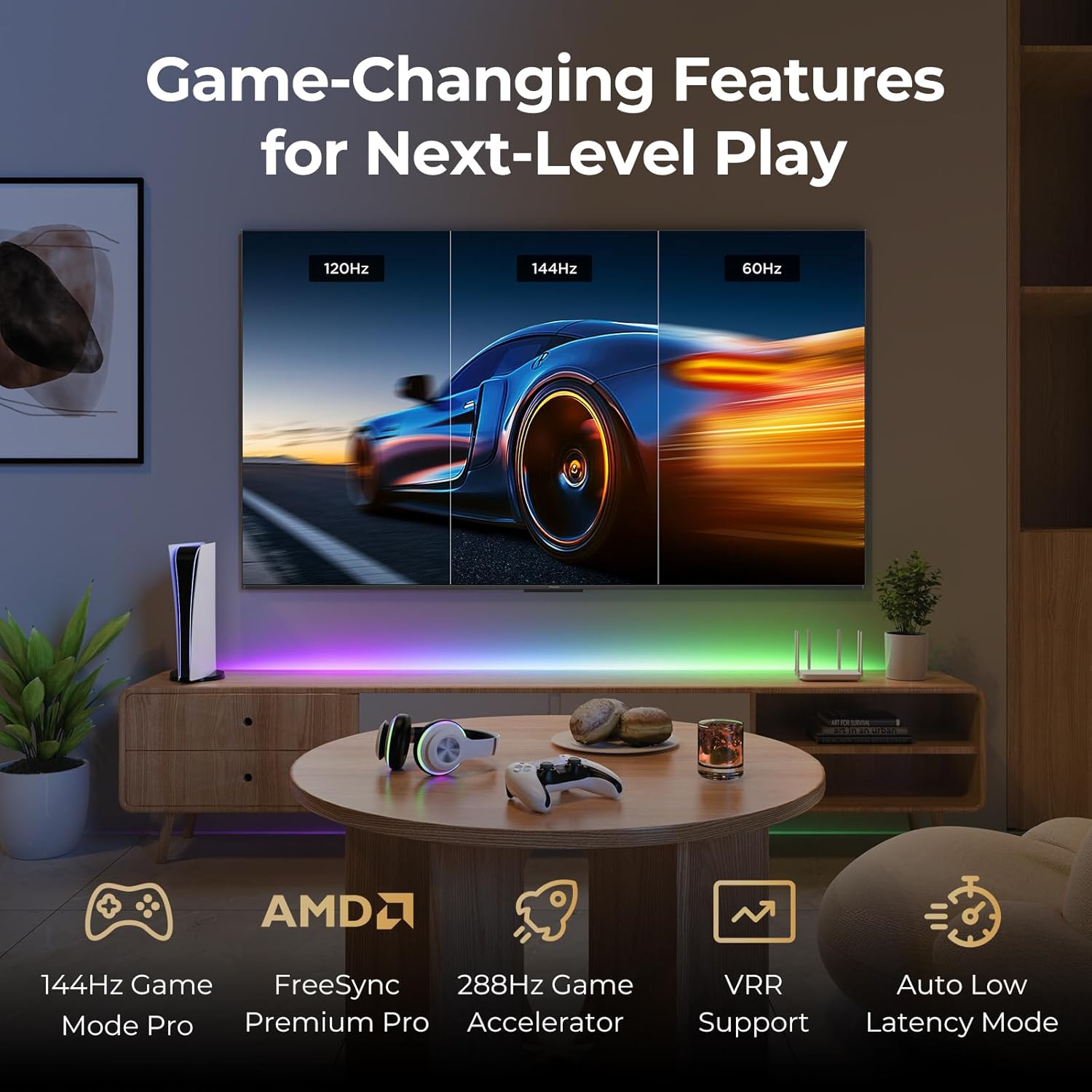
Image: A gaming setup featuring the iFFALCON TV, illustrating its high refresh rate and gaming-specific features for an optimized experience.
5. سار سنڀال
5.1 ٽي وي صاف ڪرڻ
باقاعدي صفائي ٽي وي جي ظاهر ۽ ڪارڪردگي کي برقرار رکڻ ۾ مدد ڪري ٿي.
- اسڪرين: نرم، لِنٽ کان پاڪ ڪپڙي سان اسڪرين کي نرميءَ سان صاف ڪريو. ضدي نشانن لاءِ، هلڪو ڊيampڪپڙي کي پاڻي يا اسڪرين جي مخصوص صفائي واري محلول سان ڌوئڻ (سڌو اسڪرين تي اسپري نه ڪريو).
- جسم: Use a soft, dry cloth to wipe the TV's frame and back panel. Avoid abrasive materials or harsh chemicals.
- بندرگاهن: Ensure ports are free of dust. Use compressed air if necessary, holding the can upright.
5.2 سافٽ ويئر اپڊيٽ
Your TV may receive automatic software updates to improve performance and add new features. Ensure your TV is connected to the internet for these updates.
- You can check for updates manually in the TV's settings menu under System > About > System update.
6. مسئلا حل ڪرڻ
جيڪڏهن توهان کي مسئلا درپيش اچن ٿا، ته سپورٽ سان رابطو ڪرڻ کان اڳ انهن عام حلن کي آزمايو.
- طاقت ناهي: پڪ ڪريو ته پاور ڪيبل ٽي وي ۽ وال آئوٽليٽ ٻنهي ۾ محفوظ طور تي لڳل آهي. آئوٽليٽ کي ٻئي ڊوائيس سان جانچيو.
- ڪابه تصوير/آواز ناهي: Check the selected input source. Ensure all cables to external devices are connected correctly. Restart the TV and connected devices.
- ريموٽ ڪم نه ڪري رهيو آهي: بيٽريون تبديل ڪريو. پڪ ڪريو ته ريموٽ ۽ ٽي وي جي وچ ۾ ڪا به رڪاوٽ نه آهي. جيڪڏهن ريموٽ بلوٽوٿ استعمال ڪري ٿو ته ان کي ٻيهر جوڙيو.
- نيٽ ورڪ ڪنيڪشن جا مسئلا: Restart your Wi-Fi router. Check TV network settings to ensure correct Wi-Fi password and connection.
- تصوير جي معيار جا مسئلا: تصوير جي سيٽنگن کي ترتيب ڏيو (چمڪ، برعڪس، رنگ). پڪ ڪريو ته مواد جو ذريعو اعليٰ معيار جو آهي.
- فيڪٽري ريسٽ: If problems persist, a factory reset can resolve many software-related issues. Navigate to Settings > System > About > Reset. خبردار: This will erase all personal data and settings.
7. وضاحتون
| خاصيت | وصف |
|---|---|
| برانڊ | آئيفالڪون |
| ماڊل نمبر | 85U85 |
| اسڪرين جي ماپ | 85 انچ |
| ڊسپلي ٽيڪنالاجي | QD-مني LED |
| قرارداد | 4K يو ايڇ ڊي (3840 X 2160) |
| ريفريش جي شرح | 144 Hz (Native), 288Hz DLG |
| چوٽي جي روشني | 1000 nits تائين |
| مقابلي جي نسبت | 6500:1 تائين |
| مقامي Dimming زونون | 352 |
| پروسيسر | AiPQ پرو پروسيسر |
| آپريٽنگ سسٽم | گوگل ٽي وي |
| وائس اسسٽنٽ | گوگل اسسٽنٽ، Alexa مطابقت رکندڙ |
| آڊيو سسٽم | 2.1-channel 50W, Dolby Atmos, DTS Virtual X |
| HDR سپورٽ | HDR10+, Dolby Vision IQ |
| گيمنگ خاصيتون | 144Hz VRR, FreeSync Premium Pro, ALLM, Game Bar |
| رابطي | بلوٽوٽ ، وائي فائي |
| پيداوار جا طول و عرض (ڊي x ڊبليو x ايڇ) | 15.2 x 74.4 x 45.5 انچ |
| شيءِ جو وزن | 76.7 پائونڊ |
8. وارنٽي ۽ سپورٽ
Your iFFALCON U85 Series TV is covered by a manufacturer's warranty. Please refer to the warranty card included with your product for specific terms and conditions.
For technical support, service inquiries, or additional information, please visit the official iFFALCON support website or contact their customer service. Keep your purchase receipt and product serial number handy for warranty claims.
توهان وڌيڪ معلومات ۽ سپورٽ وسيلا ڳولي سگهو ٿا دورو ڪندي iFFALCON Store on Amazon.


