پيداوار ختمview
The Eigsupia N18 Bluetooth Headset V5.4 is designed for versatile use, offering hands-free communication and audio playback for computers, cell phones, and other compatible devices. It features advanced noise cancellation and a comfortable ergonomic design, making it suitable for extended wear in various environments.

Image: The Eigsupia N18 Bluetooth Headset, its charging case with LED display, USB dongle, and various ear tip sizes.
اهم خاصيتون:
- Ergonomic ڊيزائن: Lightweight on-ear design with 45-degree rotatable in-ear part, 360-degree rotatable ear hook, and 180-degree rotatable microphone for comfortable and durable wear.
- Upgraded USB Dongle and Bluetooth 5.4: Allows simultaneous connection to mobile phones and desktop computers for stable and fast performance.
- ENC Noise Reduction and Superior Sound Quality: Equipped with a 13mm high-fidelity driver and ENC dual microphones to block up to 90% of background noise for clear audio.
- Large-capacity Battery and LED Display: 430mAh charging box provides up to 100 hours of talk time, with an LED digital display for battery life indication.
- وسيع مطابقت: Connects to two Bluetooth devices simultaneously (e.g., phone + phone, phone + tablet, phone + laptop).
- Flexible Buttons and Hands-free Calls: Supports Siri voice wake-up and multi-function buttons for volume adjustment, call management, and music control.
دٻي ۾ ڇا آهي
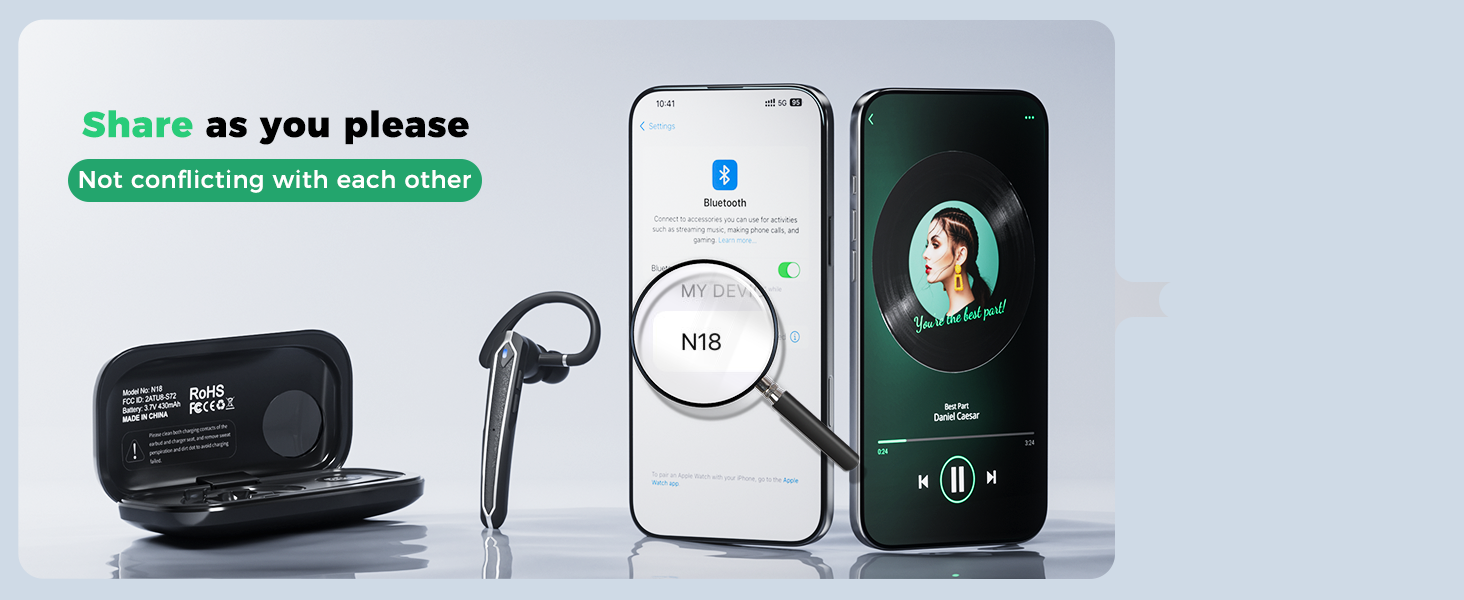
Image: A visual representation of all items included in the Eigsupia N18 package.
- Bluetooth Headset (x1)
- چارج ڪرڻ وارو ڪيس (x1)
- USB پورٽ (x1)
- ٽائپ-سي ڪيبل (x1)
- ھدايت وارو دستور (x1)
- تڪڙو گائيڊ (x1)
- Ear Tips (S/M/L) (x5)
پيداوار جا اجزاء
Familiarize yourself with the headset's adjustable components for optimal fit and microphone positioning.

Image: The headset's ear hook rotates 180 degrees to fit either ear, and the in-ear part rotates 45 degrees for a secure and comfortable fit. Includes S, M, L ear tips.
The headset features a 13mm dynamic driver for clear audio. The dual ENC microphones are strategically placed for effective noise reduction.

تصوير: هڪ ڌماڪو ٿيو view illustrating the internal components of the headset, highlighting the 13mm driver and ENC dual microphones for noise reduction.
سيٽ اپ ۽ چارج
Charging the Headset and Case:
The headset comes with a 430mAh charging case. Place the headset into the charging case to begin charging. The LED digital display on the case will show the remaining battery life of the case and the charging status of the headset.

Image: The 430mAh charging case displaying the battery percentage, indicating the charge level of the case and the headset.

Image: The headset being charged by its portable charging case, which itself is charged via a USB-C cable. The headset charges in approximately 1.5 hours.
پاور آن / آف:
The headset automatically powers on when removed from the charging case and powers off when placed back into the case.
ڊوائيسز سان جوڙيو:
The headset supports Bluetooth 5.4 for stable and fast connections. It can connect to two devices simultaneously.

Image: The headset connected wirelessly to a laptop via the included USB dongle and simultaneously to a smartphone, demonstrating wireless freedom.
To connect to a PC using the USB Dongle:
- USB ڊونگل کي پنهنجي ڪمپيوٽر تي موجود USB-A پورٽ ۾ لڳايو.
- The dongle will show a green power light, indicating it's powered on.
- Remove the headset from its charging case. It will automatically power on and attempt to connect.
- The headset's indicator light will flash blue and red while pairing, then stop flashing and go out once connected.
To connect to a Phone/Tablet via Bluetooth:
- Ensure the headset is out of the charging case and flashing blue and red (pairing mode).
- On your phone or tablet, go to Bluetooth settings.
- Select "N18" from the list of available devices to connect.
- The headset will confirm connection, and its indicator light will stop flashing.
هڪ ئي وقت ٻن ڊوائيسز سان ڳنڍڻ لاءِ:
- Connect the headset to the first device (e.g., phone).
- Disconnect Bluetooth on the first device.
- Connect the headset to the second device (e.g., laptop via dongle or Bluetooth).
- Turn on Bluetooth on the first device again. The headset will automatically reconnect to both devices, allowing seamless switching.

Image: The headset maintaining simultaneous connections with two smartphones, enabling free switching between devices for calls and music.
آپريٽنگ هدايتون
The Eigsupia N18 headset features intuitive button controls for managing calls and media.

Image: A detailed diagram illustrating the multi-function buttons on the headset and their corresponding actions for calls, music, and voice assistant.
بٽڻ افعال:
- Multi-function Button (Side Button):
- Click x1: Answer Call
- Click x2: Pause/Play Music
- Click x3: Activate Voice Assistant (Siri, Google Assistant)
- Press 2s: Mute/Unmute (during call), Hang up/Reject Call, Power On
- Press 5s: Power Off
- Volume Up Button (Top, closer to ear):
- Click x1: Volume +
- Press 2s: Next Song
- Volume Down Button (Top, closer to mouthpiece):
- Click x1: Volume -
- Press 2s: Previous Song
Voice Assistant (Siri) Activation:
Support for Siri voice wake-up allows you to manage your phone without physically holding it, enhancing convenience and safety, especially while driving.

Image: A man using the headset to activate Siri on his phone while driving, demonstrating hands-free operation.
خاموش فنڪشن:
Double-click the multi-function button to mute or unmute the microphone during a call. This feature is only active during an ongoing call.
سار سنڀال
صفائي:
Regularly clean the ear tips and the headset's surface with a soft, dry cloth. Avoid using harsh chemicals or abrasive materials.
پاڻي جي مزاحمت:
The Eigsupia N18 headset is IPX5 water-resistant, meaning it can withstand sweat and light rain. It is not designed for submersion in water.

Image: The headset with water droplets on its surface, illustrating its IPX5 water-resistant rating, suitable for handling sweat and light rain.
مشڪلاتون
If you encounter issues with your Eigsupia N18 headset, try the following steps:
- طاقت ناهي: Ensure the headset and charging case are fully charged.
- جوڙڻ جا مسئلا: Make sure Bluetooth is enabled on your device and the headset is in pairing mode (flashing blue and red). Try turning both devices off and on again.
- ڪابه آڊيو ناهي/خراب آڊيو معيار: Check the volume levels on both the headset and your connected device. Ensure the headset is properly seated in your ear. For PC connection, verify the USB dongle is securely plugged in.
- ڪنيڪشن ڦڙا: Ensure you are within the Bluetooth range (15 meters). Avoid obstacles that may interfere with the signal.
- Multi-device Connection Issues: Follow the specific steps for connecting to two devices simultaneously as outlined in the Setup section.
For more detailed troubleshooting, refer to the User Manual (PDF) available on the product's Amazon page or contact customer support.
وضاحتون
| ماڊل نالو | N18 |
| برانڊ | ايگسوپيا |
| رابطي ٽيڪنالاجي | بلوٽوٿ |
| وائرليس ڪميونيڪيشن ٽيڪنالاجي | بلوٽوٿ |
| بلوٽوت ورزن | 5.4 |
| بلوٽوٿ رينج | 15 ميٽر |
| شور ڪنٽرول | ماحولياتي شور منسوخي (ENC) |
| آڊيو ڊرائيور جي ماپ | 13 ملي ميٽر |
| تعدد جواب | 20 KHz |
| رڪاوٽ | 33 اوم |
| پاڻي جي مزاحمت جي سطح | IPX5 (پنروڪ) |
| بيٽري جي گنجائش (چارج ڪيس) | 430mAh |
| ڳالهائڻ جو وقت (چارجنگ ڪيس سان) | 100 ڪلاڪ تائين |
| مواد | ايڪريلونائٽريل بُوٽاڊين اسٽائرين (ABS)، پولي ڪاربونيٽ (PC) |
| شيءِ جو وزن | 5.6 اونس |
| مطابقت رکندڙ ڊوائيسز | Cellphones, Desktops, Laptops, Tablets, Telephones |
وارنٽي ۽ سپورٽ
- وارنٽي: The Eigsupia N18 Bluetooth Headset comes with a 12-month warranty.
- ٽيڪنيڪل سپورٽ: هن پراڊڪٽ لاءِ تاحيات ٽيڪنيڪل سپورٽ فراهم ڪئي وئي آهي.
- ڪسٽمر سروس: 24-hour customer service is available to assist with any inquiries or issues.
For support, please refer to the contact information provided in your product packaging or visit the official Eigsupia store on Amazon.


