1. تعارف
This manual provides comprehensive instructions for the operation and maintenance of your ZEALOT P12 60W Portable Bluetooth Speaker. Please read this manual thoroughly before using the device to ensure proper function and to maximize your listening experience. Retain this manual for future reference.
2. پراڊڪٽ ختمview
2.1 اهم خاصيتون
- 60W total audio output for clear and powerful sound.
- Integrated deep bass subwoofer for enhanced low frequencies.
- آسان ٽرانسپورٽ لاءِ پورٽيبل ۽ هلڪو وزن وارو ڊيزائن.
- IPX5 waterproof rating, suitable for outdoor use.
- 8000mAh built-in battery providing up to 28 hours of playtime.
- Multiple connectivity options: Bluetooth 5.3, TF card, AUX input, USB drive.
- EQ modes for customizable sound effects (Bass, Vocal, Normal).
2.2 پيڪيج مواد
- ZEALOT P12 Bluetooth Speaker
- پاور ڪيبل
- استعمال ڪندڙ جو دستياب (ھي دستاويز)
2.3 اجزاء جي سڃاڻپ

شڪل 1: سامهون view of the ZEALOT P12 Bluetooth Speaker, showing the main grille and control panel.
شڪل 2: پوئتي view of the ZEALOT P12 Bluetooth Speaker, illustrating the protective flap covering the TF card slot, AUX input, DC5V charging port, and USB port.

Figure 3: Close-up of the control panel, highlighting the power, EQ, mode, play/pause, and volume buttons.
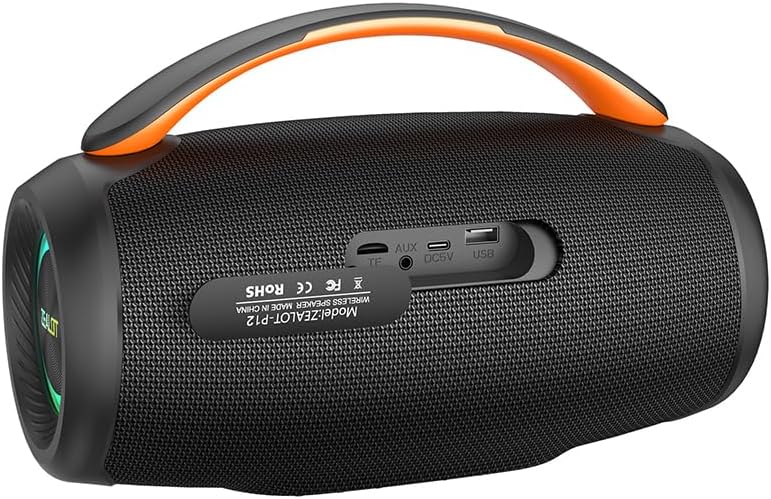
Figure 4: Diagram illustrating the internal acoustic components of the ZEALOT P12, including a 10W tweeter, 50W woofer, and two independent bass passive diaphragms for 360-degree sound.
The speaker features a top-mounted control panel with buttons for power, EQ mode selection, input mode switching (M), play/pause, and volume adjustment. The rear panel houses protected ports for charging, auxiliary input, TF card, and USB drive.
3. سيٽ اپ
3.1 شروعاتي چارجنگ
- پهرين استعمال کان اڳ، اسپيڪر کي مڪمل طور تي چارج ڪريو.
- Locate the DC5V charging port on the rear of the speaker, typically under a protective flap.
- Connect the provided power cable to the speaker's charging port and a suitable USB power adapter (not included).
- چارجنگ انڊيڪيٽر لائيٽ روشن ٿيندي. مڪمل چارج ٿيڻ کان پوءِ، ماڊل جي لحاظ کان، روشني رنگ تبديل ڪري سگهي ٿي يا بند ٿي سگهي ٿي.
3.2 پاور آن/آف
- پاور آن ڪرڻ لاءِ: دٻايو ۽ رکو پاور بٽڻ (
 ) for approximately 3 seconds until you hear an audible prompt or see the indicator lights activate.
 - پاور آف ڪرڻ لاءِ: دٻايو ۽ رکو پاور بٽڻ () for approximately 3 seconds until the indicator lights turn off.
4. آپريٽنگ هدايتون
4.1 بلوٽوٽ جوڙي
- پڪ ڪريو ته اسپيڪر آن آهي ۽ بلوٽوٿ موڊ ۾ آهي. جيڪڏهن نه، دٻايو موڊ بٽڻ (M) to switch to Bluetooth mode. The Bluetooth indicator light will flash, indicating it is ready for pairing.
- On your smartphone, tablet, laptop, or other Bluetooth-enabled device, navigate to the Bluetooth settings.
- ڳولھيو available devices. The speaker will appear as "ZEALOT P12".
- Select "ZEALOT P12" to connect. Once connected, the Bluetooth indicator light will become solid, and you may hear a confirmation tone.
- جيڪڏهن پاسورڊ لاءِ چيو وڃي ته، "0000" داخل ڪريو.
4.2 آڊيو پلے بیک
- راند/روڪ: کي دٻايو Play/Pause بٽڻ () to start or pause playback.
- حجم مٿي کي دٻايو "+" button حجم وڌائڻ لاء.
- حجم ھيٺ کي دٻايو "-" button حجم گھٽائڻ لاء.
- اڳيون ٽريڪ: کي دٻايو ۽ رکو "+" button تقريبا 2 سيڪنڊن لاء.
- پويون ٽريڪ: کي دٻايو ۽ رکو "-" button تقريبا 2 سيڪنڊن لاء.
4.3 EQ موڊس
The ZEALOT P12 offers three distinct EQ sound effects to optimize your listening experience:
Figure 5: Illustration of the EQ button and its three modes: Bass, Vocal, and Normal.
- کي دٻايو EQ بٽڻ () دستياب طريقن ذريعي چڪر ڪرڻ لاءِ:
- باس: Enhances low-frequency sounds for a deeper, richer bass experience.
- آواز: Optimizes mid-range frequencies for clearer vocals.
- عام: هڪ متوازن آواز پرو مهيا ڪري ٿوfile عام ٻڌڻ لاءِ موزون.
4.4 ٽرو وائرليس اسٽيريو (TWS) پيئرنگ (اختياري)
If you have two ZEALOT P12 speakers, you can pair them together for a stereo sound experience.
- پڪ ڪريو ته ٻئي اسپيڪر آن آهن ۽ ڪنهن به بلوٽوٿ ڊوائيس سان ڳنڍيل نه آهن.
- هڪ اسپيڪر تي (هي پرائمري اسپيڪر هوندو)، دٻايو ۽ رکو موڊ بٽڻ (M) for approximately 3 seconds. You will hear a prompt indicating TWS pairing mode.
- The primary speaker will automatically search for the secondary speaker. Once connected, you will hear a confirmation tone, and the indicator lights on both speakers will synchronize.
- Now, connect your Bluetooth device to the primary speaker as described in section 4.1. Audio will play in stereo through both speakers.
- TWS کي ختم ڪرڻ لاء، دٻايو ۽ رکو موڊ بٽڻ (M) on either speaker for 3 seconds.
5. ڪنيڪشن
In addition to Bluetooth, the ZEALOT P12 supports several other audio input methods:
- TF ڪارڊ پلے بیک: هڪ TF (مائڪرو ايس ڊي) ڪارڊ داخل ڪريو جنهن ۾ MP3 آڊيو هجي. fileTF ڪارڊ سلاٽ ۾. اسپيڪر خودڪار طريقي سان TF ڪارڊ موڊ ۾ سوئچ ڪندو ۽ پلے بیک شروع ڪندو.
- AUX ان پٽ: Connect an audio device (e.g., MP3 player, PC) to the speaker's AUX port using a 3.5mm audio cable (not included). Press the موڊ بٽڻ (M) AUX موڊ تي سوئچ ڪرڻ لاء.
- USB ڊرائيو پلے بیک: هڪ USB فليش ڊرائيو داخل ڪريو جنهن ۾ MP3 آڊيو هجي. fileUSB پورٽ ۾ s. اسپيڪر خودڪار طريقي سان USB موڊ ۾ سوئچ ڪندو ۽ پلے بیک شروع ڪندو.
6. چارجنگ ۽ بيٽري
The ZEALOT P12 is equipped with an 8000mAh rechargeable battery, providing extended playtime.
- بيٽري جي زندگي: A full charge provides up to 28 hours of continuous music playback, depending on volume level and audio content.
- چارج ڪرڻ: Use the provided power cable and a standard USB power adapter (DC5V) to charge the speaker. The charging port is located on the rear panel.
- گھٽ بيٽري جو اشارو: When the battery level is low, the speaker may emit an audible warning or an indicator light may flash. Charge the speaker promptly to avoid interruption.
7. سار سنڀال
7.1 پنروڪ ريٽنگ (IPX5)
The ZEALOT P12 speaker has an IPX5 waterproof rating, meaning it is protected against low-pressure water jets from any direction. This makes it suitable for outdoor use and resistant to splashes, rain, and sweat.
- اهم: IPX5 rating does not mean the speaker can be submerged in water. Do not immerse the speaker in water.
- Ensure the protective flap covering the charging and input ports on the rear is securely closed when using the speaker near water or in wet conditions.
7.2 عام سنڀال
- اسپيڪر کي نرم، سڪل ڪپڙي سان صاف ڪريو. گھڙڻ وارا صاف ڪندڙ يا محلول استعمال نه ڪريو.
- Avoid exposing the speaker to extreme temperatures, direct sunlight for prolonged periods, or high humidity.
- جڏهن استعمال ۾ نه هجي ته اسپيڪر کي ٿڌي، سڪل جاءِ تي اسٽور ڪريو.
- اسپيڪر کي پاڻ ڌار ڪرڻ يا مرمت ڪرڻ جي ڪوشش نه ڪريو، ڇاڪاڻ ته اهو وارنٽي کي رد ڪري ڇڏيندو.
8. مسئلا حل ڪرڻ
| مسئلو | ممڪن سبب | حل |
|---|---|---|
| اسپيڪر پاور آن نٿو ٿئي. | گھٽ بيٽري. | اسپيڪر کي مڪمل چارج ڪريو. |
| آواز ڪونهي. | حجم تمام گهٽ آهي؛ غلط ان پٽ موڊ؛ ڊوائيس ڳنڍيل ناهي. | Increase volume; press 'M' button to select correct input mode; ensure Bluetooth device is paired or AUX/USB/TF card is properly inserted. |
| بلوٽوٿ ڪنيڪشن غير مستحڪم يا ناڪام. | اسپيڪر ڊوائيس کان تمام پري آهي؛ مداخلت؛ ڊوائيس جو بلوٽوٿ بند آهي. | Move speaker closer to device (within 10 meters); avoid obstacles; ensure Bluetooth is enabled on your device; try re-pairing. |
| TWS جوڙڻ ناڪام ٿيو. | اسپيڪر اڳ ۾ ئي ٻين ڊوائيسز سان ڳنڍيل آهن؛ غلط جوڙڻ جو طريقو. | Ensure both speakers are disconnected from all Bluetooth devices before initiating TWS pairing. Follow TWS pairing instructions carefully. |
9. وضاحتون

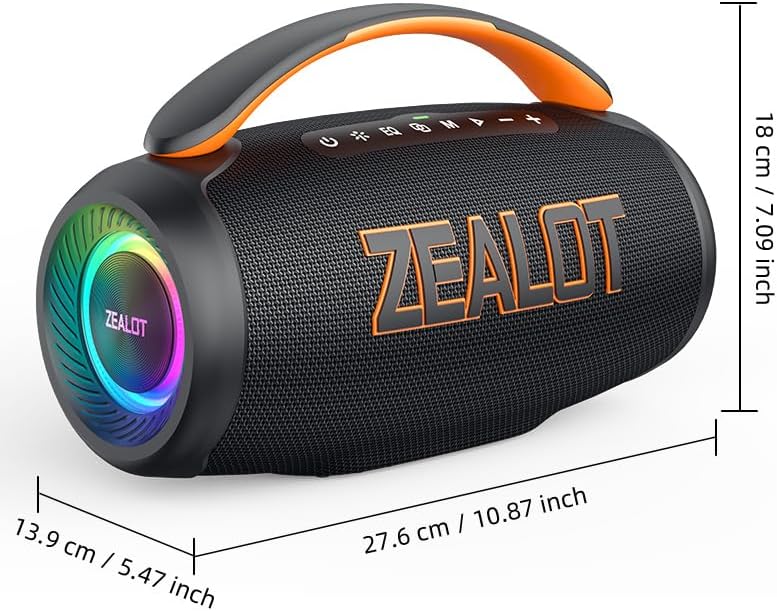
Figure 6: Dimensions of the ZEALOT P12 Bluetooth Speaker: 27.6 cm (10.87 inch) length, 13.9 cm (5.47 inch) width, 18 cm (7.09 inch) height.
| خاصيت | تفصيل |
|---|---|
| ماڊل نالو | ZEALOT P12 |
| اسپيڪر جو قسم | پورٽبل اسپيڪر |
| رابطي ٽيڪنالاجي | Bluetooth 5.3, Auxiliary (3.5mm), TF Card Slot, USB Port |
| آڊيو آئوٽ پٽ موڊ | اسٽيريو |
| اسپيڪر وڌ ۾ وڌ آئوٽ پاور | 60 واٽ |
| تعدد جواب | 20 هرٽز - 20 ڪلو هرٽز |
| بيٽري جي گنجائش | 8000mAh |
| راند جو وقت | 28 ڪلاڪ تائين |
| پنروڪ درجه بندي | IPX5 |
| پيداوار جي ماپ | 27.6D x 13.9W x 18H سينٽي ميٽر (10.87D x 5.47W x 7.09H انچ) |
| شيءِ جو وزن | 1.55 ڪلوگرام (1550 گرام) |
| مواد | Acrylonitrile Butadiene Styrene (ABS) |
| مطابقت رکندڙ ڊوائيسز | Smartphone, Tablet, Laptop, PC, Television, Projector |
| شامل اجزاء | پاور ڪيبل |
| ٺاهيندڙ | ZEALOT |
| اصل جو ملڪ | چين |
10. وارنٽي ۽ سپورٽ
For warranty information and technical support, please refer to the warranty card included with your product or contact ZEALOT customer service directly. Contact details can typically be found on the manufacturer's official webسائيٽ تي يا پراڊڪٽ پيڪنگنگ تي.
مھرباني ڪري وارنٽي دعوائن لاءِ خريد ڪرڻ جو پنھنجو ثبوت رکو.


