1. تعارف
هي دستورالعمل توهان جي هاما هائي فائي-ٽونر DIT2105 جي سيٽ اپ، آپريشن ۽ سار سنڀال لاءِ تفصيلي هدايتون مهيا ڪري ٿو. هي ڊوائيس هڪ ورسٽائل ڊجيٽل ۽ انٽرنيٽ ريڊيو ٽيونر آهي جيڪو FM، DAB/DAB+، ۽ انٽرنيٽ ريڊيو ذريعي آڊيو استقبال لاءِ ٺهيل آهي. ان ۾ بلوٽوٿ رسيور (RX) ۽ ٽرانسميٽر (TX) صلاحيتون پڻ آهن، جيڪي لچڪدار آڊيو اسٽريمنگ جي اجازت ڏين ٿيون.
2. پراڊڪٽ ختمview
2.1 اهم خاصيتون
- ڊجيٽل ۽ انٽرنيٽ ريڊيو: ايف ايم، ڊي اي بي/ڊي اي بي پلس، ۽ انٽرنيٽ ريڊيو ذريعي آڊيو سگنل وصول ڪريو.
- بلوٽوٿ رسيور (RX): پنهنجي اسمارٽ فون، ٽيبليٽ، يا ليپ ٽاپ تان ٽيونر تي موسيقي اسٽريم ڪريو.
- بلوٽوٿ ٽرانسميٽر (TX): ٽيونر مان آڊيو کي مطابقت رکندڙ بلوٽوٿ ڊوائيسز جهڙوڪ هيڊفونز يا اسپيڪرز ڏانهن منتقل ڪريو.
- اسٽيشن پري سيٽ: جلدي رسائي لاءِ 30 DAB+/DAB ۽ FM اسٽيشنن تائين ذخيرو ڪريو.
- اسٽريمنگ سروسز: هزارين گيتن ۽ موجوده پلي لسٽن تائين رسائي لاءِ Spotify Connect ۽ Amazon Music سان مطابقت رکندڙ.
- USB ٽائپ-اي پورٽ: ڊوائيسز کي چارج ڪرڻ ۽ ٻاهرين اسٽوريج مان ميڊيا کيڏڻ لاءِ (مثال طور، USB اسٽڪ، MP3 پليئر).
- 2.8" رنگ ڊسپلي: واضح آپريشن ۽ بصري معلومات فراهم ڪري ٿو.
- ٻاهرين اينٽينا ڪنيڪشن: مختلف اينٽينن سان استقبال کي بهتر بڻائڻ لاءِ ايف-ڪنيڪٽر.
- اوڪيٽيو ايپ سپورٽ: ڊوائيس کي ڪنٽرول ڪريو، پسنديده محفوظ ڪريو، ۽ موسيقي/پوڊ ڪاسٽ/ريڊيو سڌو سنئون پنهنجي اسمارٽ فون يا ٽيبليٽ تان چونڊيو.
2.2 فرنٽ پينل ڪنٽرول ۽ ڊسپلي
فرنٽ پينل ۾ هڪ صاف 2.8 انچ رنگ ڊسپلي ۽ آسان نيويگيشن ۽ آپريشن لاءِ مختلف ڪنٽرول شامل آهن.

تصوير 2.2.1: سامهون view هاما هائي فائي-ٽونر DIT2105 جو، مرڪزي 2.8 انچ رنگ ڊسپلي، حجم ۽ نيويگيشن لاءِ وڏا روٽري نوبس، ۽ پري سيٽ، موڊ، الارم، EQ، مينيو، معلومات، ۽ پوئتي ڪمن لاءِ مختلف بٽڻ ڏيکاري ٿو. هڪ AUX IN پورٽ ۽ هڪ USB پورٽ پڻ نظر اچن ٿا.

تصوير 2.2.2: ڪنڊ وارو اڳيون view هاما هائي فائي-ٽونر DIT2105 جو، چمڪندڙ ڪاري ڊيزائن ۽ رسائي لائق فرنٽ پينل ڪنٽرولز کي اجاگر ڪري ٿو.
2.3 ريئر پينل ڪنيڪشن
پوئين پينل پاور، اينٽينا، ۽ آڊيو آئوٽ پُٽ لاءِ سڀ ضروري ڪنيڪشن فراهم ڪري ٿو.

تصوير 2.3.1: هاما هائي فائي-ٽونر DIT2105 جو پوئين پينل، بلوٽوٿ اينٽينا، DAB/FM اينٽينا، آپٽيڪل آئوٽ، ڪو ايڪسيل آئوٽ، L/R لائن آئوٽ، وائي فائي اينٽينا، ۽ AC پاور ان پٽ لاءِ ڪنيڪشن ڏيکاري ٿو.

تصوير 2.3.2: Exampڪنيڪشن ڪيبلز جو هڪ وڏو تعداد، جنهن ۾ آر سي اي آڊيو ڪيبل، هڪ 3.5 ايم ايم آڊيو ڪيبل، ۽ هڪ پاور ڪيبل شامل آهن، جيڪي عام طور تي هاما هائي فائي-ٽونر DIT2105 سان استعمال ٿيندا آهن.
3. سيٽ اپ
3.1 Unpacking ۽ لڳائڻ
- احتياط سان ٽيونر کي ان جي پيڪنگ مان هٽايو.
- ٽيونر کي هڪ مستحڪم، هموار مٿاڇري تي رکو، يونٽ جي چوڌاري مناسب وينٽيليشن کي يقيني بڻايو.
- يونٽ کي سڌي سج جي روشني، گرمي جي ذريعن ۽ نمي کان پري رکو.
3.2 اينٽينا ڪنيڪشن
- ڊي اي بي/ايف ايم اينٽينا: فراهم ڪيل DAB/FM اينٽينا کي پوئين پينل تي "DAB/FM اينٽينا" F-ڪنيڪٽر سان ڳنڍيو. بهترين استقبال لاءِ، هڪ ٻاهرين اينٽينا استعمال ڪرڻ تي غور ڪريو.
- وائي فائي اينٽينا: انٽرنيٽ ريڊيو ۽ ايپ ڪنٽرول ڪارڪردگيءَ لاءِ فراهم ڪيل وائي فائي اينٽينا کي پوئين پينل تي "وائي فائي اينٽينا" ڪنيڪٽر سان ڳنڍيو.
- بلوٽوت انٽينا: بلوٽوٿ RX/TX ڪارڪردگيءَ لاءِ فراهم ڪيل بلوٽوٿ اينٽينا کي پوئين پينل تي "بلوٽوٿ اينٽينا" ڪنيڪٽر سان ڳنڍيو.
3.3 آڊيو آئوٽ ڪنيڪشن
ٽيونر کي پنهنجي سان ڳنڍيو ampهيٺ ڏنل طريقن مان هڪ استعمال ڪندي لائفائر يا فعال اسپيڪر:
- اينالاگ آئوٽ پُٽ (آر سي اي): ٽيونر تي "لائن آئوٽ ايل" ۽ "لائن آئوٽ آر" آر سي اي جيڪس کي پنهنجي لاڳاپيل اينالاگ ان پٽ سان ڳنڍيو. ampوierيڪ زنده
- ڊجيٽل آپٽيڪل آئوٽ پُٽ: ٽيونر تي "آپٽيڪل آئوٽ" پورٽ مان هڪ آپٽيڪل ڪيبل کي پنهنجي تي هڪ آپٽيڪل ان پٽ سان ڳنڍيو ampلائفائر يا ڊي اي سي.
- ڊجيٽل ڪوئڪسيل آئوٽ پُٽ: ٽونر تي "COAXIAL OUT" پورٽ مان هڪ ڪو ايڪسيل ڪيبل کي پنهنجي تي هڪ ڪو ايڪسيل ان پٽ سان ڳنڍيو ampلائفائر يا ڊي اي سي.
3.4 پاور ڪنيڪشن
- پاور ڪيبل کي پوئين پينل تي "AC IN 100-240V~ 50/60Hz" پورٽ سان ڳنڍيو.
- پاور ڪيبل جي ٻئي ڇيڙي کي مناسب وال آئوٽليٽ ۾ لڳايو.
- يونٽ ريموٽ ڪنٽرول لاءِ 2 AAA بيٽريون (شامل) استعمال ڪري ٿو.
4. آپريٽنگ هدايتون
4.1 شروعاتي پاور آن ۽ سيٽ اپ مددگار
- ٽيونر کي آن ڪرڻ لاءِ فرنٽ پينل يا ريموٽ ڪنٽرول تي پاور بٽڻ کي دٻايو.
- جڏهن توهان پهريون ڀيرو پاور آن ڪندا، هڪ سيٽ اپ وزرڊ توهان کي ٻولي جي چونڊ، نيٽ ورڪ ڪنيڪشن، ۽ وقت/تاريخ سيٽنگن ۾ رهنمائي ڪندو. اسڪرين تي ڏنل هدايتن تي عمل ڪريو.
4.2 موڊ جي چونڊ
مختلف آپريٽنگ موڊس جي وچ ۾ سوئچ ڪرڻ لاءِ فرنٽ پينل يا ريموٽ ڪنٽرول تي "موڊ" بٽڻ استعمال ڪريو:
- DAB/DAB+ ريڊيو: ڊجيٽل ريڊيو نشريات لاءِ.
- ايف ايم ريڊيو: اينالاگ ايف ايم ريڊيو نشريات لاءِ.
- انٽرنيٽ ريڊيو: انٽرنيٽ تي ريڊيو اسٽيشنن جي اسٽريمنگ لاءِ.
- بلوٽوٿ آر ايڪس: بلوٽوٿ ڊوائس مان آڊيو وصول ڪرڻ لاءِ.
- بلوٽوٿ ٽيڪساس: بلوٽوٿ ڊيوائس تي آڊيو منتقل ڪرڻ لاءِ.
- USB پلے بیک: آڊيو کيڏڻ لاءِ fileهڪ ڳنڍيل USB اسٽوريج ڊوائيس مان.
- AUX ۾: سامهون واري AUX IN پورٽ سان ڳنڍيل ٻاهرين ڊوائيس مان آڊيو هلائڻ لاءِ.
4.3 ڊي اي بي/ڊي اي بي+ ۽ ايف ايم ريڊيو
- DAB يا FM موڊ چونڊيو.
- ٽيونر خودڪار طريقي سان دستياب اسٽيشنن (DAB) لاءِ اسڪين ڪندو يا دستي ٽيوننگ (FM) جي اجازت ڏيندو.
- اسٽيشنن کي براؤز ڪرڻ لاءِ نيويگيشن نوب استعمال ڪريو.
- پسنديده اسٽيشنن کي محفوظ ڪرڻ يا ياد ڪرڻ لاءِ "پري سيٽ" بٽڻ کي دٻايو (ڊي اي بي/ڊي اي بي+ ۽ ايف ايم گڏيل لاءِ 30 تائين).
4.4 انٽرنيٽ ريڊيو
- پڪ ڪريو ته ٽيونر توهان جي وائي فائي نيٽ ورڪ سان ڳنڍيل آهي.
- انٽرنيٽ ريڊيو موڊ چونڊيو.
- صنف، جڳھ، يا ڳولا جي لحاظ کان اسٽيشنون براؤز ڪريو.
- پسنديده انٽرنيٽ ريڊيو اسٽيشنن کي پري سيٽ ۾ محفوظ ڪريو.
4.5 بلوٽوٿ ڪارڪردگي (RX/TX)
- بلوٽوٿ آر ايڪس (رسيور):
- بلوٽوٿ آر ايڪس موڊ چونڊيو.
- پنهنجي اسمارٽ فون/ٽيبليٽ/ليپ ٽاپ تي بلوٽوٿ کي فعال ڪريو.
- ڳولھيو "Hama DIT2105" (يا ساڳيو) توهان جي ڊوائيس جي بلوٽوٿ سيٽنگز ۽ پيئر ۾.
- هڪ ڀيرو ڳنڍيل ٿيڻ کان پوءِ، توهان جي ڊوائيس مان آڊيو ٽيونر جي آئوٽ پُٽ ذريعي هلندو.
- بلوٽوٿ TX (ٽرانسميٽر):
- بلوٽوٿ TX موڊ چونڊيو.
- پنهنجا بلوٽوٿ هيڊفون يا اسپيڪر پيئرنگ موڊ ۾ رکو.
- ٽيونر ويجھي بلوٽوٿ آڊيو ڊوائيسز کي ڳوليندو ۽ ڳنڍيندو.
- هڪ دفعو ڳنڍيل ٿيڻ کان پوءِ، ٽيونر مان آڊيو (مثال طور، ريڊيو، يو ايس بي) توهان جي بلوٽوٿ ڊوائيس ڏانهن منتقل ڪيو ويندو.
4.6 USB پلے بیک
- سامهون واري USB ٽائپ-اي پورٽ ۾ هڪ USB اسٽوريج ڊيوائس (مثال طور، USB اسٽڪ، MP3 پليئر) داخل ڪريو.
- USB پلے بیک موڊ چونڊيو.
- آڊيو کي براؤز ڪرڻ ۽ چونڊڻ لاءِ نيويگيشن ڪنٽرول استعمال ڪريو. files.
4.7 ايپ ڪنٽرول (OKTIV ايپ)
- پنهنجي ڊوائيس جي ايپ اسٽور تان OKTIV ايپ ڊائون لوڊ ڪريو.
- پڪ ڪريو ته توهان جو اسمارٽ فون/ٽيبليٽ ۽ ٽيونر ساڳئي وائي فائي نيٽ ورڪ سان ڳنڍيل آهن.
- OKTIV ايپ کوليو ۽ پنهنجي Hama DIT2105 سان ڳنڍڻ لاءِ هدايتن تي عمل ڪريو.
- ايپ توهان کي ٽيونر کي ڪنٽرول ڪرڻ، پري سيٽس کي منظم ڪرڻ، ۽ موسيقي/پوڊ ڪاسٽ/ريڊيو براؤز ڪرڻ جي اجازت ڏئي ٿي.
5. سار سنڀال
- صفائي: صفائي ڪرڻ کان اڳ بجلي بند ڪريو. ٽيونر جي مٿاڇري کي صاف ڪرڻ لاءِ نرم، سڪل ڪپڙو استعمال ڪريو. مائع صاف ڪندڙ يا رگڙيندڙ مواد استعمال نه ڪريو.
- وينٽيليشن: پڪ ڪريو ته وائنٽيليشن جي افتتاحن کي بند نه ڪيو ويو آهي وڌيڪ گرمي کي روڪڻ لاء.
- اسٽوريج: جيڪڏهن يونٽ کي گهڻي عرصي تائين ذخيرو ڪري رهيا آهيو، ته ان کي بجلي کان ڌار ڪريو ۽ ان کي ٿڌي، سڪل جاءِ تي ذخيرو ڪريو.
6. مسئلا حل ڪرڻ
| مسئلو | ممڪن سبب | حل |
|---|---|---|
| طاقت نه آهي | پاور ڪيبل ڳنڍيل نه آهي؛ پاور آئوٽليٽ خراب آهي. | پاور ڪيبل ڪنيڪشن چيڪ ڪريو؛ ٻيو آئوٽ ليٽ آزمايو. |
| آواز ڪونهي | حجم تمام گهٽ آهي؛ غلط ان پٽ چونڊيو ويو آهي ampلائفائر؛ آڊيو ڪيبل صحيح طرح سان ڳنڍيل نه آهن. | حجم وڌايو؛ صحيح ان پٽ چونڊيو ampلائفائر؛ آڊيو ڪيبل ڪنيڪشن چيڪ ڪريو. |
| خراب DAB/FM رسيپشن | اينٽينا ڳنڍيل نه آهي يا خراب پوزيشن ۾ آهي؛ ڪمزور سگنل. | پڪ ڪريو ته اينٽينا محفوظ طريقي سان ڳنڍيل آهي؛ اينٽينا کي ٻيهر پوزيشن ڪريو؛ هڪ ٻاهرين اينٽينا تي غور ڪريو. |
| انٽرنيٽ ريڊيو ڪم نه ڪري رهيو آهي | وائي فائي ڪنيڪشن ناهي؛ غلط وائي فائي پاسورڊ؛ روٽر جو مسئلو. | وائي فائي اينٽينا ڪنيڪشن چيڪ ڪريو؛ وائي فائي پاسورڊ جي تصديق ڪريو؛ روٽر ۽ ٽيونر کي ٻيهر شروع ڪريو. |
| بلوٽوٿ جوڙڻ ناڪام ٿيو | ڊوائيس پيئرنگ موڊ ۾ نه آهي؛ ٽيونر کان تمام پري؛ مداخلت. | پڪ ڪريو ته ٻئي ڊوائيس پيئرنگ موڊ ۾ آهن؛ ڊوائيسز کي ويجهو منتقل ڪريو؛ ٻنهي ڊوائيسز تي بلوٽوٿ ٻيهر شروع ڪريو. |
7. وضاحتون
| خاصيت | تفصيل |
|---|---|
| ماڊل نمبر | ڊي آئي ٽي 2105 |
| برانڊ | هاما |
| رنگ | ڪارو |
| رابطي ٽيڪنالاجي | بلوٽوٿ، وائي فائي، يو ايس بي، آپٽيڪل، ڪو ايڪسيل، آر سي اي |
| Tuner ٽيڪنالاجي | ڊي اي بي +، ايف ايم، انٽرنيٽ ريڊيو |
| خاص خاصيتون | DAB+/انٽرنيٽ ريڊيو/بلوٽوٿ® RX/TX، ايپ ڪنٽرول (OKTIV)، USB پلے بیک |
| مطابقت رکندڙ ڊوائيسز | اسمارٽ فون، ٽيبليٽ، ليپ ٽاپ، پي سي، اسپيڪر، هيڊ فون، ايم پي 3 پليئر، يو ايس بي اسٽڪ |
| ڏيکاريو | 2.8 انچ رنگ ڊسپلي |
| طاقت جو ذريعو | AC 100-240V ~ 50/60Hz |
| شيءِ جو وزن | 3560 گرام |
| طول و عرض (تقريبن) | 43 سينٽي ميٽر (ويڪر) x 30 سينٽي ميٽر (کوٽائي) x 7 سينٽي ميٽر (اوچائي) |
| شامل اجزاء | ٽيونر يونٽ، پاور ڪيبل، بلوٽوٿ اينٽينا، ڊي اي بي/ايف ايم اينٽينا، وائي فائي اينٽينا، ريموٽ ڪنٽرول (2 AAA بيٽرين سان) |
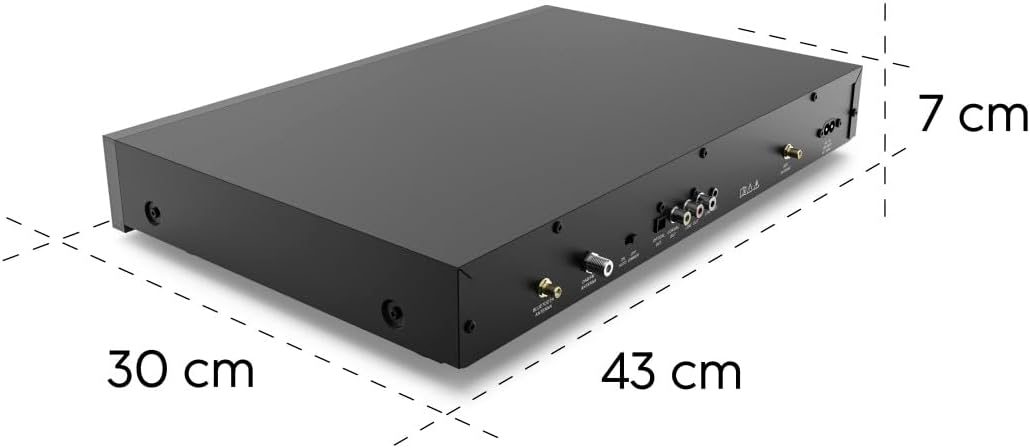
تصوير 7.1: هاما هائي فائي-ٽونر DIT2105 جا لڳ ڀڳ طول و عرض: 43 سينٽي ميٽر ويڪر، 30 سينٽي ميٽر کوٽائي، ۽ 7 سينٽي ميٽر اوچائي.
8. وارنٽي ۽ سپورٽ
وارنٽي جي معلومات ۽ ٽيڪنيڪل سپورٽ لاءِ، مھرباني ڪري پنھنجي خريداري سان مهيا ڪيل دستاويزن جو حوالو ڏيو يا سرڪاري هاما جو دورو ڪريو. webسائيٽ.
- ٺاهيندڙ: هاما
- Webسائيٽ: www.hama.com (مهرباني ڪري پنهنجي علائقائي سپورٽ صفحي جي جانچ ڪريو)


