1. تعارف
Thank you for choosing the Camtro M6 Outdoor Security Camera. This battery-powered wireless camera is designed to provide reliable outdoor surveillance with features such as 1080p video resolution, color night vision, two-way audio, and smart AI motion detection. This manual provides essential information for setting up, operating, and maintaining your camera to ensure optimal performance.
2. پيڪيج مواد
مھرباني ڪري تصديق ڪريو ته سڀ شيون توھان جي پيڪيج ۾ موجود آھن:
- Camtro M6 Outdoor Security Camera
- ھدايت وارو دستور
- چڙهڻ اسڪرو
3. پراڊڪٽ ختمview
Familiarize yourself with the components of your Camtro M6 camera.

شڪل 3.1: سامهون view of the Camtro M6 Outdoor Security Camera, showing the lens, light, and motion sensor.
The Camtro M6 features a durable, weather-resistant design suitable for outdoor use. Key components include:
- ڪئميرا لينس: Captures 1080p high-definition video.
- Infrared LED / Spotlight: Provides illumination for night vision and color night vision.
- موشن سينسر: Detects movement for smart alerts.
- مائڪروفون: ٻه طرفي آڊيو رابطي لاء.
- اسپيڪر: For two-way audio communication and alerts.
- چڙهڻ جو بنياد: For secure installation on walls or other surfaces.

شڪل 3.2: مٿانview of Camtro M6 features including AI Human Detection, Color Night Vision, Two-way Talk, and Cloud Storage.
4. سيٽ اپ
Follow these steps to set up your Camtro M6 camera:
- ڪئميرا چارج ڪريو: Before initial use, fully charge the camera battery using the provided charging cable. A full charge ensures optimal battery life.
- ايپ ڊائون لوڊ ڪريو: ڳولھيو the official Camtro security camera app on your smartphone's app store (iOS or Android) and install it.
- اڪائونٽ ٺاهيو: ايپ کوليو ۽ نئون صارف اڪائونٽ ٺاهڻ لاءِ اسڪرين تي ڏنل هدايتن تي عمل ڪريو.
- ڊوائيس شامل ڪريو: In the app, select the option to add a new device. Follow the prompts to connect your camera to your 2.4GHz وائي فائي نيٽ ورڪ. Ensure your phone is connected to a 2.4GHz network during setup. 5GHz Wi-Fi is not supported.
- ڪئميرا نصب ڪريو: Choose a suitable outdoor location for mounting. Use the included mounting screws to securely attach the camera to a wall or other stable surface. Ensure the camera has a clear field of view and is within range of your Wi-Fi signal.
5. آپريٽنگ هدايتون
Once set up, you can access and control your camera through the mobile app.
5.1 زنده View
ايپ کوليو ۽ پنهنجو ڪئميرا چونڊيو view the live feed. This allows you to monitor your property in real-time from anywhere.
5.2 ٻه طرفي آڊيو

شڪل 5.1: Illustration of the two-way audio function, allowing communication through the camera.
لائيو ۾ مائڪروفون آئڪن تي ٽيپ ڪريو view to enable two-way audio. You can speak through your phone, and your voice will be projected through the camera's speaker. Similarly, you can hear audio from the camera's location.
5.3 Smart AI Motion Detection

شڪل 5.2: The camera's AI Human Detection feature distinguishing between human movement and other objects.
The camera features AI-powered motion detection that can distinguish between humans, animals, and other moving objects. This reduces false alarms. You will receive push notifications on your smartphone when motion is detected. Adjust sensitivity settings within the app.
5.4 رنگين رات جو نظارو
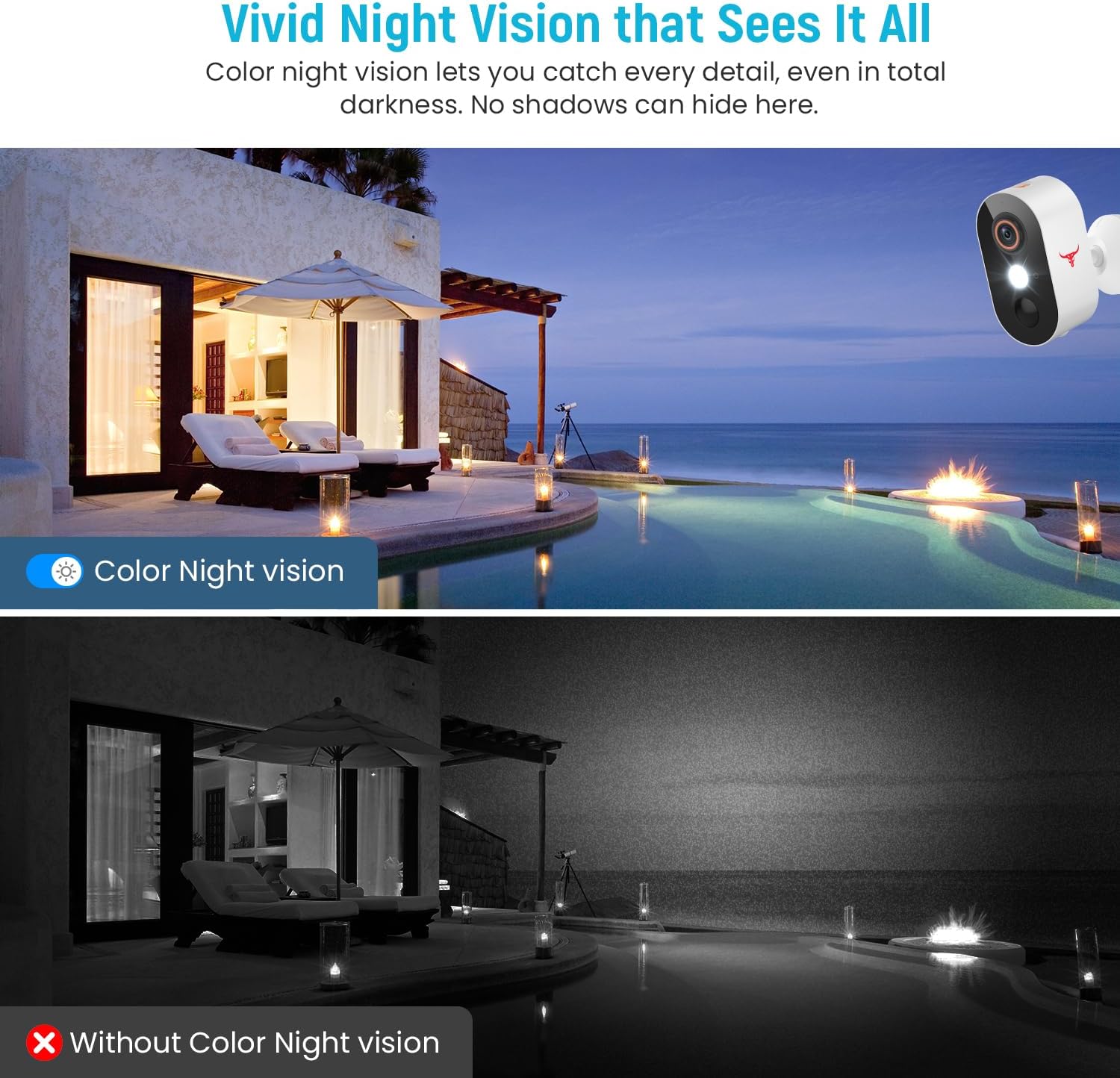
شڪل 5.3: Comparison of color night vision and standard black and white night vision.
The Camtro M6 provides vivid color night vision, allowing you to see details in low-light conditions. The camera automatically switches to night vision mode when ambient light is insufficient.
5.5 ڪلائوڊ اسٽوريج

شڪل 5.4: Visual representation of cloud storage for recorded video events.
The camera supports cloud storage for recording and reviewing video events. A subscription is required to access recorded footage. Please refer to the app for subscription options and details.
6. سار سنڀال
باقاعده سار سنڀال توهان جي ڪئميرا جي ڊگهي عمر ۽ بهترين ڪارڪردگي کي يقيني بڻائي ٿي.
- بيٽري چارج ڪرڻ: The camera is battery-powered. Monitor the battery level in the app and recharge the camera as needed. Battery life can vary based on usage and environmental factors.
- صفائي: وقتي طور تي ڪئميرا لينس ۽ هائوسنگ کي نرم، ڊي سان صاف ڪريوamp مٽي ۽ ملبہ هٽائڻ لاءِ ڪپڙو. سخت ڪيميڪل استعمال نه ڪريو.
- فرم ويئر اپڊيٽس: Keep the camera's firmware updated through the app to access new features and improvements.

شڪل 6.1: The Camtro M6 camera demonstrating its weather resistance against shine, rain, snow, and dust.
The camera is designed to withstand various weather conditions, operating effectively in temperatures ranging from 14°F to 140°F.
7. مسئلا حل ڪرڻ
If you encounter issues with your Camtro M6 camera, refer to the following common problems and solutions:
| مسئلو | ممڪن سبب | حل |
|---|---|---|
| ڪئميرا وائي فائي سان ڳنڍيل ناهي | Incorrect Wi-Fi password, 5GHz Wi-Fi network, weak signal | Ensure correct 2.4GHz Wi-Fi password. Confirm your router is broadcasting a 2.4GHz network. Move camera closer to the router. |
| غريب وڊيو معيار | Weak Wi-Fi signal, dirty lens | Improve Wi-Fi signal strength. Clean the camera lens. |
| حرڪت جي سڃاڻپ ڪم نه ڪري رهي آهي يا تمام گهڻا غلط الارم آهن | Incorrect sensitivity settings, camera placement | Adjust motion detection sensitivity in the app. Ensure camera is positioned to avoid unnecessary triggers (e.g., swaying branches). |
| بيٽري جلدي ختم ٿي ويندي آهي | Frequent motion events, continuous live view, low temperature | Reduce motion detection sensitivity. Limit continuous live viewing. Ensure camera is fully charged. |
| Two-way audio unclear | Weak Wi-Fi signal, microphone/speaker obstruction | Check Wi-Fi connection. Ensure microphone and speaker are clear of obstructions. |
8. وضاحتون
Detailed technical specifications for the Camtro M6 Outdoor Security Camera:
- ماڊل: M6
- اندروني / ٻاهرين استعمال: ٻاھران
- مطابقت رکندڙ ڊوائيسز: اسمارٽ فون (iOS، Android)
- طاقت جو ذريعو: بيٽري سان هلندڙ
- ڪنيڪشن پروٽوڪول: وائي فائي (صرف 2.4GHz)
- چڙهڻ جو قسم: ڀت جبل
- وڊيو ڪيپچر جو حل: 1080 ص
- شيون طول و عرض (L x W x H): 2.8 x 1.7 x 3.4 انچ
- شيء جو وزن: 6.6 آونس (0.41 پائونڊ)
- بيٽريون: 2 غير معياري بيٽري (شامل)
- وڊيو ڪيپچر فارميٽ: ايم پي 4
- خاص خصوصيت: Motion Sensor, Color Night Vision, 2-Way Audio
- مصنوعات لاءِ تجويز ڪيل استعمال: ٻاهرين سيڪيورٽي
9. وارنٽي ۽ سپورٽ
For warranty information and technical support, please refer to the contact details provided with your purchase or visit the official Camtro website. Our customer service team is available to assist with any questions or issues you may encounter.


