1. تعارف
This manual provides essential information for setting up, operating, maintaining, and troubleshooting your HP OMEN 16L Gaming Desktop PC, model TG03-0030. Designed for high-performance gaming and creative tasks, this desktop combines powerful hardware with a compact design.
2. دٻي ۾ ڇا آهي
Upon unboxing your HP OMEN 16L Gaming Desktop PC, verify that all the following components are included:
- OMEN 16L Gaming Desktop TG03-0030 PC
- HP USB white wired keyboard
- HP USB white wired mouse
- 500 W 80 Plus Platinum certified power supply
- سيٽ اپ جون هدايتون
- 3 months of PC Game Pass (digital code or activation instructions)
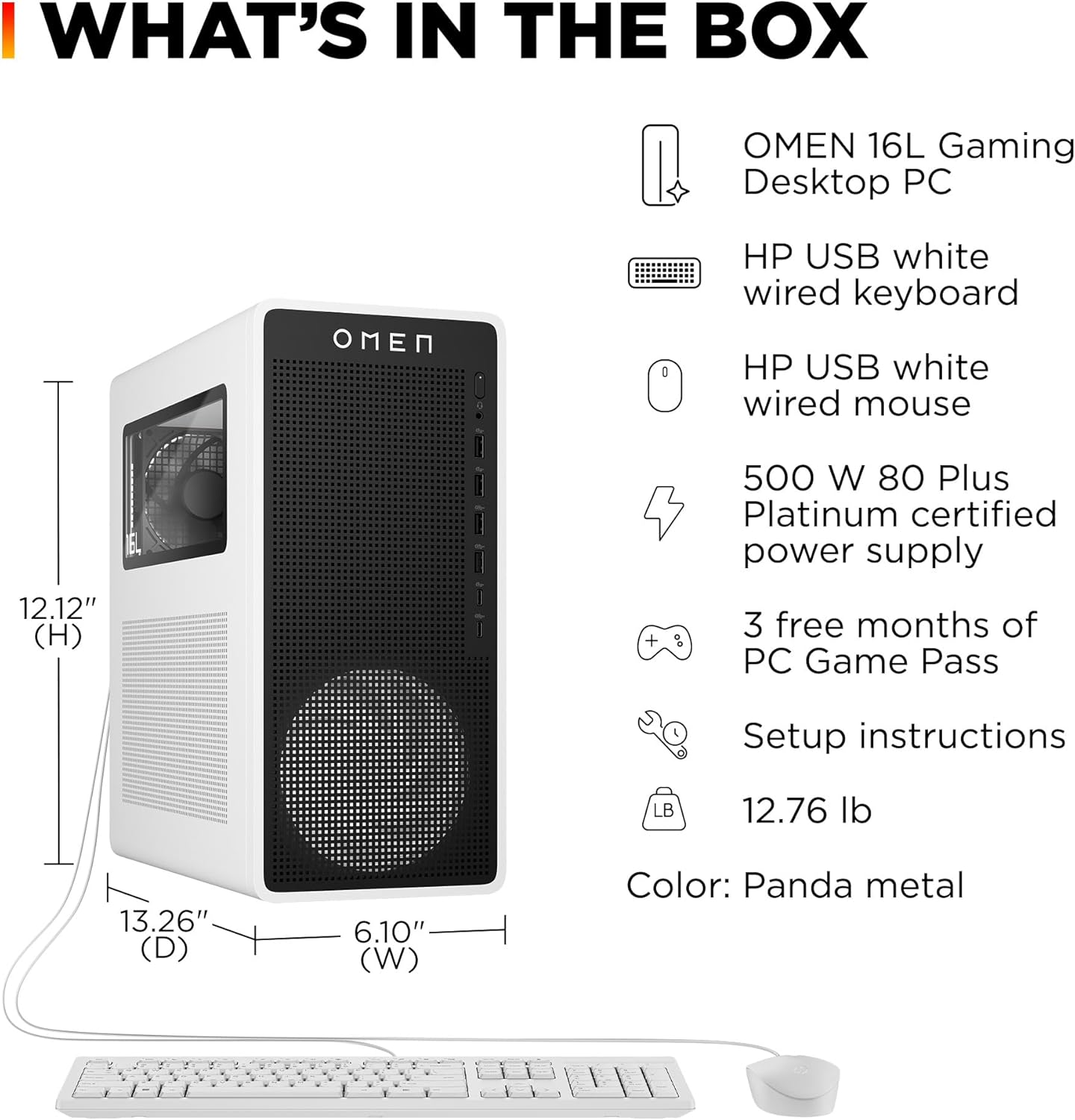
Image: The HP OMEN 16L Gaming Desktop PC and its included accessories: a white wired keyboard, a white wired mouse, and the power supply. The desktop dimensions are also indicated.
3. سيٽ اپ
3.1 شروعاتي ڪنيڪشن
- ڊيسڪ ٽاپ کي هڪ مستحڪم، هموار مٿاڇري تي رکو جتي مناسب هوا جي وهڪري هجي.
- Connect your monitor(s) to the appropriate display ports (HDMI, DisplayPort) on the rear of the PC.
- Connect the HP USB white wired keyboard and mouse to any available USB ports.
- Connect the power supply cable to the PC and then to a power outlet.
- Press the power button on the front of the desktop to turn it on.
3.2 آپريٽنگ سسٽم سيٽ اپ
Follow the on-screen instructions to complete the Windows 11 Home setup. This includes setting up your user account, network connection, and initial preferences. Microsoft Copilot is integrated to assist with productivity and creativity.

Image: The Microsoft Copilot key on the keyboard, highlighting its function for intelligent assistance within Windows 11.
4. Features & Components
4.1 بنيادي جزا
- پروسيسر: AMD Ryzen 7 8700G with integrated Neural Processing Unit (NPU) for enhanced AI capabilities.
- گرافڪس: NVIDIA GeForce RTX 5060 Ti with 16 GB GDDR7 dedicated memory, powered by NVIDIA Blackwell architecture.
- رام: 32 GB DDR5 RAM (5200 MHz) for high bandwidth and multitasking performance.
- اسٽوريج: 1 TB PCIe Gen4 NVMe M.2 Solid-State Drive (SSD) for fast data access and efficient storage.
- آپريٽنگ سسٽم: ونڊوز 11 هوم.

Image: A visual summary of the OMEN 16L Gaming Desktop's core specifications, including CPU, RAM, SSD, and GPU.
4.2 Connectivity (Ports)
The desktop offers a variety of ports for connecting peripherals and displays:
- سامهون بندرگاهن: Headphone jack, Microphone jack, 2x USB Type-A (5Gbps signaling rate), 2x USB Type-A (10Gbps signaling rate), 1x USB Type-C (5Gbps signaling rate), 1x USB Type-C (10Gbps signaling rate).
- پوئين بندرگاهن: 4x USB 2.0 Type-A, 3x 3.5mm audio jacks (Line-in/Line-out/Mic), RJ-45 (Ethernet), HDMI, 3x DisplayPort.
- وائرليس: 802.11ax (Wi-Fi 6E), Bluetooth 5.3.

Image: An illustration detailing the location and type of front and additional rear ports available on the OMEN 16L Gaming Desktop PC.
5. توهان جي پي سي کي هلائڻ
5.1 گيمنگ تجربو
The OMEN 16L is designed to deliver an elevated gaming experience:
- ڪمپيڪٽ ڊيزائن: Its 16L chassis fits easily into various spaces while maintaining powerful performance.
- DTS X Ultra Technology: Provides authentic, spatially accurate 3D sound for immersive audio in games, movies, and music.

Image: The OMEN 16L Gaming Desktop PC, highlighting its compact size suitable for various environments.

Image: The NVIDIA GeForce RTX logo, emphasizing the AI-driven capabilities of the RTX 5060 Ti GPU for gaming and creative applications.
5.2 OMEN Software Integration
- OMEN Light Studio: Customize RGB lighting effects for your PC and connected supported devices through a single application.
- OMEN AI: Provides personalized settings recommendations to optimize FPS for supported games, eliminating manual adjustments.
- OMEN Gaming Hub: A centralized platform for software enhancements, hardware control, and live services to enhance your gaming experience.
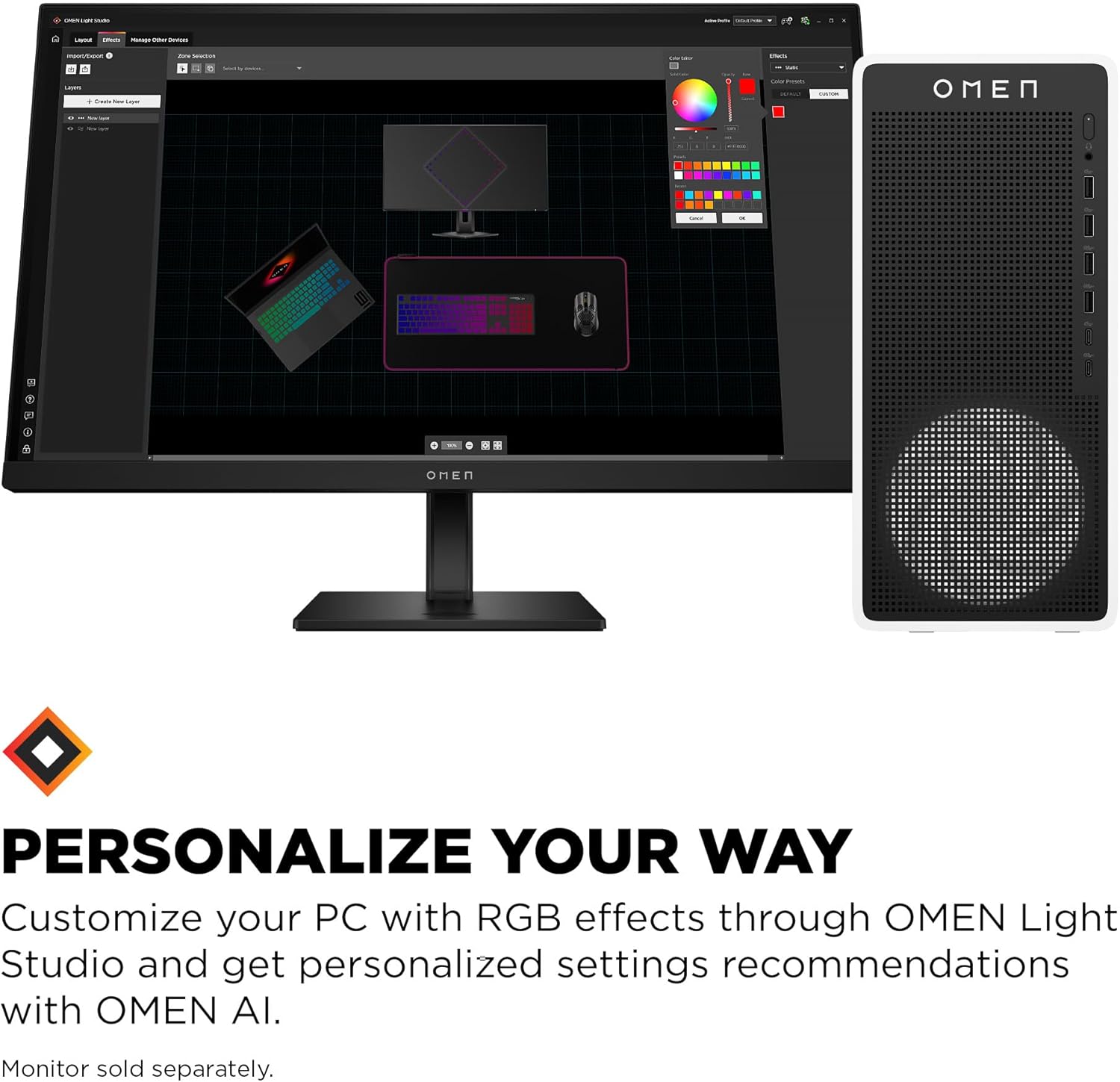
Image: The OMEN Light Studio software interface on a monitor, demonstrating the customization options for RGB lighting on the desktop and peripherals.

Image: The OMEN Gaming Hub interface on a monitor, illustrating its role as a central control for system performance, hardware, and services.
6. سار سنڀال
To ensure optimal performance and longevity of your HP OMEN 16L Gaming Desktop PC, follow these maintenance guidelines:
- Keep the desktop in a clean, dust-free environment. Regularly clean the exterior with a soft, dry cloth.
- Ensure proper airflow by keeping vents clear of obstructions.
- Periodically check for and install operating system updates and driver updates for your components.
- ڊيسڪ ٽاپ جي مٿان ڳري شيون رکڻ کان پاسو ڪريو.
7. مسئلا حل ڪرڻ
If you encounter issues with your HP OMEN 16L Gaming Desktop PC, consider the following basic troubleshooting steps:
- طاقت ناهي: Verify all power cables are securely connected to the PC and the power outlet. Try a different outlet.
- ڪابه ڊسپلي: Ensure your monitor is powered on and correctly connected to the PC's graphics card ports. Try a different display cable or monitor if available.
- سسٽم جي سست رفتاري: Check for background applications consuming excessive resources. Ensure drivers and operating system are up to date.
- گهڻو گرم ٿيڻ: Ensure the desktop's vents are clear and not obstructed. Consider cleaning dust from the internal components if comfortable doing so, or consult professional service.
- سافٽ ويئر جا مسئلا: Restart the PC. If the issue persists, consider running system diagnostics or reinstalling problematic software.
وڌيڪ ترقي يافته مسئلو حل ڪرڻ يا مسلسل مسئلن لاءِ، HP سپورٽ جو حوالو ڏيو. webسائيٽ يا ڪسٽمر سروس سان رابطو ڪريو.
8. وضاحتون
| خاصيت | تفصيل |
|---|---|
| برانڊ | HP |
| سلسلو | OMEN 16L Gaming Desktop TG03-0030 PC |
| ماڊل نمبر | BY1S7AA#ABA |
| آپريٽنگ سسٽم | ونڊوز 11 گهر |
| پروسيسر | اي ايم ڊي رائيزن 7 8700G (5.1 گيگا هرٽز) |
| پروسيسرز جو تعداد | 8 |
| رام | 32 GB DDR5 |
| ياداشت جي رفتار | 5200 MHz |
| هارڊ ڊرائيو | 1 ٽي بي PCIe Gen4 NVMe M.2 SSD |
| گرافڪس ڪوپروسيسر | NVIDIA GeForce RTX 5060 Ti (16 GB GDDR7 dedicated) |
| Chipset Brand | NVIDIA |
| وائرليس جو قسم | 802.11ax، بلوٽوٿ |
| پيداوار جي ماپ (LxWxH) | 6.1 x 13.26 x 12.12 انچ |
| شيءِ جو وزن | 12.76 پائونڊ |
| رنگ | Snow white metal |
9. وارنٽي ۽ سپورٽ
Your HP OMEN 16L Gaming Desktop PC comes with the following:
- 1 سال محدود هارڊويئر وارنٽي.
- سافٽ ويئر ۽ شروعاتي سيٽ اپ لاءِ 1 سالن جي محدود ٽيڪنيڪل سپورٽ.
For detailed warranty terms and support options, please visit the official HP support website or contact HP customer service directly.
10. ماحولياتي خيالات
The OMEN 16L Gaming Desktop PC is constructed with sustainability in mind, utilizing:
- Up to 55% post-consumer recycled plastic.
- Up to 20% recycled metal.

Image: The OMEN 16L Gaming Desktop PC, emphasizing its design with environmentally conscious and recycled materials.