1. تعارف
This manual provides essential information for the safe and efficient operation of your SANSUI ES-G24C1L 24-inch curved gaming monitor. Please read this manual thoroughly before using the product and retain it for future reference.

تصوير: سامهون view of the SANSUI 24-inch curved gaming monitor highlighting its key specifications.
اهم خاصيتون:
- 24-inch 1500R Curved VA Display
- Full HD (1920x1080P) Resolution
- 160Hz ريفريش جي شرح
- 1ms MPRT Response Time
- AMD FreeSync Compatibility
- HDR سپورٽ
- 110٪ sRGB رنگين گاموت
- Multiple Connectivity: HDMI 2.0, DisplayPort 1.4
- VESA Mount Compatible (75x75mm)
2. حفاظت جي ڄاڻ
مانيٽر کي نقصان کان بچائڻ ۽ استعمال ڪندڙ جي حفاظت کي يقيني بڻائڻ لاءِ هيٺ ڏنل حفاظتي احتياطن تي عمل ڪريو:
- باهه يا بجليءَ جي جھٽڪن جي خطرن کان بچڻ لاءِ مانيٽر کي مينهن يا نمي جي سامهون نه رکو.
- مانيٽر نه کوليو casing. اندر ڪو به استعمال ڪندڙ جي خدمت لائق پرزا نه آهن. سڀني سروسنگ کي قابل اهلڪارن جي حوالي ڪريو.
- مانيٽر کي هڪ مستحڪم، فليٽ مٿاڇري تي رکو ته جيئن ان کي ڪري نه پوي.
- مناسب وينٽيليشن کي يقيني بڻايو. وينٽيليشن جي سوراخن کي بند نه ڪريو.
- Use only the power adapter and cables provided or specified by the manufacturer.
- بجلي جي طوفان دوران يا ڊگهي عرصي تائين استعمال نه ٿيڻ تي مانيٽر کي ان پلگ ڪريو.
3. پيڪيج مواد
پڪ ڪريو ته سڀئي شيون پيڪيج ۾ موجود آهن:
- SANSUI ES-G24C1L 24-inch Curved Gaming Monitor
- مانيٽر اسٽينڊ (بنياد ۽ گردن)
- پاور اڊاپٽر
- HDMI ڪيبل
- استعمال ڪندڙ دستي
- اسٽينڊ اسيمبلي لاءِ اسڪرو
4. سيٽ اپ جون هدايتون
4.1 اسٽينڊ کي گڏ ڪرڻ
- اسڪرين کي محفوظ رکندي، مانيٽر کي ان جي پيڪنگنگ مان احتياط سان هٽايو.
- مهيا ڪيل اسڪرو استعمال ڪندي اسٽينڊ نيڪ کي مانيٽر پينل سان ڳنڍيو.
- اسٽينڊ بيس کي اسٽينڊ گردن سان ڳنڍيو ۽ باقي اسڪرو سان ان کي محفوظ ڪريو.
- گڏ ٿيل مانيٽر کي هڪ مستحڪم، هموار مٿاڇري تي رکو.
Alternatively, the monitor supports VESA 75x75mm mounting for compatible wall mounts or monitor arms. Ensure the VESA mount is rated for the monitor's weight (approximately 7.68 lbs).

Image: Illustrated guide for stand assembly and product dimensions.
4.2 ڳنڍيندڙ ڪيبل
Ensure the monitor and your computer are powered off before making any connections.
- پاور ڪنيڪشن: Connect the power adapter to the monitor's DC IN port, then plug the adapter into a power outlet.
- وڊيو ڪنيڪشن: Connect one end of the HDMI cable (or DisplayPort cable, not included) to your computer's graphics card output and the other end to the corresponding HDMI 2.0 or DP 1.4 port on the monitor.
- آڊيو آئوٽ: If desired, connect external speakers or headphones to the monitor's 3.5mm Audio Jack.
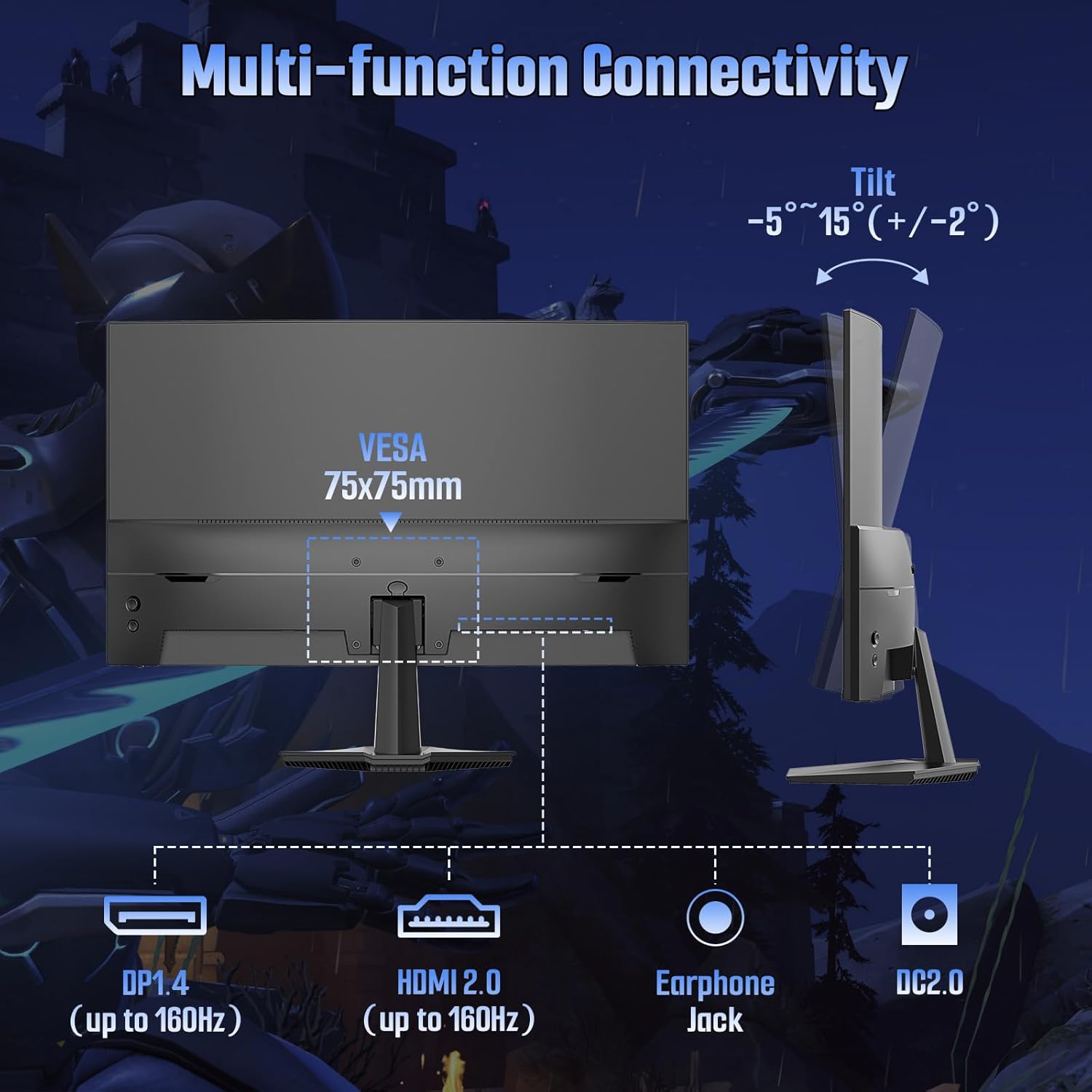
تصوير: پوئين پاسي view of the monitor detailing port locations and tilt adjustment capability.
5. آپريٽنگ هدايتون
5.1 پاور آن/آف
مانيٽر کي آن يا آف ڪرڻ لاءِ ان تي موجود پاور بٽڻ کي دٻايو. جڏهن مانيٽر فعال هوندو ته پاور انڊيڪيٽر لائيٽ روشن ٿيندي.
5.2 آن اسڪرين ڊسپلي (OSD) مينيو
Use the control buttons on the monitor to navigate and adjust settings within the OSD menu. Common OSD menu options include:
- تصويري سيٽنگون: Brightness, Contrast, Color Temperature, Sharpness, HDR.
- رنگ سيٽنگون: Adjust color gamut, gamma, and individual RGB levels.
- ان پٽ چونڊيو: دستي طور تي HDMI ۽ DisplayPort ان پٽ جي وچ ۾ سوئچ ڪريو.
- آڊيو: Adjust volume for the audio jack output.
- او ايس ڊي سيٽنگون: ٻولي، او ايس ڊي شفافيت، او ايس ڊي ٽائم آئوٽ.
- گیمنگ خاصيتون: FreeSync, MPRT, Crosshair, Game Timer, Black Level.
5.3 گيمنگ جون خاصيتون
The ES-G24C1L monitor includes several features designed to enhance your gaming experience:
- 160Hz ريفريش جي شرح: Provides smoother motion and reduced input lag.
- 1ms MPRT (Moving Picture Response Time): Minimizes motion blur for clearer fast-paced scenes.
- FreeSync: Synchronizes the monitor's refresh rate with your AMD graphics card to eliminate screen tearing and stuttering. Enable this feature in the OSD menu and your graphics card settings.

Image: Visual demonstration of FreeSync technology reducing screen tearing.
- Black Level Adjustment: راندين جي اونداهي علائقن ۾ نمائش کي وڌائي ٿو.
- ڪراسيئر: Displays an on-screen crosshair for improved aiming in first-person shooter games.
- Game Timer: An on-screen timer for tracking in-game events.
- گھڻن راند جا طريقا: Pre-calibrated display settings for various game genres (FPS, RTS, MOVIE, STANDARD).
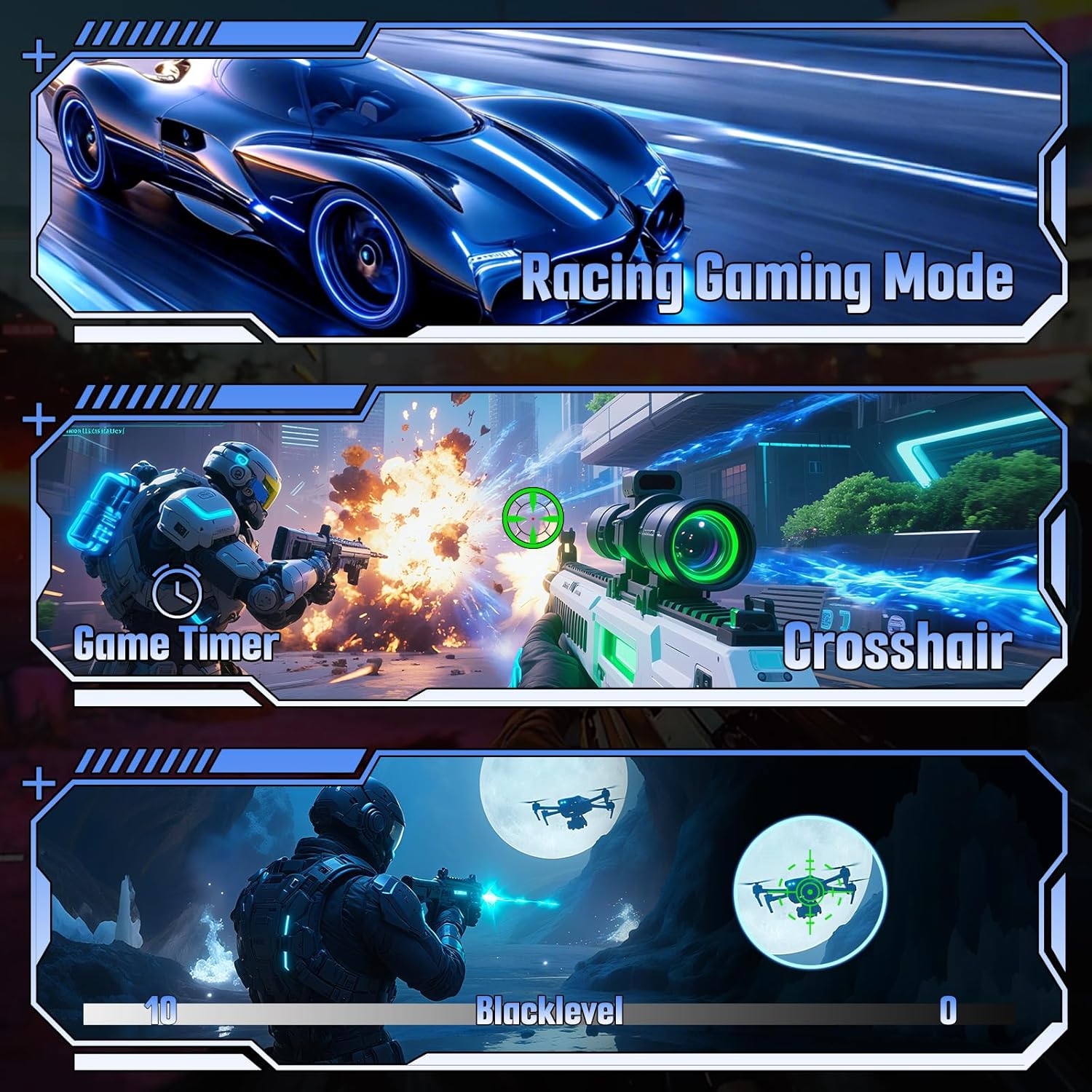
تصوير: Examples of various gaming features including game modes, timer, crosshair, and black level.
6. وضاحتون
| خاصيت | تفصيل |
|---|---|
| ماڊل نمبر | ES-G24C1L |
| اسڪرين جي ماپ | 24 انچ |
| گھمڻ | 1500 آر |
| پينل جو قسم | VA |
| قرارداد | 1920 x 1080 (FHD) |
| ريفريش جي شرح | 160Hz |
| جوابي وقت | 1ms MPRT |
| روشني | 300 نائيٽ |
| مقابلي جي نسبت | 3000:1 |
| رنگ گامٽ | 110٪ sRGB |
| رنگ ڏيکاريو | 16.7 Million (8-bit) |
| HDR سپورٽ | ها |
| موافقت واري هم وقت سازي | FreeSync |
| رابطي | 1x HDMI 2.0, 1x DisplayPort 1.4, 1x Audio Jack |
| وي سي اي جبل | 75x75mm |
| جھلڻ جي ترتيب | -5° to 15° (+/-2°) |
| پيداوار جا طول و عرض (اسٽينڊ سان) | 4.69 x 23.78 x 15.55 انچ |
| شيءِ جو وزن | 7.68 پائونڊ |

تصوير: مٿانview of the monitor's technical specifications and gaming enhancements.
7. مسئلا حل ڪرڻ
جيڪڏهن توهان کي پنهنجي مانيٽر سان مسئلا درپيش اچن ٿا، ته هيٺ ڏنل عام مسئلا حل ڪرڻ واري قدمن جو حوالو ڏيو:
- طاقت ناهي: Ensure the power cable is securely connected to both the monitor and the power outlet. Verify the power adapter is functioning.
- ڪوبه سگنل: Check that the video cable (HDMI/DP) is firmly connected to both the monitor and your computer. Ensure the correct input source is selected in the monitor's OSD menu. Try restarting your computer.
- چمڪندڙ اسڪرين: Check the video cable for damage. Ensure your graphics card drivers are up to date. Disable or enable FreeSync in the OSD menu and graphics card settings to see if it resolves the issue.
- غلط ريزوليوشن/ريفريش ريٽ: Adjust the display settings in your computer's operating system to the recommended resolution (1920x1080) and refresh rate (160Hz).
- تصويري معيار جا مسئلا: Adjust brightness, contrast, and color settings in the OSD menu. Ensure HDR is enabled or disabled as desired in both the monitor OSD and your operating system settings.
8. سار سنڀال
Proper care will extend the life of your monitor:
- اسڪرين جي صفائي: نرم، لِنٽ کان پاڪ ڪپڙي سان اسڪرين کي نرميءَ سان صاف ڪريو. ضدي نشانن لاءِ، هلڪو ڊيampڪپڙي کي پاڻي يا خاص اسڪرين ڪلينر سان ڌوئڻ ڏيو. اسڪرين تي سڌو سنئون مائع نه اسپري ڪريو.
- سي جي صفائيasing: مانيٽر کي صاف ڪرڻ لاءِ نرم، سڪل ڪپڙو استعمال ڪريو casing. گھڙڻ وارا صاف ڪندڙ کان پاسو ڪريو.
- وينٽيليشن: وڌيڪ گرم ٿيڻ کان بچڻ لاءِ وينٽيليشن جي سوراخن کي مٽي ۽ رڪاوٽن کان صاف رکو.
- اسٽوريج: When storing the monitor for extended periods, place it in a cool, dry environment and protect it from dust.
9. وارنٽي ۽ سپورٽ
Your SANSUI ES-G24C1L monitor is backed by a warranty that includes:
- Money-back guarantee and free replacement within 30 days from the order date.
- حياتياتي ٽيڪنيڪل سپورٽ.
For technical assistance or warranty claims, please contact SANSUI customer support. Refer to the contact information provided with your purchase or visit the official SANSUI webسائيٽ.


