تعارف
The Browning Strike Force FHDR 40MP Trail Camera is a high-performance device designed for wildlife monitoring, game tracking, and property surveillance. This manual provides essential information for setting up, operating, and maintaining your camera to ensure optimal performance.

Image: The Browning Strike Force FHDR 40MP Trail Camera shown with its complete bundle, including the 32GB SDHC Memory Card, Hi-Speed USB SD Card Reader, and AA batteries.
بنڊل مواد
- 1 × Browning Strike Force FHDR 40MP Trail Camera
- 1 × 32GB SDHC Memory Card
- 1 × Hi-Speed SD USB Card Reader
- 2 × Packs of 4 AA Batteries (Total of 8 Batteries)
- 1 × Black Microfiber Camera and Lens Cleaning Cloth
سيٽ اپ گائيڊ
Follow these steps to prepare your Browning Strike Force FHDR camera for use.
1. بيٽري لڳائڻ
The camera requires six (6) AA batteries for operation. Ensure batteries are inserted with correct polarity.
- Open the battery compartment door located on the side or bottom of the camera.
- Insert six new AA batteries, matching the positive (+) and negative (-) terminals as indicated inside the compartment.
- Close the battery compartment door securely to ensure a watertight seal.
2. ايس ڊي ڪارڊ لڳائڻ
A 32GB SDHC Memory Card is included for storing images and videos.
- Locate the SD card slot, typically near the battery compartment or under a protective flap.
- Insert the 32GB SDHC card into the slot with the label facing the correct direction until it clicks into place.
- ڪڍڻ لاءِ، ڪارڊ کي نرميءَ سان اندر دٻايو جيستائين اهو ٻاهر نه اچي.
3. ڪئميرا لڳائڻ
The camera is designed for tree mounting and outdoor use.

Image: The Browning FHDR40 Trail Camera securely mounted on a tree, demonstrating its intended outdoor deployment for capturing wildlife.
- Choose a suitable location, such as a tree or post, that provides a clear view علائقي جو توهان مانيٽر ڪرڻ چاهيو ٿا.
- Use the included mounting strap or a compatible mounting accessory to secure the camera firmly.
- Adjust the camera's angle to ensure optimal coverage and avoid direct sunlight or strong backlighting.
4. شروعاتي پاور آن ۽ بنيادي سيٽنگون
After installing batteries and SD card, power on the camera and configure basic settings.
- Switch the camera to the "ON" position.
- The camera's internal display will activate. Navigate through the menu using the control buttons.
- موجوده تاريخ ۽ وقت مقرر ڪريو.
- Format the SD card (this will erase all data on the card, so ensure it's empty or backed up).
- Select your desired capture mode (e.g., Photo, Video, Photo + Video, Time-Lapse).
ڪئميرا هلائڻ
Understand the key features and operational modes of your trail camera.
Capture Modes and Settings
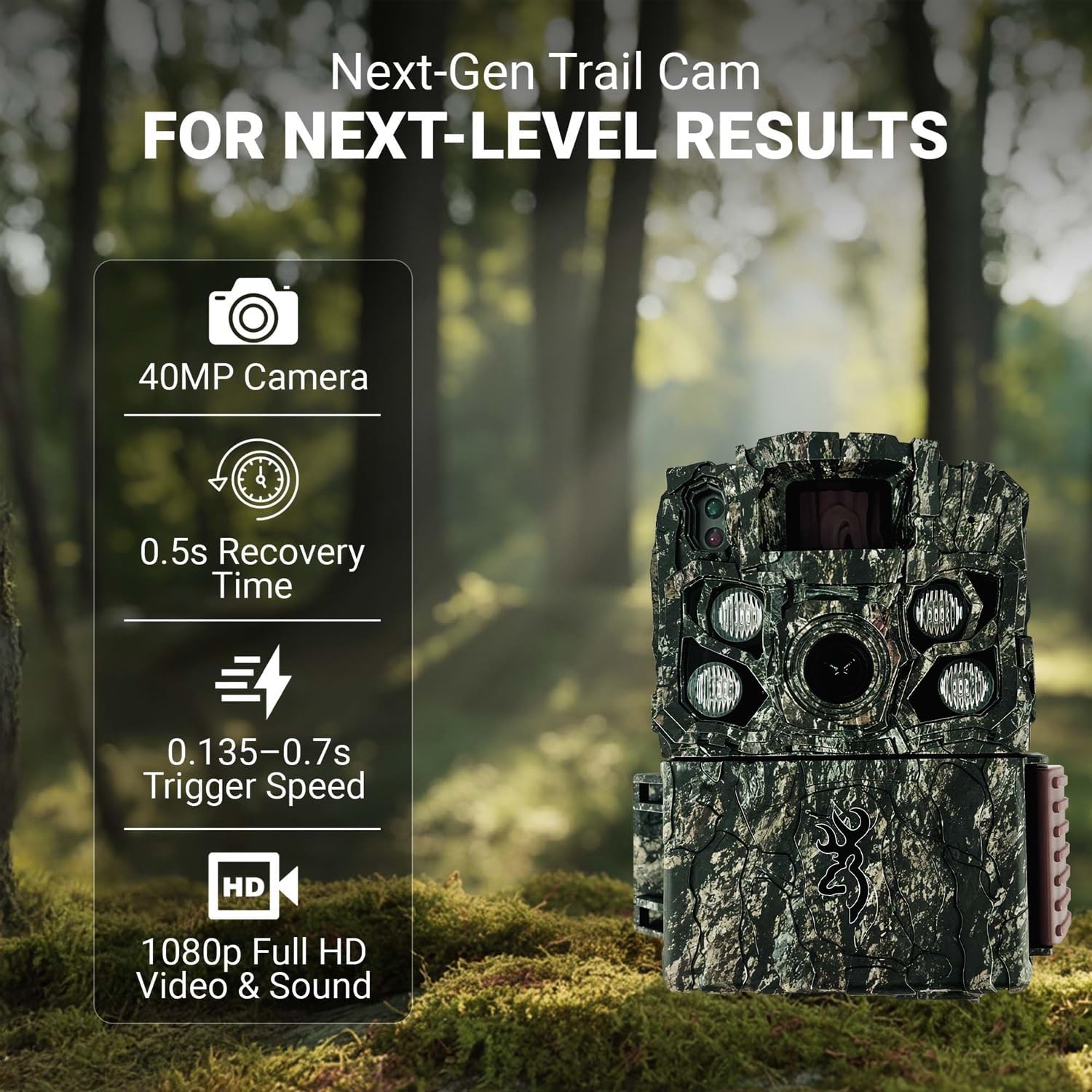
Image: The Browning Trail Camera highlighting its core performance metrics: 40MP camera, 0.5s recovery time, 0.135-0.7s adjustable trigger speed, and 1080p Full HD video with sound.
- تصويري ڪيفيت: Capture stunning 40-megapixel still images, providing exceptional detail and clarity.
- وڊيو رڪارڊنگ: Record high-definition 1080p Full HD videos with audio. The Smart IR Video feature ensures continuous recording as long as motion is detected.
- ٽرڪ جي رفتار: The adjustable trigger speed ranges from 0.135 to 0.7 seconds, allowing for quick capture of fast-moving subjects.
- بحالي جو وقت: A rapid 0.5-second recovery time minimizes the delay between captures, ensuring you don't miss subsequent events.
- ڳولڻ جي حد: The camera features an 80-foot detection range, effectively covering a wide area.
Night Vision and Illumination
The Strike Force FHDR is equipped with advanced night vision capabilities for clear imaging in low-light conditions.

Image: A clear night vision photograph of two deer, demonstrating the camera's ability to capture detailed images in complete darkness.
- Gen 2 Night Optics: Enhanced optics for superior performance in dark environments.
- Radiant 4 Night IR Illumination: Provides powerful infrared light for bright, clear night images without disturbing wildlife.
- Adjustable IR Flash: Choose between Long Range, Fast Motion, and Economy modes to optimize flash performance based on your needs and conserve battery life.
ڊيٽا واپس آڻڻ
To access your captured images and videos, use the included Hi-Speed USB SD Card Reader.
- Turn off the camera and remove the SD card.
- Insert the SD card into the Hi-Speed USB SD Card Reader.
- Connect the USB card reader to your computer's USB port.
- The SD card will appear as a removable drive. You can then copy or move your files توهان جي ڪمپيوٽر ڏانهن.
سار سنڀال
Proper maintenance ensures the longevity and optimal performance of your trail camera.
ڪئميرا جي صفائي
Use the provided Black Microfiber Camera and Lens Cleaning Cloth for cleaning.
- Gently wipe the camera lens and IR sensors with the microfiber cloth to remove dust, dirt, or smudges.
- For the camera body, use a soft, damp cloth to wipe away any grime. Avoid harsh chemicals or abrasive materials.
- Ensure all seals and covers are free of debris to maintain weather resistance.
بيٽري مٽائڻ
Replace batteries when the low battery indicator appears or when performance degrades.
- Always replace all six AA batteries at once with new, high-quality alkaline or lithium batteries.
- پراڻي ۽ نئين بيٽرين، يا بيٽرين جي مختلف قسمن کي گڏ نه ڪريو.
- مقامي ضابطن جي مطابق ذميواري سان استعمال ٿيل بيٽرين کي ختم ڪريو.
ذخيرو
When not in use for extended periods, store the camera properly.
- Remove all batteries from the camera to prevent leakage.
- ڪئميرا کي ٿڌي، سڪل جاءِ تي، سڌي سج جي روشني ۽ انتهائي گرمي پد کان پري رکو.
- Keep the lens and sensors covered or protected to prevent dust accumulation.
مشڪلاتون
عام مسئلن ۽ انهن جي حل لاءِ هن حصي جو حوالو ڏيو.
| مسئلو | ممڪن سبب | حل |
|---|---|---|
| ڪئميرا پاور نه آهي | Dead or incorrectly inserted batteries; faulty SD card. | Check battery polarity and replace with fresh batteries. Ensure SD card is inserted correctly. |
| خراب تصوير/وڊيو معيار | Dirty lens; incorrect settings; low light without IR. | Clean the lens with the microfiber cloth. Adjust image/video resolution settings. Ensure IR flash is enabled for night use. |
| Camera not detecting motion | Obstruction in detection zone; incorrect sensitivity setting; camera too high. | Clear obstructions. Adjust PIR sensitivity. Mount camera at optimal height (approx. 3-5 feet). |
| SD ڪارڊ جي غلطي | Corrupted card; incompatible card; full card. | Format the SD card in the camera. Try a different compatible SD card. Ensure card is not full. |
وضاحتون
Detailed technical specifications for the Browning Strike Force FHDR 40MP Trail Camera.
| ماڊل نالو | Browning Trail Cameras Strike Force FHDR40 |
| ماڊل نمبر | بي ٽي سي-5 ايف ايڇ ڊي آر 40 |
| تصويري قرارداد | 40 ميگا پکسل |
| وڊيو قرارداد | 1080p Full HD with Sound (MP4 format) |
| ٽرگر جي رفتار | 0.135 کان 0.7 سيڪنڊن تائين ترتيب ڏئي سگھجي ٿو |
| بحالي وقت | 0.5 سيڪنڊ |
| ڳولڻ جي حد | 80 فوٽ |
| رات جي روشني | Gen 2 Night Optics, Radiant 4 Night IR Illumination, 110 ft. night flash range |
| طاقت جو ذريعو | 6 AA Batteries (external power support available) |
| ذخيرو | SD Card (up to 32GB SDHC included) |
| طول و عرض (L x W x H) | 4.25 x 3 x 2.5 انچ |
| شيءِ جو وزن | 1.6 پائونڊ |
| چڙهڻ جو قسم | وڻ جبل |
| اندروني / ٻاهران استعمال | ٻاھران |
وارنٽي ۽ سپورٽ
For detailed warranty information and customer support, please refer to the documentation included with your product or visit the official Browning webسائيٽ.
ٺاهيندڙ: برائوننگ
Webسائيٽ: www.browning.com (مهرباني ڪري سرڪاري چيڪ ڪريو web(تازه ترين سپورٽ معلومات ۽ رابطي جي تفصيلن لاءِ سائيٽ.)


