تعارف
This manual provides instructions for the installation, operation, and troubleshooting of your Comfort Direct TR214D remote control for Harbor Breeze ceiling fans. Please read these instructions carefully before use to ensure proper function and longevity of your device.

Image: The Comfort Direct TR214D remote control shown with its included wall mount and mounting screws.
سيٽ اپ ۽ تنصيب
1. بيٽري لڳائڻ
The remote control requires one 23A 12V battery (not included).
- ريموٽ ڪنٽرول جي پٺي تي بيٽري جي خاني کي ڳوليو.
- بيٽري جو ڍڪ بند ڪريو.
- هڪ 23A 12V بيٽري داخل ڪريو، پڪ ڪريو ته پولارٽي (+/-) ڪمپارٽمينٽ اندر ڊاگرام سان ملي ٿي.
- بيٽري جي ڍڪ کي تبديل ڪريو.

تصوير: پوئين پاسي view of the remote control with the battery cover removed, showing the battery compartment and spring contacts.
2. جوڙڻ جون هدايتون
Follow these steps to pair your remote control with your existing ceiling fan receiver. Only one remote can be programmed per fan.
- فين جي بجلي بند ڪريو: پڪ ڪريو ته توهان جي ڇت جي پنکڙي کي بجلي جي فراهمي ڀت جي سوئچ يا سرڪٽ بريڪر تي مڪمل طور تي بند آهي.
- پاور واپس فين تي آن ڪريو: ڇت جي پنن کي بجلي بحال ڪريو.
- "0" ڪي دٻايو ۽ رکو: Within 30 seconds of restoring power, press and hold the "0" (Off) key on the remote control for 5 seconds.
- The fan light should blink or the fan should briefly turn on to indicate successful pairing.

Image: A visual guide illustrating the three steps for pairing the remote control, highlighting the "0" button.

تصوير: هڪ ويجهو تصوير view of the remote control, specifically highlighting the '0' button used for pairing.
3. وال جبل جي انسٽاليشن
The included wall mount allows for convenient storage of your remote control.
- ڀت تي هڪ مناسب جڳهه چونڊيو، سڌي سج جي روشني يا گرمي جي ذريعن کان پري.
- Use the provided screws to secure the wall mount to the desired surface.
- Place the remote control into the mounted holder.

Image: The remote control, its wall mount, and two mounting screws, illustrating the components for wall installation.

Image: The remote control securely placed in its wall mount, positioned on a wall in a room with a ceiling fan.
آپريٽنگ هدايتون
The TR214D remote control provides full control over your ceiling fan's speed and light functions.
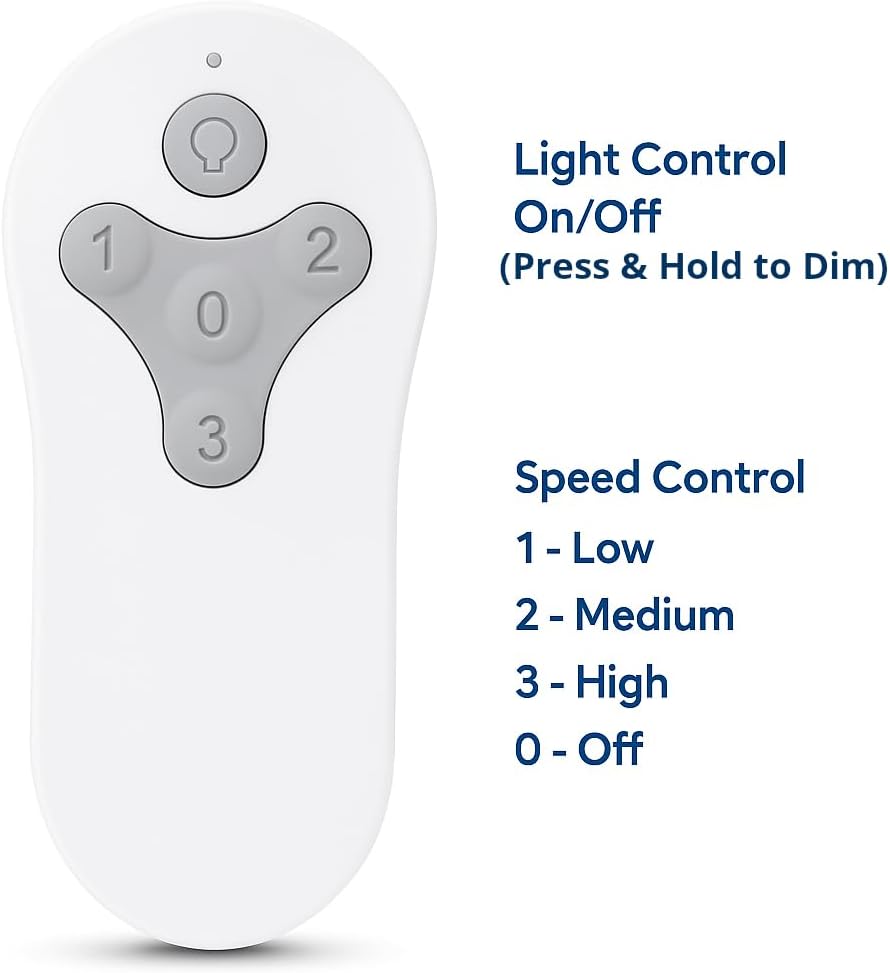
Image: The remote control with labels indicating the functions of each button: Light Control (On/Off, Press & Hold to Dim) and Speed Control (1-Low, 2-Medium, 3-High, 0-Off).
فين اسپيڊ ڪنٽرول
- بٽڻ 1: Sets fan speed to Low.
- بٽڻ 2: Sets fan speed to Medium.
- بٽڻ 3: Sets fan speed to High.
- بٽڻ 0: پنن کي بند ڪري ٿو.
روشني ڪنٽرول
- Light Button (Bulb Icon): Press once to turn the fan light On or Off.
- ڊمنگ فنڪشن: Press and hold the Light Button to dim or brighten the fan light to your preferred level. Release the button when the desired brightness is reached.
مطابقت
This Comfort Direct TR214D remote control is designed as a replacement for various Harbor Breeze ceiling fan remote models and is compatible with specific fan models.
مطابقت رکندڙ ريموٽ ماڊل:
- A25-FA0138
- KUJCE10311
- ٽرڪس اينيمڪس بي
- KUJCE10712
- TR214A
- KUJCE10610
Compatible Fan Models:
- BRD48MWW6LR
- BRD60BNK6LRS
- BRD60MBK6LR
- BRD60OSB6LR
- MZ44BNK3LR
- MZ44MBLK3LR
- MZ44ORB3LR
- MZ44WW3LR
- TG44BNK3D1RC
- TG44LW3D1RS
- TG44MBK3D1RS
- TG44OSB3D1RC
- TG52BNK3D1RC
- TG52LW3D1RCS
- TG52MBK3D1RC
- TG52OSB3D1RC

Image: A graphic displaying a comprehensive list of Harbor Breeze fan models that are compatible with this remote control.
مشڪلاتون
If your remote control is not functioning as expected, refer to the following guide:
| خراب ريموٽ ڪنٽرول جون علامتون | Good Remote Control Symptoms |
|---|---|
| 1. بٽڻ دٻائڻ تي ڳاڙهي اشاري جي روشني روشن نه ٿيندي آهي. | 1. ڳاڙهي اشاري جي روشني صرف تڏهن روشن ٿئي ٿي جڏهن بٽڻ دٻايا ويندا آهن. |
| 2. ڳاڙهي اشاري جي روشني تڏهن روشن ٿئي ٿي جڏهن ڪو به بٽڻ نه دٻايو وڃي. | 2. Red indicator light stays illuminated when you PRESS and HOLD buttons. |
| Action: Replace remote control if you experience any of these symptoms. | Action: DO NOT replace remote control if you experience these symptoms. You likely have a different problem with your fan. |

Image: A troubleshooting chart detailing symptoms related to the remote control's red indicator light and recommended actions.
If the remote is not pairing, ensure you have followed the pairing instructions precisely, especially the timing of pressing the "0" button after restoring power to the fan. Also, verify that the battery is correctly installed and has sufficient charge.
وضاحتون
| ماڊل نمبر | سي ڊي ٽي آر 214 ڊي |
| برانڊ | ڪمفرٽ ڊائريڪٽ |
| طاقت جو ذريعو | Battery Powered (1 x 23A 12V battery, not included) |
| ڪنٽرول جو طريقو | Remote (Radiofrequency) |
| طاقت جي سطحن جو تعداد | 4 (Off, Low, Medium, High) |
| پيداوار جي ماپ | 2.76 x 1.8 x 4.57 انچ |
| شيءِ جو وزن | 1.13 اونس |
| اندروني / ٻاهران استعمال | اندريون |
وارنٽي ۽ سپورٽ
هي پراڊڪٽ هڪ سان گڏ اچي ٿو 1 سال ٺاهيندڙ وارنٽي. For warranty claims or technical support, please contact Comfort Direct customer service. Refer to your purchase documentation for specific contact details or visit the official Comfort Direct webسائيٽ.
Note: The manufacturer warranty covers defects in materials and workmanship under normal use. It does not cover damage caused by misuse, accidents, or unauthorized modifications.


