1. تعارف
This manual provides detailed instructions for the installation, operation, and maintenance of the SIMAIR SEO1602-A 2.34 inch 16x2 Character OLED Display Module. This module is designed for various embedded applications requiring a compact and clear character display.

شڪل 1: سامهون view of the SIMAIR SEO1602-A OLED Display Module.
2. اهم خاصيتون
- 2.34 inch diagonal display size.
- 16 characters by 2 lines display format.
- OLED technology for high brightness and contrast.
- Monochrome white character display.
- Supports multiple communication interfaces: 6800/8080 Parallel, SPI, and IIC.
- Integrated SSD1311 controller chip.
- COB (Chip-on-Board) package for compact design.
- Wide operating temperature range: -40°C to 80°C.
- 16-pin interface for connectivity.
- Constructed with ROHS compliant environmental protection materials.
3. وضاحتون
| خاصيت | قدر |
|---|---|
| ڊسپلي جو قسم | OLED Character Display |
| ڊسپلي فارميٽ | 16 اکر x 2 لائنون |
| اسڪرين جي ماپ | 2.34 انچ |
| رنگ ڏيکاريو | Monochrome White |
| ڪنٽرولر IC | SSD1311 |
| ڪميونيڪيشن انٽرفيس | 6800/8080 Parallel, SPI, IIC |
| آپريٽنگ جي درجه حرارت | -40°C کان 80°C |
| پنن جو تعداد | 16 |
| شين جي طول و عرض (ڊبليو ايڇ ڊي ڊي) | 80.0mm x 36.0mm x 9.4mm (تقريبن) |
| جوابي وقت | 2 ملي سيڪنڊ |
| اسپيڪٽ ريشو | 2.22:1 |
| ٺاهيندڙ | سمائر |
| ماڊل نمبر | SEO1602-A |
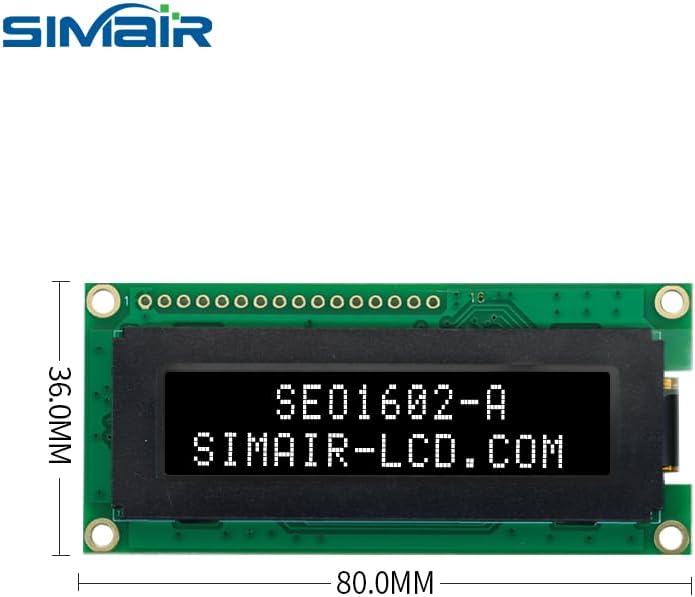
Figure 2: Dimensions of the SIMAIR SEO1602-A OLED Display Module.
4. پن آئوٽ جي وضاحت
The SEO1602-A module features a 16-pin interface for power, data, and control signals. The specific function of each pin depends on the chosen communication mode (Parallel, SPI, or IIC). Users should refer to the detailed datasheet for the SSD1311 controller and the module for precise pin assignments and electrical characteristics.

شڪل 3: پوئتي view of the SIMAIR SEO1602-A OLED Display Module, illustrating the PCB and pin interface.
5. سيٽ اپ ۽ تنصيب
5.1. بجلي جي فراهمي
صحيح حجم کي يقيني بڻائيtage is supplied to the module as specified in the datasheet. Incorrect voltage can lead to irreversible damage to the display module. Typically, these modules operate on a 3.3V or 5V supply, but always verify with the official documentation.
5.2. انٽرفيس ڪنيڪشن
Connect the module to your microcontroller or system board using the appropriate communication interface (6800/8080 Parallel, SPI, or IIC). Verify all pin connections are secure and correct according to the chosen interface protocol. Pay close attention to data lines, clock lines, and control signals (e.g., CS, DC, RES for SPI/IIC, or RS, RW, E for Parallel).
5.3. Initializing the Display
After power-up, the display requires a specific sequence of initialization commands sent via the chosen communication interface. Consult the SSD1311 controller datasheet or example code provided by SIMAIR or the controller manufacturer for the precise initialization sequence. This sequence typically sets up display mode, contrast, and other operational parameters.
6. آپريٽنگ هدايتون
6.1. Displaying Characters
Characters are displayed by sending their ASCII values to the display's data registers. The SSD1311 controller handles character mapping and display refreshing. Ensure your character data is formatted correctly for the selected communication mode.
6.2. Cursor Control
The display supports cursor positioning and visibility control. Commands are available to move the cursor to a specific character position (row and column) and to turn the cursor on/off. Refer to the SSD1311 datasheet for the specific command codes.
6.3. چمڪ جي ترتيب
The SSD1311 controller may offer commands for adjusting the display's brightness or contrast. These settings can be modified by sending specific commands to the controller. Consult the controller datasheet for detailed register settings and command structures.
7. سار سنڀال
- Keep the display surface clean and free from dust and moisture. Use a soft, dry, lint-free cloth for cleaning. Avoid abrasive materials or chemical cleaners.
- Avoid applying excessive pressure to the display area, as this can damage the OLED panel.
- Store the module in a dry, anti-static environment when not in use to prevent electrostatic discharge (ESD) damage.
- Do not expose the module to extreme temperatures outside its specified operating range (-40°C to 80°C) or to direct sunlight for prolonged periods.
8. مسئلا حل ڪرڻ
8.1. Display Not Lighting Up
- Check power supply connections and voltage levels to ensure they are within the specified range.
- Verify all interface connections are correct and secure. Loose connections are a common cause of display issues.
- Ensure the display initialization sequence has been sent correctly and completely after power-up.
8.2. Incorrect Characters Displayed
- Confirm the correct communication protocol (Parallel, SPI, IIC) is selected and implemented in your code.
- Check the data being sent to the display for accuracy. Ensure ASCII values correspond to the desired characters.
- Verify the character set and font settings if applicable, especially if using custom characters.
8.3. Intermittent Display
- Inspect for loose connections or cold solder joints on the module or connecting wires.
- Check for electromagnetic interference (EMI) in the operating environment that might disrupt communication.
- Ensure the power supply is stable and free from noise.
9. وارنٽي ۽ سپورٽ
This product is covered by the manufacturer's standard warranty against defects in materials and workmanship. For technical support, detailed datasheets, or warranty claims, please contact your vendor or refer to the official SIMAIR website for the most up-to-date information and resources.


