1. پراڊڪٽ ختمview
The ZK-SMC04 is a versatile DC 10-30V 6.6A Stepper Motor Driver Controller Integrated Board designed for precise control of 42, 57, and 86 series stepper motors. This integrated unit combines driving and control functionalities, offering forward/reverse operation, pulse speed adjustment, and angle control. It supports PLC serial communication for advanced applications.
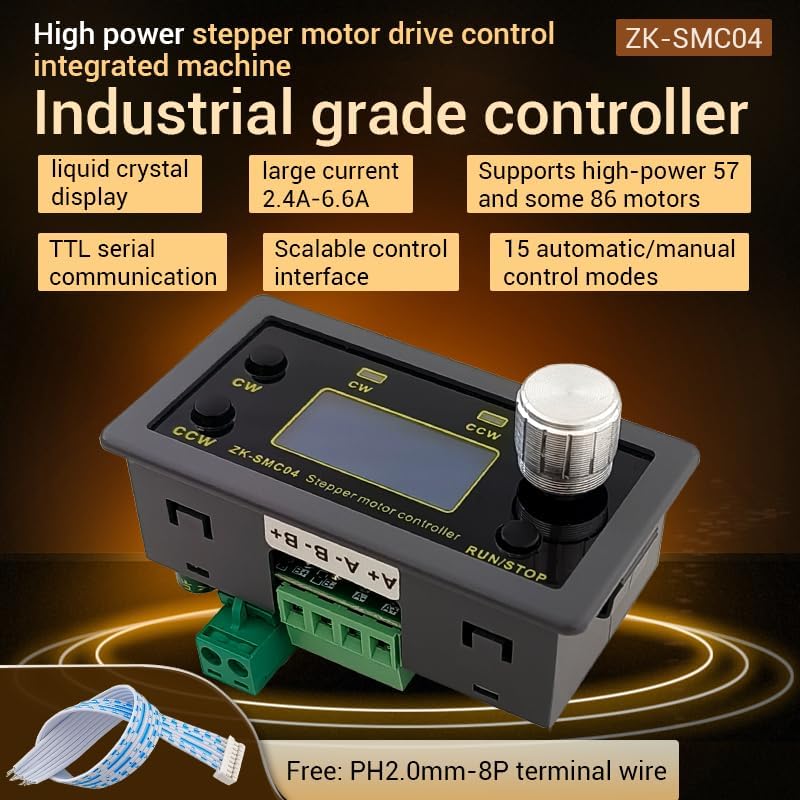
Figure 1.1: ZK-SMC04 Stepper Motor Controller highlighting features such as liquid crystal display, large current capability (2.4A-6.6A), support for high-power 57 and 86 motors, TTL serial communication, scalable control interface, and 15 automatic/manual control modes.
اهم خاصيتون شامل آهن:
- وسيع بجلي جي فراهمي جي حد: DC 10-30V universal.
- High Driving Capability: Peak 6.6A.
- High Pulse Frequency: Up to 200KHZ.
- موٽر مطابقت: Adaptable for 42, 57, and 86 stepper motors.
- ڪنٽرول موڊ: 15 automatic/manual control modes.
- ڪميونيڪيشن: TTL serial port for remote communication control.
- ڪمپيڪٽ ڊيزائن: Product size 79x43x41mm, recommended hole size 75x39mm for mounting.
2. وضاحتون

Figure 2.1: Detailed specifications of the ZK-SMC04 Stepper Motor Driver Controller.
| پيرا ميٽر | قدر |
|---|---|
| پراڊڪٽ ماڊل | ZK-SMC04 |
| پيداوار جو نالو | Drive Control Integrated Machine |
| سپلائي جلدtage | DC 10-30V (>3A recommended) |
| آئوٽ پٽ ڪرنٽ | 2.4A - 6.6A (Peak) |
| Adaptable Motors | 42, 57, 86 Stepper Motors |
| نبض جي تعدد | Up to 200KHZ |
| ڪنٽرول موڊ جي چونڊ | 15 options (customizable) |
| آپريٽنگ ماحول | -10 ~ 60 °C (non-condensing) |
| شيل جي ماپ | 79x43x41mm |
| افتتاحي سائيز | 75x39mm |
| شيءِ جو وزن | 3.52 اونس |
3. سيٽ اپ ۽ تنصيب
3.1 وائرنگ ڊاگرام
Proper wiring is essential for the correct operation of the ZK-SMC04. Refer to the diagrams below for power, motor, and control signal connections.

Figure 3.1: Basic product wiring diagram. Connect the DC power supply to the "Power supply +" and "Power supply -" terminals. Connect the stepper motor phases to A+, A-, B+, B- terminals.

Figure 3.2: Expansion interface and serial port output. The 8-pin expansion interface provides connections for external triggers (start/stop, switch direction), limit switches, and output signals. The serial port allows for TTL communication.

شڪل 3.3: مثالample connection for signal, limit switches, and output. This diagram illustrates how to connect NPN normally open proximity switches for limit detection and push buttons for start/stop and direction change functions.
3.2 Driver Settings (DIP Switches)
The ZK-SMC04 features DIP switches on the board for configuring output current and microstep resolution. Ensure the power is off before adjusting these switches.

Figure 3.4: Driver settings via DIP switches. This image details how to set the output peak current, microstep resolution, chopping mode (Smooth mode SpreadCycle or Silent Mode StealthChop), and holding current (1/2 Run or iRun).
موجوده سيٽنگ:
| اوٽ جي چوٽي موجوده | Output Average Current | SW1 | SW2 | SW3 |
|---|---|---|---|---|
| 3.3A | 2.4A | بند | بند | بند |
| 3.7A | 2.7A | on | بند | بند |
| 4.1A | 3.1A | بند | on | بند |
| 4.5A | 3.4A | on | on | بند |
| 5.0A | 3.6A | بند | بند | on |
| 5.4A | 3.8A | on | بند | on |
| 5.8A | 4.1A | بند | on | on |
| 6.6A | 4.7A | on | on | on |
Microstep Resolution Setting:
| SW4 | SW5 | Microstep Settings |
|---|---|---|
| بند | بند | 8 |
| on | بند | 16 |
| بند | on | 32 |
| on | on | 64 |
Chopping Mode (SW6):
- بند: Smooth mode SpreadCycle (Used at high speeds)
- تي: Silent Mode StealthChop (Recommended at low speed, operates silently when the motor is at low speed or stopped)
Maintain Current (SW7):
- بند: iRun (running current)
- تي: 1/2 iRun (reduces heat generation)
4. آپريٽنگ هدايتون
The ZK-SMC04 features an intuitive interface with a rotary encoder and buttons for easy operation and parameter adjustment.
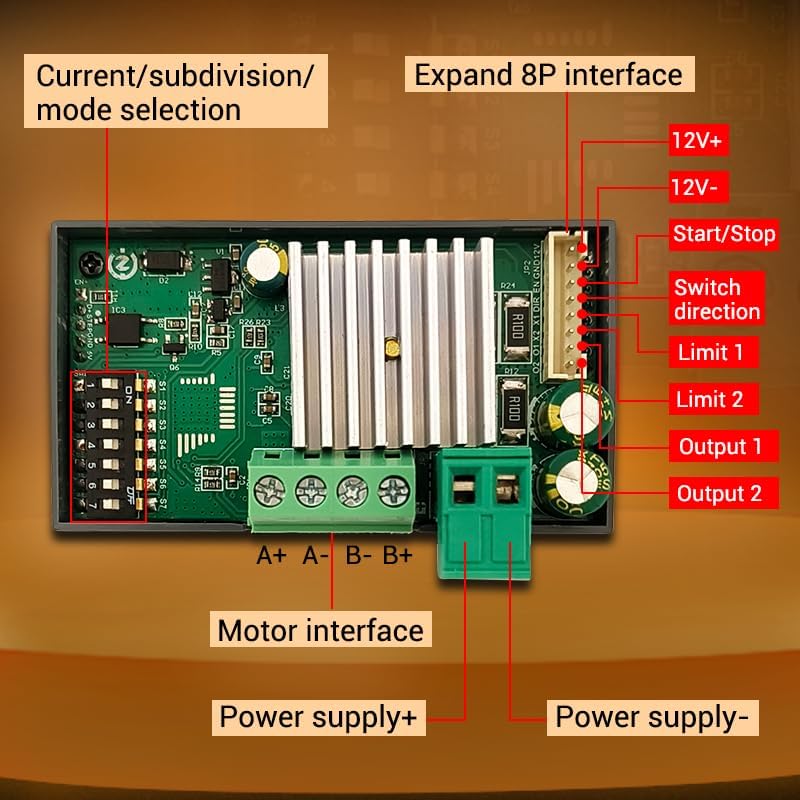
Figure 4.1: Front panel controls. The panel includes buttons for CW (Clockwise) and CCW (Counter-Clockwise) rotation, corresponding indicators, an encoder setting knob for adjustments, and a RUN/STOP button.
4.1 بنيادي آپريشن
- شروع/روڪ: کي دٻايو رن/اسٽاپ button to start or stop the motor.
- ھدايت ڪنٽرول:
- دٻايو CW اڳتي وڌڻ لاءِ بٽڻ.
- دٻايو CCW button for reverse rotation.
- Speed/Angle Adjustment: Rotate the encoder setting knob to adjust parameters such as speed or angle.
4.2 Menu Navigation and Parameter Settings
The ZK-SMC04 allows for detailed configuration through its menu system. Follow these steps to navigate and adjust parameters:

Figure 4.2: Menu navigation and parameter adjustment. This diagram shows how to stop running and exit, enter menu settings, tune parameters, and exit parameter settings using the rotary encoder and buttons.
- Stop Running and Exit: On the running interface, adjust the speed using the rotary encoder. Press the CW button for forward rotation, CCW button for reverse. Long press the RUN/STOP button to stop running and exit.
- مينيو سيٽنگون داخل ڪريو: From the running interface, long press the encoder to enter the menu settings interface.
- Navigate Menu: In the menu settings interface, rotate the encoder to change the parameter codes from F-01 to F-14. Long press the encoder to save the parameters and exit to enter the running interface.
- Tune Parameters: In the menu settings interface, short press the encoder to enter the F-XX corresponding menu parameter setting state. The parameters will flash. Short press the shift button to rotate the encoder and adjust the parameters. Short press the RUN/STOP button to exit parameter settings and return to the main menu number adjustment interface.
4.3 Menu Functions List
The following table provides a detailed description of each menu function (F-01 to F-14) and their adjustable ranges and default values.

Figure 4.3: Comprehensive list of menu functions and their corresponding actions and settings.
| نمبر | فنڪشن | ترتيب واري حد | ڊفالٽ قدر |
|---|---|---|---|
| F-01 | Selection of action flow mode (Table introduction below) | 1 - 15 | 3 |
| F-02 | Number of positive rotation pulses/unit (High three bits by rotary encoder, low four bits by display) | 1 - 999999 | 1600 |
| F-03 | Forward rotation speed unit: revolutions per minute | 0.1 - 999 | 10 |
| F-04 | Number of reverse pulses/unit (High three bits by rotary encoder, low four bits by display) | 1 - 999999 | 1600 |
| F-05 | Reverse speed unit: revolutions per minute | 0.1 - 999 | 10 |
| F-06 | Number of cycles of work (where 0 = countless times) | 0 - 9999 or countless | 1 |
| F-07 | Forward time delay unit: seconds (accuracy ±0.2 seconds) | 0.0 - 999.9 | 0.0 |
| F-08 | Reverse time delay unit: seconds (accuracy ±0.2 seconds) | 0.0 - 999.9 | 0.0 |
| F-09 | Number of pulses per revolution (1-9999, x10) Unit: 10 (e.g., for 1.8° stepper motor, 8 subdivision = 160, 16 subdivision = 320, 32 subdivision = 640, 64 subdivision = 1280) | 1 - 9999 | 160 |
| F-10 | Main interface display content (Up: motor coil speed, Down: revolutions per minute) | 0 - 1 | 00 |
| F-11 | The action when pressing the pause button (0: motor slows down and stops slowly, 1: motor immediately stops) | 0 - 1 | 0 |
| F-12 | Acceleration and deceleration levels (1-100, 1 being the slowest and 100 being the fastest) | 1 - 100 | 20 |
| F-13 | خود تالا ڪرڻ وارو سوئچ | 0 - 1 | 0 |
| F-14 | ٽپال ايڊريس | 1 - 255 | 1 |
5. سار سنڀال
To ensure the longevity and optimal performance of your ZK-SMC04 Stepper Motor Driver Controller, follow these general maintenance guidelines:
- صاف رکو: Regularly clean the device with a soft, dry cloth to prevent dust accumulation, especially around ventilation openings and connectors.
- ماحولياتي حالتون: Operate the controller within the specified temperature and humidity ranges (-10 ~ 60 °C, non-condensing) to prevent damage.
- محفوظ ڪنيڪشن: وقت بوقت سڀني وائرنگ ڪنيڪشنن کي چيڪ ڪريو ته جيئن پڪ ڪري سگهجي ته اهي محفوظ آهن ۽ زنگ کان پاڪ آهن. ڍلا ڪنيڪشن وقفي وقفي سان آپريشن يا نقصان جو سبب بڻجي سگهن ٿا.
- اوورلوڊ کان بچڻ: Ensure the connected motor and power supply are within the specified limits of the ZK-SMC04 to prevent overheating and damage to the driver.
6. مسئلا حل ڪرڻ
This section provides solutions to common issues you might encounter with the ZK-SMC04 Stepper Motor Driver Controller.

Figure 6.1: Troubleshooting guide for common operational problems.
| رجحان | ممڪن مسئلا | حل جا طريقا |
|---|---|---|
| The screen doesn't light up | موٽر شافٽ بي طاقت آهي | Check the power supply circuit to see if it is connected in reverse or supplying power normally. |
| Driver chip protection | ٻيهر پاور آن. | |
| موٽر گردش نه ڪندو آھي | The pulse signal is weak | It is recommended to increase the voltage يا وڏو ڪرنٽ چونڊيو. |
| موٽر نه گھمندي آهي ۽ وائبريٽ ڪندي رهندي آهي | ڪنهن به مسئلي لاءِ موٽر وائرنگ چيڪ ڪريو. | |
| موٽر جي گردش ۾ غلطي | موٽر تار جو غلط ڪنيڪشن | Swap two wires of the same phase for any motor (e.g., A+ and A- exchange positions). |
| غلط پوزيشن | سگنل مداخلت | Remove interference. |
| موٽر جي تار ۾ ٽٽل سرڪٽ آهي. | چيڪ ڪريو ۽ صحيح ڳنڍيو. | |
| Subdivision error | Set up correct segmentation. | |
| Motor stalling vibration | The current is too small | موجوده کي وڌايو. |
| Turn on the mute mode, which is only suitable for low-speed states | Turn off silent mode. | |
| مختصر تيز رفتاري وقت | تيز رفتاري جو وقت وڌايو. | |
| گھٽ وولٽtagاي يا گهٽ ڪرنٽ | Appropriately increase the voltage يا موجوده. |
7. وارنٽي ۽ سپورٽ
For warranty information, technical support, or any inquiries regarding the ZK-SMC04 Stepper Motor Driver Controller, please contact GODIYMODULES directly through their official channels or the retailer from whom the product was purchased.
Please refer to the original purchase documentation for specific warranty terms and conditions.


