تعارف
This manual provides comprehensive instructions for the installation, operation, and maintenance of your Commercial Electric 12 inch LED Flush Mount Smart Light. This fixture features CCT (Correlated Color Temperature) and RGB (Red, Green, Blue) color selection, a night light function, and smart control capabilities via the Hubspace app, Wi-Fi, or Bluetooth. It is also compatible with Alexa and Google Assistant for voice control.
حفاظت جي ڄاڻ
مھرباني ڪري انسٽاليشن شروع ڪرڻ کان پھريان سڀ ھدايتون پڙھو ۽ سمجھو. انھن ھدايتن تي عمل ڪرڻ ۾ ناڪامي جي نتيجي ۾ بجلي جو جھٽڪو، باهه، يا ٻيا خطرا ٿي سگھن ٿا جيڪي زخمي يا ملڪيت کي نقصان پھچائي سگھن ٿا.
- خبردار: برقي جھٽڪو جو خطرو. انسٽال ڪرڻ يا سروس ڪرڻ کان اڳ فيوز يا سرڪٽ بريڪر تي بجلي بند ڪريو.
- خبردار: Risk of fire. Use only with 120V AC, 60Hz circuits.
- Do not install this fixture in wet locations. Suitable for damp جڳھون.
- پڪ ڪريو ته سڀئي برقي ڪنيڪشن محفوظ آهن ۽ مقامي ضابطن ۽ آرڊيننس جي تعميل ڪن ٿا.
- Do not attempt to disassemble or modify the fixture. There are no user-serviceable parts inside.
- جيڪڏهن توهان انسٽاليشن جي عمل جي باري ۾ يقين نه آهيو ته هڪ قابل اليڪٽريشن سان صلاح ڪريو.
پيڪيج مواد
پڪ ڪريو ته هيٺ ڏنل سڀئي حصا توهان جي پيڪيج ۾ شامل آهن:
- LED Flush Mount Smart Light Fixture
- وڌندڙ خط
- Mounting Screws and Wire Nuts
- ھدايت وارو دستور
سيٽ اپ ۽ تنصيب
Follow these steps to properly install your LED flush mount light fixture.
قبل از انسٽاليشن
- پاور بند ڪريو: Locate the circuit breaker or fuse box and turn off the power to the light switch location.
- وائرنگ تيار ڪريو: Ensure the existing wiring from the ceiling is properly stripped and ready for connection.
فڪسچر تي چڙهڻ
- چڙهڻ واري بریکٹ کي ڳنڍيو: Secure the mounting bracket to the junction box in the ceiling using the provided screws.
- وائرنگ ڳنڍڻ: Connect the fixture's white wire to the supply white wire, the fixture's black wire to the supply black wire, and the fixture's ground wire to the supply ground wire using the provided wire nuts. Ensure connections are secure.
- Attach fixture: Carefully align the fixture with the mounting bracket and secure it in place.
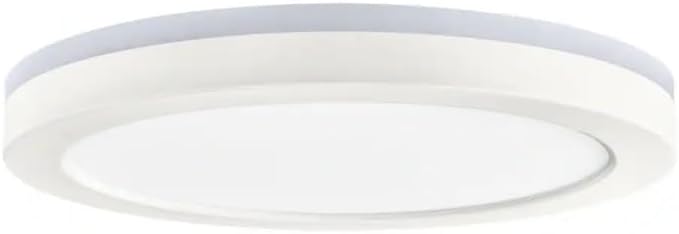
Image: Commercial Electric 12 inch LED Flush Mount Smart Light Fixture, showing its matte white finish and circular design.
Hubspace App Connection
- Download Hubspace App: Download the free Hubspace app from your device's app store.
- اڪائونٽ ٺاهيو: Open the app and create a Hubspace account or log in.
- ڊوائيس شامل ڪريو: Follow the in-app instructions to add your new LED flush mount light. Ensure your Wi-Fi network is 2.4GHz.
- پاور آن: Once prompted by the app, turn on the power to the light fixture at the circuit breaker. The light should begin to blink, indicating it is in pairing mode.
- مڪمل جوڙو: Follow the remaining steps in the Hubspace app to complete the pairing process.
آپريٽنگ هدايتون
Your smart light offers various control options and features:
- Remote Control via Hubspace App: Control your light from anywhere using the Hubspace app on your smartphone or tablet.
- وائرليس آپريشن: Connects directly to your existing Wi-Fi or Bluetooth network; no additional hub is required.
- وائس ڪنٽرول: Compatible with Amazon Alexa and Google Assistant for hands-free operation. Link your Hubspace account to your voice assistant app.
- CCT (Color Temperature) Selection: Adjust the white light color temperature from 2700K (soft white) to 6500K (daylight) using the Hubspace app.
- RGB Color Selection: Choose from a wide spectrum of colors to match any mood or setting.
- ختم ڪرڻ Adjust the brightness from 5% to 100% through the Hubspace app.
- رات جي روشني فنڪشن: Activate a low-level, warm light setting for nighttime use.
- گروپ ڪنٽرول: If you have multiple Hubspace-enabled lights, you can group them together in the app to control them simultaneously.
سار سنڀال
To maintain the appearance and performance of your LED flush mount light, follow these simple guidelines:
- صفائي: صفائي ڪرڻ کان اڳ پڪ ڪريو ته بجلي بند آهي. فڪسچر کي نرم، سڪل، يا ٿوري ڊي سان صاف ڪريو.amp cloth. Do not use abrasive cleaners, solvents, or polishes as they may damage the finish or electrical components.
- ڪوبه استعمال ڪندڙ-خدمت وارو حصو: The LED components are integrated and not replaceable. Do not attempt to open the fixture.
مشڪلاتون
If you encounter issues with your light fixture, refer to the table below for common problems and solutions.
| مسئلو | ممڪن سبب | حل |
|---|---|---|
| روشني doesرندي ناهي. | No power to the fixture. Loose wiring connection. | Check circuit breaker/fuse. Ensure all wire connections are secure. |
| روشني غير متوقع طور تي ٽمٽار يا مدھم ٿي ويندي آهي. | Loose wiring. Incompatible dimmer switch (if not using app dimming). | Check wiring connections. This smart light is dimmable via the Hubspace app only; do not use with external dimmer switches. |
| Cannot connect to Hubspace app. | Incorrect Wi-Fi password. Router is 5GHz only. Light not in pairing mode. | Verify Wi-Fi password. Ensure your router supports 2.4GHz. Power cycle the light (turn off/on at switch) to re-enter pairing mode. |
| وائس ڪنٽرول ڪم نه ڪري رهيو آهي. | Hubspace account not linked to voice assistant. Incorrect commands. | Ensure Hubspace is linked in your Alexa/Google Home app. Refer to voice assistant documentation for correct commands. |
وضاحتون
| خاصيت | تفصيل |
|---|---|
| ماڊل نمبر | 1010633889 |
| برانڊ | تجارتي برقي |
| مواد | اکري |
| لائيٽ فيڪٽري فارم | ڇت |
| روشني ذريعن جو تعداد | 1 |
| شيءِ جو وزن | 3 پائونڊ |
| پيداوار جي ماپ (L x W x H) | 12.13 x 12.13 x 1.25 انچ |
| وڌ ۾ وڌ روشني | 1350 Lumens |
| رنگ جي درجه حرارت (CCT) | 2700K (Soft White) to 6500K (Daylight) |
| Dimming جي حد | 5% to 100% (via Hubspace app) |
| رابطي | Wi-Fi (2.4GHz) / Bluetooth |
| آواز جو مددگار مطابقت | Alexa، گوگل اسسٽنٽ |
وارنٽي ۽ سپورٽ
For warranty information or technical support, please refer to the documentation included with your purchase or visit the Commercial Electric website. You may also contact customer service through the Hubspace app for assistance with smart features.


